Traditional Punjabi suits have a style that never goes out of fashion. That is why I wanted to create these Traditional Punjabi Look Girls Photo Editing Prompts after trying many different prompt versions myself. Some edits looked too artificial, while others changed the face completely. After several tests, I found a few prompts that kept the original face natural while also showing the beauty of Patiala suits, Phulkari dupattas, bridal outfits, Sharara dresses, and other traditional Punjabi styles. Those are the prompts I have shared in this article.
I know many people want realistic Punjabi girl photo edits but do not want to spend hours changing small prompt details. That is exactly why I tested every prompt before publishing it here. You can use these prompts with Gemini AI, ChatGPT, and other AI photo editing tools that support detailed image prompts. Inside this collection, you will find prompts for Punjabi wedding looks, village portraits, Sarson Ke Khet photos, Jaggo celebrations, boutique fashion, and everyday traditional outfits.
Why Traditional Punjabi Look Is Trending
Punjabi fashion stands out because it mixes bold colours, detailed embroidery, statement jewellery, and easy flowing outfits. Patiala salwar, Phulkari dupattas, Punjabi juttis, and Parandas still carry a strong regional identity. Phulkari is especially important because its colourful embroidery has been passed through generations and remains connected with celebrations and weddings.
That mix of tradition and visual detail also makes Punjabi looks popular for photo editing. In this article, I have used different suit styles, jewellery, Parandas, poses, and real Punjabi settings so every prompt creates a noticeably different result.
Traditional Punjabi Look Girls AI Photo Prompts
I personally tested every prompt below using different outfit styles, lighting, and backgrounds. These prompts can help you create realistic Punjabi girl photo edits, from simple village looks to wedding and festive portraits. Just upload a clear photo, copy the prompt you like, and adjust a few details if you want to match your own style.
Prompt 1. Purple Wedding Style
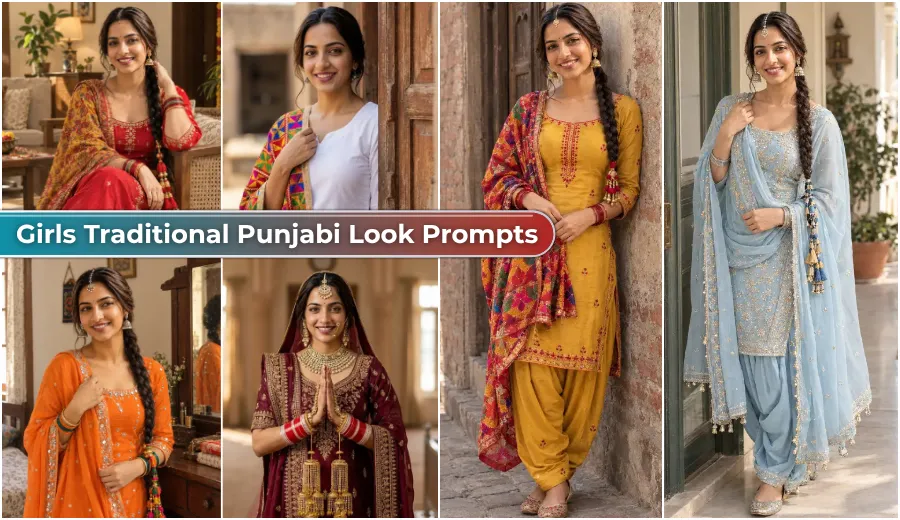
For this one, I wanted a richer Punjabi wedding mood without making the scene look like a studio set. The darker purple outfit, layered jewellery, and warm indoor lighting create a more premium traditional result.
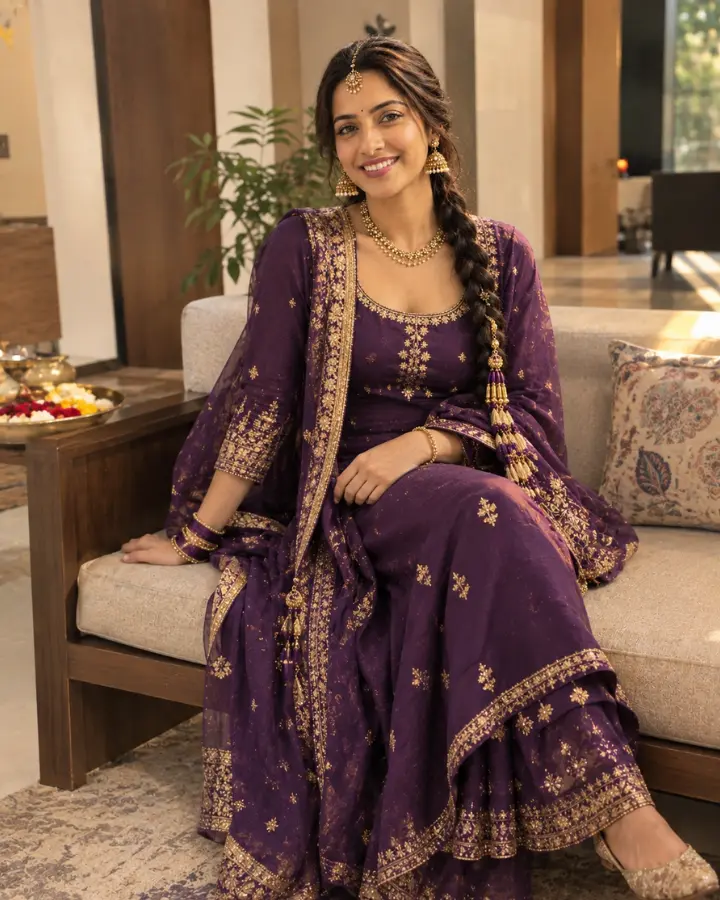
Transform the uploaded photo into a hyper realistic modern Punjabi wedding fashion photograph while keeping the exact same person and facial identity. Lock the original face completely. Preserve the same forehead, face shape, eyes, eyebrows, nose, lips, cheeks, jawline, skin tone, natural marks, pores, facial texture, and realistic imperfections. Give only a soft confident smile with natural eye contact. Style the person in a rich royal purple Punjabi suit with intricate gold embroidery, matching embellished dupatta, authentic Punjabi jhumkas, layered gold necklace, tikka, bangles, and a long braid with a decorative Paranda. Place the scene in a stylish contemporary Indian home with modern interiors, warm neutral walls, elegant wooden furniture, indoor plants, soft lamps, cushions, and subtle wedding décor. Show the full outfit from a slightly angled camera perspective, seated naturally with relaxed hands. Use soft window light, realistic indoor illumination, natural shadows, shallow depth, subtle film grain, true-to-life skin texture, realistic jewellery reflections, and professional DSLR photography. Negative prompt: face change, AI look, plastic skin, over-smoothing, fake jewellery, distorted hands, extra fingers, HDR, cartoon, text, watermark.Prompt 2. Punjabi Village Courtyard Look
This look is more simple and earthy. I focused on the kind of details that make a traditional setting believable, such as old plaster, clay pots, uneven flooring, and soft natural light.
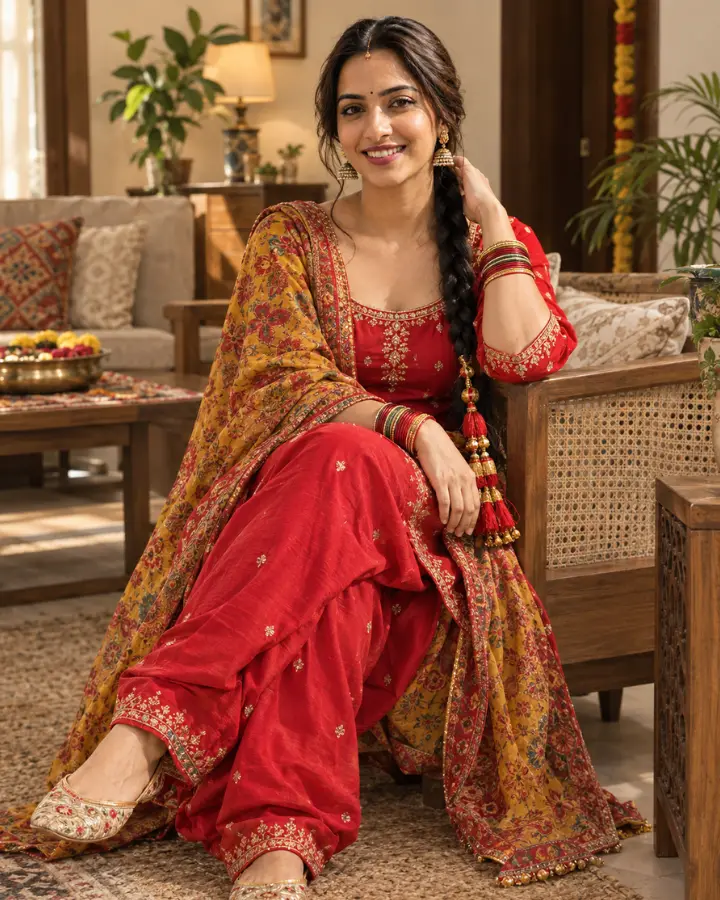
Create a hyper realistic modern Punjabi fashion photograph from the uploaded reference photo. Preserve the exact same person's identity with maximum accuracy. Keep the original facial structure, face shape, forehead, eyebrows, eyes, nose, lips, cheeks, jawline, skin tone, natural marks, pores, fine lines, and authentic skin texture clearly recognizable. Do not alter the face or add artificial skin smoothing. Give a relaxed confident smile with subtle Punjabi makeup, soft kajal, natural blush, and muted lipstick. Keep the exact same bright red Punjabi kameez with fine golden embroidery, matching loose salwar, and patterned mustard-red dupatta. Preserve the Punjabi jhumkas, simple tikka, colourful glass bangles, and long black braid with red-gold Paranda. Place the person in a stylish modern Indian home with contemporary wooden furniture, warm neutral walls, indoor plants, soft lamps, cushions, and subtle wedding décor. Use an elegant seated model pose, slightly turned sideways, naturally arranging the dupatta, with the full outfit and footwear visible. Capture with a 28mm lens, soft window light, realistic shadows, detailed fabric, natural pores, subtle grain, cinematic depth, and authentic DSLR photography. Negative prompt: changed face, AI slop, fake jewellery, distorted hands, extra fingers, HDR, cartoon, text, watermark.Prompt 3. Elegant Blue Punjabi Suit
I kept the final look lighter and cleaner with a sky blue suit and wide salwar. The glass doorway, soft daylight, and relaxed pose give it a modern Punjabi home photography feel.
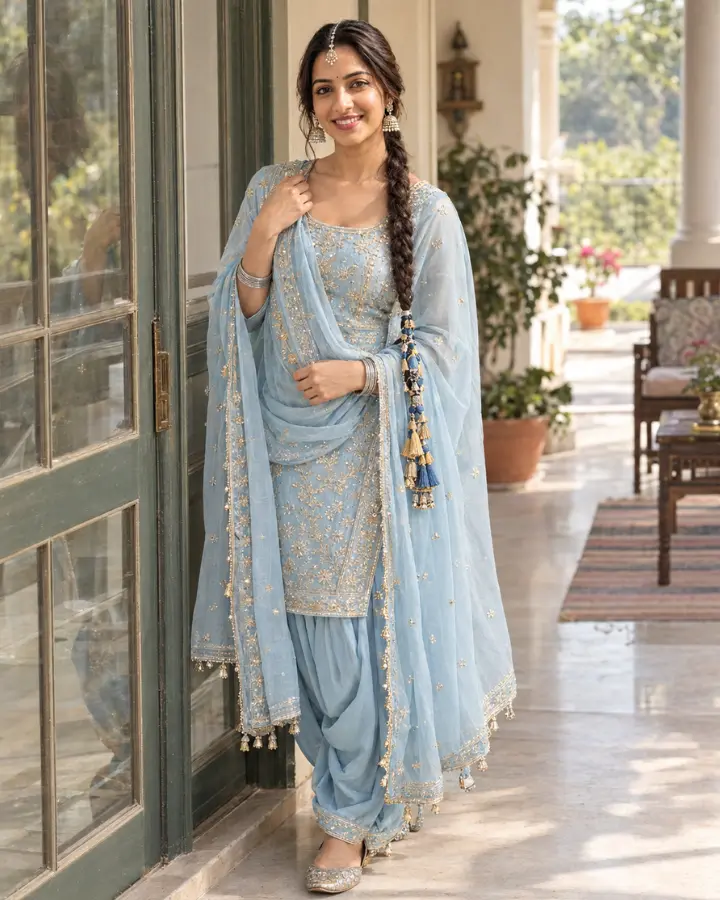
Generate an ultra realistic Punjabi traditional fashion photograph using the uploaded image as a strict identity reference. Preserve the exact same person's face and identity without changing the original facial structure, face shape, forehead, eyebrows, eyes, nose, lips, cheeks, jawline, skin tone, natural marks, pores, fine lines, or authentic skin texture. The face should remain clearly recognizable as the same person. Change only the expression into a peaceful gentle smile and use soft Punjabi makeup with natural kajal, peach lipstick, and subtle blush. Dress the person in a sky blue Punjabi suit with detailed silver and gold embroidery, wide flowing salwar, and a sheer matching dupatta with embroidered borders and small hanging embellishments. Add elegant Punjabi jhumkas, a delicate tikka, silver bangles, and a long braid with a blue and gold Paranda. Place the person beside a large old glass doorway leading to a bright veranda with natural household details visible in the distance. Pose them slightly sideways while looking toward the camera, one hand gently holding the dupatta near the shoulder. Capture the complete outfit and footwear using an 85mm lens from a slightly raised camera angle. Use soft daylight, realistic glass reflections, natural shadows, visible skin pores, fabric fibres, subtle camera grain, and authentic depth. Negative prompt: face alteration, identity mismatch, plastic skin, artificial AI look, over smoothing, fake glass reflection, distorted hands, extra fingers, duplicate jewellery, warped clothing, excessive HDR, cartoon, anime, unrealistic skin, text, watermark.
Prompt 4. Orange Suit With Mirror Work
This look was inspired by the bright orange outfit and indoor mirror styling I liked from the reference examples. I kept the jewellery detailed but made the room feel lived in rather than perfectly staged.
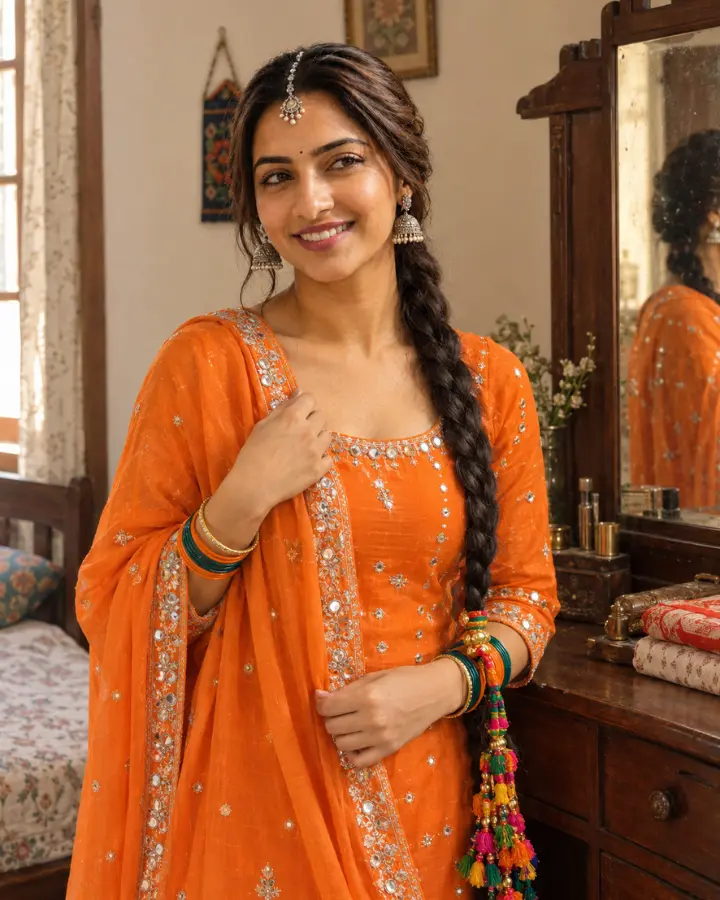
Use the uploaded photo as the only identity reference and preserve the exact same person with maximum facial accuracy. Keep the original eyes, eyebrows, nose, lips, cheeks, jawline, forehead, skin tone, facial proportions, natural marks, pores, and authentic skin texture unchanged. The face must remain clearly recognizable as the same person. Change only the expression into a gentle side smile and use light Punjabi makeup with natural kajal, soft lipstick, and a small bindi. Dress the person in a bright orange Punjabi salwar suit featuring delicate silver mirror work, a matching orange dupatta with embroidered edges, silver jhumkas, a small traditional tikka, green and orange bangles, and a thick long braid finished with a colourful Paranda. Frame the full outfit naturally in a traditional bedroom with a wooden dressing table, slightly aged mirror, folded fabric, simple wall decor, and soft window light. The person is standing beside the mirror while looking slightly away from the camera, with one hand adjusting the dupatta. Use a realistic 35mm camera view, natural indoor shadows, true fabric folds, detailed embroidery, real skin pores, and subtle lens depth. Negative prompt: face change, identity mismatch, artificial skin, plastic texture, excessive makeup, AI generated appearance, fake mirror reflection, distorted hands, extra fingers, duplicated jewellery, warped fabric, oversaturated colours, HDR effect, blur, cartoon rendering, text, watermark.
Prompt 5. Maroon Phulkari Dupatta Style
I used a darker maroon suit here because it gives the photo a richer traditional feeling. The Phulkari dupatta adds colour while the staircase setting keeps the result different from the usual standing pose.
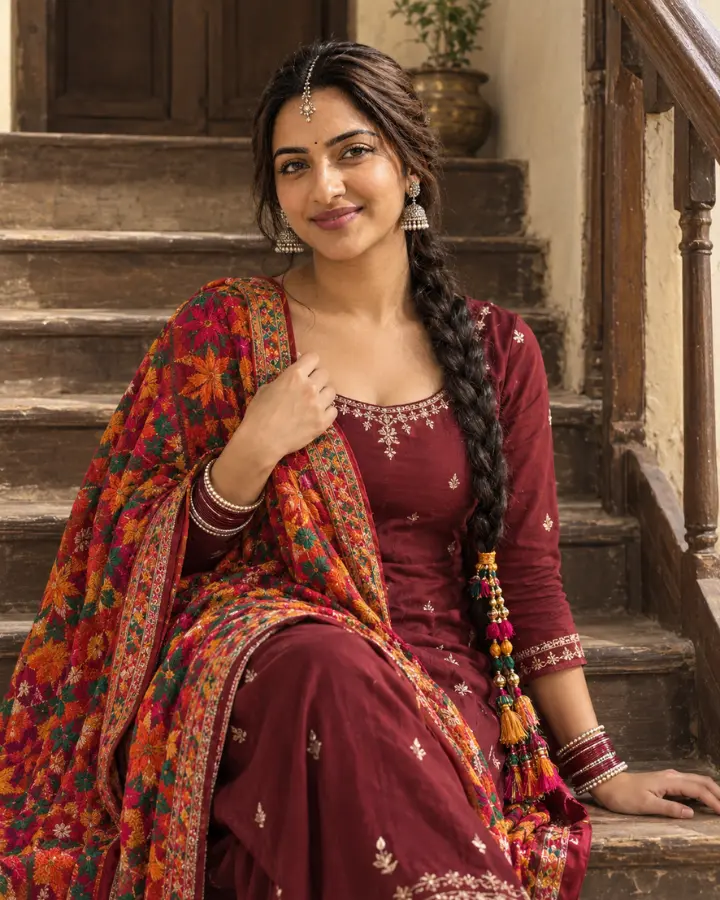
Generate a highly realistic Punjabi fashion photograph from the uploaded reference photo while keeping the exact same facial identity. Preserve the original face shape, forehead, eyes, eyebrows, nose, lips, cheeks, jawline, skin tone, facial proportions, natural marks, pores, fine lines, and authentic skin texture. Do not beautify or reconstruct the face. The expression can change into a calm thoughtful look with a very slight smile, and the makeup can be softly enhanced with kajal and muted lipstick. Dress the person in a deep maroon Punjabi suit with subtle cream embroidery and a richly detailed Phulkari dupatta featuring traditional multicolour floral thread patterns. Add Punjabi jhumkas, a delicate tikka, layered bangles, and a long braid decorated with a traditional Paranda. Pose the person sitting naturally on wide old wooden stairs, one hand resting beside the body and the other lightly holding the dupatta. Use an indoor Punjabi heritage home with worn stair edges, textured plaster, a wooden railing, and soft daylight entering from one side. Capture the full outfit with a slightly lower 45mm camera angle, realistic shadows, natural skin pores, detailed fabric fibres, and true photographic depth. Negative prompt: changed face, wrong identity, smooth plastic skin, fake beauty filter, AI slop, distorted body, extra fingers, incorrect hands, floating jewellery, duplicate Paranda, unrealistic embroidery, fake staircase, excessive sharpness, harsh HDR, cartoon, anime, text, watermark.Prompt 6. Peela Suit And Red Phulkari
The yellow suit with a strong Phulkari dupatta gives this edit a very cheerful Punjabi feel. I used a narrow brick passage and a relaxed pose so the photo feels like a real outdoor family home setting.
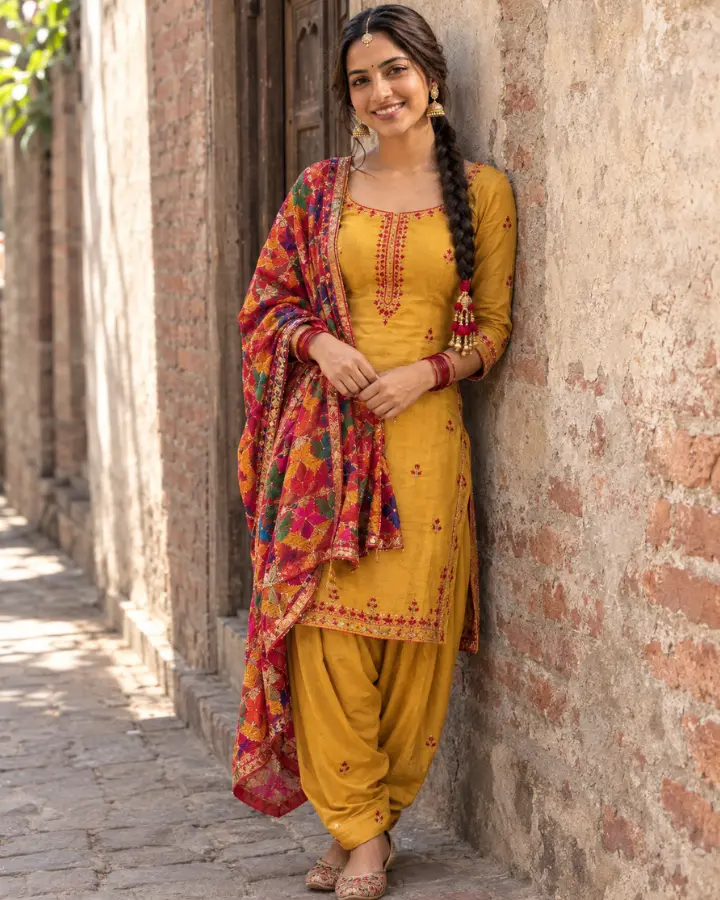
Keep the uploaded person's identity completely locked and create a hyper realistic full body photograph. Preserve the exact facial structure, face shape, forehead, eyes, eyebrows, nose, lips, cheeks, jawline, skin tone, natural marks, pores, fine facial texture, and all recognizable features from the reference photo. Do not change the face or make it look digitally generated. Allow only a natural cheerful expression with a soft smile and subtle Punjabi festive makeup. Dress the person in a mustard yellow Punjabi kameez with matching loose salwar pants and fine red embroidery. Add a red and multicolour Phulkari dupatta with visible traditional thread patterns, gold Punjabi jhumkas, a small tikka, red glass bangles, and a long braid finished with a red and gold Paranda. Place the person in a narrow old brick corridor beside a textured wall and wooden doorway. The pose should be relaxed, with one shoulder lightly touching the wall and both hands gently holding the dupatta. Capture the entire outfit and footwear using a 35mm lens from slightly below eye level. Use natural morning light, imperfect wall texture, realistic fabric folds, visible skin pores, soft shadows, and true camera depth. Negative prompt: identity change, altered facial features, fake skin, excessive smoothing, AI slop, beauty filter, distorted hands, extra fingers, fake jewellery, duplicated accessories, floating dupatta, unrealistic brick texture, oversaturated yellow, HDR, cartoon, anime, text, watermark.
Prompt 7. Patiala Shahi Salwar Suit Punjabi Girl Look
This was one of the first looks I tested. The deep pleats of the Patiala suit looked very natural when I kept the colors bright. I also noticed that adding a traditional paranda made the final photo feel much more authentic.
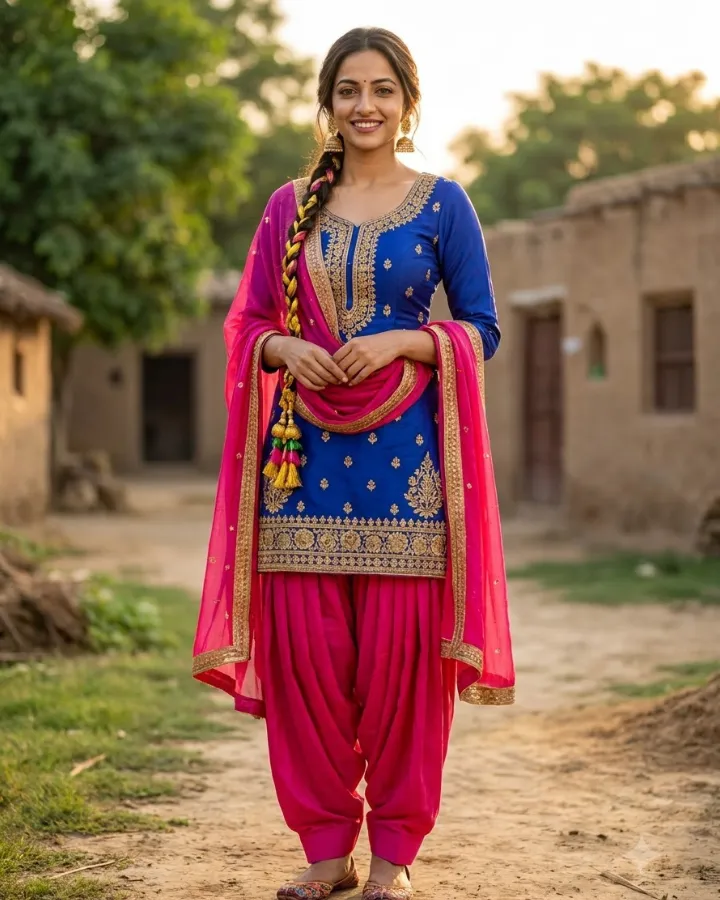
STAGE AND ENVIRONMENT SETUP CORE STYLE: Create a full hyper realistic portrait of a smiling Punjabi girl wearing a royal blue and bright pink Patiala Shahi salwar suit with rich pleats in a warm Punjab village setting using a vertical 4:5 composition. STRICT IDENTITY LOCK ANTI AI REALISM: Edit only the uploaded image and preserve every facial detail, natural skin texture, hair strands and body shape without changing identity. OUTFIT POSE AND EXPRESSION SHIFT: Add a colorful golden paranda, Punjabi jutti, large golden jhumkas and a gentle smile with relaxed standing pose. PROFESSIONAL CAMERA AND LIGHTING MATRIX: Use an 85mm full frame lens look with f1.8 aperture and soft evening sunlight. BACKGROUND AND ENVIRONMENT: Show village houses, green trees and earthy paths with soft depth. NEGATIVE PROMPT: face alteration, identity mismatch, plastic skin, artificial AI look, over smoothing, cartoon rendering, anime style, harsh digital HDR, distorted features, double jewelry overlays, cluttered backgrounds, text overlays.
Prompt 8. Phulkari Dupatta Traditional Punjabi Kudi Look
This became one of my favorite edits because the colorful Phulkari dupatta completely changed the photo. I noticed that keeping the kurti simple made the embroidery stand out in a very natural way.
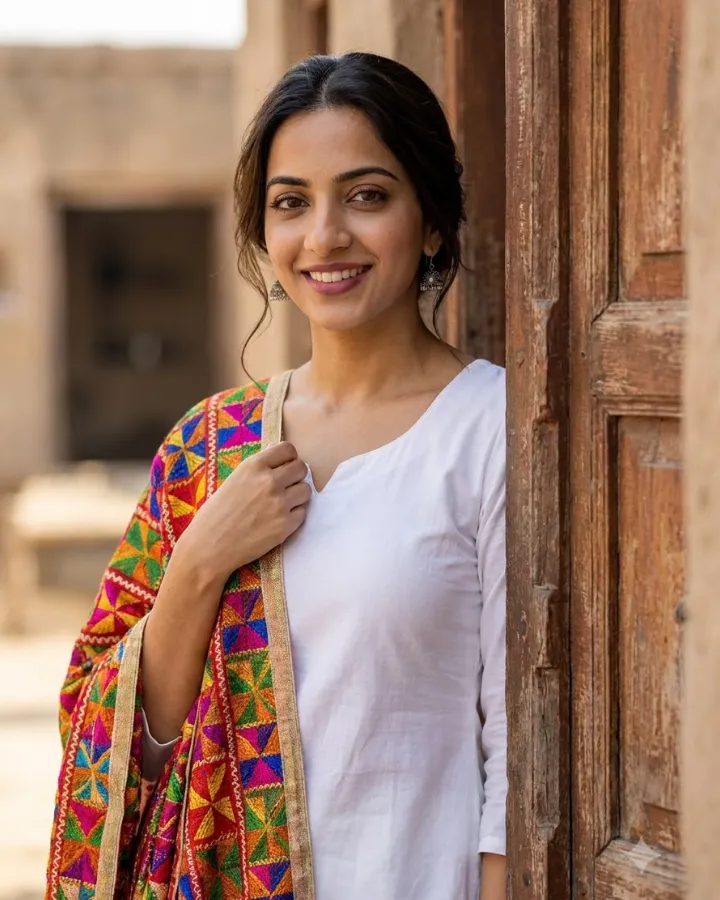
STAGE AND ENVIRONMENT SETUP CORE STYLE: Create a full hyper realistic close portrait of a beautiful Punjabi girl wearing a simple white short kurti with a richly embroidered multicolored Phulkari dupatta in a traditional village setting using a vertical 4:5 composition. STRICT IDENTITY LOCK ANTI AI REALISM: Edit only the uploaded image and keep every facial feature, natural skin texture, fine hair strands, eye shape and body structure exactly the same without artificial changes. OUTFIT POSE AND EXPRESSION SHIFT: Add small silver jhumkas with natural makeup and a gentle smile while lightly holding the dupatta near the shoulder. PROFESSIONAL CAMERA AND LIGHTING MATRIX: Use an 85mm full frame lens look with f1.8 aperture and soft natural daylight for realistic skin tones. BACKGROUND AND ENVIRONMENT: Place the subject beside a rustic wooden door with warm earthy textures and natural depth. NEGATIVE PROMPT: face alteration, identity mismatch, plastic skin, artificial AI look, over smoothing, cartoon rendering, anime style, harsh digital HDR, distorted features, double jewelry overlays, cluttered backgrounds, text overlays.
Prompt 9. Punjabi Bride Anand Karaj Wedding Look
When I tested this bridal style, the traditional Chooda and Kaleere made the biggest difference. The overall photo looked elegant because I kept the expression calm and the background simple.
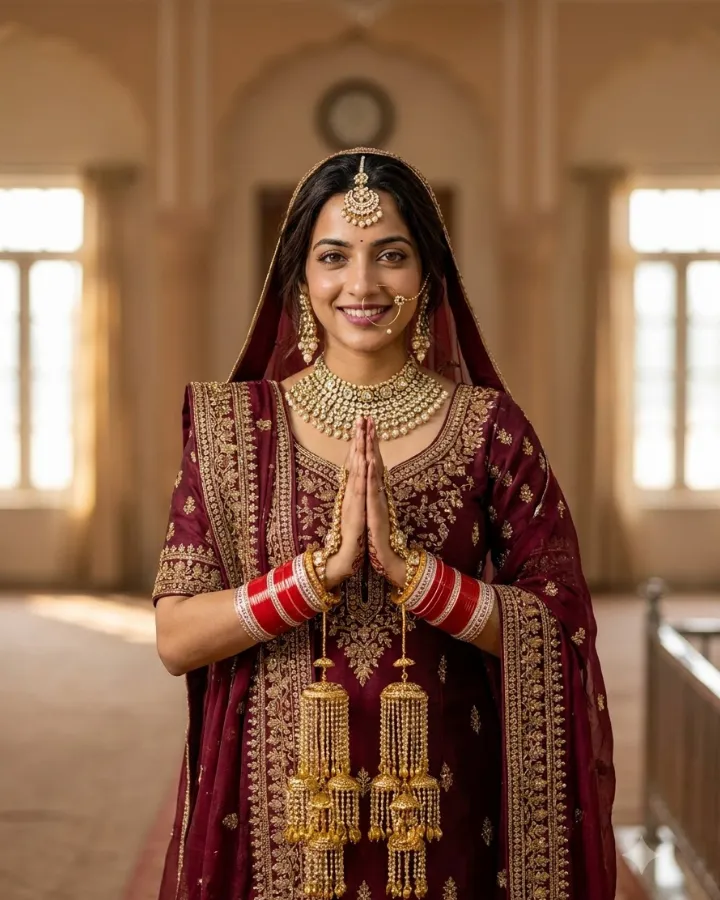
STAGE AND ENVIRONMENT SETUP CORE STYLE: Create a full hyper realistic bridal portrait of a Punjabi bride wearing a deep maroon Anand Karaj salwar suit with rich traditional details inside a peaceful Gurudwara setting using a vertical 4:5 composition. STRICT IDENTITY LOCK ANTI AI REALISM: Edit only the uploaded image while preserving the complete facial identity, skin texture, natural pores, eye shape, hair details and body proportions without any reshaping. OUTFIT POSE AND EXPRESSION SHIFT: Add traditional red and white Chooda, long gold Kaleere, heavy Kundan jewelry and a graceful smile with folded hands. PROFESSIONAL CAMERA AND LIGHTING MATRIX: Use an 85mm full frame lens look with f1.8 aperture and soft indoor natural lighting. BACKGROUND AND ENVIRONMENT: Show a peaceful Gurudwara interior with elegant architecture and soft warm depth. NEGATIVE PROMPT: face alteration, identity mismatch, plastic skin, artificial AI look, over smoothing, cartoon rendering, anime style, harsh digital HDR, distorted features, double jewelry overlays, cluttered backgrounds, text overlays.
Prompt 10. Modern Punjabi Sharara Suit Boutique Style
I tried this look because modern Punjabi boutique outfits are very popular. The wide sharara and short kurti looked stylish without losing the traditional feel. Soft studio lighting gave me the cleanest and most realistic result.
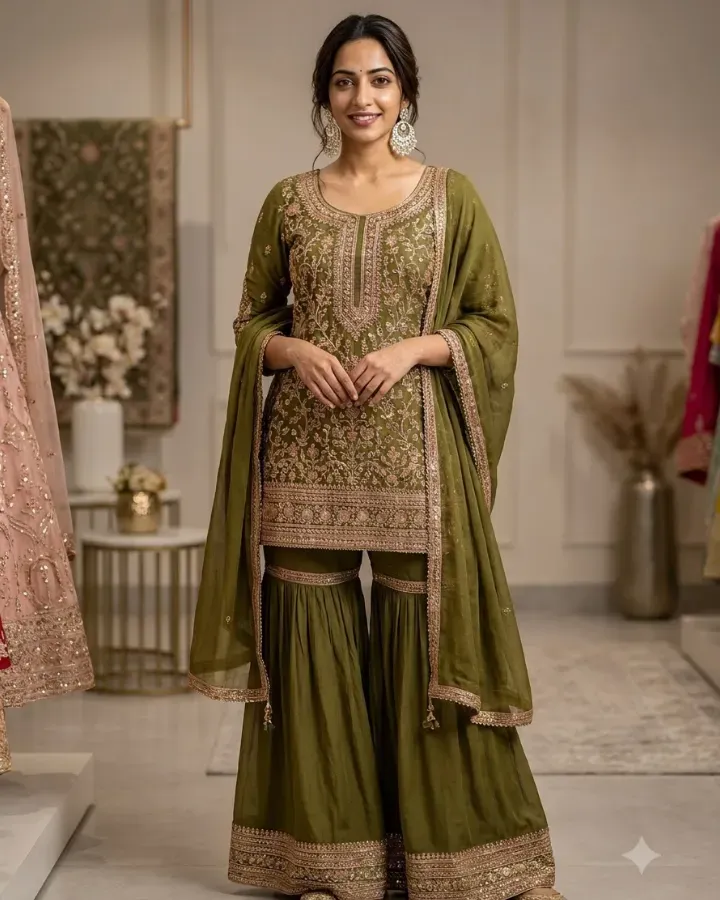
STAGE AND ENVIRONMENT SETUP CORE STYLE: Create a full hyper realistic portrait of a fashionable Punjabi girl wearing an olive green and rose gold boutique style Sharara suit with a short embroidered kurti in a premium indoor fashion setting using a vertical 4:5 composition. STRICT IDENTITY LOCK ANTI AI REALISM: Edit only the uploaded image and preserve the original facial features, skin texture, eye shape, hair strands and body structure with complete identity accuracy. OUTFIT POSE AND EXPRESSION SHIFT: Dress the subject in a wide flared Sharara with delicate Tilla borders, statement mirror work earrings and a confident natural pose with a soft smile. PROFESSIONAL CAMERA AND LIGHTING MATRIX: Use an 85mm full frame lens look with f1.8 aperture, balanced studio lighting and realistic skin tones. BACKGROUND AND ENVIRONMENT: Place the subject inside a modern boutique studio with elegant decor and soft background blur. NEGATIVE PROMPT: face alteration, identity mismatch, plastic skin, artificial AI look, over smoothing, cartoon rendering, anime style, harsh digital HDR, distorted features, double jewelry overlays, cluttered backgrounds, text overlays.
ChatGPT vs Gemini AI
I tested all these Punjabi look prompts myself in both ChatGPT and Gemini AI, then added 10 actual results to this post. For prompts 1 to 6, I have added my ChatGPT results, while prompts 7 to 10 show my Gemini AI results. I noticed that some prompts gave better results in ChatGPT, while others looked better in Gemini AI. I also prepared these prompts with strong face preservation instructions, so the uploaded person’s identity stays as close to the original as the tool allows.
How To Use These Prompts
- Start with a clear photo: I use a sharp photo where the face is visible and not covered by hair, sunglasses, or another object.
- Upload the original photo: Add the photo first, then paste only one prompt. I avoid testing several prompts in the same request.
- Check the first result: I look at the face, hands, jewellery, Paranda, clothing details, and background before making another attempt.
- Fix only what looks wrong: If the face looks slightly different, I repeat the prompt with a stronger identity instruction instead of adding many extra instructions.
Quick Photo Size Guide
| Use | Size | Ratio |
|---|---|---|
| Instagram Feed | 1080 × 1350 px | 4:5 |
| Instagram Story | 1080 × 1920 px | 9:16 |
| Facebook Feed | 1080 × 1350 px | 4:5 |
| WhatsApp Status | 1080 × 1920 px | 9:16 |
| Website | 1200 × 1500 px | 4:5 |
For these traditional outfit edits, 4:5 is my preferred size. It gives enough space to show the outfit while keeping the person large enough in the frame.
Tips to Get Better Results with These Prompts
When I test AI photo editing prompts, I usually make a few small changes before creating the final image. These simple edits often give a much better result without changing the original style.
- Keep the original face: If your AI tool supports it, ask it to preserve your facial features. This gives a more natural looking photo.
- Add your favorite outfit color: You can replace any outfit color with your own choice. Simply change the color name inside the prompt.
- Change the background vibe: If you want a different setting, replace the background with a sunflower field, flower garden, heritage haveli, village street, or festive wedding location.
- Adjust the lighting: Try adding soft morning light, golden evening light, cloudy daylight, or warm indoor light based on the mood you want.
- Make the outfit more festive: You can add details like heavier embroidery, different jewelry, fresh flowers, or a colorful dupatta for a richer look.
- Choose a different camera style: If you want a wider portrait or a close up image, simply change the framing or camera angle while keeping the face unchanged.
- Use a high quality photo: I always get better results when I upload a sharp image with a clear face and good lighting.
FAQ
Can I change the outfit color without affecting the prompt?
Yes. You only need to replace the color mentioned in the prompt. Everything else can stay the same, and the overall style will still work well.
Why does my jewellery sometimes look artificial?
Too many jewellery details can sometimes confuse an image tool. I get better results when I describe the main jewellery pieces clearly and keep the pose simple.
Will these prompts keep my exact face?
The prompts strongly instruct the tool to preserve the uploaded identity and facial details. However, no image tool can guarantee perfect identity preservation in every generation.