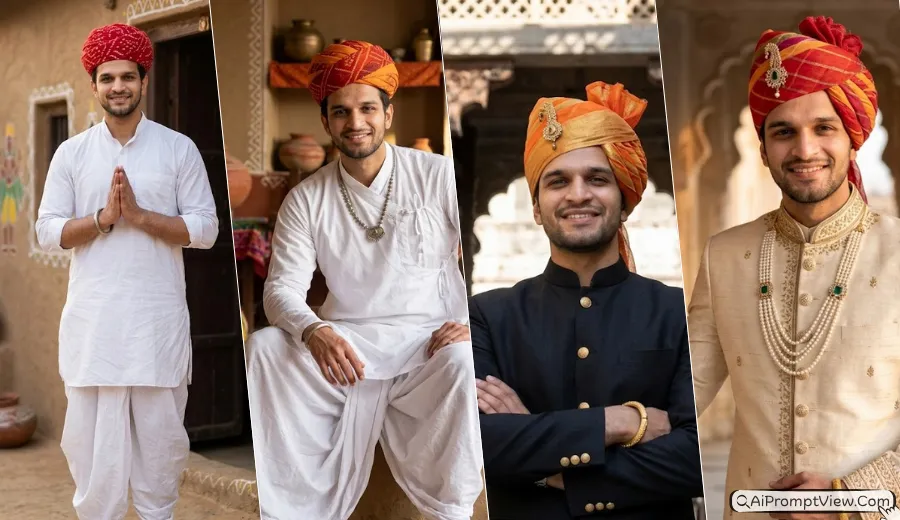
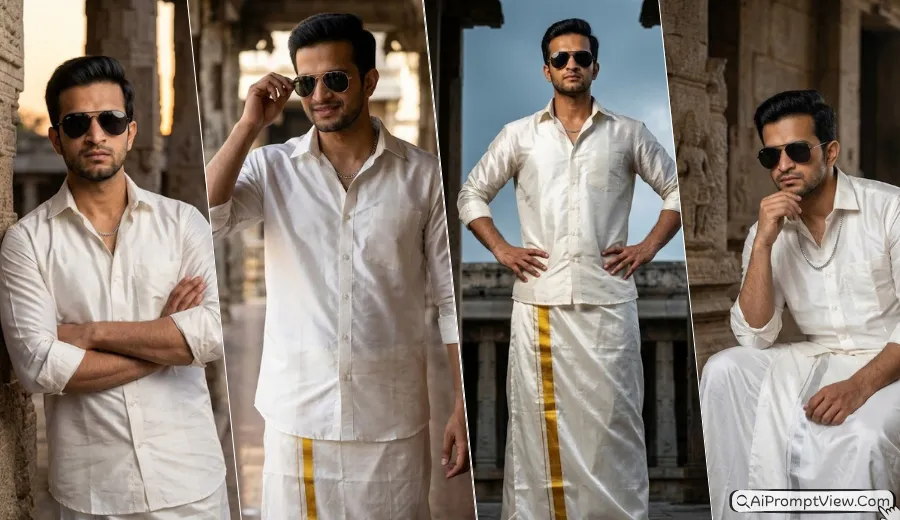
Best Monsoon Prompt for Boys is all about creating realistic rain photos with unique camera angles and natural editing. I have been testing different AI photo editing prompts for the past few weeks, and this monsoon collection gave me some of my favorite results. The rain looked real, the lighting felt natural, and the photos had the same clean feel that you usually see in professional DSLR portraits. A few prompts needed small changes before they looked right, so I only included the ones that worked well during my testing.
I personally tried these prompts with ChatGPT, Gemini AI, and Flow AI using different photos, outfits, and lighting. In my experience, a clear front facing photo gives the best result, especially for Rain monsoon photoshoot ideas and AI photo prompts for boys. Every prompt below is based on my own testing, so you can copy, paste, and make small changes if you want a style that matches your own vibe.
Rain Monsoon Photo Prompt for Boys
Every prompt below creates a different monsoon style photo while keeping the face natural and realistic. You will find rain photo with different camera angles, outfits, poses, lighting, and backgrounds, so you can choose the style that matches your personality. Each prompt is ready to copy and use, and you can also make small changes to create your own unique look.
Prompt 1. Hero Rain Entrance
This prompt gives a strong hero style look without making the photo feel over edited. I tried it with a simple walking photo, and the low camera angle completely changed the vibe. The rain looked natural, and the face stayed clean and realistic.
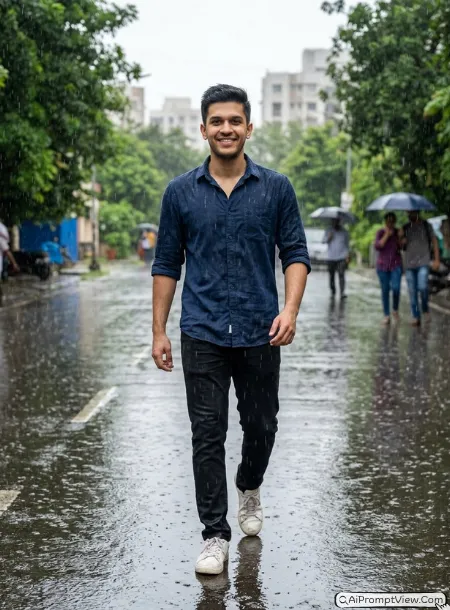
STAGE AND ENVIRONMENT SETUP CORE STYLE: Turn the uploaded photo into a realistic monsoon portrait of an Indian young man walking toward the camera during heavy rain. Keep the camera low so the subject looks confident without looking dramatic. Let the falling rain add movement around the body while keeping the face easy to see. The final image should look like it was clicked by a professional photographer during a real rainy day. STRICT IDENTITY LOCK ANTI AI REALISM: Use only the uploaded image as the face reference. Keep the same skin tone, face shape, eyes, beard, hairstyle, lips, and body size. Show real skin with visible pores, soft texture, tiny facial details, and natural hair strands. Do not make the skin smooth, shiny, or wax like. OUTFIT POSE AND EXPRESSION SHIFT: Dress him in a dark blue cotton shirt with rolled sleeves, black slim fit jeans, and white sneakers slightly wet from the rain. Show him walking naturally with relaxed shoulders, easy arm movement, and a calm confident face. PROFESSIONAL CAMERA AND LIGHTING MATRIX: Give the image a professional DSLR feel with a natural 35mm portrait lens look. Keep the face sharp, add soft background blur, and use cloudy daylight with realistic rain drops and reflections on the wet road. BACKGROUND AND ENVIRONMENT: Show a quiet Indian street after fresh rain with wet roads, green roadside trees, small puddles, distant buildings, and a soft natural depth that makes everything feel fresh and real. NEGATIVE PROMPT: face alteration, identity mismatch, plastic skin, artificial AI look, over smoothing, cartoon rendering, anime style, harsh digital HDR, distorted features, double jewelry overlays, cluttered backgrounds, text overlays.
Prompt 2. Window Rain Mood
I liked this one because it creates a quiet monsoon feeling without trying too hard. The water drops on the window made the photo look more emotional. It worked best when I used a photo with soft natural light.
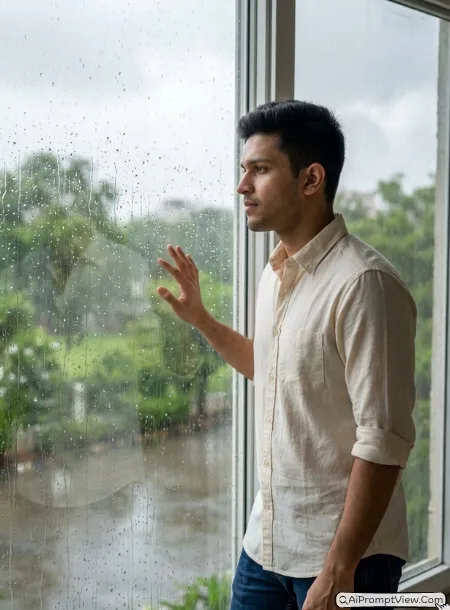
STAGE AND ENVIRONMENT SETUP CORE STYLE: Edit the uploaded photo as if an Indian young man is standing beside a large window while it rains outside. Use a natural side profile view and let the rain drops on the glass become part of the story. The mood should feel calm, silent, and comfortable, just like watching rain on a peaceful afternoon. STRICT IDENTITY LOCK ANTI AI REALISM: Keep the uploaded face exactly the same. Do not change skin tone, face shape, beard, hairstyle, eyes, nose, lips, or body size. Make the skin look completely real with visible pores, soft texture, and natural facial details. Avoid smooth skin, beauty filters, or fake looking edits. OUTFIT POSE AND EXPRESSION SHIFT: Dress him in a light cream cotton shirt with folded sleeves and dark blue jeans. Let one hand rest near the window while he quietly looks outside with a relaxed and thoughtful expression. PROFESSIONAL CAMERA AND LIGHTING MATRIX: Create the look of a professional portrait taken with an 85mm lens. Keep the face in clear focus, use soft daylight coming through the window, and add gentle background blur with realistic reflections on the wet glass. BACKGROUND AND ENVIRONMENT: Show a clean Indian home with large glass windows, rain drops running down the glass, green trees outside, cloudy skies, and a peaceful monsoon atmosphere that feels warm and natural. NEGATIVE PROMPT: face alteration, identity mismatch, plastic skin, artificial AI look, over smoothing, cartoon rendering, anime style, harsh digital HDR, distorted features, double jewelry overlays, cluttered backgrounds, text overlays.
Prompt 3. Umbrella Reflection
This was one of the most creative results during my testing. Instead of focusing only on the subject, the puddle reflection made the photo stand out. I got the best result on a clean road after fresh rain.
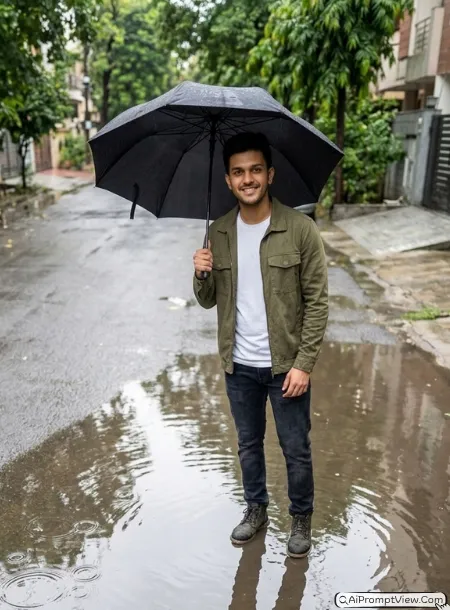
STAGE AND ENVIRONMENT SETUP CORE STYLE: Make the uploaded photo look like it was taken on a rainy morning with an Indian young man standing beside a clear rain puddle while holding a black umbrella. Use a top view camera angle that captures both the person and the reflection in the water. Keep everything simple, peaceful, and natural without adding extra effects. STRICT IDENTITY LOCK ANTI AI REALISM: Keep the original face completely unchanged. Match the same skin tone, beard, hairstyle, eyes, lips, jawline, and body shape from the uploaded image. Show real skin with natural pores, soft facial texture, and fine hair details. Do not make the skin glossy, plastic, or over edited. OUTFIT POSE AND EXPRESSION SHIFT: Dress him in an olive green casual jacket over a plain white tee, dark jeans, and waterproof boots. Show him standing naturally while holding the umbrella with one hand and looking gently toward the puddle reflection. PROFESSIONAL CAMERA AND LIGHTING MATRIX: Give the photo a clean DSLR look with a natural 50mm lens feel. Keep the reflection sharp, use soft cloudy daylight, balanced exposure, and realistic water texture with small ripples. BACKGROUND AND ENVIRONMENT: Show a peaceful Indian street with fresh rain puddles, wet pavement, green roadside trees, soft morning light, and blurred buildings in the distance to create a fresh monsoon mood. NEGATIVE PROMPT: face alteration, identity mismatch, plastic skin, artificial AI look, over smoothing, cartoon rendering, anime style, harsh digital HDR, distorted features, double jewelry overlays, cluttered backgrounds, text overlays.
Prompt 4. Street Rain Walk
This prompt gave me a clean travel style look. I tried it with a normal road photo, and the wet street made everything feel more cinematic. The behind shoulder angle looked natural and did not feel forced.
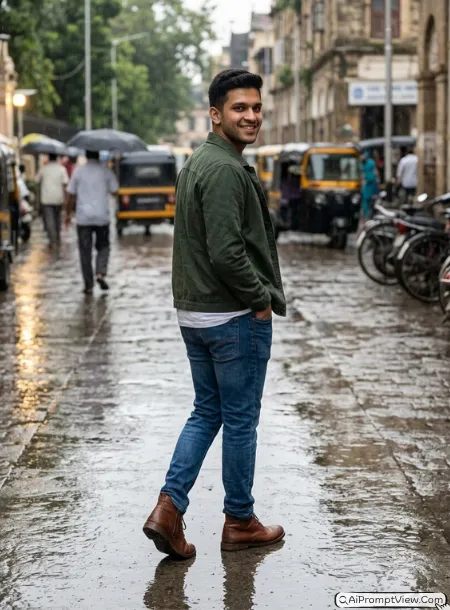
STAGE AND ENVIRONMENT SETUP CORE STYLE: Give the uploaded photo the feeling of a real monsoon evening on an Indian street. Show the young man walking away from the camera while the view follows him from behind the shoulder. The wet road should catch soft reflections from the cloudy sky and the light rain should make the whole scene feel fresh instead of dramatic. Keep the mood simple and natural like a real travel photo. STRICT IDENTITY LOCK ANTI AI REALISM: Keep the uploaded face exactly the same without changing the skin tone, face shape, hairstyle, beard, eyes, lips, or body build. Let the skin look naturally detailed with visible pores, soft texture, and real facial depth. Avoid smooth skin, waxy texture, or fake beauty effects. OUTFIT POSE AND EXPRESSION SHIFT: Dress him in a dark green casual jacket over a plain white shirt, blue jeans, and brown boots. Show him walking with relaxed shoulders, one hand inside the pocket, and an easy natural posture like he is enjoying the rain. PROFESSIONAL CAMERA AND LIGHTING MATRIX: Create the look of a professional DSLR travel photo using a natural 35mm lens feel. Keep the subject clear, the background softly blurred, and use gentle cloudy daylight with realistic reflections on the wet road. BACKGROUND AND ENVIRONMENT: Show a peaceful Indian street with rain covered roads, parked bikes, roadside trees, fresh puddles, and distant buildings fading softly into the rainy weather. NEGATIVE PROMPT: face alteration, identity mismatch, plastic skin, artificial AI look, over smoothing, cartoon rendering, anime style, harsh digital HDR, distorted features, double jewelry overlays, cluttered backgrounds, text overlays.
Prompt 5. Bike in Rain
This one quickly became one of my favorites. The flying rain around the bike looked very real, and the face stayed sharp without looking edited. I got the best result after using a simple sitting pose.
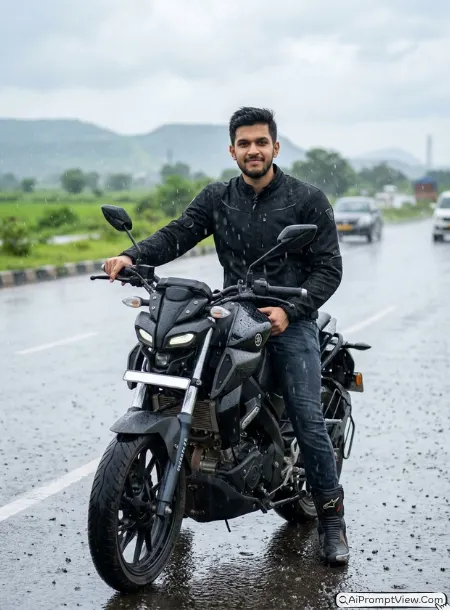
STAGE AND ENVIRONMENT SETUP CORE STYLE: Transform the uploaded photo into a realistic monsoon bike portrait of an Indian young man sitting confidently on a modern motorcycle during steady rainfall. Use a natural forty five degree front angle that shows both the rider and the bike without making the pose look artificial. Let the rain create small splashes around the bike and keep the whole scene rich with real monsoon vibes. STRICT IDENTITY LOCK ANTI AI REALISM: Use only the uploaded photo as the identity reference. Keep the face, skin tone, beard, hairstyle, eyes, lips, and body shape exactly the same. Show realistic skin with visible pores, soft texture, and natural facial details. Do not make the face glossy, plastic, or over polished. OUTFIT POSE AND EXPRESSION SHIFT: Dress him in a black riding jacket, dark denim jeans, riding boots, and simple gloves. Let him sit comfortably with one hand on the handlebar while looking confidently toward the camera with a relaxed face. PROFESSIONAL CAMERA AND LIGHTING MATRIX: Give the image the look of a DSLR portrait with a natural 50mm lens style. Keep the bike and face sharp, soften the background slightly, and use cloudy daylight with realistic rain drops and water reflections. BACKGROUND AND ENVIRONMENT: Show an Indian highway surrounded by green fields, cloudy skies, wet roads, and fresh rain falling gently to create a clean adventure style monsoon scene. NEGATIVE PROMPT: face alteration, identity mismatch, plastic skin, artificial AI look, over smoothing, cartoon rendering, anime style, harsh digital HDR, distorted features, double jewelry overlays, cluttered backgrounds, text overlays.
Prompt 6. Rooftop Monsoon
I enjoyed testing this prompt because it felt open and peaceful. The top view made the photo look different from the others, and the relaxed pose looked much better than trying to act dramatic.
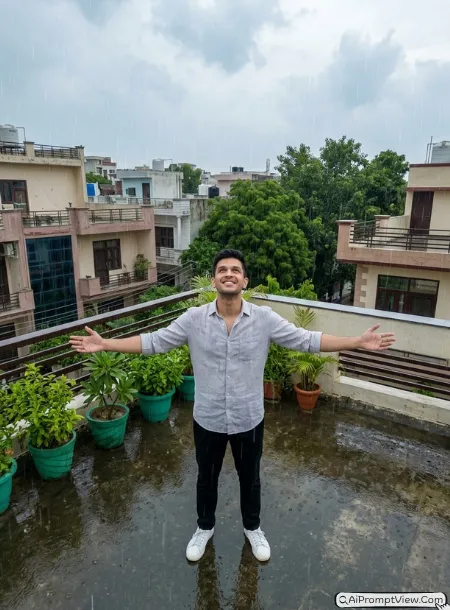
STAGE AND ENVIRONMENT SETUP CORE STYLE: Turn the uploaded photo into a peaceful rooftop monsoon portrait of an Indian young man enjoying fresh rain under an open sky. Use a natural drone style top view that shows both the person and the rooftop without making the angle feel extreme. The rain should fall gently across the frame while the open sky creates a calm and free feeling. STRICT IDENTITY LOCK ANTI AI REALISM: Keep the uploaded face exactly the same with no changes to the skin tone, hairstyle, beard, eyes, lips, face shape, or body proportions. Let the skin look completely real with visible pores, soft natural texture, and authentic facial details. Avoid smooth, shiny, or artificial looking skin. OUTFIT POSE AND EXPRESSION SHIFT: Dress him in a light grey linen shirt, black trousers, and simple white sneakers. Show him standing with both arms open, looking slightly upward with a relaxed smile that feels natural and comfortable. PROFESSIONAL CAMERA AND LIGHTING MATRIX: Give the photo the look of a professional DSLR image with a wide twenty four millimeter lens feel. Use soft cloudy daylight, natural rain streaks, balanced exposure, and gentle background depth. BACKGROUND AND ENVIRONMENT: Show a clean Indian rooftop with nearby buildings, green trees in the distance, cloudy skies, rain water collecting on the floor, and a peaceful monsoon atmosphere that feels fresh and real. NEGATIVE PROMPT: face alteration, identity mismatch, plastic skin, artificial AI look, over smoothing, cartoon rendering, anime style, harsh digital HDR, distorted features, double jewelry overlays, cluttered backgrounds, text overlays.
Prompt 7. Cafe Rain Portrait
This prompt gave me one of the softest monsoon portraits. The rain on the glass added a nice layer without hiding the face. I liked this one because it looked warm, simple, and very close to a real camera photo.
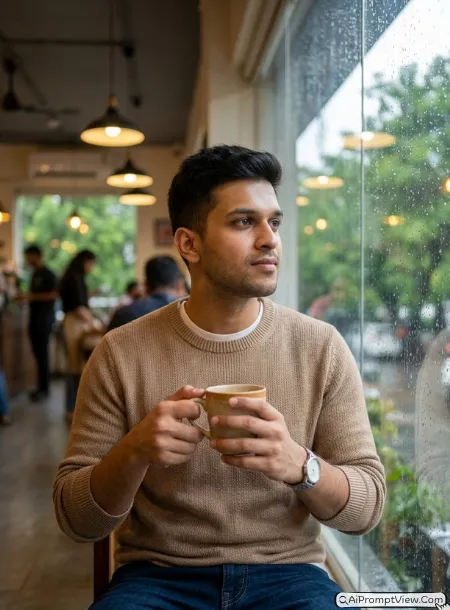
STAGE AND ENVIRONMENT SETUP CORE STYLE: Style the uploaded photo as a cozy monsoon portrait inside a small Indian cafe. Show the young man sitting beside a large glass window while rain slowly runs down the glass outside. Use a close up view through the window so the water drops stay soft in the foreground and the face remains the main focus. The whole image should feel quiet, warm, and naturally captured on a rainy afternoon. STRICT IDENTITY LOCK ANTI AI REALISM: Keep the uploaded face exactly the same without changing the skin tone, face shape, eyes, beard, hairstyle, lips, or body size. Let the skin look completely real with visible pores, soft texture, and natural facial details. Keep the hair natural and avoid smooth skin, plastic shine, or fake beauty effects. OUTFIT POSE AND EXPRESSION SHIFT: Dress him in a light brown knitted sweater over a plain white shirt with dark blue jeans and a simple wristwatch. Let him hold a warm coffee cup with both hands while quietly looking through the rainy window with a soft relaxed expression. PROFESSIONAL CAMERA AND LIGHTING MATRIX: Give the photo a natural DSLR portrait feel with an 85mm lens look. Keep the face sharp, the background softly blurred, and mix warm cafe lights with cool daylight coming through the glass. BACKGROUND AND ENVIRONMENT: Show a cozy Indian cafe with wooden tables, warm hanging lights, blurred people in the background, rain covered windows, green trees outside, and a peaceful monsoon atmosphere. NEGATIVE PROMPT: face alteration, identity mismatch, plastic skin, artificial AI look, over smoothing, cartoon rendering, anime style, harsh digital HDR, distorted features, double jewelry overlays, cluttered backgrounds, text overlays.
Prompt 8. Forest Rain
I tested this prompt on a simple outdoor photo, and the green background looked beautiful after adding rain. The wide camera angle made everything feel fresh without taking attention away from the subject.
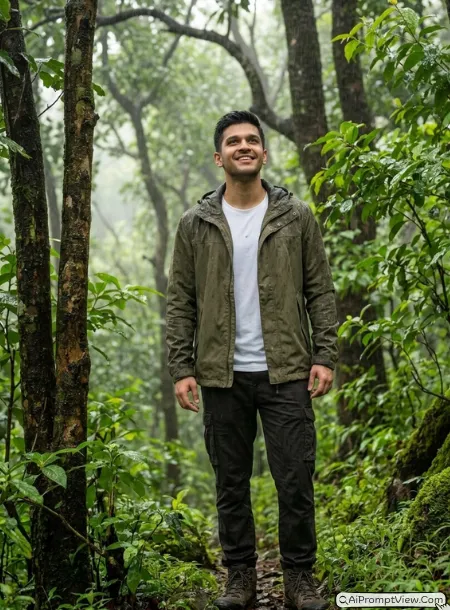
STAGE AND ENVIRONMENT SETUP CORE STYLE: Edit the uploaded photo as if it was taken inside a fresh green forest during a gentle monsoon shower. Use a wide camera angle that captures the beauty of the trees while keeping the subject naturally placed in the middle of the scene. Let the rain fall softly through the leaves and create a cool peaceful feeling without looking over edited. STRICT IDENTITY LOCK ANTI AI REALISM: Keep every facial detail exactly the same including the skin tone, beard, hairstyle, eyes, lips, jawline, and body shape. Show natural skin with visible pores, soft texture, and realistic facial depth. Avoid plastic skin, beauty filters, or artificial face changes. OUTFIT POSE AND EXPRESSION SHIFT: Dress him in an olive green hooded jacket over a white cotton shirt with dark cargo pants and hiking boots. Show him standing comfortably while looking up toward the falling rain with a small natural smile. PROFESSIONAL CAMERA AND LIGHTING MATRIX: Create the feel of a professional DSLR outdoor photo using a wide angle lens. Keep the lighting soft, the greenery rich, and the rain clear while maintaining realistic depth across the frame. BACKGROUND AND ENVIRONMENT: Show a dense Indian forest with tall trees, fresh green leaves, light mist, wet rocks, small streams, and soft rain creating a calm natural monsoon setting. NEGATIVE PROMPT: face alteration, identity mismatch, plastic skin, artificial AI look, over smoothing, cartoon rendering, anime style, harsh digital HDR, distorted features, double jewelry overlays, cluttered backgrounds, text overlays.
Prompt 9. Running in Rain
This prompt took me one extra try, but it was worth it. The running pose looked very natural, and the water splashes gave the photo real energy. It felt like a sports photographer clicked it during the rain.
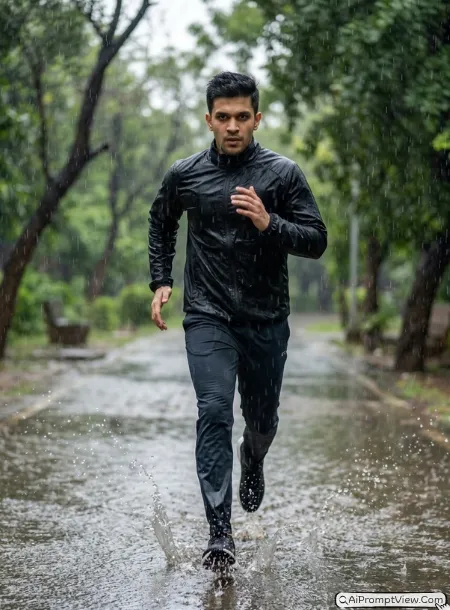
STAGE AND ENVIRONMENT SETUP CORE STYLE: Turn the uploaded photo into an energetic monsoon action portrait of an Indian young man running through heavy rain. Use a smooth tracking camera angle that follows the movement naturally. Let the rain and water splashes add excitement while keeping the face clear and realistic. The final image should feel like a real outdoor sports photograph instead of an AI generated picture. STRICT IDENTITY LOCK ANTI AI REALISM: Keep the uploaded face exactly the same with no changes to the skin tone, hairstyle, beard, eyes, lips, or body build. Show realistic skin with visible pores, soft texture, and natural facial details. Do not create glossy skin, plastic texture, or artificial beauty effects. OUTFIT POSE AND EXPRESSION SHIFT: Dress him in a black sports jacket, dark running pants, lightweight shoes, and no extra accessories. Show him running naturally with balanced arm movement, focused eyes, and a relaxed confident expression. PROFESSIONAL CAMERA AND LIGHTING MATRIX: Give the photo the look of a DSLR action shot using a natural telephoto lens feel. Keep the subject sharp, capture realistic water splashes, and use soft cloudy daylight with gentle motion in the falling rain. BACKGROUND AND ENVIRONMENT: Show an Indian park with rain covered walking paths, fresh green trees, puddles reflecting the cloudy sky, and a clean monsoon atmosphere full of natural movement. NEGATIVE PROMPT: face alteration, identity mismatch, plastic skin, artificial AI look, over smoothing, cartoon rendering, anime style, harsh digital HDR, distorted features, double jewelry overlays, cluttered backgrounds, text overlays.
Prompt 10. Night Rain Neon
I saved this one for the end because it gave me the most cinematic result. The colorful lights reflected beautifully on the wet road, but the face still looked completely natural. A simple pose worked much better than trying to look serious.
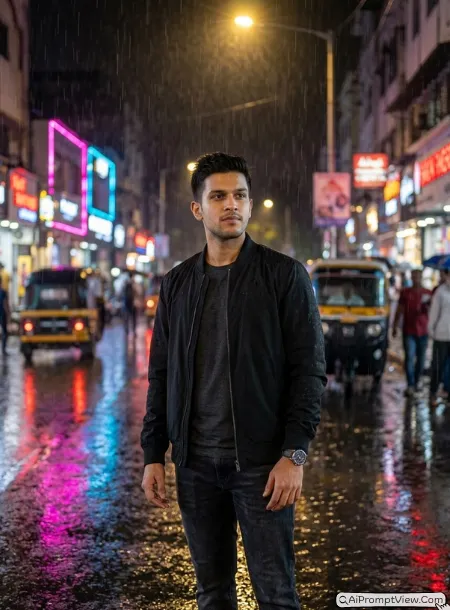
STAGE AND ENVIRONMENT SETUP CORE STYLE: Make the uploaded photo look like it was captured on a rainy night in an Indian city. Show the young man standing under a street light while colorful neon lights reflect across the wet road. Use a gentle Dutch tilt camera angle to add a stylish touch without making the photo look unrealistic. Keep the rain rich, natural, and full of depth. STRICT IDENTITY LOCK ANTI AI REALISM: Use only the uploaded photo as the face reference. Keep the same skin tone, face shape, beard, hairstyle, eyes, lips, and body proportions. Show real skin with visible pores, natural texture, soft facial lines, and realistic hair strands. Do not create plastic skin, beauty filter effects, or artificial face changes. OUTFIT POSE AND EXPRESSION SHIFT: Dress him in a black bomber jacket over a charcoal grey tee, dark jeans, clean sneakers, and a simple wristwatch. Let him stand comfortably with relaxed shoulders, both hands by his sides, and a calm confident expression while looking slightly away from the camera. PROFESSIONAL CAMERA AND LIGHTING MATRIX: Create the feel of a professional DSLR night portrait using a natural 50mm lens look. Keep the face sharp, the background softly blurred, and balance the warm street light with blue and pink neon reflections on the wet road. BACKGROUND AND ENVIRONMENT: Show a modern Indian city street with glowing shop lights, rain covered pavement, colorful puddle reflections, blurred traffic lights, and a rich cinematic monsoon atmosphere that still feels like a real photograph. NEGATIVE PROMPT: face alteration, identity mismatch, plastic skin, artificial AI look, over smoothing, cartoon rendering, anime style, harsh digital HDR, distorted features, double jewelry overlays, cluttered backgrounds, text overlays.
Tips to Get Even Better Rain Photo Editing Results
After testing many rain photo prompts, I noticed that small changes often make a bigger difference than changing the whole prompt. These are the simple things I usually do before generating the final image.
- Pick a clear source photo: Use a photo where your face is clearly visible. A clean image helps keep the face natural and more realistic.
- Match the weather with your outfit: Dark clothes usually look better in heavy rain, while light colors work well with soft drizzle or cloudy weather.
- Change the rain style: You can replace heavy rain with light rain, mist, or rain after the storm if you want a different mood.
- Add your own location: Replace the background with your favorite place like a village road, mountain, beach, city street, or rooftop to make the photo feel more personal.
- Try different lighting: Add words like soft morning light, golden sunset, cloudy daylight, blue hour, or neon lights to create a new vibe without changing the full prompt.
- Keep the pose natural: Small movements like walking, looking away, or holding an umbrella usually give better results than stiff poses.
- Adjust the camera angle: You can change low angle, close up, drone view, side profile, or wide angle to create a completely different style from the same prompt.
Common Mistakes to Avoid in Photo Editing
I made some of these mistakes when I first started testing rain prompts. Avoiding them gave me much cleaner and more realistic results.
- Do not use blurry photos: AI cannot keep the face natural if the original image is already blurry.
- Do not add too many effects: Too many words like smoke, lightning, fire, glow, fog, and neon together can make the image look fake.
- Avoid changing everything at once: If the result is not perfect, change only one part like the background or lighting instead of rewriting the whole prompt.
- Do not force unrealistic poses: Natural standing, walking, or sitting poses almost always look better than dramatic action poses.
- Avoid very bright skin edits: Ask for natural skin texture with visible pores instead of smooth or glossy skin. This makes the portrait look much closer to a real DSLR photo.
- Do not overload the background: Too many cars, buildings, lights, or objects can take attention away from the subject. A simple rainy background usually gives the best result.
- Generate more than one version: I normally try two or three generations with the same prompt. Sometimes a small variation gives a much better final photo.
Last Words
While testing these prompts, I noticed that the best results came from simple photos with good lighting. The AI handled the rain effects much better when the original face was clear. My personal favorites were Hero Rain Entrance and Night Rain Neon because they looked the closest to real DSLR photos. If your first result is not perfect, try a different source photo before changing the prompt. That small step gave me much better edits most of the time. Happy editing!
Also Check: 10 Best Monsoon Couple AI Photo Prompt