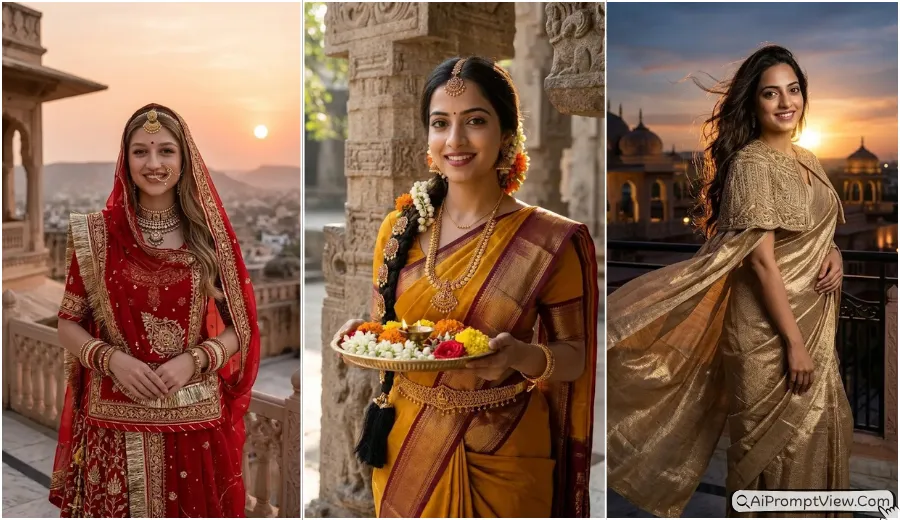
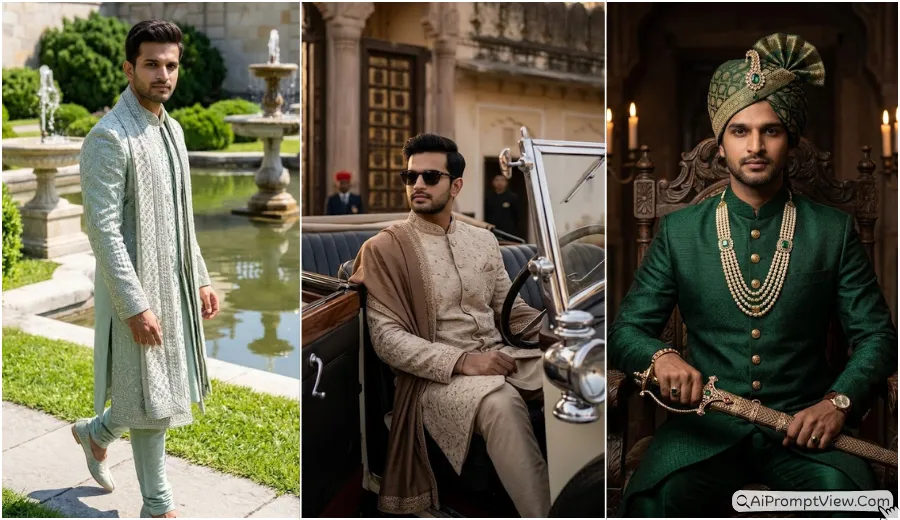
Traditional Marwadi Rajasthani Look AI Prompts for Men and Boys are made for users who want royal, cultural, and cinematic photo edits in a rich Rajasthan style. In this post, I have shared copy paste prompts for Marwadi Safa, Dhoti Kurta, Pagdi, Sherwani, Achkan, palace backgrounds, desert looks, Durbar Hall styles, Sheesh Mahal vibes, and festive Rajasthani photo edits. You can use these prompts with Gemini AI, ChatGPT image editing, and other photo editing tools that support image uploads with text prompts.
I usually test these prompts myself first, check the face lock, skin texture, outfit details, and background quality, then share the prompts that give the best result. I have written every prompt in a copy paste style so you can upload your photo, paste the prompt, and create a clean royal portrait without changing your real face. These prompts are written to keep the real face safe and create a clean hyper realistic cultural photo edit.
Traditional Marwadi Look Photo Prompts for Men
The prompts below can help you create royal Marwadi and Rajasthani style photo edits with real skin details, rich outfits, Safa, jewelry, palace scenes, desert backgrounds, and festive cultural mood.
You will find different looks like Maharaja court portrait, desert fort walk, vintage Mewar Angrakha, golden sand dunes, royal balcony, Durbar Hall, Sheesh Mahal, polo ground, Diwali stepwell, and strong fortress gateway style.
1. Royal Court Maharaja Look
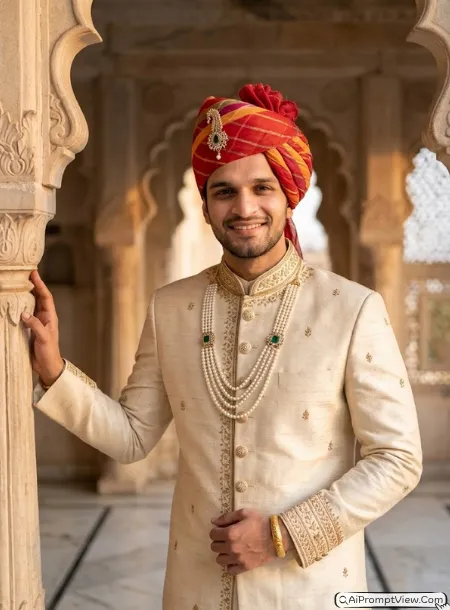
1. STAGE AND ENVIRONMENT SETUP CORE STYLE
Visual Persona And Aesthetic Mood: Create a pure heritage Marwadi Maharaja portrait with a royal Rajputana mood, strong male presence, calm power, and rich palace styling. The look should feel like a premium cultural portrait shoot, not an AI generated image.
Composition: Vertical 4:5 composition with a majestic waist up frame. Keep the subject in sharp focus with balanced headroom and natural body proportion.

2. STRICT IDENTITY LOCK ANTI AI REALISM
Face Reference: Edit my uploaded photo. Use the uploaded image as the only reference for facial features, skin tone, face shape, and core body structure.
Fidelity Lock: The face shape, eye shape, nose structure, jawline, and lip lines must remain 100 percent identical and unchanged. Do not reshape the face. Do not make the skin plastic. Do not add fake beauty filter effect.
Natural Textures: Preserve real skin texture, micro pores, fine lines, natural facial depth, beard texture if present, and real hair strands. The final image must look like real camera photography.

3. OUTFIT POSE AND EXPRESSION SHIFT
Dynamic Pose And Posture: The man stands tall with one hand resting softly on a carved stone pillar. His body posture should look calm, royal, and natural.
Facial Expression: Keep a confident and composed expression while looking directly into the camera.
Attire And Styling Details: Dress him in a cream raw silk Sherwani with fine golden zari work on the collar, front panel, and sleeves. Add a bright red and saffron Jodhpuri Safa with a royal Kalgi brooch. Add a multi layer pearl Kantha necklace with an emerald pendant and a solid gold royal Kada on one wrist. Keep fabric folds and jewelry shine realistic.

4. PROFESSIONAL CAMERA AND LIGHTING MATRIX
Camera Gear And Settings: Simulated capture on a high end full frame camera with an 85mm prime lens, shot at f 1.8 for sharp focus on the subject and creamy background blur.
Lighting Matrix: Use warm golden hour side light that softly touches the face, Safa, and Sherwani. Add natural shadows on the cheekbones and fabric details.

5. BACKGROUND AND ENVIRONMENT
Background Scene: Place the subject in an old Udaipur style palace courtyard with scalloped arches, marble flooring, carved jaali windows, and royal depth in the background.
Color Palette: Warm gold, deep crimson, rich cream, soft brown shadows, and royal palace highlights.

NEGATIVE PROMPT:
face alteration, identity mismatch, plastic skin, artificial AI look, over smoothing, cartoon rendering, anime style, harsh digital HDR, distorted features, double jewelry overlays, cluttered backgrounds, text overlays.
2. Desert Fort Heritage Walk
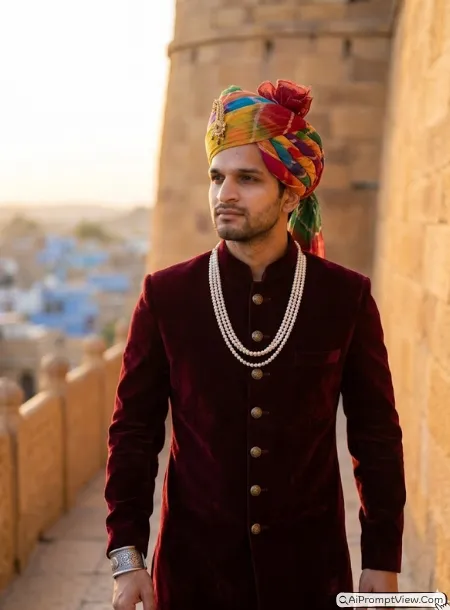
1. STAGE AND ENVIRONMENT SETUP CORE STYLE
Visual Persona And Aesthetic Mood: Create a rugged yet premium Marwadi nobleman look with desert fort heritage, warm evening light, and a timeless Rajasthani royal mood.
Composition: Vertical 3:4 composition with a full torso medium shot. Keep the subject walking naturally with realistic body balance.

2. STRICT IDENTITY LOCK ANTI AI REALISM
Face Reference: Edit my uploaded photo. Use the uploaded image as the only reference for facial features, skin tone, face shape, and core body structure.
Fidelity Lock: Keep the face shape, eye shape, nose line, jaw structure, and lips fully unchanged. Do not change identity. Do not create another person.
Natural Textures: Preserve real skin texture, beard style if present, natural hair strands, skin pores, and real facial depth. No fake smooth skin.

3. OUTFIT POSE AND EXPRESSION SHIFT
Dynamic Pose And Posture: Capture him walking slowly on a fort pathway with one shoulder slightly turned and hands relaxed.
Facial Expression: Keep a proud and thoughtful expression while the eyes look slightly away toward the horizon.
Attire And Styling Details: Dress him in a deep maroon velvet Achkan with antique brass buttons and soft fabric texture. Add a colorful Panchranga Jodhpuri Safa with a vintage gold Kalgi. Add a double string pearl necklace and a heavy silver royal cuff. Keep all accessories realistic and balanced.

4. PROFESSIONAL CAMERA AND LIGHTING MATRIX
Camera Gear And Settings: Simulated capture on a high end full frame camera with an 85mm prime lens, shot at f 1.8 for sharp subject focus and soft background blur.
Lighting Matrix: Use low evening sun from behind to create a warm golden rim light around the shoulders, Safa, and face edges.

5. BACKGROUND AND ENVIRONMENT
Background Scene: Set the portrait near the sandstone ramparts of Jaisalmer Fort with textured old stone walls and a soft city view in the far background.
Color Palette: Sand brown, deep maroon, amber light, soft gold, and natural desert shadows.

NEGATIVE PROMPT:
face alteration, identity mismatch, plastic skin, artificial AI look, over smoothing, cartoon rendering, anime style, harsh digital HDR, distorted features, double jewelry overlays, cluttered backgrounds, text overlays.
3. Vintage Mewar Angrakha Style
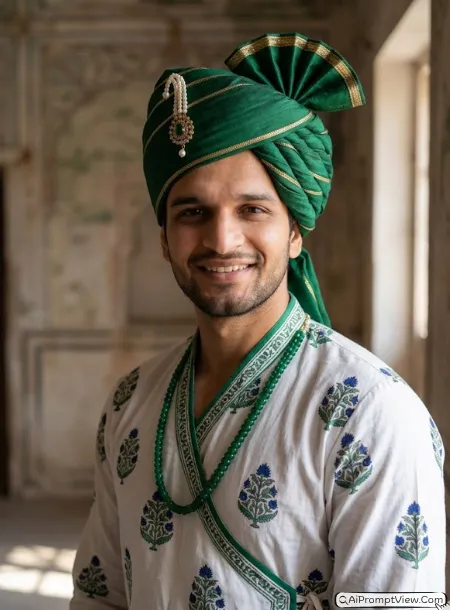
1. STAGE AND ENVIRONMENT SETUP CORE STYLE
Visual Persona And Aesthetic Mood: Create a classic Mewar inspired Marwadi portrait with vintage clothing, soft indoor light, and a calm heritage feel.
Composition: Vertical 4:5 composition with a close portrait frame from chest up. Keep the face clear and natural.

2. STRICT IDENTITY LOCK ANTI AI REALISM
Face Reference: Edit my uploaded photo. Use the uploaded image as the only reference for facial features, skin tone, face structure, and body shape.
Fidelity Lock: Keep the eye shape, nose structure, lips, jawline, and face shape exactly the same. No face swap error. No artificial reshaping.
Natural Textures: Preserve natural skin texture, fine lines, pores, hair strands, and facial hair if present. It must look like real photography.

3. OUTFIT POSE AND EXPRESSION SHIFT
Dynamic Pose And Posture: Show the subject in a three quarter angle pose with the head turned gently toward the camera.
Facial Expression: Keep a soft respectful smile with sharp but natural eyes.
Attire And Styling Details: Dress him in a white cotton Angrakha with side tie detail, hand block style royal motifs, and emerald green fabric trim. Add an emerald green silk Jodhpuri Safa with gold thread details and a simple pearl Kalgi. Add a single emerald beaded Kantha necklace.

4. PROFESSIONAL CAMERA AND LIGHTING MATRIX
Camera Gear And Settings: Simulated capture on a high end full frame camera with an 85mm prime lens, shot at f 1.8 for sharp facial focus and soft background blur.
Lighting Matrix: Use soft daylight entering from a large side window. Keep natural shadows on the face and visible texture on the outfit.

5. BACKGROUND AND ENVIRONMENT
Background Scene: Place him inside an old Haveli room with faded fresco walls, antique texture, and soft shadows in the corners.
Color Palette: Crisp white, deep emerald, vintage ivory, soft brown, and natural indoor shadows.

NEGATIVE PROMPT:
face alteration, identity mismatch, plastic skin, artificial AI look, over smoothing, cartoon rendering, anime style, harsh digital HDR, distorted features, double jewelry overlays, cluttered backgrounds, text overlays.
4. Golden Sand Dunes Warrior Look
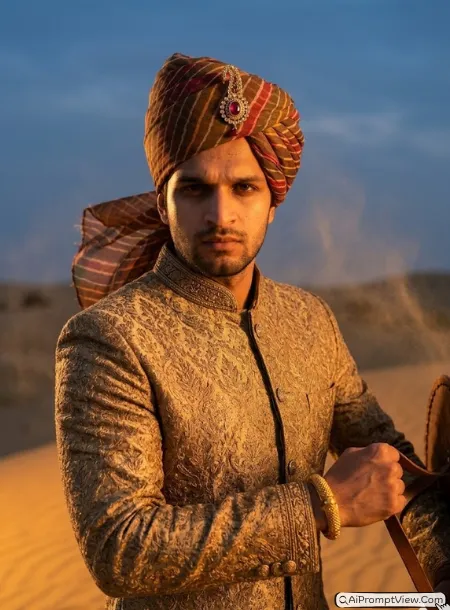
1. STAGE AND ENVIRONMENT SETUP CORE STYLE
Visual Persona And Aesthetic Mood: Create a strong Marwadi warrior prince look with desert wind, cinematic sunset, and royal Thar desert energy.
Composition: Vertical 3:4 composition with a waist up cinematic frame. Keep the subject strong and centered.

2. STRICT IDENTITY LOCK ANTI AI REALISM
Face Reference: Edit my uploaded photo. Use the uploaded image as the only reference for facial features, skin tone, face shape, and body structure.
Fidelity Lock: Keep the original face shape, eyes, nose, lips, and jawline unchanged. Do not alter identity or make the face look synthetic.
Natural Textures: Preserve real skin pores, facial hair texture if present, natural hair strands, and real human facial depth.

3. OUTFIT POSE AND EXPRESSION SHIFT
Dynamic Pose And Posture: Show him standing firmly against a soft desert wind with one arm slightly raised as if holding a traditional leather shield strap.
Facial Expression: Keep an intense and focused expression with natural eyes and strong facial emotion.
Attire And Styling Details: Dress him in an antique gold brocade Bandhgala jacket with detailed thread work. Add a rustic Leheriya Jodhpuri Safa moving lightly in the wind with a ruby centered royal Kalgi. Add a thick gold royal Kada on the wrist.

4. PROFESSIONAL CAMERA AND LIGHTING MATRIX
Camera Gear And Settings: Simulated capture on a high end full frame camera with an 85mm prime lens, shot at f 1.8 for sharp subject focus and creamy bokeh.
Lighting Matrix: Use dramatic sunset light with orange rays from the side. Add strong but realistic shadows on the face, outfit, and turban.

5. BACKGROUND AND ENVIRONMENT
Background Scene: Set the portrait in the golden sand dunes of the Thar desert with a dramatic evening sky and soft sand dust in the air.
Color Palette: Orange sunset, deep gold, bronze skin tones, twilight blue, and warm desert shadows.

NEGATIVE PROMPT:
face alteration, identity mismatch, plastic skin, artificial AI look, over smoothing, cartoon rendering, anime style, harsh digital HDR, distorted features, double jewelry overlays, cluttered backgrounds, text overlays.
5. Royal Gateway Chieftain Look
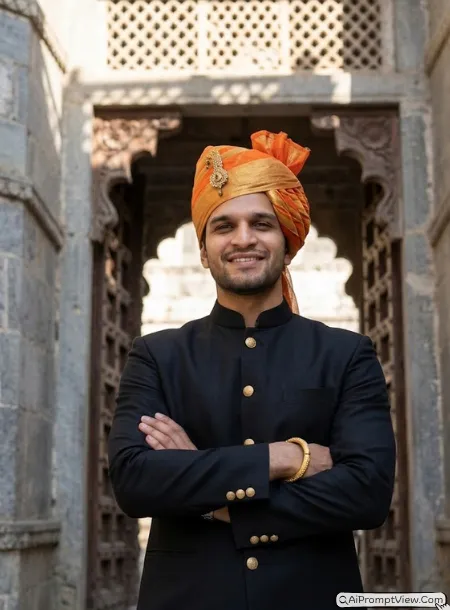
1. STAGE AND ENVIRONMENT SETUP CORE STYLE
Visual Persona And Aesthetic Mood: Create a bold Marwadi chieftain style portrait with powerful fortress energy, strong stance, and rich traditional masculinity.
Composition: Vertical 4:5 composition with a powerful chest up close portrait. Keep the face and upper body strong in frame.

2. STRICT IDENTITY LOCK ANTI AI REALISM
Face Reference: Edit my uploaded photo. Use the uploaded image as the only reference for facial features, skin tone, face shape, and body structure.
Fidelity Lock: Keep the original face shape, eye shape, nose line, jawline, lips, and natural facial balance unchanged. Do not change identity.
Natural Textures: Preserve real skin texture, pores, natural marks, beard or moustache if present, and real hair strands. Avoid fake smooth skin.

3. OUTFIT POSE AND EXPRESSION SHIFT
Dynamic Pose And Posture: Show him standing under a massive fort gateway with arms folded confidently across the chest and chin slightly raised.
Facial Expression: Keep a strong, calm, and steady expression with natural eye contact.
Attire And Styling Details: Dress him in a black khadi silk Bandhgala jacket with matte gold buttons. Add an orange and gold tissue silk Jodhpuri Safa with an antique Kalgi. Add a single thick gold royal Kada on the wrist. Keep the fabric texture and metal details real.

4. PROFESSIONAL CAMERA AND LIGHTING MATRIX
Camera Gear And Settings: Simulated capture on a high end full frame camera with an 85mm prime lens, shot at f 1.8 for sharp facial focus and creamy background blur.
Lighting Matrix: Use direct noon sunlight filtered through stone jaali work to create soft geometric shadow patterns on the outfit and background.

5. BACKGROUND AND ENVIRONMENT
Background Scene: Place him below a massive carved wooden and iron gateway door of a Mewar style fortress with old stone walls and deep royal scale.
Color Palette: Charcoal black, royal orange, weathered grey stone, matte gold, and crisp daylight highlights.

NEGATIVE PROMPT:
face alteration, identity mismatch, plastic skin, artificial AI look, over smoothing, cartoon rendering, anime style, harsh digital HDR, distorted features, double jewelry overlays, cluttered backgrounds, text overlays.
6. Sheesh Mahal Reflection Look
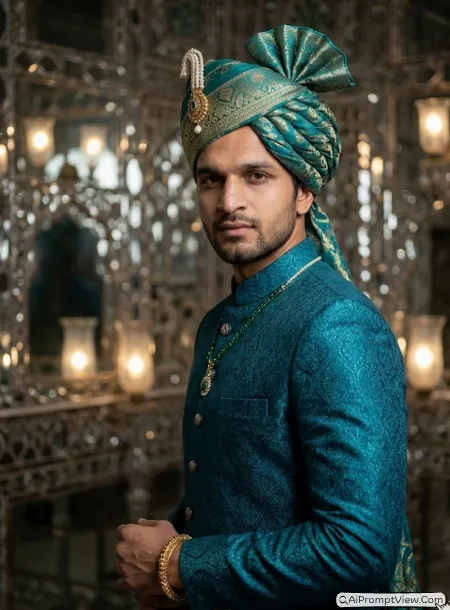
1. STAGE AND ENVIRONMENT SETUP CORE STYLE
Visual Persona And Aesthetic Mood: Create a premium Sheesh Mahal inspired Marwadi portrait with mirror reflections, deep royal color, and luxury cultural styling.
Composition: Vertical 3:4 composition with a tight waist up frame. Keep the face sharp and the mirror background softly blurred.

2. STRICT IDENTITY LOCK ANTI AI REALISM
Face Reference: Edit my uploaded photo. Use the uploaded image as the only reference for facial features, skin tone, face shape, and body structure.
Fidelity Lock: Keep the original face shape, eyes, nose, lips, and jawline fully unchanged. Do not alter identity. Do not create a fake model face.
Natural Textures: Preserve raw skin realism, micro pores, fine lines, beard texture if present, and natural hair details.

3. OUTFIT POSE AND EXPRESSION SHIFT
Dynamic Pose And Posture: Show the man slightly turned away with his head facing the camera. Keep the shoulders relaxed and natural.
Facial Expression: Keep a sharp, calm, and mysterious expression with real eye detail.
Attire And Styling Details: Dress him in a dark turquoise Jamawar silk Sherwani with self pattern weaving. Add a turquoise and gold brocade Jodhpuri Safa with a pearl beaded Kalgi. Add a heavy gold royal Kada and a subtle emerald necklace string.

4. PROFESSIONAL CAMERA AND LIGHTING MATRIX
Camera Gear And Settings: Simulated capture on a high end full frame camera with an 85mm prime lens, shot at f 1.8 for sharp focus and creamy bokeh.
Lighting Matrix: Use multiple soft light reflections from mirror mosaics. Keep highlights small, clean, and realistic without overexposing the face.

5. BACKGROUND AND ENVIRONMENT
Background Scene: Place him inside a Sheesh Mahal style palace room with thousands of tiny hand cut mirror pieces, royal walls, and deep visual depth.
Color Palette: Deep turquoise, gold, silver mirror shine, rich shadows, and soft palace glow.

NEGATIVE PROMPT:
face alteration, identity mismatch, plastic skin, artificial AI look, over smoothing, cartoon rendering, anime style, harsh digital HDR, distorted features, double jewelry overlays, cluttered backgrounds, text overlays.
7. Royal Marwadi Chaupal Photo
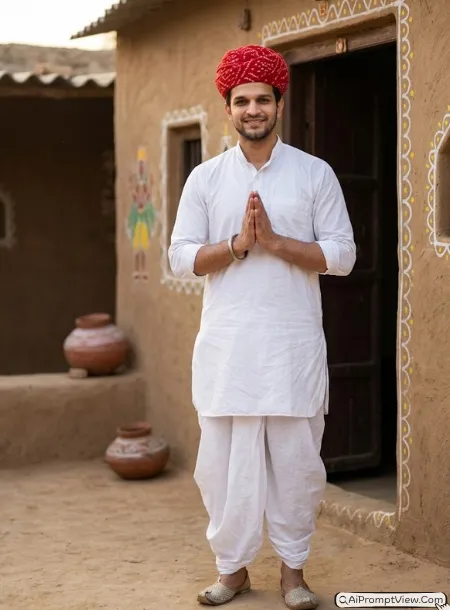
1. STAGE AND ENVIRONMENT SETUP CORE STYLE

Visual Persona And Aesthetic Mood: Create an authentic old Rajasthan village heritage portrait inspired by traditional Marwadi culture. The mood should feel warm, welcoming, cultural, and deeply connected to village life. The final image should look like a real professional cultural photoshoot captured in rural Rajasthan.

Composition: Vertical 4:5 composition with a full body portrait. The subject should be standing naturally while looking directly into the camera with a gentle smile.

2. STRICT IDENTITY LOCK ANTI AI REALISM

Face Reference: Edit my uploaded photo. Use the uploaded image as the only reference for facial features, skin tone, and core body structure.

Fidelity Lock: The face shape, eye shape, nose structure, jawline, beard style, moustache style, and lip lines must remain fully unchanged. No face reshaping, no beauty filters, and no artificial modifications.

Natural Textures: Preserve natural skin texture, visible pores, natural facial depth, authentic hair strands, realistic beard details, and true skin tone. The final result must look like real photography.

3. OUTFIT POSE AND EXPRESSION SHIFT

Dynamic Pose And Posture: Standing beside a traditional mud house entrance with both hands gently joined in front of the body. The posture should feel relaxed and respectful.

Facial Expression: Looking directly into the camera with a natural smile and friendly expression.

Attire And Styling Details: Wearing a traditional white cotton Dhoti Kurta with realistic fabric folds and hand stitched details. A bright red Bandhani Safa is tied in authentic Marwadi style. Add a traditional silver Kada and simple village style Mojari shoes. Keep all fabric textures highly realistic.

4. PROFESSIONAL CAMERA AND LIGHTING MATRIX

Camera Gear And Settings: Simulated capture on a high end full frame camera with an 85mm prime lens, shot at f 1.8 for sharp subject focus and creamy background blur.

Lighting Matrix: Soft morning sunlight falling naturally from one side, creating realistic facial shadows and bringing out the texture of the Dhoti and Safa.

5. BACKGROUND AND ENVIRONMENT

Background Scene: Traditional Rajasthan village courtyard with mud walls, hand painted folk art, clay pots, wooden doors, and rural heritage elements.

Color Palette: Warm beige, earthy brown, bright red Safa tones, soft sunlight gold, and natural village colors.

NEGATIVE PROMPT:
face alteration, identity mismatch, plastic skin, artificial AI look, over smoothing, cartoon rendering, anime style, harsh digital HDR, distorted features, extra limbs, cluttered background, text overlays.
8. Traditional Marwadi Baithak Look
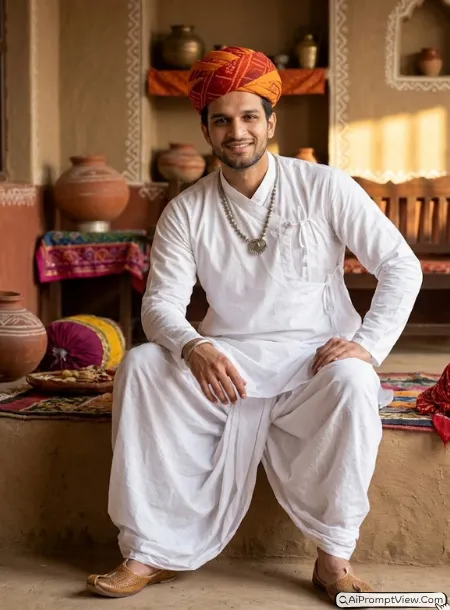
1. STAGE AND ENVIRONMENT SETUP CORE STYLE

Visual Persona And Aesthetic Mood: Create a classic old Rajasthan cultural portrait inspired by traditional village gatherings and family heritage. The image should feel peaceful, elegant, and deeply rooted in Marwadi tradition.

Composition: Vertical 4:5 composition with a full body seated portrait. The entire body should be visible from head to feet.

2. STRICT IDENTITY LOCK ANTI AI REALISM

Face Reference: Edit my uploaded photo. Use the uploaded image as the only reference for facial features, skin tone, and body structure.

Fidelity Lock: Keep the face shape, eyes, nose, lips, jawline, beard, and moustache exactly the same as the uploaded image. No artificial face enhancement.

Natural Textures: Preserve authentic skin texture, visible pores, realistic facial hair, natural wrinkles, and true human details.

3. OUTFIT POSE AND EXPRESSION SHIFT

Dynamic Pose And Posture: Sitting comfortably on a traditional village platform with one knee raised slightly and one hand resting on the knee. The posture should feel relaxed and natural.

Facial Expression: Looking directly into the camera with a warm smile and calm expression.

Attire And Styling Details: Wearing a bright white traditional Dhoti Kurta with loose flowing fabric. A rich orange and red Marwadi Safa wrapped in authentic heritage style. Add traditional silver necklace details, village style Kada, and handcrafted Mojari footwear. Keep clothing highly detailed and realistic.

4. PROFESSIONAL CAMERA AND LIGHTING MATRIX

Camera Gear And Settings: Simulated capture on a high end full frame camera with an 85mm prime lens, shot at f 1.8.

Lighting Matrix: Warm golden sunlight entering softly from the side with realistic highlights on the face and traditional outfit.

5. BACKGROUND AND ENVIRONMENT

Background Scene: Traditional Rajasthan home interior with colorful textile decoration, clay pots, handmade wall patterns, wooden seating, and cultural village decor.

Color Palette: Warm yellow, earthy red, ivory white, rustic brown, and golden sunlight tones.

NEGATIVE PROMPT:
face alteration, identity mismatch, plastic skin, artificial AI look, over smoothing, cartoon rendering, anime style, harsh digital HDR, distorted features, extra jewelry, cluttered background, text overlays.
9. Marwadi Farmer Heritage Portrait
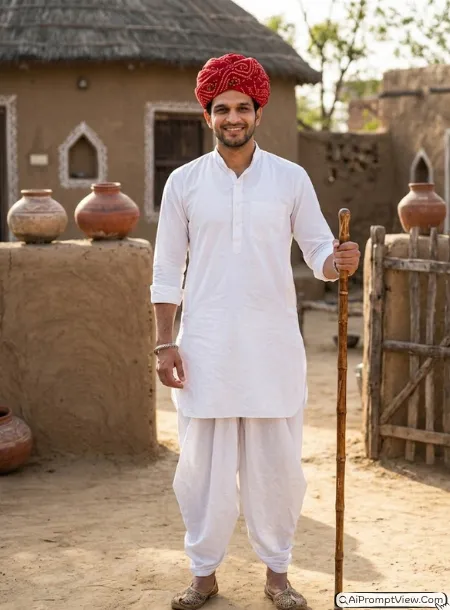
1. STAGE AND ENVIRONMENT SETUP CORE STYLE

Visual Persona And Aesthetic Mood: Create a proud traditional Rajasthan farmer portrait with cultural authenticity, simplicity, and timeless village charm. The image should feel realistic and deeply connected to rural heritage.

Composition: Vertical 4:5 composition with a full body standing portrait. The complete outfit should remain visible.

2. STRICT IDENTITY LOCK ANTI AI REALISM

Face Reference: Edit my uploaded photo. Use the uploaded image as the only reference for facial features, skin tone, and body structure.

Fidelity Lock: Preserve the original face shape, eyes, nose, beard, moustache, jawline, and lips exactly. No facial changes or AI beauty effects.

Natural Textures: Preserve skin pores, facial depth, natural beard texture, realistic hair strands, and true skin color.

3. OUTFIT POSE AND EXPRESSION SHIFT

Dynamic Pose And Posture: Standing naturally while holding a traditional wooden staff in one hand and the other hand resting comfortably near the waist.

Facial Expression: Looking directly into the camera with a gentle smile and confident expression.

Attire And Styling Details: Wearing a pure white traditional Dhoti Kurta with realistic cotton texture and natural folds. Add a bright red traditional Safa with detailed Bandhani pattern. Traditional silver Kada and embroidered Mojari shoes complete the look.

4. PROFESSIONAL CAMERA AND LIGHTING MATRIX

Camera Gear And Settings: Simulated capture on a high end full frame camera with an 85mm prime lens, shot at f 1.8.

Lighting Matrix: Natural afternoon sunlight with realistic shadows and detailed texture visibility throughout the outfit and face.

5. BACKGROUND AND ENVIRONMENT

Background Scene: Rajasthan rural setting with mud houses, village pathways, clay water pots, wooden fences, and open sky in the background.

Color Palette: Earthy brown, bright red, natural white, soft sunlight gold, and warm village tones.

NEGATIVE PROMPT:
face alteration, identity mismatch, plastic skin, artificial AI look, over smoothing, cartoon rendering, anime style, harsh digital HDR, distorted features, extra limbs, cluttered backgrounds, text overlays.
10. Royal Marwadi Festival Portrait
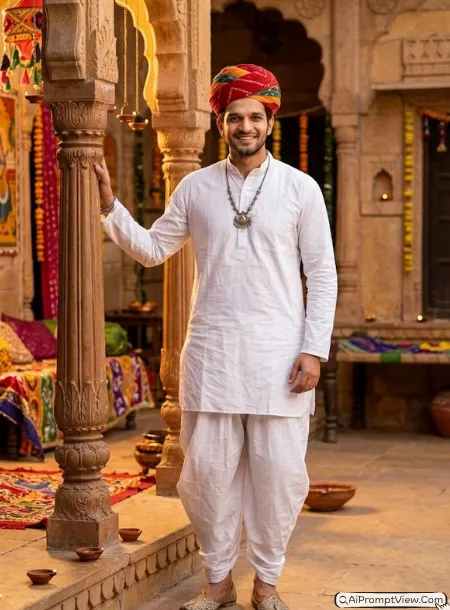
1. STAGE AND ENVIRONMENT SETUP CORE STYLE

Visual Persona And Aesthetic Mood: Create a joyful traditional Rajasthan festival portrait inspired by old Marwadi celebrations and cultural gatherings. The image should feel festive, authentic, and rich in heritage.

Composition: Vertical 4:5 composition with a full body portrait. The subject should remain the main focus while showing the complete traditional outfit.

2. STRICT IDENTITY LOCK ANTI AI REALISM

Face Reference: Edit my uploaded photo. Use the uploaded image as the only reference for facial features, skin tone, and body structure.

Fidelity Lock: The original face shape, eyes, nose, lips, beard, moustache, and jawline must remain fully unchanged. No artificial enhancements.

Natural Textures: Preserve realistic skin pores, facial texture, beard details, natural hair strands, and authentic photography quality.

3. OUTFIT POSE AND EXPRESSION SHIFT

Dynamic Pose And Posture: Standing naturally with one hand resting lightly on a traditional wooden pillar and the other relaxed beside the body.

Facial Expression: Looking directly into the camera with a cheerful smile and welcoming expression.

Attire And Styling Details: Wearing a traditional white Dhoti Kurta with premium cotton texture and realistic folds. Add a colorful red and saffron Marwadi Safa with traditional village styling. Include handcrafted silver jewelry details and traditional Mojari shoes. All fabrics must appear realistic and naturally draped.

4. PROFESSIONAL CAMERA AND LIGHTING MATRIX

Camera Gear And Settings: Simulated capture on a high end full frame camera with an 85mm prime lens, shot at f 1.8.

Lighting Matrix: Warm festival evening light with soft golden glow and realistic shadows on the face and outfit.

5. BACKGROUND AND ENVIRONMENT

Background Scene: Traditional Rajasthan cultural courtyard decorated with colorful fabrics, folk art patterns, clay lamps, village architecture, and festive details.

Color Palette: Warm saffron, rich red, natural white, golden evening light, and earthy heritage colors.

NEGATIVE PROMPT:
face alteration, identity mismatch, plastic skin, artificial AI look, over smoothing, cartoon rendering, anime style, harsh digital HDR, distorted features, extra accessories, cluttered backgrounds, text overlays.
Tips To Get The Best Result
These prompts are already written in a detailed style, but you can still make small changes if you want a more personal look. I do this many times while testing prompts because one small word can change the full mood of the final photo.
Use a clear face photo first. If the uploaded photo is sharp, the result becomes more natural. Also, do not remove the face lock lines because they help keep your real face safe in the final edit.
- Avoid fake AI skin: Always keep words like real skin texture, pores, natural facial depth, and no plastic skin in the prompt.
- Add daylight vibe: If you want a bright and fresh look, add this line in the lighting part: use soft natural daylight with clean skin texture and gentle shadows.
- Add royal evening mood: If you want a warm cinematic look, add this line: use golden hour sunset light with soft glow on the face and outfit.
- Change background: You can replace palace courtyard with desert fort, old Haveli, royal balcony, lake palace, or stepwell as per your choice.
- Change outfit color: You can change cream Sherwani to royal blue Sherwani, maroon Achkan to black Achkan, or mustard kurta to ivory kurta without changing the full prompt.
- Keep your beard or moustache: Add this line if needed: preserve my natural beard and moustache exactly as shown in the uploaded photo.
- Make it more festive: Add words like diya light, wedding function mood, cultural celebration, soft flower decor, or traditional festive glow.
Common Mistakes To Avoid
Do not use a blurry selfie. AI tools need a clear face to create a realistic result. Do not upload photos with heavy filters because the final skin may look fake. Also avoid using too many extra commands in one prompt because it can confuse the output.
Do not remove the negative prompt. It helps reduce cartoon style, fake skin, face distortion, and messy jewelry. If the first result is not perfect, try again with the same prompt and a better base photo.