If you want to change camera angles in AI photo editing, this guide will help you do it with simple copy and paste prompts. I found that even a small camera angle change can make the same photo look fresh without changing the person’s face or identity.
Many people think they need a new photo for every style. That is not true. In most AI editors, you can keep the same person and simply change the camera position. The result looks like the photo was taken from a different point of view. In this guide, I will share ten popular camera angle prompts that work well for portraits, travel photos, selfies, and social media posts.
These prompts work with ChatGPT, Gemini AI, and many other AI photo editing tools that support image editing with text prompts. Just upload your photo, paste the prompt, and let the AI change only the camera angle while keeping the subject natural.
What Is a Camera Angle in AI Photo Editing?
A camera angle is simply the position from which the camera captures a photo. It changes how the subject looks without changing the actual person. A photo taken from eye level feels natural. The same person can look taller from a low angle or more relaxed from a high angle.
In AI photo editing, you do not need to take the photo again. The AI understands your instructions and recreates the image from a different perspective. This saves time and gives you many creative options from a single photo.
Change Camera Angles AI Prompts
A good camera angle can completely change the feel of a photo. The person stays the same, but the perspective makes the image look more natural, cinematic, or social media friendly. Below are the camera angle prompts that I recommend using. Each one is made for a different style, so you can choose the one that matches your photo.
Prompt 1. Eye Level Portrait
The eye level angle is the most natural camera position. It feels like someone is standing in front of you and taking the photo. This angle works well for profile pictures, professional portraits, and everyday photos.
I usually use this angle when I want the edited photo to look as realistic as possible. Since the camera stays at eye level, the face keeps its natural proportions without looking dramatic.
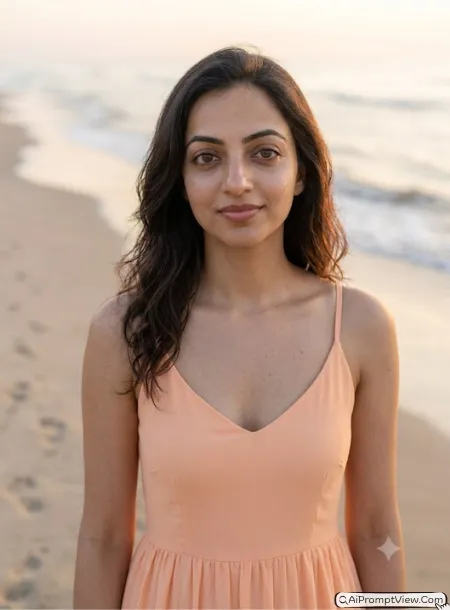
STAGE AND ENVIRONMENT SETUP CORE STYLE: Edit the uploaded photo into a natural eye level portrait. Position the camera exactly at the subject's eye height with a realistic portrait composition. Keep the framing balanced and natural without changing the original scene unless needed. STRICT IDENTITY LOCK ANTI AI REALISM: Use the uploaded photo as the only reference. Keep the facial features, face shape, skin tone, hairstyle, body shape, natural skin texture, pores, and expression unchanged. Preserve the original identity completely. OUTFIT POSE AND EXPRESSION SHIFT: Keep the original outfit if suitable. Maintain a relaxed standing or sitting pose with a natural facial expression and comfortable eye contact toward the camera. PROFESSIONAL CAMERA AND LIGHTING MATRIX: Use an 85mm portrait lens look with realistic depth of field, soft natural daylight, balanced exposure, sharp facial details, and realistic colors. BACKGROUND AND ENVIRONMENT: Keep the existing background realistic with a soft background blur that naturally separates the subject without changing the environment. NEGATIVE PROMPT: face alteration, identity mismatch, plastic skin, artificial AI look, over smoothing, cartoon rendering, anime style, harsh digital HDR, distorted features, double jewelry overlays, cluttered backgrounds, text overlays.
Prompt 2. Close Up Portrait
A close up portrait puts all the attention on the face. It captures small details like the eyes, smile, and skin texture. This angle is great for display pictures, beauty portraits, and professional headshots.
I like using this prompt when I want facial details to stand out. It gives a clean portrait while keeping the background less noticeable.
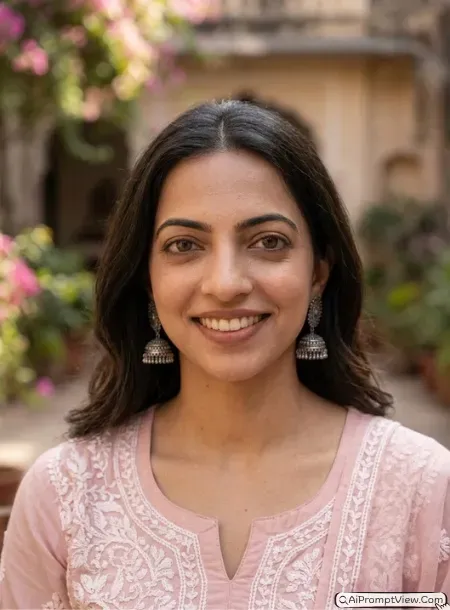
STAGE AND ENVIRONMENT SETUP CORE STYLE: Edit the uploaded image into a realistic close up portrait with the camera placed at eye level and tightly framed from the shoulders upward. Make the face the main focus while keeping natural proportions. STRICT IDENTITY LOCK ANTI AI REALISM: Use only the uploaded photo as the identity reference. Keep the face, eyes, nose, lips, jawline, hairstyle, skin tone, pores, fine details, and facial expression exactly the same. Do not beautify or reshape the face. OUTFIT POSE AND EXPRESSION SHIFT: Keep the original outfit visible near the shoulders. Maintain a calm expression with relaxed posture and natural eye contact. PROFESSIONAL CAMERA AND LIGHTING MATRIX: Use an 85mm lens style with shallow depth of field, soft window light or natural daylight, realistic shadows, crisp focus on the eyes, and balanced skin tones. BACKGROUND AND ENVIRONMENT: Blur the background naturally while keeping realistic colors and depth without distracting objects. NEGATIVE PROMPT: face alteration, identity mismatch, plastic skin, artificial AI look, over smoothing, cartoon rendering, anime style, harsh digital HDR, distorted features, double jewelry overlays, cluttered backgrounds, text overlays.
Prompt 3. Selfie Style Angle
The selfie style angle is one of the most popular camera angles today. It looks casual, friendly, and natural because it feels like the photo was taken with a mobile phone. This style works well for Instagram, WhatsApp profile photos, and travel memories.
I like this angle because it does not feel overly posed. A slight camera tilt and natural hand position make the photo look much more realistic.
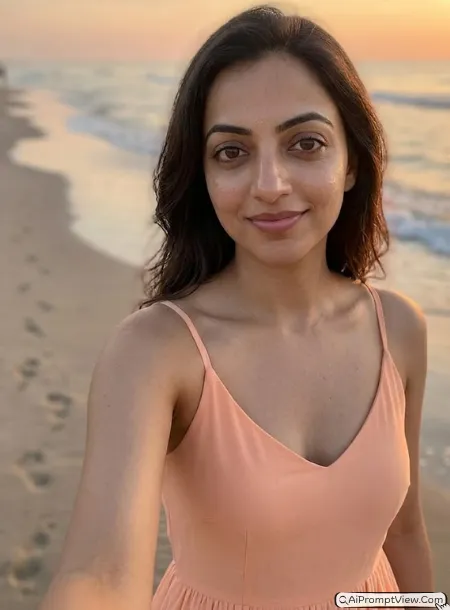
STAGE AND ENVIRONMENT SETUP CORE STYLE: Edit the uploaded image into a realistic selfie style portrait with the camera positioned naturally at arm's length and slightly above eye level. Create the perspective of a front camera selfie without showing any smartphone, hand holding a phone, camera reflection, or mirror. Keep the framing close, casual, and naturally centered. STRICT IDENTITY LOCK ANTI AI REALISM: Use the uploaded image as the only identity reference. Preserve the original facial features, face shape, skin tone, hairstyle, eye shape, natural skin texture, pores, and expression exactly as they appear. Do not beautify or reshape the face. OUTFIT POSE AND EXPRESSION SHIFT: Keep the original outfit and show the subject looking directly into the camera lens with a relaxed posture, natural head tilt, and a genuine soft smile or calm expression. PROFESSIONAL CAMERA AND LIGHTING MATRIX: Create a realistic front camera smartphone photography look with balanced natural daylight, soft shadows, true skin colors, realistic exposure, and sharp facial details. BACKGROUND AND ENVIRONMENT: Keep the original background realistic with natural depth and a soft background blur that matches a genuine handheld selfie while maintaining realistic perspective. NEGATIVE PROMPT: phone visible, hand holding phone, mirror selfie, camera reflection, face alteration, identity mismatch, plastic skin, artificial AI look, over smoothing, cartoon rendering, anime style, harsh digital HDR, distorted features, double jewelry overlays, cluttered backgrounds, text overlays.
Prompt 4. Low Camera Angle
A low camera angle places the camera below the subject and points upward. This simple change makes the person appear taller, stronger, and more confident. It is often used for cinematic portraits, fashion photography, and hero style shots.
I use this angle when I want the photo to have a bold look without changing the person’s face. Even a small shift in camera position can make the image feel much more dramatic.
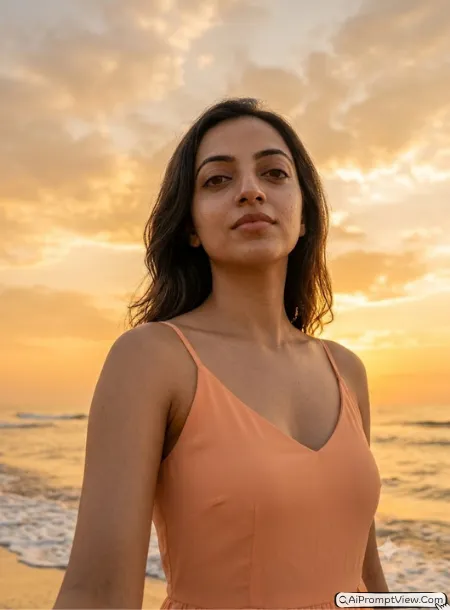
STAGE AND ENVIRONMENT SETUP CORE STYLE: Edit the uploaded image into a cinematic low angle portrait with the camera positioned below the subject and pointing upward. Keep the perspective realistic while making the subject appear confident and powerful. STRICT IDENTITY LOCK ANTI AI REALISM: Use only the uploaded image as the facial reference. Keep the face, skin tone, facial proportions, hairstyle, natural pores, fine skin texture, and body shape unchanged. OUTFIT POSE AND EXPRESSION SHIFT: Keep the original outfit or improve small fabric details while maintaining the same style. Show the subject standing naturally with confident posture and a calm facial expression. PROFESSIONAL CAMERA AND LIGHTING MATRIX: Use a realistic 50mm lens look with natural daylight or soft golden hour lighting, balanced exposure, realistic shadows, and clear facial focus. BACKGROUND AND ENVIRONMENT: Keep the existing environment realistic while showing more sky or upper background to match the low camera viewpoint. NEGATIVE PROMPT: face alteration, identity mismatch, plastic skin, artificial AI look, over smoothing, cartoon rendering, anime style, harsh digital HDR, distorted features, double jewelry overlays, cluttered backgrounds, text overlays.
Prompt 5. High Camera Angle
A high camera angle means the camera is placed above the subject and looks downward. This creates a soft, stylish look that is common in lifestyle photography and Instagram portraits. It also works well for indoor selfies and café photos.
I have noticed this angle looks best when the head is slightly raised toward the camera. The result feels natural instead of looking forced.
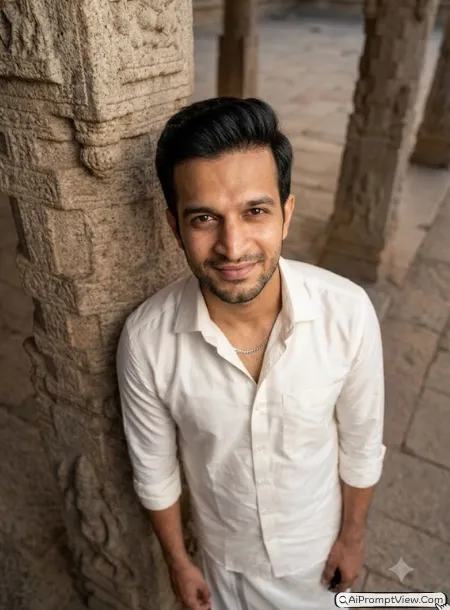
STAGE AND ENVIRONMENT SETUP CORE STYLE: Edit the uploaded image into a realistic high camera angle portrait with the camera placed above the subject and tilted gently downward. Keep the composition balanced with a natural top view perspective. STRICT IDENTITY LOCK ANTI AI REALISM: Use the uploaded image as the only identity reference. Preserve the original face shape, eyes, nose, lips, hairstyle, skin tone, natural pores, and facial details exactly as they appear. OUTFIT POSE AND EXPRESSION SHIFT: Keep the original outfit and show the subject looking slightly upward toward the camera with a relaxed posture and soft natural smile. PROFESSIONAL CAMERA AND LIGHTING MATRIX: Use a realistic portrait lens look with soft daylight, balanced contrast, accurate skin tones, and clean focus on the face. BACKGROUND AND ENVIRONMENT: Keep the background realistic and slightly visible from the higher viewpoint while maintaining natural depth and lighting. NEGATIVE PROMPT: face alteration, identity mismatch, plastic skin, artificial AI look, over smoothing, cartoon rendering, anime style, harsh digital HDR, distorted features, double jewelry overlays, cluttered backgrounds, text overlays.
Prompt 6. Side Profile Portrait
A side profile portrait shows your face from one side instead of looking directly at the camera. Most photographers use a 45 degree angle because it looks natural and highlights the face shape without hiding important features.
I like using this angle for clean portraits and outdoor photos. It gives a professional look while keeping the photo simple and realistic.
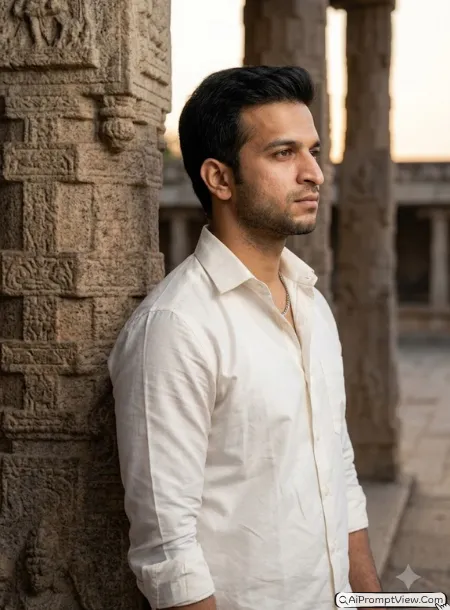
STAGE AND ENVIRONMENT SETUP CORE STYLE: Edit the uploaded image into a realistic side profile portrait with the camera positioned at a natural 45 degree angle. Keep the composition balanced while showing one side of the face clearly with realistic perspective. STRICT IDENTITY LOCK ANTI AI REALISM: Use the uploaded image as the only facial reference. Preserve the original face shape, skin tone, hairstyle, eyebrows, eyes, nose, lips, jawline, natural pores, skin texture, and body proportions without changing the identity. OUTFIT POSE AND EXPRESSION SHIFT: Keep the original outfit and show the subject standing or sitting naturally with the face turned slightly sideways and a calm expression. PROFESSIONAL CAMERA AND LIGHTING MATRIX: Use an 85mm portrait lens look with soft natural daylight, realistic shadows, balanced exposure, and sharp focus on the visible eye and facial details. BACKGROUND AND ENVIRONMENT: Keep the existing background realistic with gentle background blur that naturally separates the subject without changing the scene. NEGATIVE PROMPT: face alteration, identity mismatch, plastic skin, artificial AI look, over smoothing, cartoon rendering, anime style, harsh digital HDR, distorted features, double jewelry overlays, cluttered backgrounds, text overlays.
Prompt 7. Over The Shoulder Shot
This camera angle is popular in travel, lifestyle, and cinematic photography. Instead of looking directly at the camera, the subject turns slightly away while the camera captures the face from behind the shoulder.
I often use this style for travel photos because it adds depth to the scene. It also makes beautiful landscapes feel more connected to the person.
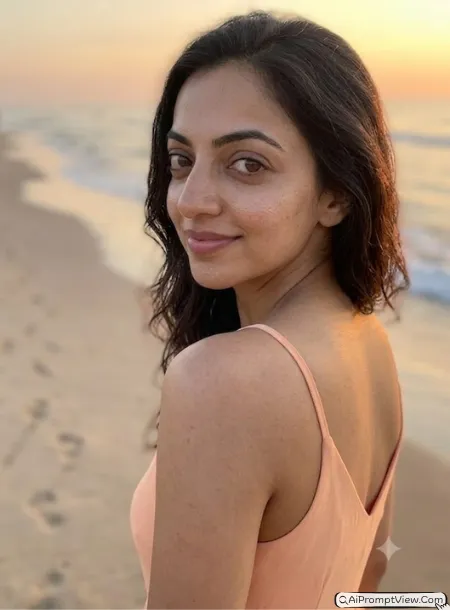
STAGE AND ENVIRONMENT SETUP CORE STYLE: Edit the uploaded image into a realistic over the shoulder portrait with the camera placed slightly behind the subject while keeping part of the face visible. Create a natural cinematic perspective without changing the person's identity. STRICT IDENTITY LOCK ANTI AI REALISM: Use only the uploaded photo as the identity reference. Preserve the original facial features, skin tone, hairstyle, body shape, natural skin texture, pores, and expression exactly as they are. OUTFIT POSE AND EXPRESSION SHIFT: Keep the original outfit and show the subject naturally looking back over one shoulder with relaxed posture and a soft expression. PROFESSIONAL CAMERA AND LIGHTING MATRIX: Use a realistic full frame camera look with natural daylight, balanced contrast, shallow depth of field, and sharp focus on the face. BACKGROUND AND ENVIRONMENT: Keep the original environment visible with realistic depth so the scenery becomes part of the composition while remaining natural. NEGATIVE PROMPT: face alteration, identity mismatch, plastic skin, artificial AI look, over smoothing, cartoon rendering, anime style, harsh digital HDR, distorted features, double jewelry overlays, cluttered backgrounds, text overlays.
Prompt 8. Walking Candid Shot
Walking candid photos have become very popular because they do not look staged. Instead of standing still, the subject is captured while walking naturally. This style works especially well for travel, street, and fashion photos.
I like this angle because the movement makes the photo feel more alive. A natural walking pose usually looks much better than a perfectly posed portrait.
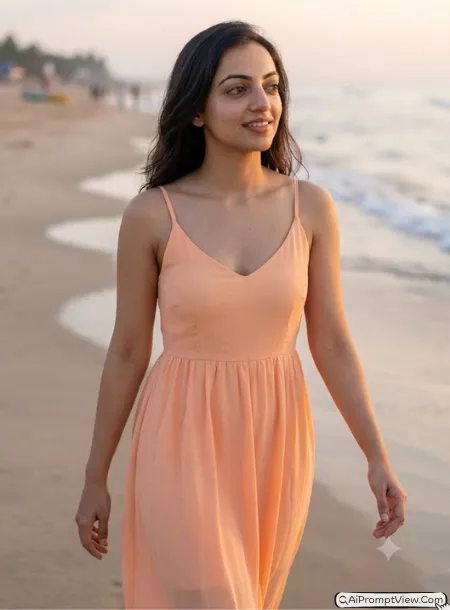
STAGE AND ENVIRONMENT SETUP CORE STYLE: Edit the uploaded image into a realistic walking candid portrait with the camera capturing the subject naturally while walking. Keep the perspective realistic with natural body movement and balanced framing. STRICT IDENTITY LOCK ANTI AI REALISM: Use the uploaded image as the only identity reference. Preserve the original face, hairstyle, skin tone, natural pores, body proportions, facial expression, and all facial details without modification. OUTFIT POSE AND EXPRESSION SHIFT: Keep the original outfit and show the subject taking a natural walking step with relaxed arms, comfortable posture, and a genuine expression instead of looking directly at the camera. PROFESSIONAL CAMERA AND LIGHTING MATRIX: Use a realistic 50mm lens style with natural daylight, slight motion feel, balanced exposure, and sharp focus on the subject. BACKGROUND AND ENVIRONMENT: Keep the original location realistic with natural depth and a softly blurred background that enhances the walking effect. NEGATIVE PROMPT: face alteration, identity mismatch, plastic skin, artificial AI look, over smoothing, cartoon rendering, anime style, harsh digital HDR, distorted features, double jewelry overlays, cluttered backgrounds, text overlays.
Prompt 9. Full Body Wide Shot
A full body wide shot keeps the entire person inside the frame while also showing more of the surroundings. This angle is perfect when the background is just as important as the subject. It works well for travel photos, street photography, nature portraits, and outfit pictures.
I usually choose this angle when I want the location to tell part of the story. The extra space around the subject makes the photo feel more open and realistic.
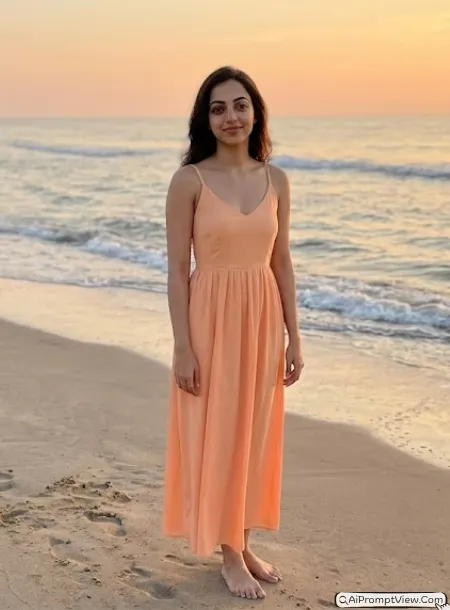
STAGE AND ENVIRONMENT SETUP CORE STYLE: Edit the uploaded image into a realistic full body wide shot with the entire subject visible from head to toe. Position the camera at a comfortable eye level from a natural distance so both the person and the surrounding environment remain clearly visible. STRICT IDENTITY LOCK ANTI AI REALISM: Use the uploaded image as the only identity reference. Preserve the original face shape, skin tone, hairstyle, body proportions, natural pores, facial details, and expression without any artificial enhancement. OUTFIT POSE AND EXPRESSION SHIFT: Keep the original outfit and show the subject standing or walking naturally with relaxed body language and a genuine expression. PROFESSIONAL CAMERA AND LIGHTING MATRIX: Use a realistic 35mm full frame lens look with balanced daylight, accurate colors, soft shadows, and natural depth of field while keeping the subject sharp. BACKGROUND AND ENVIRONMENT: Show more of the original location with realistic perspective, natural depth, and enough space around the subject to create a balanced wide composition. NEGATIVE PROMPT: face alteration, identity mismatch, plastic skin, artificial AI look, over smoothing, cartoon rendering, anime style, harsh digital HDR, distorted features, double jewelry overlays, cluttered backgrounds, text overlays.
Prompt 10. Drone View
The drone view creates a unique top down perspective that is difficult to capture with a normal camera. It is one of the best choices for travel photos, beaches, mountains, roads, and open landscapes because it shows both the subject and the surroundings from above.
I like using this prompt for travel edits because it makes ordinary photos look much more cinematic while still keeping the person realistic and easy to recognize.
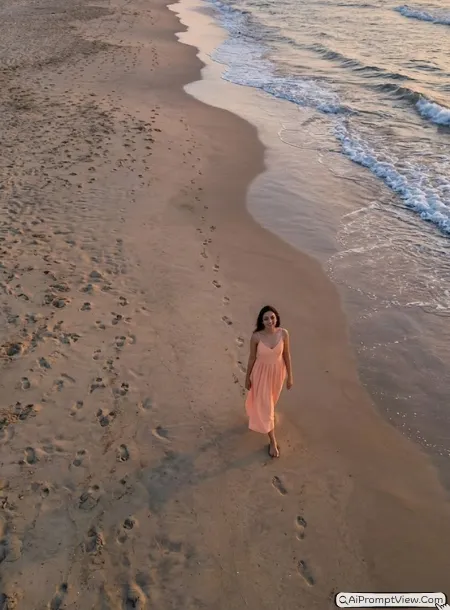
STAGE AND ENVIRONMENT SETUP CORE STYLE: Edit the uploaded image into a realistic aerial drone view with the camera positioned high above the subject while maintaining a natural top down perspective. Keep the composition wide enough to include both the subject and the surrounding environment. STRICT IDENTITY LOCK ANTI AI REALISM: Use the uploaded image as the only identity reference. Preserve the original face, hairstyle, skin tone, body proportions, facial expression, natural pores, and realistic skin texture without changing the person's identity. OUTFIT POSE AND EXPRESSION SHIFT: Keep the original outfit and place the subject in a relaxed standing or walking pose that looks natural from an aerial viewpoint. PROFESSIONAL CAMERA AND LIGHTING MATRIX: Use a realistic drone camera style with balanced daylight, accurate colors, natural shadows, crisp details, and realistic perspective. BACKGROUND AND ENVIRONMENT: Show the complete surrounding landscape with realistic depth, clean composition, and natural scale while keeping the subject clearly visible within the scene. NEGATIVE PROMPT: face alteration, identity mismatch, plastic skin, artificial AI look, over smoothing, cartoon rendering, anime style, harsh digital HDR, distorted features, double jewelry overlays, cluttered backgrounds, text overlays.
Final Words
These camera angle prompts may look simple, but they can completely change the feel of a photo. What I like most is that you do not need a new picture every time. You can use the same image and try different perspectives until you find the one that matches your style. My personal favorite is the eye level angle for everyday portraits and the over the shoulder shot for travel photos. Try each prompt with your own images and see which camera angle fits your photos best.