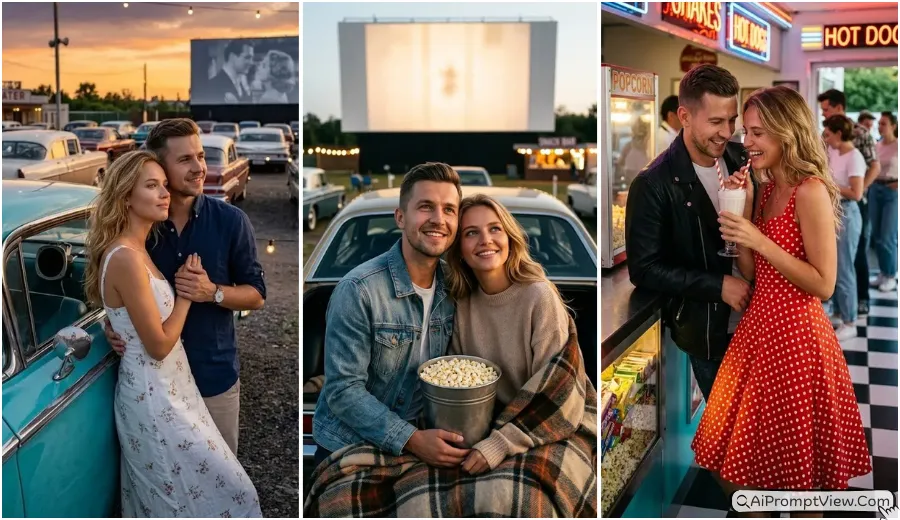
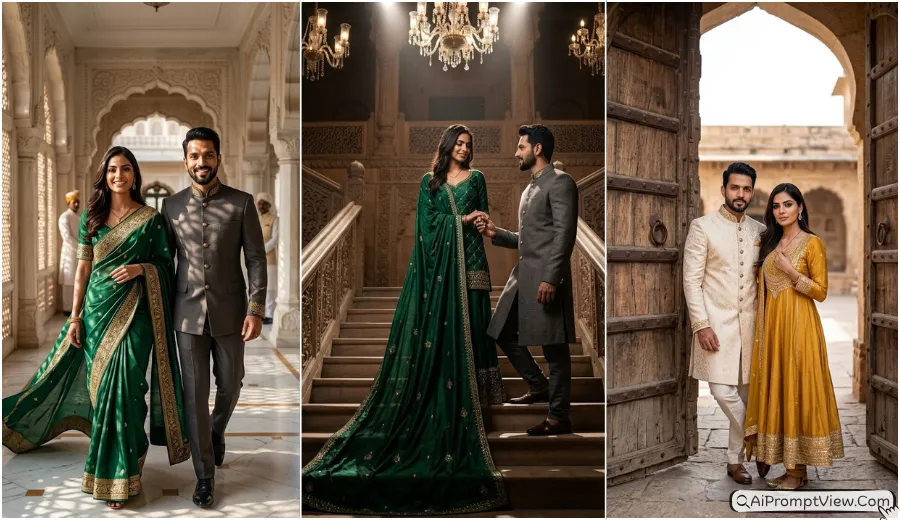
Trending Couple Romantic Photo Prompts 2026: I tested these Couple Time Travel AI Photo Prompts to create photos where the same couple appears in 1956 and 2026 at the same famous Indian place. The result looked surprisingly real after a few small changes in the prompts. Each photo keeps both timelines completely separate, so the old side feels like a real vintage memory while the new side looks like a modern cinematic moment. If you enjoy AI photo editing, vintage photo edits, before and after AI photos, couple photo prompts, or realistic AI image prompts, these ideas are worth trying.
I personally tested every prompt on Gemini, ChatGPT, and Flow, and all three gave very good results with only small differences. You can use whichever AI image tool you like. I also kept every prompt easy to edit, so you can change outfits, poses, locations, years, or the overall mood without starting from scratch. I will keep testing new prompt ideas before sharing them here because I want every prompt to be practical and easy to use.
Couple Time Travel AI Photo Prompts
What makes this style special is that it tells two love stories inside one image without making them interact with each other. Each timeline has its own world, its own romance, and its own atmosphere. In my experience, this creates a much stronger emotional feeling than a normal split photo.
Prompt 1. Chandni Chowk Time Rift Love
I tested this prompt many times before sharing it. The best result came when both years stayed completely separate. The old side looked like a real family photo from the past, while the modern side felt bright and cinematic.
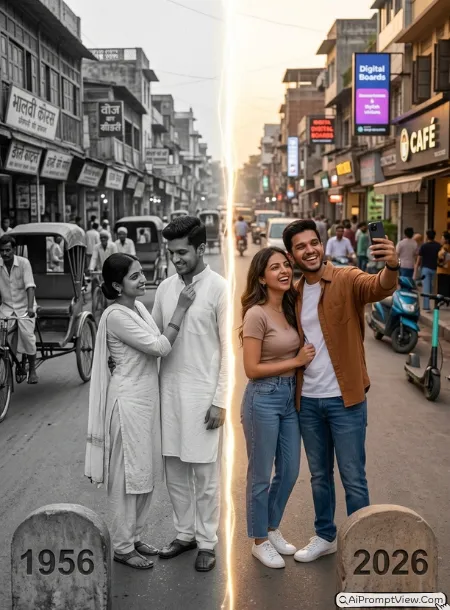
STAGE AND ENVIRONMENT SETUP CORE STYLE: Create one ultra realistic full frame portrait of the same couple at Chandni Chowk from one identical camera angle. A glowing vertical time rift naturally divides the year 1956 on the left and the year 2026 on the right. Add stone markers showing 1956 and 2026 beside each side. STRICT IDENTITY LOCK ANTI AI REALISM: Edit only the uploaded couple photo. Keep both faces, skin tone, hairstyle, body shape and natural texture exactly unchanged. OUTFIT POSE AND EXPRESSION SHIFT: The 1956 couple wears traditional cotton outfits, smiles shyly while she adjusts his collar. The 2026 couple wears modern casual clothes, laughs while taking a selfie. Never allow interaction across the divider. PROFESSIONAL CAMERA AND LIGHTING MATRIX: Render 1956 as authentic black and white film with realistic grain. Render 2026 with an 85mm lens, warm evening light and cinematic depth. BACKGROUND AND ENVIRONMENT: The 1956 side shows cycle rickshaws, tongas, wooden shops, old Hindi boards and vintage crowds only. The 2026 side shows cafés, electric scooters, digital boards, modern traffic and stylish visitors. NEGATIVE PROMPT: face alteration, identity mismatch, plastic skin, artificial AI look, over smoothing, cartoon rendering, anime style, harsh digital HDR, distorted features, double jewelry overlays, cluttered backgrounds, text overlays.
Prompt 2. Jaipur Hawa Mahal Time Crack
This became realistic only after I made the cracked road act like a real time barrier. Once I removed every modern detail from the old side, the final image looked much more convincing.
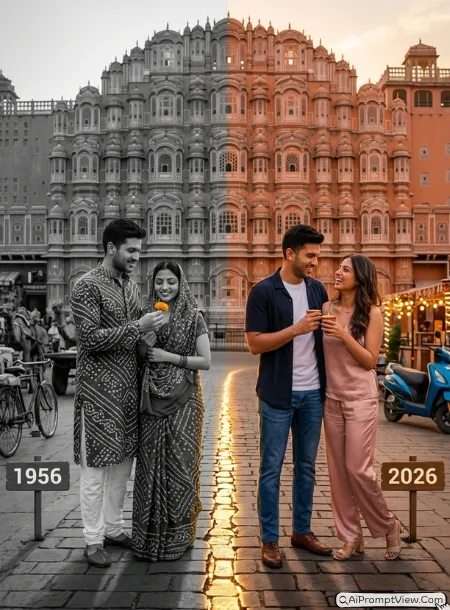
STAGE AND ENVIRONMENT SETUP CORE STYLE: Create one ultra realistic full frame portrait of the same couple before Hawa Mahal using one identical camera position. A glowing cracked stone road naturally separates the year 1956 on the left and the year 2026 on the right with matching year markers beside each side. STRICT IDENTITY LOCK ANTI AI REALISM: Edit only the uploaded couple photo. Preserve both faces, body proportions, hairstyle, skin tone and natural texture exactly. OUTFIT POSE AND EXPRESSION SHIFT: The 1956 couple wears traditional Bandhani clothing while the man offers a marigold flower and both smile softly. The 2026 couple wears stylish modern outfits, shares one kulhad lassi and laughs together. Never allow hands, shadows or eye contact to cross the divider. PROFESSIONAL CAMERA AND LIGHTING MATRIX: Render 1956 in authentic monochrome film with natural grain. Render 2026 using an 85mm lens with warm Rajasthan sunset colours and cinematic blur. BACKGROUND AND ENVIRONMENT: The 1956 side contains camel carts, bicycles, craftsmen, sandstone shops and old Jaipur streets only. The 2026 side includes decorative lighting, cafés, electric vehicles and fashionable visitors. NEGATIVE PROMPT: face alteration, identity mismatch, plastic skin, artificial AI look, over smoothing, cartoon rendering, anime style, harsh digital HDR, distorted features, double jewelry overlays, cluttered backgrounds, text overlays.
Prompt 3. Gateway of India Golden Hour Time Wave
I liked this one because the sea became the divider instead of a wall. The glowing wave made both timelines feel connected without mixing them together.
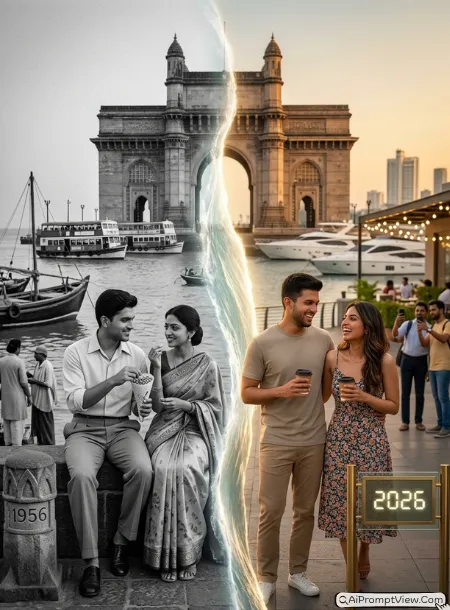
STAGE AND ENVIRONMENT SETUP CORE STYLE: Create one ultra realistic full frame golden hour portrait of the same couple at the Gateway of India from one identical camera angle. A glowing ocean wave rises through the center, naturally dividing the year 1956 on the left and the year 2026 on the right. Add harbour markers showing both years. STRICT IDENTITY LOCK ANTI AI REALISM: Edit only the uploaded couple photo. Preserve both faces, hairstyle, body shape, skin tone and natural texture exactly. OUTFIT POSE AND EXPRESSION SHIFT: The 1956 couple wears elegant vintage clothing while peacefully sharing roasted peanuts beside the sea. The 2026 couple wears modern casual outfits, enjoys coffee and laughs together. Both timelines remain completely separate. PROFESSIONAL CAMERA AND LIGHTING MATRIX: Render 1956 as authentic black and white film with realistic grain. Render 2026 using an 85mm lens with cinematic golden hour lighting and creamy background blur. BACKGROUND AND ENVIRONMENT: The 1956 side includes vintage ferries, fishing boats, black taxis and period visitors only. The 2026 side features luxury yachts, cafés, modern skyline, decorative lights and tourists. NEGATIVE PROMPT: face alteration, identity mismatch, plastic skin, artificial AI look, over smoothing, cartoon rendering, anime style, harsh digital HDR, distorted features, double jewelry overlays, cluttered backgrounds, text overlays.
Prompt 4. Varanasi Ghat Sacred Time River
This prompt looked much more realistic after I made the glowing river stream become the time divider. It naturally separated both years without making the image look edited.
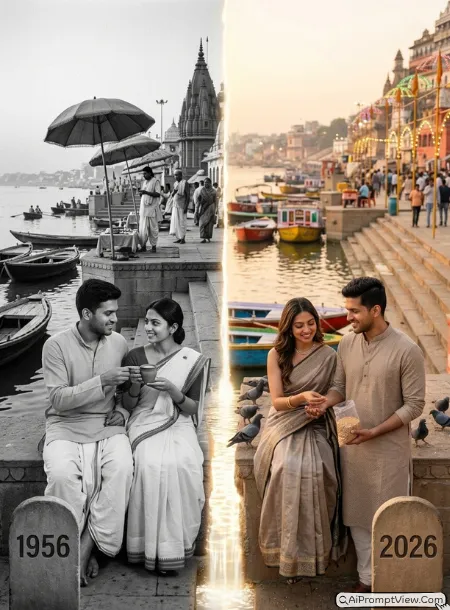
STAGE AND ENVIRONMENT SETUP CORE STYLE: Create one ultra realistic full frame sunrise portrait of the same couple at Dashashwamedh Ghat from one identical camera angle. A glowing sacred water stream flows through the center, naturally dividing the year 1956 on the left and the year 2026 on the right with stone year markers beside each side. STRICT IDENTITY LOCK ANTI AI REALISM: Edit only the uploaded couple photo. Keep both faces, hairstyle, body shape, skin tone and natural texture exactly unchanged. OUTFIT POSE AND EXPRESSION SHIFT: The 1956 couple wears simple traditional Banarasi clothing while sharing one clay cup of chai with gentle smiles. The 2026 couple wears elegant modern ethnic outfits while feeding birds together. Never allow interaction across the glowing river divider. PROFESSIONAL CAMERA AND LIGHTING MATRIX: Render 1956 as authentic black and white film with realistic grain. Render 2026 using an 85mm lens with warm sunrise light and cinematic depth. BACKGROUND AND ENVIRONMENT: The 1956 side includes wooden boats, priests, old temples, cloth umbrellas and period visitors only. The 2026 side shows renovated ghats, colourful boats, decorative lighting, tourists and clean walkways. NEGATIVE PROMPT: face alteration, identity mismatch, plastic skin, artificial AI look, over smoothing, cartoon rendering, anime style, harsh digital HDR, distorted features, double jewelry overlays, cluttered backgrounds, text overlays.
Prompt 5. India Gate Festival Lights Through Time
This became one of my favourite results because the lanterns looked like a real part of the scene instead of an editing effect. Both timelines stayed separate while sharing the same beautiful evening.
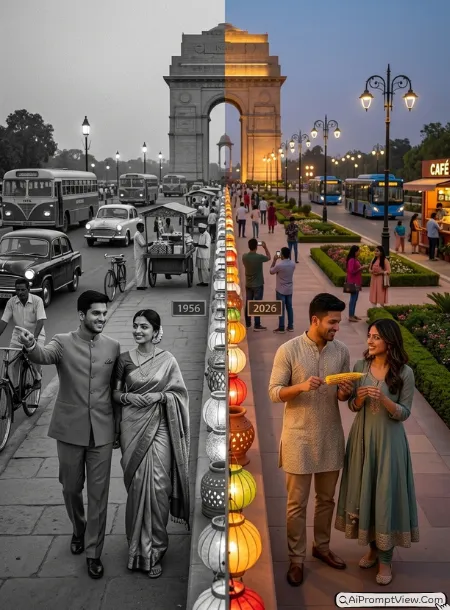
STAGE AND ENVIRONMENT SETUP CORE STYLE: Create one ultra realistic full frame evening portrait of the same couple near India Gate from one identical camera position. A vertical row of glowing festival lanterns naturally separates the year 1956 on the left and the year 2026 on the right with matching year plaques beside each side. STRICT IDENTITY LOCK ANTI AI REALISM: Edit only the uploaded couple photo. Preserve both faces, hairstyle, body proportions, skin tone and realistic texture exactly. OUTFIT POSE AND EXPRESSION SHIFT: The 1956 couple wears elegant vintage clothing while walking slowly together as he points toward India Gate. The 2026 couple wears modern casual ethnic outfits while happily sharing roasted corn. Never allow shadows, hands or eye contact across the lantern divider. PROFESSIONAL CAMERA AND LIGHTING MATRIX: Render 1956 as authentic monochrome film with natural grain. Render 2026 using a 50mm lens with warm evening lights and cinematic background blur. BACKGROUND AND ENVIRONMENT: The 1956 side contains vintage buses, bicycles, old vendors and traditional families only. The 2026 side features landscaped gardens, decorative lighting, electric buses, cafés and modern visitors. NEGATIVE PROMPT: face alteration, identity mismatch, plastic skin, artificial AI look, over smoothing, cartoon rendering, anime style, harsh digital HDR, distorted features, double jewelry overlays, cluttered backgrounds, text overlays.
Prompt 6. Marine Drive Moonlight Tide
I replaced the glowing line with two ocean tides that almost touched each other. That simple change made the scene feel much more natural and emotional.
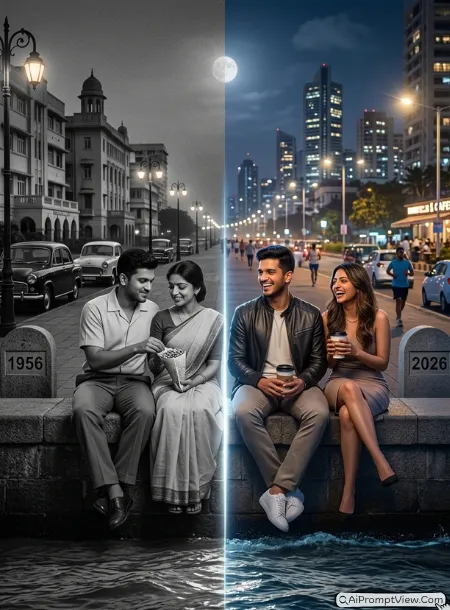
STAGE AND ENVIRONMENT SETUP CORE STYLE: Create one ultra realistic full frame night portrait of the same couple at Marine Drive from one identical camera angle. Two glowing ocean tides meet at the center without touching, naturally dividing the year 1956 on the left and the year 2026 on the right with matching sea markers beside each side. STRICT IDENTITY LOCK ANTI AI REALISM: Edit only the uploaded couple photo. Preserve both faces, hairstyle, body proportions, skin tone and natural skin texture exactly. OUTFIT POSE AND EXPRESSION SHIFT: The 1956 couple wears simple vintage clothing while sitting on the sea wall sharing roasted peanuts. The 2026 couple wears stylish modern outfits while holding coffee cups and laughing together. Never allow reflections, shadows or body parts across the tide divider. PROFESSIONAL CAMERA AND LIGHTING MATRIX: Render 1956 as authentic black and white film with realistic grain. Render 2026 using an 85mm lens with soft moonlight, cinematic city bokeh and natural colours. BACKGROUND AND ENVIRONMENT: The 1956 side shows vintage cars, old street lamps and quiet Marine Drive only. The 2026 side includes illuminated skyscrapers, cafés, electric vehicles, joggers and vibrant Mumbai nightlife. NEGATIVE PROMPT: face alteration, identity mismatch, plastic skin, artificial AI look, over smoothing, cartoon rendering, anime style, harsh digital HDR, distorted features, double jewelry overlays, cluttered backgrounds, text overlays.
Prompt 7. Mysore Palace Royal Garden Time Bloom
This prompt became one of my prettiest results after I changed the divider into a flower pathway instead of a glowing wall. It made both timelines feel natural while keeping them completely separate.
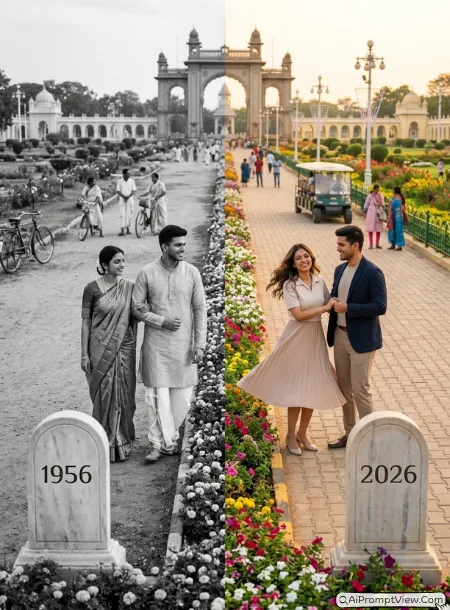
STAGE AND ENVIRONMENT SETUP CORE STYLE: Create one ultra realistic full frame portrait of the same couple at Mysore Palace from one identical camera angle. A blooming flower pathway naturally divides the year 1956 on the left and the year 2026 on the right with elegant stone markers showing both years. STRICT IDENTITY LOCK ANTI AI REALISM: Edit only the uploaded couple photo and preserve both faces, hairstyle, skin tone, body proportions and natural texture exactly. OUTFIT POSE AND EXPRESSION SHIFT: The 1956 couple wears royal Mysore silk outfits while walking arm in arm with soft smiles. The 2026 couple wears elegant modern clothes while happily twirling together. Never allow eye contact, shadows or body parts across the divider. PROFESSIONAL CAMERA AND LIGHTING MATRIX: Render 1956 as authentic black and white film with realistic grain. Render 2026 using an 85mm lens with warm golden hour light and cinematic depth. BACKGROUND AND ENVIRONMENT: The 1956 side shows vintage palace gardens, bicycles, royal pathways and traditionally dressed visitors only. The 2026 side includes restored gardens, decorative lighting, electric carts, colourful flowers and modern tourists. NEGATIVE PROMPT: face alteration, identity mismatch, plastic skin, artificial AI look, over smoothing, cartoon rendering, anime style, harsh digital HDR, distorted features, double jewelry overlays, cluttered backgrounds, text overlays.
Prompt 8. Golden Temple Morning Blessing
I had to stop the reflections from mixing both timelines. Making the marble walkway the time divider gave me a peaceful and much more realistic result.
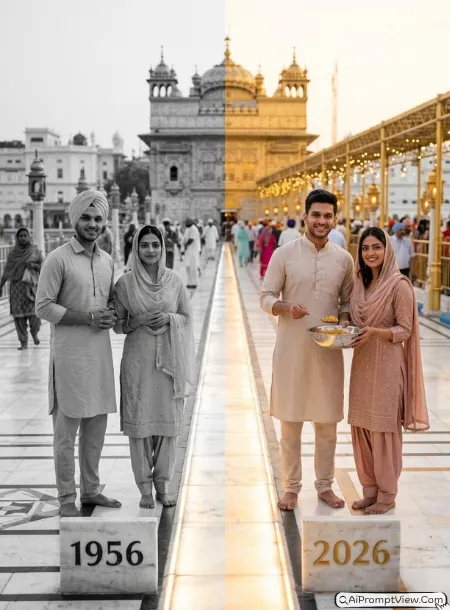
STAGE AND ENVIRONMENT SETUP CORE STYLE: Create one ultra realistic full frame sunrise portrait of the same couple at the Golden Temple from one identical camera angle. A glowing marble walkway naturally separates the year 1956 on the left and the year 2026 on the right with matching marble year markers. STRICT IDENTITY LOCK ANTI AI REALISM: Edit only the uploaded couple photo and preserve both faces, skin tone, hairstyle, body proportions and natural texture exactly. OUTFIT POSE AND EXPRESSION SHIFT: The 1956 couple wears simple traditional Punjabi clothing with covered heads while standing peacefully after prayer. The 2026 couple wears elegant modern Punjabi outfits while serving food together with warm smiles. Never allow reflections, hands or shadows across the divider. PROFESSIONAL CAMERA AND LIGHTING MATRIX: Render 1956 as authentic black and white film with natural grain. Render 2026 using an 85mm lens with soft sunrise light and cinematic background blur. BACKGROUND AND ENVIRONMENT: The 1956 side includes traditional pilgrims, heritage marble paths and old surroundings only. The 2026 side features restored marble, organised visitors, decorative lighting and modern facilities while keeping full respect for the holy place. NEGATIVE PROMPT: face alteration, identity mismatch, plastic skin, artificial AI look, over smoothing, cartoon rendering, anime style, harsh digital HDR, distorted features, double jewelry overlays, cluttered backgrounds, text overlays.
Prompt 9. Darjeeling Hill Station Morning Mist
The mountain fog kept blending both years until I used the railway track as the divider. That one change made each timeline look like a different morning from the same beautiful place.
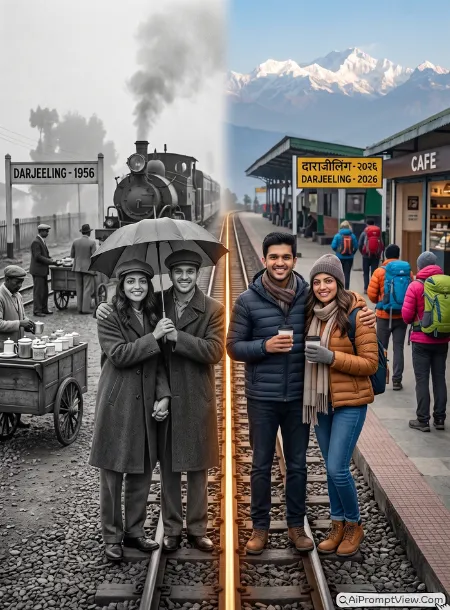
STAGE AND ENVIRONMENT SETUP CORE STYLE: Create one ultra realistic full frame sunrise portrait of the same couple beside the Darjeeling Himalayan Railway from one identical camera angle. A glowing railway track naturally divides the year 1956 on the left and the year 2026 on the right with vintage and modern station markers showing both years. STRICT IDENTITY LOCK ANTI AI REALISM: Edit only the uploaded couple photo and preserve both faces, hairstyle, skin tone, body proportions and natural texture exactly. OUTFIT POSE AND EXPRESSION SHIFT: The 1956 couple wears warm vintage clothing while sharing one umbrella during the cool morning. The 2026 couple wears stylish winter outfits while holding hot coffee and smiling together. Never allow reflections, shadows or body parts across the railway divider. PROFESSIONAL CAMERA AND LIGHTING MATRIX: Render 1956 as authentic black and white film with realistic grain. Render 2026 using a 70mm lens with fresh mountain light and cinematic depth. BACKGROUND AND ENVIRONMENT: The 1956 side includes a steam train, wooden station, tea sellers and period travellers only. The 2026 side features restored platforms, cafés, colourful tourists and vibrant Himalayan scenery. NEGATIVE PROMPT: face alteration, identity mismatch, plastic skin, artificial AI look, over smoothing, cartoon rendering, anime style, harsh digital HDR, distorted features, double jewelry overlays, cluttered backgrounds, text overlays.
Prompt 10. Victoria Memorial Forever Together
This gave me the most emotional result because both couples were enjoying the same evening without ever meeting. The old and new worlds felt connected only through love.
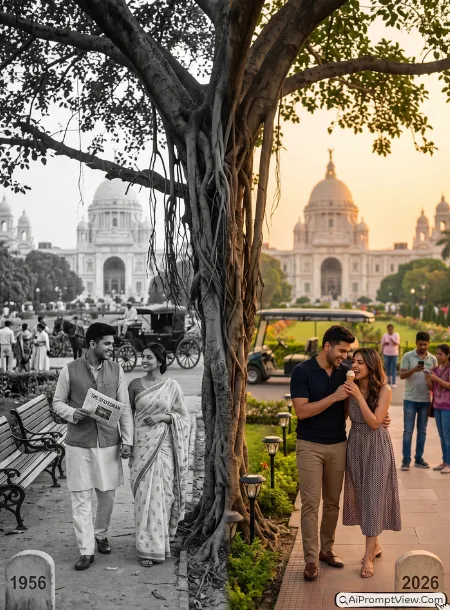
STAGE AND ENVIRONMENT SETUP CORE STYLE: Create one ultra realistic full frame golden hour portrait of the same couple beside Victoria Memorial from one identical camera angle. A large ancient banyan tree naturally divides the year 1956 on the left and the year 2026 on the right with matching stone year markers beside each pathway. STRICT IDENTITY LOCK ANTI AI REALISM: Edit only the uploaded couple photo and preserve both faces, hairstyle, skin tone, body proportions and natural skin texture exactly. OUTFIT POSE AND EXPRESSION SHIFT: The 1956 couple wears elegant cotton vintage clothing while walking together beneath the tree as the man carries a folded newspaper. The 2026 couple wears stylish modern outfits while sharing one ice cream and laughing together. Never allow hands, reflections, shadows or eye contact across the tree divider. PROFESSIONAL CAMERA AND LIGHTING MATRIX: Render 1956 as authentic black and white film with realistic grain. Render 2026 using an 85mm lens with warm sunset light, natural colours and cinematic blur. BACKGROUND AND ENVIRONMENT: The 1956 side includes horse carriages, wooden benches, vintage gardens and period visitors only. The 2026 side shows restored gardens, decorative lights, electric carts and modern tourists. NEGATIVE PROMPT: face alteration, identity mismatch, plastic skin, artificial AI look, over smoothing, cartoon rendering, anime style, harsh digital HDR, distorted features, double jewelry overlays, cluttered backgrounds, text overlays.
How to Use These Prompts
Using these prompts is very easy. I tested them on Gemini, ChatGPT, and Flow, and the steps were almost the same in every tool. Just upload your couple photo, copy the prompt, and generate the image. If the first result is not perfect, make one small change and try again instead of changing the whole prompt.
- Copy the prompt you want to use.
- Open Gemini, ChatGPT, Flow, or any AI image generator.
- Upload a clear and high quality couple photo.
- Paste the prompt and generate the image.
- Wait for the AI to finish creating the photo.
- If your AI tool supports image editing, upload the generated image again and ask for small improvements instead of starting over.
- If the faces do not match well, use a clearer reference photo with both faces fully visible.
- Save the final image in the highest quality available after you get the best result.
Customize These Prompts Your Way
You do not have to use these prompts exactly as they are. I tried changing many small details during testing, and some edits made the final image look even more realistic. You can also try these ideas.
- Change 1956 and 2026 to any years you like, such as 1947 vs 2026 or 1985 vs 2026.
- Replace the location with your own city or any famous place.
- Change the season to rain, winter, autumn, or spring.
- Try sunrise, golden hour, blue hour, or night lighting.
- Use different romantic, funny, candid, or emotional poses.
- Change the outfits to match the culture or time period.
- Replace the natural divider with a tree, river, road, railway track, flower path, wall, or light beam.
- Add old vehicles like bicycles, tongas, steam trains, or classic cars for vintage scenes.
- Keep the old side in authentic black and white film style with natural grain.
- Make the modern side colorful with realistic cinematic lighting.
- Add small personal details like a pet, favorite flower, umbrella, book, or coffee cup.
- Always upload the highest quality reference photo for better face matching.
- If the faces change, add stronger identity lock instructions before generating again.
Final Tips
One thing I noticed during testing is that the reference photo matters more than the prompt itself. A clear photo with natural light almost always produced a better result than a heavily edited selfie. I also got better face accuracy when both people were looking naturally toward each other instead of directly at the camera. If the first image is not perfect, do not change the whole prompt. Change only one small detail, generate again, and compare the result. This simple method helped me create much more realistic images while keeping the same overall style and mood.