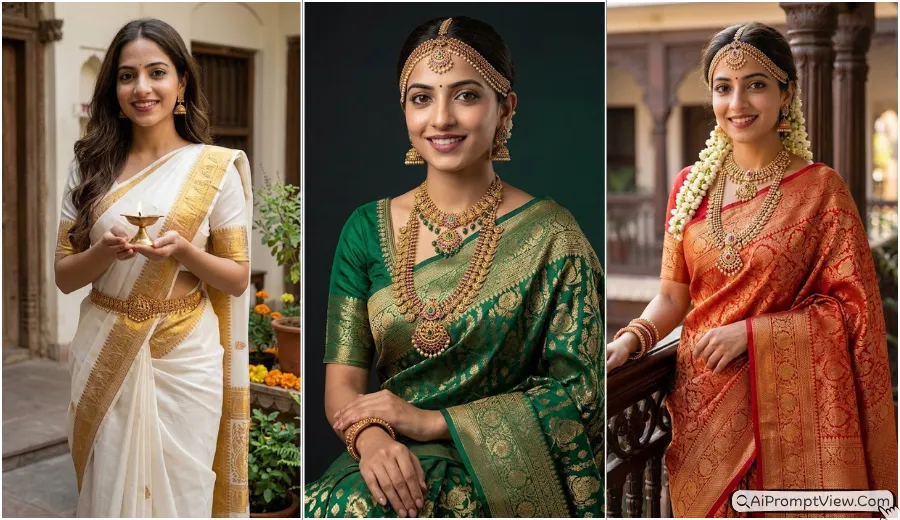
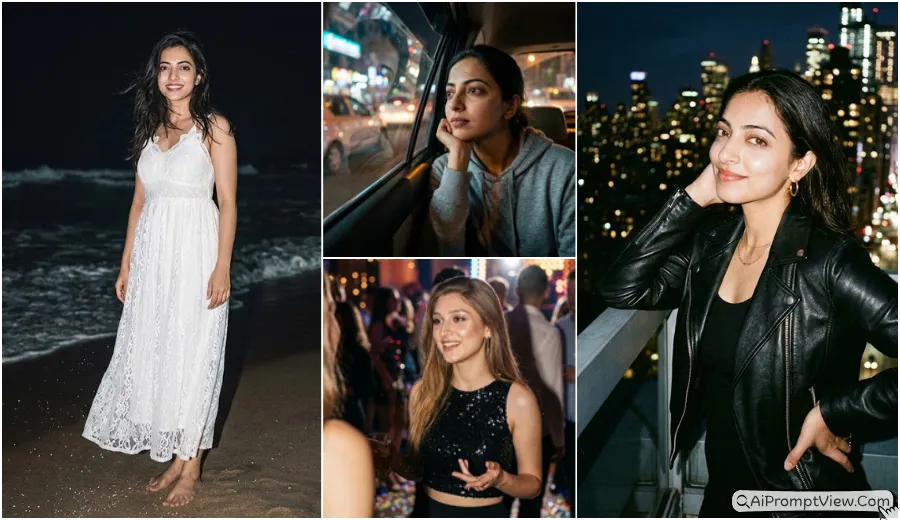
If you are looking for Trending Butterfly Effect Girls Photo Prompts, viral Instagram style photo editing copy paste prompts that give a realistic butterfly look, this collection is for you. I personally tested every prompt before adding it here because many prompts looked good at first but did not keep the face natural. After trying different poses, butterfly styles, outfits, and backgrounds, I selected only the prompts that gave me clean, realistic, and premium looking results that you can use to edit your own photo with confidence.
I tested these prompts with ChatGPT and Gemini AI image editing tools using my own photos. They also work well with many other AI image generators that support detailed editing prompts. I always suggest using a clear and high quality photo because that helped me get better face details during my testing.
Butterfly Effect Girls Photo Prompts
Below, you will find different butterfly effect photo editing prompts for many creative styles. I have included butterfly wings, butterfly dresses, glowing butterfly portraits, dreamy garden looks, royal themes, magical light effects, and more. Every prompt is written to help you create a realistic photo while keeping your original face and identity natural.
Prompt 1. Golden Meadow Monarch Glow
I tried this prompt during sunset testing, and it quickly became one of my favorites. The golden light and monarch butterflies looked very natural together. I noticed that keeping the pose relaxed made the final photo look even better.
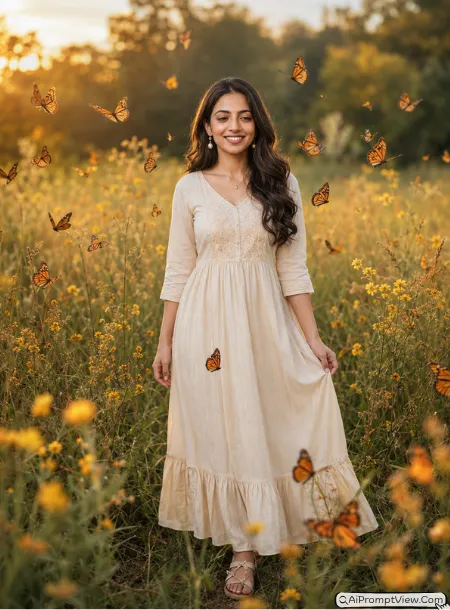
STAGE AND ENVIRONMENT SETUP CORE STYLE: Create a hyper realistic butterfly effect portrait in a peaceful golden meadow during warm golden hour. The photo should feel soft, calm, and full of natural beauty with glowing sunlight across tall grass and wild flowers. Use a vertical 4:5 full body composition with balanced framing and realistic depth. STRICT IDENTITY LOCK ANTI AI REALISM: Edit the uploaded photo. Use the uploaded image as the only reference for facial features, skin tone, face shape, eye shape, nose structure, lip lines, jawline, and body structure. Keep the face fully unchanged. Preserve natural pores, soft baby hair, real skin texture, realistic eyelashes, and true human depth. OUTFIT POSE AND EXPRESSION SHIFT: Show the girl standing naturally with one hand gently touching the edge of her flowing cream dress while the other hand rests beside her. Keep a soft happy smile while looking slightly toward the butterflies. Dress her in a light cream cotton maxi dress with gentle folds, simple pearl earrings, and flat sandals. PROFESSIONAL CAMERA AND LIGHTING MATRIX: Use a full frame 85mm lens look with f/1.8 aperture, sharp subject focus, creamy background blur, and warm sunlight coming from the left side with soft highlights across the face. BACKGROUND AND ENVIRONMENT: Surround the girl with flying orange and black monarch butterflies, golden grass, blooming yellow flowers, distant trees, and rich sunset colors with realistic depth and peaceful countryside mood. NEGATIVE PROMPT: face alteration, identity mismatch, plastic skin, artificial AI look, over smoothing, cartoon rendering, anime style, harsh digital HDR, distorted features, double jewelry overlays, cluttered backgrounds, text overlays.
Prompt 2. Midnight Garden Blue Wings
This one gave me a completely different mood. I tested a few moonlight scenes before this version. The dark blue butterflies looked much cleaner when the background stayed simple and the lighting remained soft.
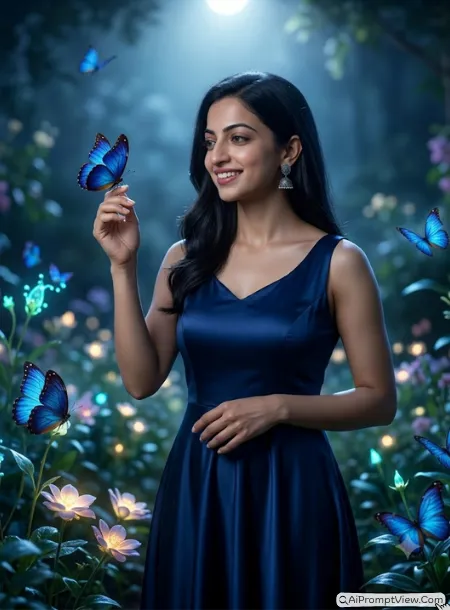
STAGE AND ENVIRONMENT SETUP CORE STYLE: Create a hyper realistic butterfly effect portrait inside a peaceful midnight garden filled with glowing flowers under bright moonlight. The image should feel elegant, quiet, and slightly dreamy while keeping realistic colors and natural lighting. Use a vertical 4:5 full body composition with strong visual depth. STRICT IDENTITY LOCK ANTI AI REALISM: Edit the uploaded photo. Use the uploaded image as the only reference for facial features, skin tone, face shape, eye shape, nose structure, lip lines, jawline, and body structure. Keep the face completely unchanged. Preserve realistic skin texture, fine pores, soft hair strands, and authentic facial details. OUTFIT POSE AND EXPRESSION SHIFT: Show the girl standing beside blooming flowers with one hand gently raised as if a butterfly has landed on her fingers while the other hand rests near her waist. Keep a peaceful smile and relaxed expression. Dress her in a flowing deep navy blue satin gown with soft fabric movement and silver earrings. PROFESSIONAL CAMERA AND LIGHTING MATRIX: Use a full frame 85mm lens look with f/1.8 aperture, crisp focus on the subject, creamy background blur, cool moonlight from above, and soft side lighting to add gentle shadows. BACKGROUND AND ENVIRONMENT: Fill the garden with glowing plants, dark green leaves, rich blue Morpho butterflies, soft moonlight, distant stone paths, and natural evening atmosphere with realistic depth. NEGATIVE PROMPT: face alteration, identity mismatch, plastic skin, artificial AI look, over smoothing, cartoon rendering, anime style, harsh digital HDR, distorted features, double jewelry overlays, cluttered backgrounds, text overlays.
Prompt 3. Cherry Blossom Butterfly Walk
When I used this prompt, I noticed the soft pink colors made the whole portrait look fresh. I first tested a brighter version, but this gentle style looked much more natural and balanced.
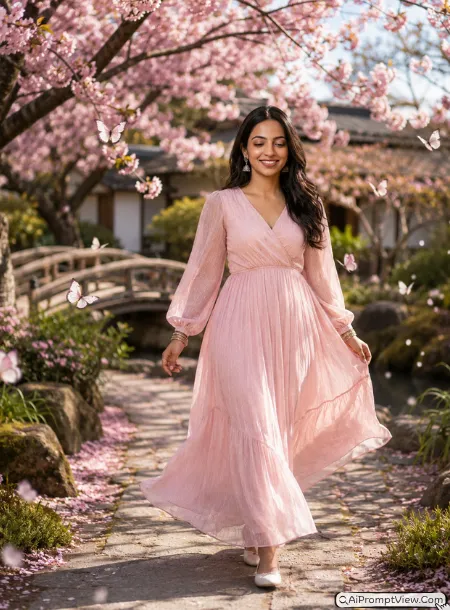
STAGE AND ENVIRONMENT SETUP CORE STYLE: Create a hyper realistic butterfly effect portrait inside a peaceful Japanese cherry blossom garden during a bright spring morning. The image should feel fresh, elegant, and calm with soft natural light and blooming trees. Use a vertical 4:5 full body composition with realistic perspective and gentle depth. STRICT IDENTITY LOCK ANTI AI REALISM: Edit the uploaded photo. Use the uploaded image as the only reference for facial features, skin tone, face shape, eye shape, nose structure, lip lines, jawline, and body structure. Keep the face fully unchanged. Preserve natural pores, skin texture, realistic hair strands, soft facial shadows, and authentic human details. OUTFIT POSE AND EXPRESSION SHIFT: Show the girl walking slowly along a stone path while lightly holding the side of her pastel pink dress with one hand and letting the other hand swing naturally. Keep a warm smile while looking slightly down toward nearby butterflies. Dress her in a soft pink flowing dress with delicate fabric folds, small floral earrings, and simple white shoes. PROFESSIONAL CAMERA AND LIGHTING MATRIX: Use a full frame 85mm lens look with f/1.8 aperture, sharp focus on the subject, smooth background blur, and gentle morning sunlight filtering through flowering trees. BACKGROUND AND ENVIRONMENT: Surround the path with blooming cherry blossom trees, white and pink butterflies, falling flower petals, peaceful garden bridges, soft pastel colors, and realistic spring atmosphere. NEGATIVE PROMPT: face alteration, identity mismatch, plastic skin, artificial AI look, over smoothing, cartoon rendering, anime style, harsh digital HDR, distorted features, double jewelry overlays, cluttered backgrounds, text overlays.
Prompt 4. Rainforest Butterfly Waterfall
I tested a few rainforest scenes before finishing this one. Most looked too crowded. This version gave me a much cleaner result because the waterfall stayed soft in the background while the butterflies remained the main focus.
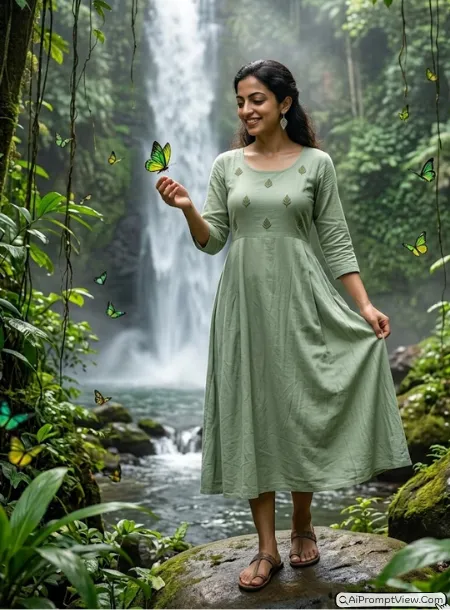
STAGE AND ENVIRONMENT SETUP CORE STYLE: Create a hyper realistic butterfly effect portrait inside a lush tropical rainforest with a tall waterfall flowing behind the subject. The image should feel fresh, peaceful, and full of natural energy while keeping realistic colors and rich green tones. Use a vertical 4:5 full body composition with true environmental depth and balanced framing. STRICT IDENTITY LOCK ANTI AI REALISM: Edit the uploaded photo. Use the uploaded image as the only reference for facial features, skin tone, face shape, eye shape, nose structure, lip lines, jawline, and body structure. Keep the face completely unchanged. Preserve natural skin texture, visible pores, soft hair strands, realistic eyelashes, and true human depth without beauty filter effects. OUTFIT POSE AND EXPRESSION SHIFT: Show the girl standing on a smooth natural rock with one hand gently stretched toward flying butterflies while the other hand softly holds the side of a light sage green flowing dress. Keep a relaxed smile while looking toward the nearest butterfly. Dress her in a soft cotton dress with natural fabric folds, small leaf shaped earrings, and simple sandals. PROFESSIONAL CAMERA AND LIGHTING MATRIX: Use a full frame 85mm lens look with f/1.8 aperture, crisp subject focus, creamy background blur, soft daylight filtering through rainforest trees, and gentle reflections from the waterfall creating realistic highlights. BACKGROUND AND ENVIRONMENT: Surround the subject with bright green and yellow butterflies, tropical plants, mist rising from the waterfall, wet rocks, hanging vines, rich forest depth, and peaceful nature colors. NEGATIVE PROMPT: face alteration, identity mismatch, plastic skin, artificial AI look, over smoothing, cartoon rendering, anime style, harsh digital HDR, distorted features, double jewelry overlays, cluttered backgrounds, text overlays.
Prompt 5. Desert Sunset Butterfly Breeze
This prompt surprised me during testing. I thought the warm sand would hide the butterflies, but the orange wings looked beautiful against the sunset sky. The flowing outfit made the final image feel more alive.
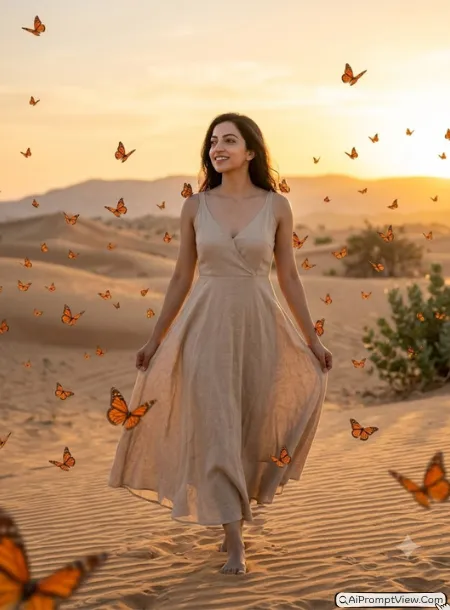
STAGE AND ENVIRONMENT SETUP CORE STYLE: Create a hyper realistic butterfly effect portrait during a warm desert sunset with glowing sand dunes stretching into the distance. The photo should feel peaceful, rich, and cinematic while keeping natural colors and realistic lighting. Use a vertical 4:5 full body composition with soft depth and balanced framing. STRICT IDENTITY LOCK ANTI AI REALISM: Edit the uploaded photo. Use the uploaded image as the only reference for facial features, skin tone, face shape, eye shape, nose structure, lip lines, jawline, and body structure. Keep the face fully unchanged. Preserve natural pores, realistic skin texture, soft baby hair, authentic facial shadows, and true human detail. OUTFIT POSE AND EXPRESSION SHIFT: Show the girl slowly walking across the sand while gently holding the edge of a flowing beige dress with both hands. Keep a calm smile while looking toward the glowing sunset. Dress her in a lightweight linen dress with soft movement, simple golden earrings, and flat sandals. PROFESSIONAL CAMERA AND LIGHTING MATRIX: Use a full frame 85mm lens look with f/1.8 aperture, sharp focus on the subject, creamy background blur, warm sunset light from behind, and soft reflected light from the desert sand. BACKGROUND AND ENVIRONMENT: Fill the scene with orange butterflies flying through warm air, rolling sand dunes, soft evening sky, gentle desert plants, distant hills, and rich golden tones with realistic depth. NEGATIVE PROMPT: face alteration, identity mismatch, plastic skin, artificial AI look, over smoothing, cartoon rendering, anime style, harsh digital HDR, distorted features, double jewelry overlays, cluttered backgrounds, text overlays.
Prompt 6. Lavender Field Butterfly Dream
I personally liked this prompt because the purple flowers made the butterflies stand out without making the image feel busy. It worked well for me when I used a relaxed pose instead of looking directly at the camera.
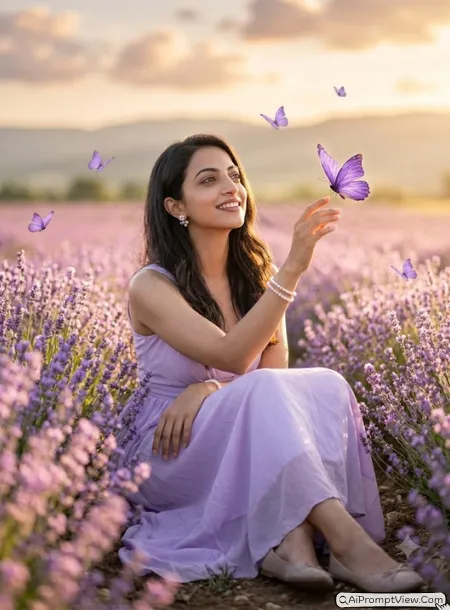
STAGE AND ENVIRONMENT SETUP CORE STYLE: Create a hyper realistic butterfly effect portrait inside a wide lavender field during a bright summer evening. The image should feel soft, romantic, and peaceful with fresh floral colors and realistic natural light. Use a vertical 4:5 full body composition with beautiful depth and balanced framing. STRICT IDENTITY LOCK ANTI AI REALISM: Edit the uploaded photo. Use the uploaded image as the only reference for facial features, skin tone, face shape, eye shape, nose structure, lip lines, jawline, and body structure. Keep the face completely unchanged. Preserve natural skin texture, visible pores, soft facial details, realistic hair strands, and authentic human depth. OUTFIT POSE AND EXPRESSION SHIFT: Show the girl sitting gently among blooming lavender flowers with one hand resting behind her for support while the other hand reaches toward a nearby butterfly. Keep a soft cheerful smile while looking slightly upward. Dress her in a flowing lavender dress with light fabric folds, pearl bracelets, delicate floral earrings, and comfortable flat shoes. PROFESSIONAL CAMERA AND LIGHTING MATRIX: Use a full frame 85mm lens look with f/1.8 aperture, crisp focus on the subject, creamy background blur, warm evening sunlight from one side, and soft natural glow across the flowers. BACKGROUND AND ENVIRONMENT: Surround the girl with endless lavender fields, flying purple butterflies, distant hills, soft clouds, warm sky colors, and peaceful countryside scenery with realistic depth. NEGATIVE PROMPT: face alteration, identity mismatch, plastic skin, artificial AI look, over smoothing, cartoon rendering, anime style, harsh digital HDR, distorted features, double jewelry overlays, cluttered backgrounds, text overlays.
Prompt 7. Underwater Fantasy Butterfly Glow
This prompt took me a few tries because underwater scenes can easily look fake. After changing the lighting and keeping the pose simple, the final result looked much more natural while still feeling creative.
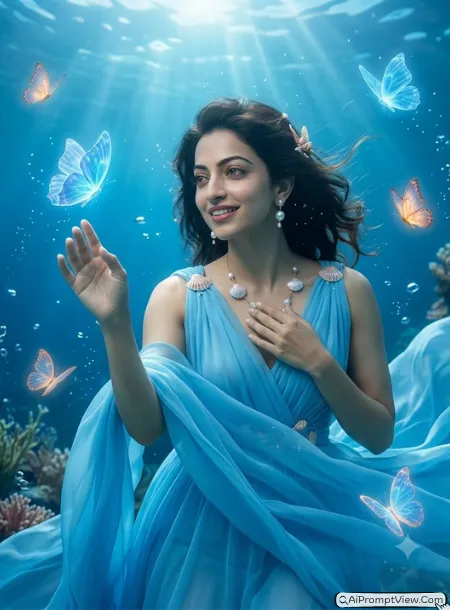
STAGE AND ENVIRONMENT SETUP CORE STYLE: Create a hyper realistic butterfly effect portrait inside a magical underwater world with crystal clear ocean water and soft blue light. The image should feel peaceful, elegant, and slightly dreamy while maintaining realistic human details and natural colors. Use a vertical 4:5 full body composition with realistic underwater depth. STRICT IDENTITY LOCK ANTI AI REALISM: Edit the uploaded photo. Use the uploaded image as the only reference for facial features, skin tone, face shape, eye shape, nose structure, lip lines, jawline, and body structure. Keep the face fully unchanged. Preserve natural pores, realistic skin texture, soft facial details, floating natural hair strands, and authentic human depth. OUTFIT POSE AND EXPRESSION SHIFT: Show the girl floating gracefully underwater with one hand reaching forward while the other gently rests near the chest. Keep a soft relaxed smile while looking toward nearby glowing butterflies. Dress her in a flowing sky blue chiffon gown with realistic fabric movement, pearl earrings, and delicate shell inspired accessories. PROFESSIONAL CAMERA AND LIGHTING MATRIX: Use a full frame 85mm lens look with f/1.8 aperture, crisp focus on the subject, soft underwater light rays from above, natural blue reflections, and smooth background blur. BACKGROUND AND ENVIRONMENT: Fill the ocean scene with translucent glowing butterflies, coral reefs, tiny bubbles, sea plants, soft blue water tones, distant fish silhouettes, and realistic underwater depth with peaceful atmosphere. NEGATIVE PROMPT: face alteration, identity mismatch, plastic skin, artificial AI look, over smoothing, cartoon rendering, anime style, harsh digital HDR, distorted features, double jewelry overlays, cluttered backgrounds, text overlays.
Prompt 8. Crystal Butterfly Fairy Wings
I spent quite a while testing wing styles before writing this prompt. Many versions looked fake because the wings became too bright or covered the face. This one gave me the most natural result. The transparent crystal wings stayed behind the subject and the face remained the main focus.
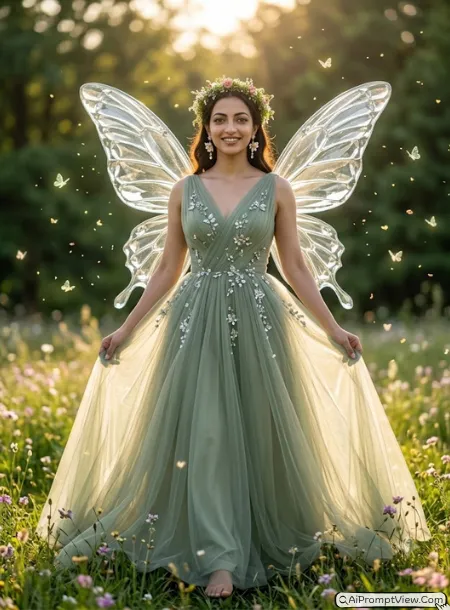
STAGE AND ENVIRONMENT SETUP CORE STYLE: Create a hyper realistic butterfly fairy portrait with large transparent crystal butterfly wings attached naturally behind the subject. The image should feel elegant, magical, and premium while remaining completely realistic like a luxury fashion photoshoot. Use a vertical 4:5 full body composition with natural body proportions and balanced framing. STRICT IDENTITY LOCK ANTI AI REALISM: Edit the uploaded photo. Use the uploaded image as the only reference for facial features, skin tone, face shape, eye shape, nose structure, lip lines, jawline, eyebrows, ears, neck, and body structure. Keep the face fully unchanged with identical identity. Preserve real pores, soft baby hair, realistic eyelashes, natural skin texture, and authentic human depth without reshaping or beauty filter effects. OUTFIT POSE AND EXPRESSION SHIFT: Show the girl standing gracefully with one foot slightly forward while both hands gently hold the sides of a flowing sage green tulle gown decorated with tiny crystal flowers. Keep a soft confident smile while looking slightly toward the camera. Add delicate floral earrings and a natural flower crown without covering the hairline. PROFESSIONAL CAMERA AND LIGHTING MATRIX: Use a full frame 85mm lens look with f/1.8 aperture, extremely sharp subject focus, creamy background blur, soft golden hour sunlight from behind, realistic rim lighting around the crystal wings, and gentle highlights across the dress. BACKGROUND AND ENVIRONMENT: Place the subject inside a peaceful flower meadow filled with white daisies, tiny glowing butterflies, floating pollen particles, warm sunlight, soft green trees, and realistic environmental depth with natural color grading. NEGATIVE PROMPT: face alteration, identity mismatch, plastic skin, artificial AI look, over smoothing, cartoon rendering, anime style, harsh digital HDR, distorted features, double jewelry overlays, cluttered backgrounds, text overlays.
Prompt 9. Butterfly Memory Wings Portrait
This became one of my favorite concepts after several tests. At first the photo memories inside the wings looked crowded. I reduced the number of photos and added soft glass texture. The final result looked much more realistic while keeping the face as the main attraction.
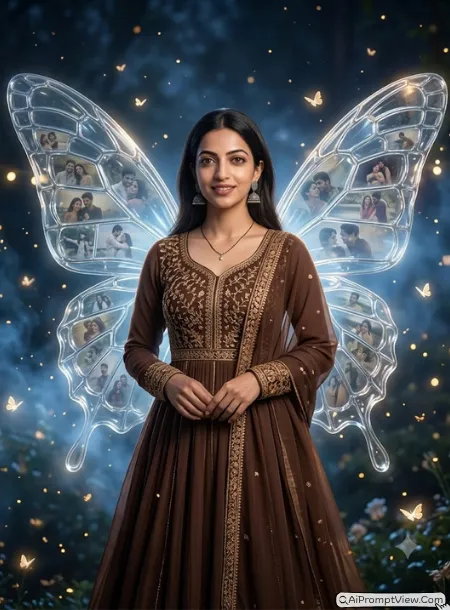
STAGE AND ENVIRONMENT SETUP CORE STYLE: Create a hyper realistic butterfly memory portrait where the subject has enormous transparent butterfly wings made from glowing glass panels containing small faded memories and photo moments instead of plain wing patterns. The image should feel emotional, artistic, and premium while looking like a real professional fantasy fashion photograph rather than digital artwork. Use a vertical 4:5 full body composition with realistic body proportions and cinematic environmental depth. STRICT IDENTITY LOCK ANTI AI REALISM: Edit the uploaded photo. Use the uploaded image as the only reference for facial features, skin tone, face shape, eye shape, nose structure, lip lines, jawline, eyebrows, ears, hairline, neck, and body structure. Keep the face one hundred percent unchanged with identical identity. Preserve natural pores, realistic skin texture, tiny facial details, authentic hair strands, soft eyelashes, and true human depth without face reshaping or beauty filter effects. OUTFIT POSE AND EXPRESSION SHIFT: Show the girl standing naturally with both hands softly joined near her waist while looking calmly toward the camera with a gentle smile. Dress her in a flowing chocolate brown embroidered Anarkali style gown with delicate golden thread work, soft chiffon layers, elegant jhumka earrings, and minimal jewelry that does not distract from the wings. PROFESSIONAL CAMERA AND LIGHTING MATRIX: Use a full frame 85mm lens look with f/1.8 aperture, ultra sharp subject focus, creamy background blur, warm cinematic spotlight from the upper left, soft rim lighting around the wings, realistic reflections inside every glass panel, and premium fashion photography quality. BACKGROUND AND ENVIRONMENT: Place the subject inside a dark dreamy evening garden with tiny glowing butterflies, floating golden particles, soft blue haze, distant fairy lights, rich depth, and large translucent butterfly wings filled with small softly faded memory portraits that blend naturally into the wing structure without covering the main subject. NEGATIVE PROMPT: face alteration, identity mismatch, plastic skin, artificial AI look, over smoothing, cartoon rendering, anime style, harsh digital HDR, distorted features, double jewelry overlays, cluttered backgrounds, text overlays.
Prompt 10. Butterfly Dress Bloom
I tested a few butterfly dress ideas before this one. Most looked too artificial because the butterflies covered the whole body. This version looked much cleaner because the butterflies formed only the outer layers of the gown while keeping the outfit realistic.
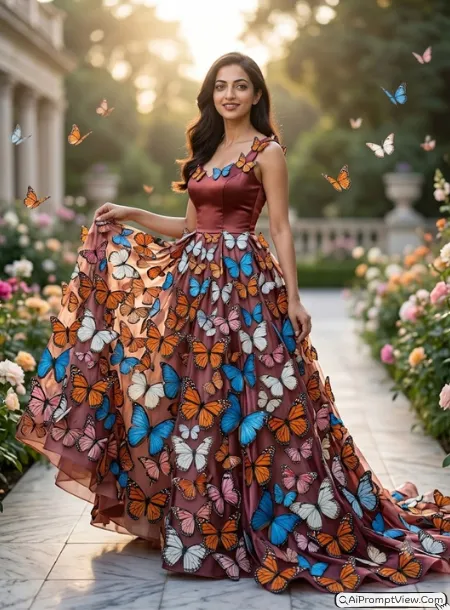
STAGE AND ENVIRONMENT SETUP CORE STYLE: Create a hyper realistic butterfly couture portrait where hundreds of realistic butterflies naturally form the outer flowing layers of an elegant evening gown. The image should feel luxurious, graceful, and artistic while looking like a real high fashion magazine photoshoot. Use a vertical 4:5 full body composition with balanced framing and natural body proportions. STRICT IDENTITY LOCK ANTI AI REALISM: Edit the uploaded photo. Use the uploaded image as the only reference for facial features, skin tone, face shape, eye shape, nose structure, lip lines, jawline, eyebrows, ears, neck, and body structure. Keep the face completely unchanged. Preserve natural pores, realistic skin texture, soft baby hair, authentic eyelashes, and true human facial depth without beauty filter effects. OUTFIT POSE AND EXPRESSION SHIFT: Show the girl standing elegantly while lightly lifting one side of the butterfly dress with one hand and relaxing the other beside her body. Keep a confident smile while looking slightly away from the camera. The upper dress should be rich satin while the lower flowing layers transform into hundreds of orange, blue, white, and pink butterflies with realistic wing texture. PROFESSIONAL CAMERA AND LIGHTING MATRIX: Use a full frame 85mm lens look with f/1.8 aperture, sharp subject focus, creamy background blur, soft golden sunlight from behind, and premium fashion lighting with realistic shadows. BACKGROUND AND ENVIRONMENT: Place the subject inside a royal botanical garden with marble pathways, blooming flowers, gentle breeze, floating butterflies, soft sunlight, and rich environmental depth that complements the butterfly gown naturally. NEGATIVE PROMPT: face alteration, identity mismatch, plastic skin, artificial AI look, over smoothing, cartoon rendering, anime style, harsh digital HDR, distorted features, double jewelry overlays, cluttered backgrounds, text overlays.
Prompt 11. Butterfly Light Portal
I really liked this concept after changing the lighting several times. Bright effects made it look fake at first. Soft glowing light behind the wings gave me a much more realistic result.
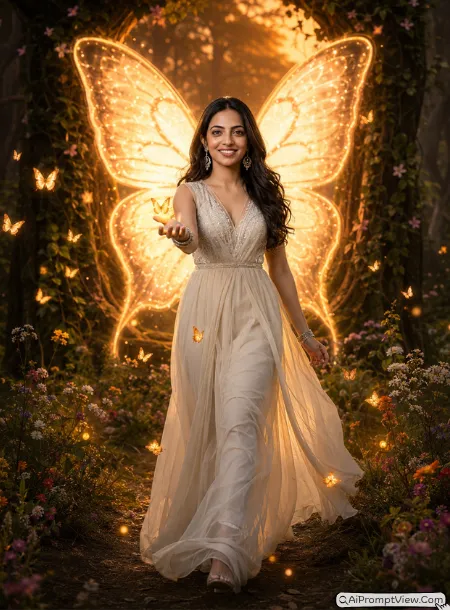
STAGE AND ENVIRONMENT SETUP CORE STYLE: Create a hyper realistic butterfly portal portrait where a giant glowing butterfly shaped light portal appears behind the subject. The image should feel dreamy, premium, and cinematic while remaining realistic like a professional outdoor fashion shoot. Use a vertical 4:5 full body composition with natural perspective and environmental depth. STRICT IDENTITY LOCK ANTI AI REALISM: Edit the uploaded photo. Use the uploaded image as the only reference for facial features, skin tone, face shape, eye shape, nose structure, lip lines, jawline, eyebrows, ears, neck, and body structure. Keep the face one hundred percent unchanged. Preserve real pores, skin texture, fine facial details, realistic hair strands, and authentic human depth. OUTFIT POSE AND EXPRESSION SHIFT: Show the girl walking slowly toward the camera while gently extending one hand forward as small glowing butterflies fly around her fingers. Keep a relaxed smile. Dress her in a soft ivory chiffon gown with flowing fabric, crystal earrings, and delicate bracelets. PROFESSIONAL CAMERA AND LIGHTING MATRIX: Use a full frame 85mm lens look with f/1.8 aperture, crisp focus, creamy background blur, warm sunset lighting mixed with soft glowing backlight coming from the butterfly portal, and realistic light reflections across the dress. BACKGROUND AND ENVIRONMENT: Place the subject inside a peaceful forest clearing with wild flowers, floating butterflies, soft mist, natural trees, warm evening colors, and a huge glowing butterfly shaped portal fading naturally into the background. NEGATIVE PROMPT: face alteration, identity mismatch, plastic skin, artificial AI look, over smoothing, cartoon rendering, anime style, harsh digital HDR, distorted features, double jewelry overlays, cluttered backgrounds, text overlays.
Prompt 12. Butterfly Crown Queen
I wanted something that looked royal without becoming fantasy art. I noticed that keeping the crown made from living butterflies instead of metal made the portrait feel fresh and believable.
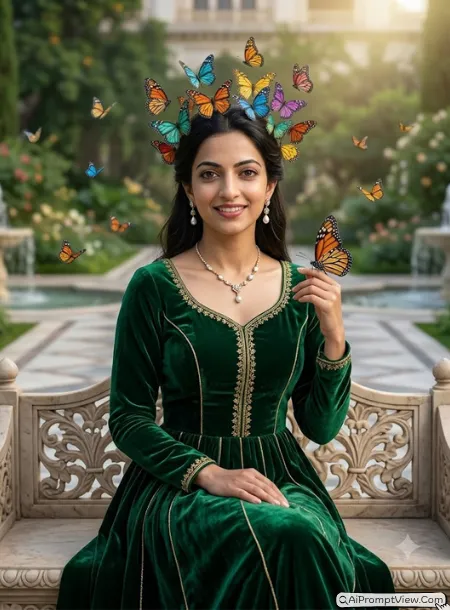
STAGE AND ENVIRONMENT SETUP CORE STYLE: Create a hyper realistic royal butterfly portrait where colorful butterflies naturally form an elegant living crown above the subject's head. The image should feel graceful, luxurious, and realistic like a premium editorial fashion photograph. Use a vertical 4:5 full body composition with balanced framing and true environmental depth. STRICT IDENTITY LOCK ANTI AI REALISM: Edit the uploaded photo. Use the uploaded image as the only reference for facial features, skin tone, face shape, eye shape, nose structure, lip lines, jawline, eyebrows, ears, neck, and body structure. Keep the face fully unchanged. Preserve natural pores, realistic skin texture, soft hair strands, authentic eyelashes, and human facial depth. OUTFIT POSE AND EXPRESSION SHIFT: Show the girl sitting naturally on a carved stone bench while one hand rests gently on her lap and the other lightly touches a butterfly near her shoulder. Keep a soft royal smile. Dress her in an elegant emerald green velvet gown with fine embroidery, pearl earrings, and a graceful necklace. PROFESSIONAL CAMERA AND LIGHTING MATRIX: Use a full frame 85mm lens look with f/1.8 aperture, sharp focus, creamy background blur, soft morning sunlight, and gentle highlights around the butterfly crown. BACKGROUND AND ENVIRONMENT: Place the subject inside a grand palace garden with fountains, flowering plants, marble pathways, flying butterflies, rich greenery, and warm natural lighting that creates a peaceful royal atmosphere. NEGATIVE PROMPT: face alteration, identity mismatch, plastic skin, artificial AI look, over smoothing, cartoon rendering, anime style, harsh digital HDR, distorted features, double jewelry overlays, cluttered backgrounds, text overlays.
Prompt 13. Butterfly Reflection Lake
This concept looked beautiful after I changed the camera angle. The water reflection added something special without making the scene look edited.
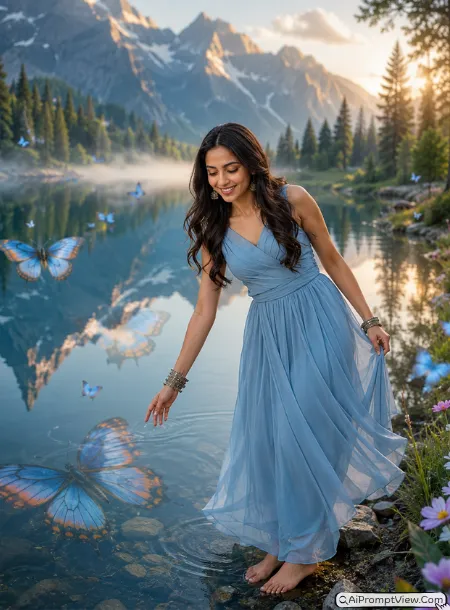
STAGE AND ENVIRONMENT SETUP CORE STYLE: Create a hyper realistic butterfly portrait beside a crystal clear lake where giant butterfly reflections appear naturally on the water surface instead of the sky. The image should feel peaceful, elegant, and artistic while remaining completely photorealistic. Use a vertical 4:5 full body composition with realistic perspective and deep environmental framing. STRICT IDENTITY LOCK ANTI AI REALISM: Edit the uploaded photo. Use the uploaded image as the only reference for facial features, skin tone, face shape, eye shape, nose structure, lip lines, jawline, eyebrows, ears, neck, and body structure. Keep the face exactly the same. Preserve realistic skin texture, pores, soft hair strands, and authentic facial details. OUTFIT POSE AND EXPRESSION SHIFT: Show the girl standing barefoot near the lake edge while gently reaching toward the water with one hand and lightly holding her dress with the other. Keep a peaceful smile while looking down. Dress her in a flowing powder blue chiffon gown with soft movement and minimal jewelry. PROFESSIONAL CAMERA AND LIGHTING MATRIX: Use a full frame 85mm lens look with f/1.8 aperture, premium sharpness, creamy background blur, early sunrise lighting, and realistic reflections across the water. BACKGROUND AND ENVIRONMENT: Place the subject beside a calm mountain lake surrounded by wild flowers, green trees, floating butterflies, soft mist, mirror reflections, and giant butterfly silhouettes reflected naturally across the lake surface. NEGATIVE PROMPT: face alteration, identity mismatch, plastic skin, artificial AI look, over smoothing, cartoon rendering, anime style, harsh digital HDR, distorted features, double jewelry overlays, cluttered backgrounds, text overlays.
Prompt 14. Butterfly Sky Stairway
This idea took me several attempts because floating stairs can easily look unrealistic. Making them look like old stone steps gave me a much more natural final image.
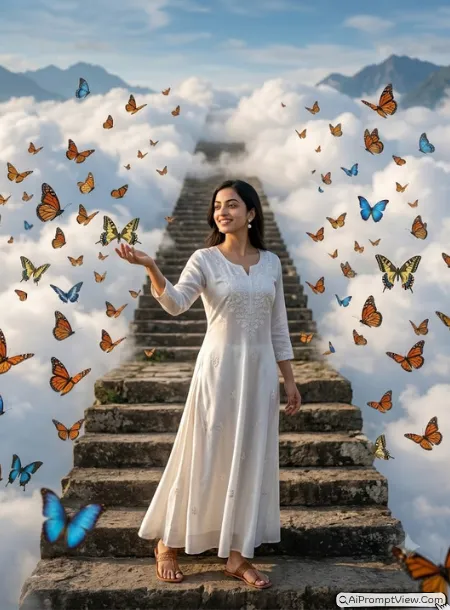
STAGE AND ENVIRONMENT SETUP CORE STYLE: Create a hyper realistic butterfly portrait where an ancient stone stairway rises gently into the clouds while thousands of butterflies fly around the subject. The image should feel inspiring, peaceful, and premium without looking artificial. Use a vertical 4:5 full body composition with realistic perspective and cinematic depth. STRICT IDENTITY LOCK ANTI AI REALISM: Edit the uploaded photo. Use the uploaded image as the only reference for facial features, skin tone, face shape, eye shape, nose structure, lip lines, jawline, eyebrows, ears, neck, and body structure. Keep the face fully unchanged. Preserve natural pores, realistic skin texture, authentic hair strands, and true facial depth. OUTFIT POSE AND EXPRESSION SHIFT: Show the girl standing at the first step while gently extending one hand toward the butterflies and keeping the other hand relaxed beside her body. Keep a peaceful smile. Dress her in a flowing white silk gown with delicate embroidery, pearl earrings, and elegant sandals. PROFESSIONAL CAMERA AND LIGHTING MATRIX: Use a full frame 85mm lens look with f/1.8 aperture, crisp focus, creamy depth of field, warm sunrise lighting, and soft rim light around the butterflies. BACKGROUND AND ENVIRONMENT: Surround the subject with soft clouds, old stone stairs, blue sky, realistic butterflies, warm sunlight, distant mountains, and natural atmospheric depth that feels believable. NEGATIVE PROMPT: face alteration, identity mismatch, plastic skin, artificial AI look, over smoothing, cartoon rendering, anime style, harsh digital HDR, distorted features, double jewelry overlays, cluttered backgrounds, text overlays.
Prompt 15. Butterfly Galaxy Aura
This was the last concept I tested. I avoided bright neon colors because they made the portrait look fake. A soft galaxy glow with realistic butterflies looked much more premium.
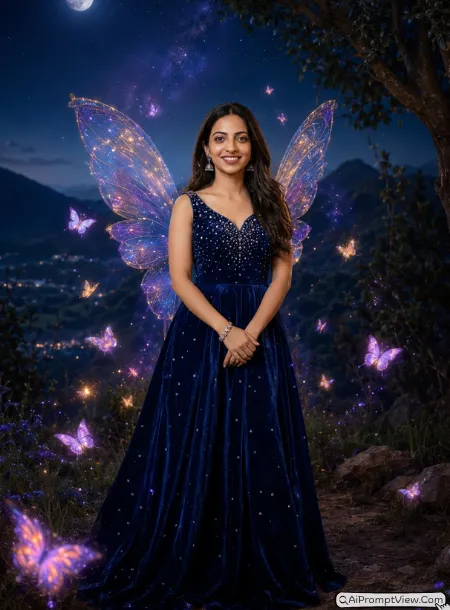
STAGE AND ENVIRONMENT SETUP CORE STYLE: Create a hyper realistic butterfly portrait surrounded by a soft galaxy inspired butterfly aura with gentle cosmic colors blending naturally into the night sky. The image should feel luxurious, dreamy, and realistic like a premium fashion campaign photographed outdoors at night. Use a vertical 4:5 full body composition with true environmental depth and balanced framing. STRICT IDENTITY LOCK ANTI AI REALISM: Edit the uploaded photo. Use the uploaded image as the only reference for facial features, skin tone, face shape, eye shape, nose structure, lip lines, jawline, eyebrows, ears, neck, and body structure. Keep the face completely unchanged. Preserve natural skin texture, realistic pores, fine facial details, authentic hair strands, and true human depth. OUTFIT POSE AND EXPRESSION SHIFT: Show the girl standing confidently with both hands gently crossed in front while looking directly toward the camera with a soft smile. Dress her in a midnight blue velvet gown decorated with tiny crystal details, elegant earrings, and a delicate bracelet. PROFESSIONAL CAMERA AND LIGHTING MATRIX: Use a full frame 85mm lens look with f/1.8 aperture, ultra sharp focus, creamy background blur, soft moonlight, subtle galaxy glow behind the subject, and realistic cinematic lighting across the face. BACKGROUND AND ENVIRONMENT: Place the subject on a quiet hill under a star filled night sky with realistic butterflies glowing softly around the body, distant mountains, gentle mist, natural trees, rich blue tones, and premium atmospheric depth. NEGATIVE PROMPT: face alteration, identity mismatch, plastic skin, artificial AI look, over smoothing, cartoon rendering, anime style, harsh digital HDR, distorted features, double jewelry overlays, cluttered backgrounds, text overlays.
FAQ
-
Can I use these butterfly prompts with my own photo?
Yes. These prompts are written for photo editing. Just upload your own image and use the prompt. The identity lock section helps keep your face as close as possible to the original photo.
-
Do all the prompts create the same butterfly style?
No. Every prompt has a different concept. Some create butterfly wings, some create butterfly dresses, glowing effects, royal portraits, dreamy gardens, or artistic butterfly scenes.
-
Can I change the colors or background in these prompts?
Yes. You can easily replace colors, outfits, lighting, flowers, or locations with your own ideas. Small changes often create a completely new look without changing the main style.
Last Words
The vintage butterfly prompt was the last one I tested, and I honestly spent more time on it than the others. Small lighting changes made a big difference in the final photo. My favorite tip is to use a clear photo with a natural expression because that helped every prompt look more realistic during my testing. I hope you enjoy trying these butterfly effect girls photo prompts as much as I enjoyed creating and testing them. If one becomes your favorite, I would love to know which look you liked the most.