Product Photography AI Prompts 2026: Many people try to create premium sneaker product photography with Gemini AI and ChatGPT, but the final image often looks unrealistic. Sometimes the shoe design changes, the product color becomes different, or the result looks more like AI art than real commercial photography. To solve that problem, I have shared 10 copy paste prompts that are specially written for premium sneaker and shoes product photography.
These prompts can help you create realistic footwear ads, shoes product photoshoot with model images, and premium sneaker photography while keeping the uploaded shoe design unchanged. Before sharing them here, I tested different lighting setups, camera angles, backgrounds, and product photography styles myself. Only the prompts that gave realistic and clean results were included in this article. Whether you are a seller, creator, or sneaker lover, you can use these prompts with your own shoe photo to create professional looking product images.
Section 1: Outdoor Premium Sneaker Edits
These prompts create fresh outdoor sneaker photography with natural light, open backgrounds, and realistic commercial product ad results.
1. Sunny Grass Levitation Sneaker Look
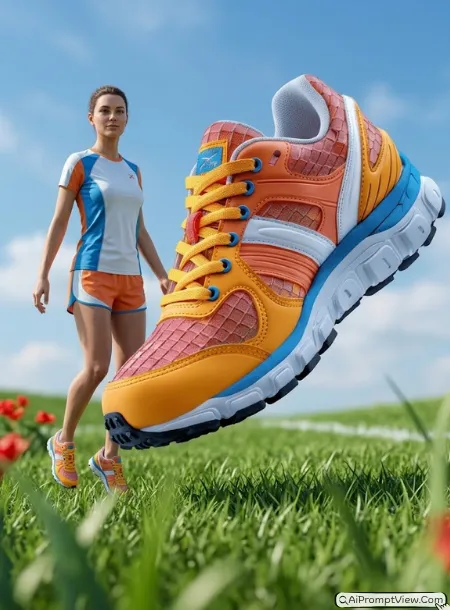
STAGE AND ENVIRONMENT SETUP CORE STYLE: Create a hyper realistic outdoor sneaker product photoshoot with a premium sporty mood and clean commercial ad style. Use a vertical 4:5 composition with a dramatic low angle camera view from grass level. The uploaded sneaker must be the main product and must stay exactly the same as the original photo.

STRICT PRODUCT AND IDENTITY LOCK ANTI AI REALISM: Edit my uploaded product photo. Use the uploaded image as the only reference for the shoe design, color, shape, sole, lace pattern, texture, logo placement and material details. Do not change the product design in any way. If a model is added, keep the model realistic with natural skin texture, real skin tone, fine lines, visible pores and no plastic beauty filter look.

OUTFIT POSE AND EXPRESSION SHIFT: Add a realistic fashion model in a sporty outdoor pose, jumping lightly or standing near the floating sneaker in a natural product ad style. The sneaker should look suspended in mid air at a dynamic 45 degree angle, with clear motion feel and sharp product focus. Keep the model expression calm, confident and natural.

PROFESSIONAL CAMERA AND LIGHTING MATRIX: Simulated capture on a high end full frame camera with an 85mm prime lens, shot at f/1.8 for sharp product focus and creamy background blur. Use bright natural midday sunlight with soft highlights on the shoe material. Add realistic shadows under the shoe and soft grass reflections.

BACKGROUND AND ENVIRONMENT: Create a lush green grass field with soft out of focus grass blades near the camera. Add a clear blue sky with soft white clouds in the background. Use vibrant red, green, white and sky blue tones if they match the uploaded shoe, but keep the original product color unchanged.

NEGATIVE PROMPT: product design change, shoe color change, logo distortion, wrong sole shape, fake material, face alteration, identity mismatch, plastic skin, artificial AI look, over smoothing, cartoon rendering, anime style, harsh digital HDR, distorted features, cluttered background, text overlays.
2. Forest Moss Sneaker Product Shoot
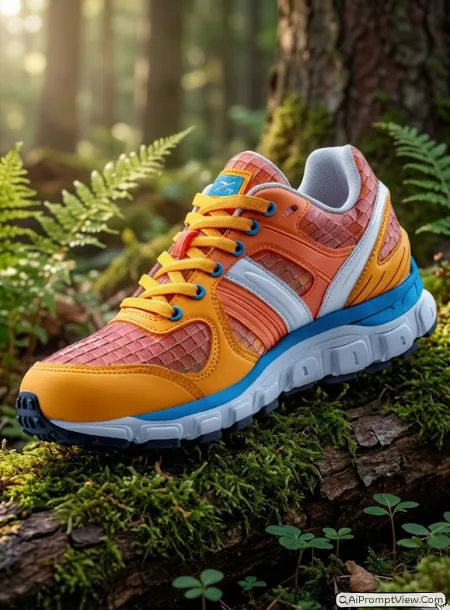
STAGE AND ENVIRONMENT SETUP CORE STYLE: Create a hyper realistic forest style sneaker product photoshoot with a calm luxury outdoor mood. Use a vertical 3:4 composition with a close eye level product frame. The uploaded sneaker must stay fully unchanged and should look like a premium product placed in nature.

STRICT PRODUCT AND IDENTITY LOCK ANTI AI REALISM: Edit my uploaded product photo. Keep the shoe shape, color, logo, laces, stitching, sole, material texture and all small product details exactly the same as the uploaded image. Do not redesign the shoe. If a model is included, keep natural human skin texture, real hair strands, soft facial lines and no fake model look.

OUTFIT POSE AND EXPRESSION SHIFT: Place the sneaker on a mossy wooden log or let a realistic model hold the shoe gently near a forest setup. The pose should feel natural, not stiff. The shoe should be slightly tilted forward to show the laces and front profile clearly.

PROFESSIONAL CAMERA AND LIGHTING MATRIX: Simulated capture on a high end full frame camera with an 85mm prime lens, shot at f/1.8 for sharp product focus and soft background blur. Use warm diffused morning light with a light fog feel. Highlight the shoe texture, stitching and sole edge with soft natural shine.

BACKGROUND AND ENVIRONMENT: Build a peaceful forest floor scene with green moss, tree bark, small white flowers, soft ferns and natural brown wood textures. Keep the background blurred and clean so the uploaded shoe remains the main focus.

NEGATIVE PROMPT: product design change, shoe color change, logo distortion, wrong sole shape, fake material, face alteration, identity mismatch, plastic skin, artificial AI look, over smoothing, cartoon rendering, anime style, harsh digital HDR, distorted features, cluttered background, text overlays.
Section 2: Studio And Floating Product Looks
These prompts are perfect for luxury shoe campaigns with floating effects, premium studio setups, and high end product presentation.
3. Floating Water Droplet Runner Look
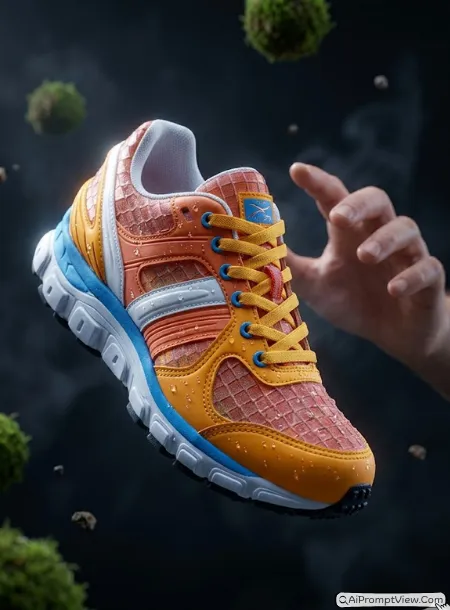
STAGE AND ENVIRONMENT SETUP CORE STYLE: Create a surreal but hyper realistic running shoe product photoshoot with floating elements and a premium sports ad mood. Use a vertical 4:5 composition with a close centered product shot. The uploaded shoe should remain exactly the same as the original product photo.

STRICT PRODUCT AND IDENTITY LOCK ANTI AI REALISM: Edit my uploaded product photo. Use the uploaded image as the only reference for shoe design, shape, sole, laces, color, brand mark area and fabric texture. Do not change or improve the product design. If adding a model hand or model body, keep skin realistic with natural pores, real skin tone and no over smoothed AI look.

OUTFIT POSE AND EXPRESSION SHIFT: Make the shoe float in the air with a soft downward tilt. Add small water droplets on the shoe surface, but do not cover or hide the original product details. Add a realistic model hand reaching toward the shoe or standing behind it in soft blur for a premium product campaign feel.

PROFESSIONAL CAMERA AND LIGHTING MATRIX: Simulated capture on a high end full frame camera with an 85mm prime lens, shot at f/1.8 for sharp product focus and creamy bokeh. Use strong rim light from the upper left side so the water droplets shine naturally. Keep shadows deep but not harsh.

BACKGROUND AND ENVIRONMENT: Use a dark minimal studio background with floating moss balls, tiny stone pieces and soft mist. Keep the background simple and deep so the product looks expensive and clean.

NEGATIVE PROMPT: product design change, shoe color change, logo distortion, wrong sole shape, fake material, face alteration, identity mismatch, plastic skin, artificial AI look, over smoothing, cartoon rendering, anime style, harsh digital HDR, distorted features, cluttered background, text overlays.
4. Raw Stone Luxury Sneaker Look
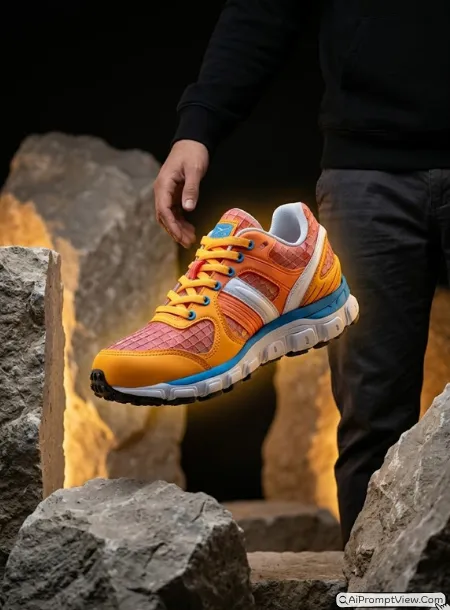
STAGE AND ENVIRONMENT SETUP CORE STYLE: Create a luxury sneaker product photoshoot inside a raw stone studio setup. Use a vertical 3:4 composition with a clean side profile product frame. The uploaded sneaker must remain exactly the same, with no change in design, logo, color, sole or material.

STRICT PRODUCT AND IDENTITY LOCK ANTI AI REALISM: Edit my uploaded product photo. Keep the original shoe design fully unchanged. Preserve the same color, stitching, laces, sole thickness, toe shape, texture and all visible product marks from the uploaded image. If a model is added, keep a real human look with natural skin texture and no plastic face effect.

OUTFIT POSE AND EXPRESSION SHIFT: Show the sneaker floating calmly between rough stone pillars, or place it near a realistic model wearing a simple premium streetwear outfit. The model should look relaxed and confident, with a clean product ad pose.

PROFESSIONAL CAMERA AND LIGHTING MATRIX: Simulated capture on a high end full frame camera with an 85mm prime lens, shot at f/1.8 for sharp shoe focus and smooth background blur. Add warm hidden amber light from behind the rocks to create a soft glow around the shoe.

BACKGROUND AND ENVIRONMENT: Use large grey limestone rocks, rough stone blocks and a deep black studio background. The scene should feel bold, minimal and premium. Keep the shoe clear and sharp in the center.

NEGATIVE PROMPT: product design change, shoe color change, logo distortion, wrong sole shape, fake material, face alteration, identity mismatch, plastic skin, artificial AI look, over smoothing, cartoon rendering, anime style, harsh digital HDR, distorted features, cluttered background, text overlays.
Section 3: Product Photoshoot With Model
These prompts help create realistic shoes product photoshoot with model images that look like professional sports and fashion ads.
5. Athletic Runner With Sneaker Focus
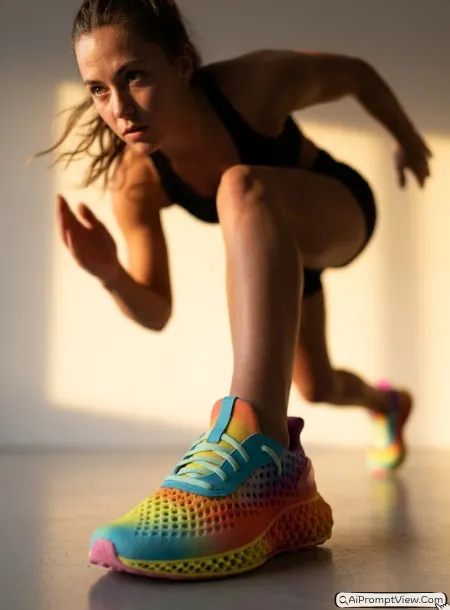
STAGE AND ENVIRONMENT SETUP CORE STYLE: Create a hyper realistic athletic shoes product photoshoot with a model in motion. Use a vertical 4:5 composition with an extreme low angle view focused on the front shoe. The uploaded shoe product must stay exactly same as the source image.

STRICT PRODUCT AND IDENTITY LOCK ANTI AI REALISM: Edit my uploaded product photo. Keep the shoe design, color, logo, laces, fabric texture, sole pattern and overall structure fully unchanged. Do not replace the shoe with another model. Keep the added model realistic with natural body shape, real skin texture, natural hair strands and no artificial AI face.

OUTFIT POSE AND EXPRESSION SHIFT: Add a realistic athlete model wearing the uploaded shoes naturally during a mid sprint pose. The front foot should be sharp and close to the camera, while the back leg can be softly blurred. The model should have a focused and natural sports expression.

PROFESSIONAL CAMERA AND LIGHTING MATRIX: Simulated capture on a high end full frame camera with an 85mm prime lens, shot at f/1.8 for sharp focus on the shoe and creamy motion blur in the background. Use warm sunset backlight to create a strong athletic ad mood with realistic shadows.

BACKGROUND AND ENVIRONMENT: Use a clean training studio floor with a warm orange sunset light wall behind the model. Add soft reflections on the floor and keep the full scene realistic, not cartoon style.

NEGATIVE PROMPT: product design change, shoe color change, logo distortion, wrong sole shape, fake material, face alteration, identity mismatch, plastic skin, artificial AI look, over smoothing, cartoon rendering, anime style, harsh digital HDR, distorted features, cluttered background, text overlays.
6. Exploding Ground Sports Shoe Ad
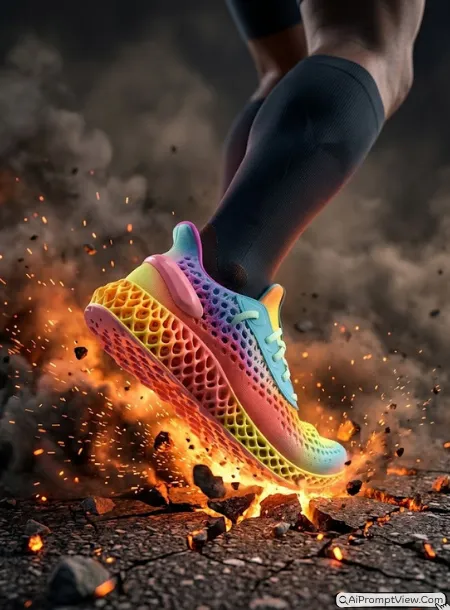
STAGE AND ENVIRONMENT SETUP CORE STYLE: Create a bold hyper realistic sports shoe advertisement with explosive ground energy. Use a vertical 3:4 composition with a side angle action frame. The uploaded shoe must stay exactly same as the original product photo.

STRICT PRODUCT AND IDENTITY LOCK ANTI AI REALISM: Edit my uploaded product photo. Use the uploaded shoe as the only product reference. Preserve exact shoe shape, color, lace design, logo area, sole structure, fabric texture and all visible product details. If a model is added, keep the model realistic with natural skin, real body balance and no fake AI smoothness.

OUTFIT POSE AND EXPRESSION SHIFT: Add a realistic sports model stepping forward with power, as if the shoe is breaking through the ground. The pose should show energy, but the product must remain sharp and clear. Keep the model expression focused and natural.

PROFESSIONAL CAMERA AND LIGHTING MATRIX: Simulated capture on a high end full frame camera with an 85mm prime lens, shot at f/1.8 for sharp product focus and cinematic background blur. Use fiery orange light from the ground with dark smoke shadows and realistic small sparks.

BACKGROUND AND ENVIRONMENT: Create a cracked asphalt ground with small stones, dust chunks and glowing orange embers rising around the shoe. Keep the scene dramatic but clean enough for a premium sportswear product ad.

NEGATIVE PROMPT: product design change, shoe color change, logo distortion, wrong sole shape, fake material, face alteration, identity mismatch, plastic skin, artificial AI look, over smoothing, cartoon rendering, anime style, harsh digital HDR, distorted features, cluttered background, text overlays.
Section 4: Minimal And Lifestyle Shoe Edits
These prompts focus on clean backgrounds, natural styling, and modern lifestyle photography suitable for brands and social media.
7. Driftwood Balance Trail Shoe Look
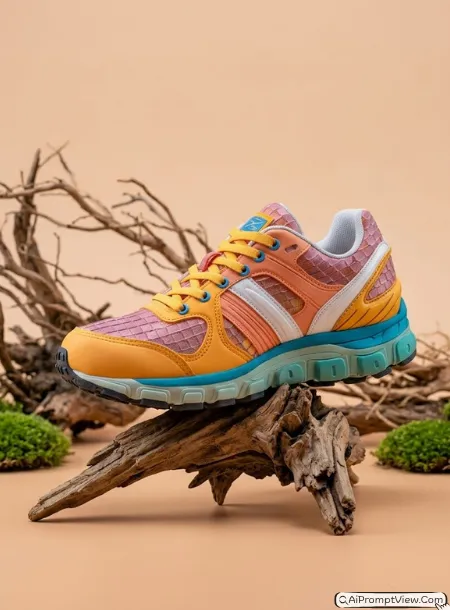
STAGE AND ENVIRONMENT SETUP CORE STYLE: Create a clean outdoor lifestyle shoe product photoshoot with organic textures and soft premium style. Use a vertical 4:5 composition with balanced product framing. Keep the uploaded shoe exactly the same as the source image.

STRICT PRODUCT AND IDENTITY LOCK ANTI AI REALISM: Edit my uploaded product photo. Do not change the shoe design, color, logo area, material, laces, sole shape or product size. Keep all original details locked. If a model is used, keep natural skin texture, real body posture, soft expression and no artificial beauty filter.

OUTFIT POSE AND EXPRESSION SHIFT: Place the shoe on a sharp driftwood piece or show a model holding the shoe while standing near a clean earthy setup. The model should wear simple outdoor activewear and look calm, natural and confident.

PROFESSIONAL CAMERA AND LIGHTING MATRIX: Simulated capture on a high end full frame camera with an 85mm prime lens, shot at f/1.8 for sharp focus and creamy background blur. Use soft directional studio light from the front right to bring out the shoe texture and sole pattern.

BACKGROUND AND ENVIRONMENT: Create a smooth tan peach studio floor with dry tree roots, small green moss patches and a clean pastel background. Keep the product looking premium, balanced and realistic.

NEGATIVE PROMPT: product design change, shoe color change, logo distortion, wrong sole shape, fake material, face alteration, identity mismatch, plastic skin, artificial AI look, over smoothing, cartoon rendering, anime style, harsh digital HDR, distorted features, cluttered background, text overlays.
8. Dual Pair Rock Bed Sneaker Look
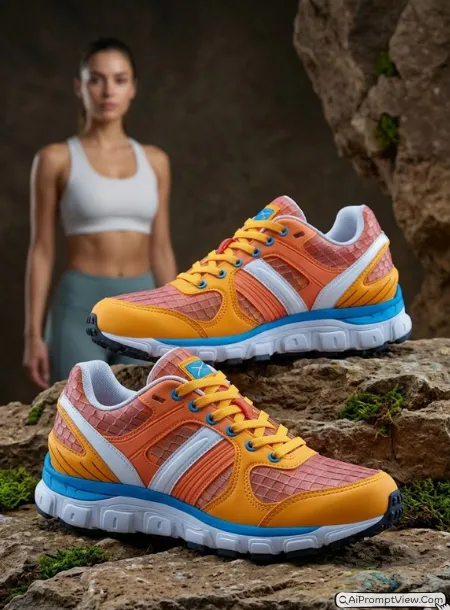
STAGE AND ENVIRONMENT SETUP CORE STYLE: Create a premium athletic shoe catalog photoshoot with a clean pair display and natural rock styling. Use a vertical 3:4 composition with a wide product frame. The uploaded shoe pair must remain fully unchanged.

STRICT PRODUCT AND IDENTITY LOCK ANTI AI REALISM: Edit my uploaded product photo. Keep both shoes exactly the same as uploaded. Preserve original shape, color, laces, logo area, sole, fabric texture, stitching and all visible product details. Do not add wrong brand marks. If a model is added, keep the person realistic with natural skin and no AI plastic look.

OUTFIT POSE AND EXPRESSION SHIFT: Arrange the same pair of shoes on a rugged rock bed. One shoe can sit slightly higher at the back, and the second shoe can stay lower in the foreground. Add a realistic model standing softly blurred in the background if needed, wearing clean sportswear.

PROFESSIONAL CAMERA AND LIGHTING MATRIX: Simulated capture on a high end full frame camera with an 85mm prime lens, shot at f/1.8 for sharp product focus and smooth background blur. Use overhead softbox style light with even shine and no harsh glare.

BACKGROUND AND ENVIRONMENT: Build an earthy rock formation with small green moss patches and a deep textured studio background. Keep the shoes sharp, clean and ready for a product catalog or ad banner.

NEGATIVE PROMPT: product design change, shoe color change, logo distortion, wrong sole shape, fake material, face alteration, identity mismatch, plastic skin, artificial AI look, over smoothing, cartoon rendering, anime style, harsh digital HDR, distorted features, cluttered background, text overlays.
Section 5: Creative Premium Product Display
These prompts are designed for eye catching footwear campaigns with unique product placement, artistic setups, and premium visual appeal.
9. Tree Branch Hanging Sneaker Look
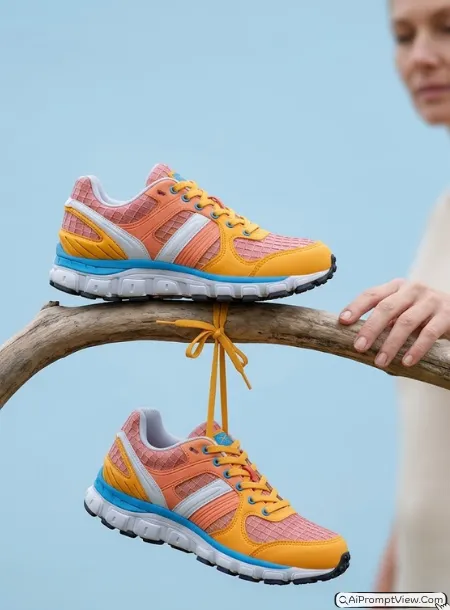
STAGE AND ENVIRONMENT SETUP CORE STYLE: Create a high fashion outdoor sneaker product photoshoot with clean natural styling. Use a vertical 4:5 composition with a simple eye level product frame. The uploaded sneaker must stay exactly same as the source photo.

STRICT PRODUCT AND IDENTITY LOCK ANTI AI REALISM: Edit my uploaded product photo. Use the uploaded shoe as the only product reference. Keep the same shoe shape, color, laces, logo area, sole, material texture and all small details unchanged. If a model appears, keep real skin texture, natural hair, soft facial lines and no fake AI model look.

OUTFIT POSE AND EXPRESSION SHIFT: Place one sneaker on a smooth curved tree branch and let the second shoe hang naturally by its laces. Add a realistic model hand gently touching the branch or standing nearby in soft blur. The pose should feel calm, stylish and natural.

PROFESSIONAL CAMERA AND LIGHTING MATRIX: Simulated capture on a high end full frame camera with an 85mm prime lens, shot at f/1.8 for sharp product focus and creamy bokeh. Use soft daylight with minimal shadows and clean open air brightness.

BACKGROUND AND ENVIRONMENT: Use a clean pale sky blue background with a smooth dry wooden branch as the main prop. Keep the scene minimal so the product looks premium and easy to notice.

NEGATIVE PROMPT: product design change, shoe color change, logo distortion, wrong sole shape, fake material, face alteration, identity mismatch, plastic skin, artificial AI look, over smoothing, cartoon rendering, anime style, harsh digital HDR, distorted features, cluttered background, text overlays.
10. Industrial Concrete Sneaker Boot Look
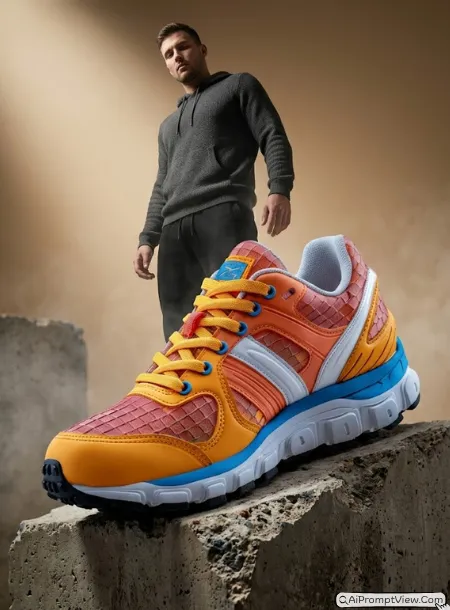
STAGE AND ENVIRONMENT SETUP CORE STYLE: Create a rugged industrial product photoshoot for sneaker boots or heavy shoes. Use a vertical 3:4 composition with a low angle powerful product frame. The uploaded product must stay exactly the same as the original photo.

STRICT PRODUCT AND IDENTITY LOCK ANTI AI REALISM: Edit my uploaded product photo. Preserve the exact product shape, color, material, laces, metal details, sole pattern, logo area and all visible shoe details. Do not change the boot design. If adding a model, make the person look fully realistic with natural skin, real pose and no over smoothed AI face.

OUTFIT POSE AND EXPRESSION SHIFT: Place the sneaker boot on the rough edge of a broken concrete block. Add a realistic model standing behind it in a confident fashion pose, wearing simple streetwear. The product should be the hero, with the model supporting the scene.

PROFESSIONAL CAMERA AND LIGHTING MATRIX: Simulated capture on a high end full frame camera with an 85mm prime lens, shot at f/1.8 for sharp shoe focus and soft background blur. Use moody spotlight from the upper left side to show leather texture, lace detail and deep sole patterns.

BACKGROUND AND ENVIRONMENT: Create a gritty industrial studio scene with concrete blocks, soft rising fog and a warm beige gradient wall. Keep the lighting cinematic and realistic, like a premium footwear campaign.

NEGATIVE PROMPT: product design change, shoe color change, logo distortion, wrong sole shape, fake material, face alteration, identity mismatch, plastic skin, artificial AI look, over smoothing, cartoon rendering, anime style, harsh digital HDR, distorted features, cluttered background, text overlays.
How To Use These Prompts
- Upload a clear photo of your sneaker or shoes.
- Copy any prompt from this article.
- Paste the prompt into Gemini AI, ChatGPT, Nano Banana, or your preferred AI image editing tool.
- Generate the image and check the result.
- If the shoe design changes, add this line and generate again: Keep my uploaded product exactly same without changing design.
Tips For Better Realistic Shoe Product Edits
Use a clean product photo first. If the source shoe image is blurry or half cut, the final result may also look weak.
Always write that the uploaded product must stay unchanged. This is very important for product photography because customers should see the real product design.
Try different backgrounds for different shoe types. Running shoes look good with motion, grass, track, dust and sports lighting. Casual sneakers look good with clean studio, streetwear, wood, stone and soft outdoor scenes.
Avoid too many effects in one prompt. If you add sparks, smoke, water, flowers, stones and model all together, the result may look messy. Keep one strong idea in each edit.
Common Mistakes To Avoid
Do not use a random product photo from another brand if you want honest business images. Use your own product photo.
Do not allow the tool to change the shoe color if your post is for a real shop or product page. Do not add text inside the image unless you really need it. Text often looks broken in AI edits.
Do not accept results where the sole shape, lace style or product logo area looks different from the original photo.
Where You Can Use These Prompts
You can use these premium sneaker and shoes product photography prompts for online store banners, product display images, Instagram posts, Pinterest pins, ad creatives, fashion mockups and portfolio samples.
For best results, use your real product photo, then generate 2 or 3 versions. Pick the one where the shoe is most accurate and the model looks natural.