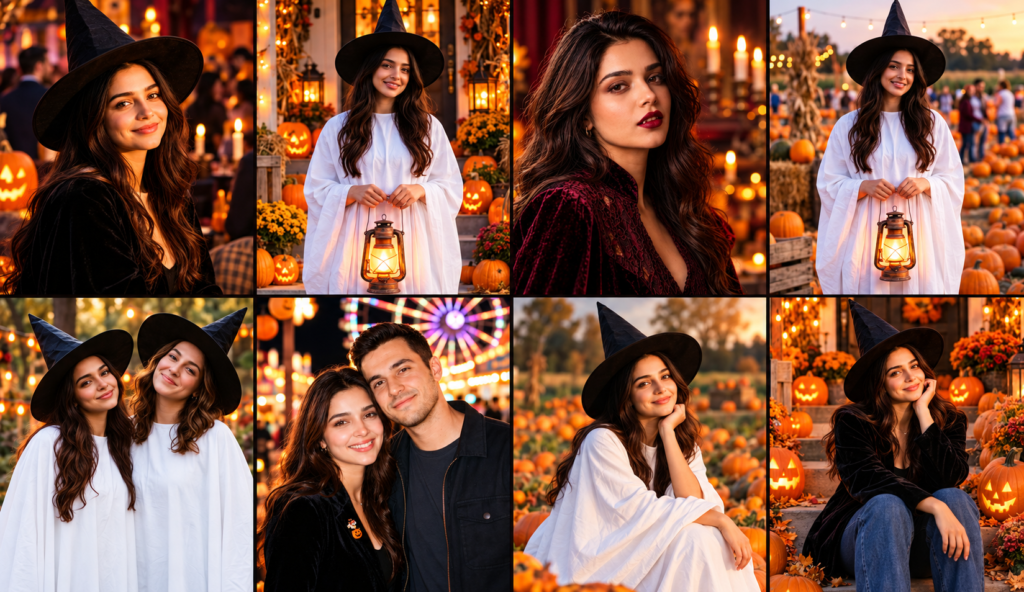
I love the mix of spooky and cute Halloween photos, especially when the lighting looks real. These Halloween AI photo prompts cover everything from party portraits and dark vampire makeup to cute ghost photos with white sheets and witch hats. They are useful when you want an AI Halloween photoshoot without buying a full costume or setting up a real pumpkin patch.
I have included different looks for anyone who wants a Halloween photo edit for Instagram, a spooky DP for WhatsApp, or a stylish party picture. You will find warm pumpkin lights, dark streets, autumn leaves, lanterns, and fun costume ideas. Some prompts focus on sharp portraits, while others give you that dreamy, candid party feel.
You can try these prompts with Gemini AI or ChatGPT image features. Upload a clear photo of yourself and paste in the prompt that matches your chosen look. I recommend starting with one photo before trying several styles. Check whether the face, hair, and skin tone still look like you. Results can vary, so you may need to adjust a few details. The aim is to create a fun Halloween edit that still feels like a real photograph.
Why These Halloween Photo Prompts Are Fun to Try
I like these prompts because small details can change the whole mood of a photo. A direct camera flash makes a party portrait feel casual, while orange lantern light gives a ghost costume a softer look. The trick is to describe the light, pose, and setting clearly. That helps the final image feel more natural instead of looking like a digital costume poster.
10 Halloween AI Photo Prompts for Realistic Party Looks and Cute Ghost Photos
These Halloween looks mix realistic party photos with playful costume ideas. I have written each prompt around a different scene, so you can choose one that fits your style. Keep your original face photo clear, and change the outfit or background details when needed. For the best result, focus on natural skin texture and believable lighting.
Prompt 1. Halloween House Party Flash Portrait
This look is great for a stylish Halloween party picture with friends or a solo portrait. The prompt uses direct flash and a decorated indoor setting for a casual photo feel. A clear face photo is a good starting point for this style.
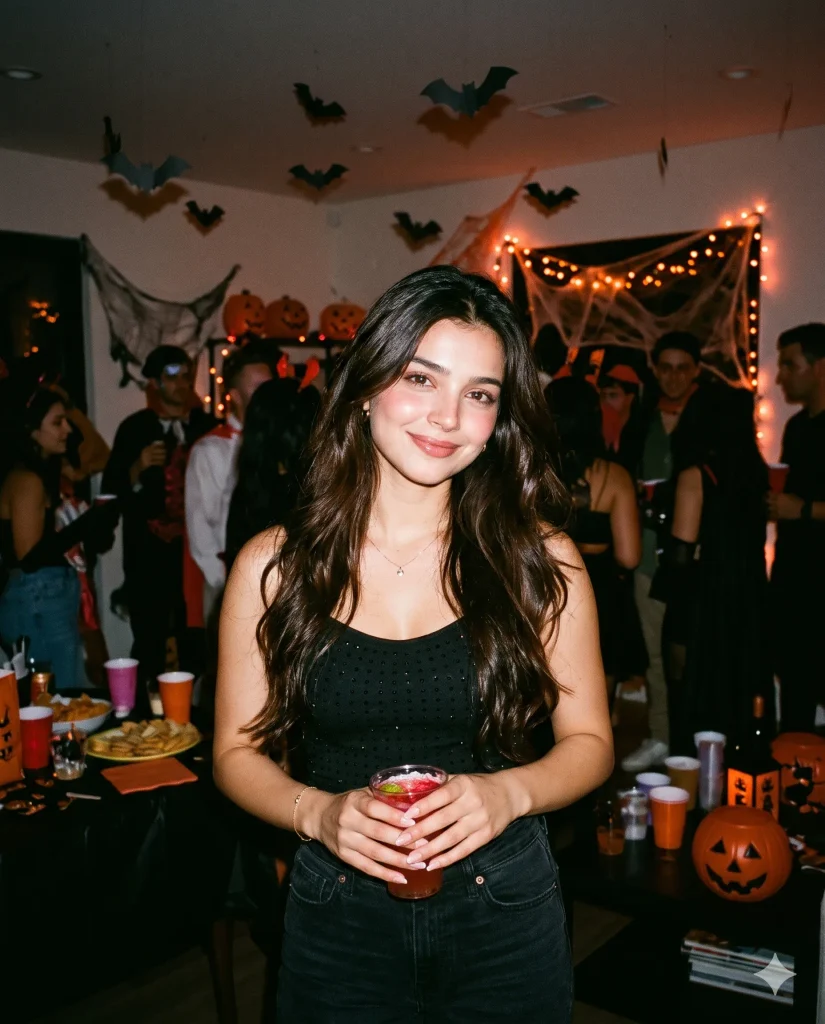
SCENE AND STYLE: Create a realistic Halloween house party portrait in a dim living room with orange lights and hanging decorations. IDENTITY PRESERVATION: Keep the uploaded adult subject's face, skin tone, and natural features unchanged. WARDROBE AND POSE: Add a stylish black party outfit, relaxed shoulders, and a playful confident smile. CAMERA AND LIGHTING: Use direct on camera flash, 35mm lens perspective, sharp eyes, and natural skin texture. SETTING DETAILS: Include guests softly blurred behind the subject. NEGATIVE PROMPT: face alteration, identity mismatch, plastic skin, artificial AI look, over smoothing, cartoon rendering, anime style, harsh digital HDR, distorted features, double jewelry overlays, cluttered backgrounds, text overlays.
Prompt 2. Cute Sheet Ghost in a Witch Hat
This prompt creates a playful ghost costume with a white sheet and a pointed witch hat. The goal is to keep the fabric folds believable and the overall look lighthearted. It works best when the sheet drapes naturally instead of looking stiff.
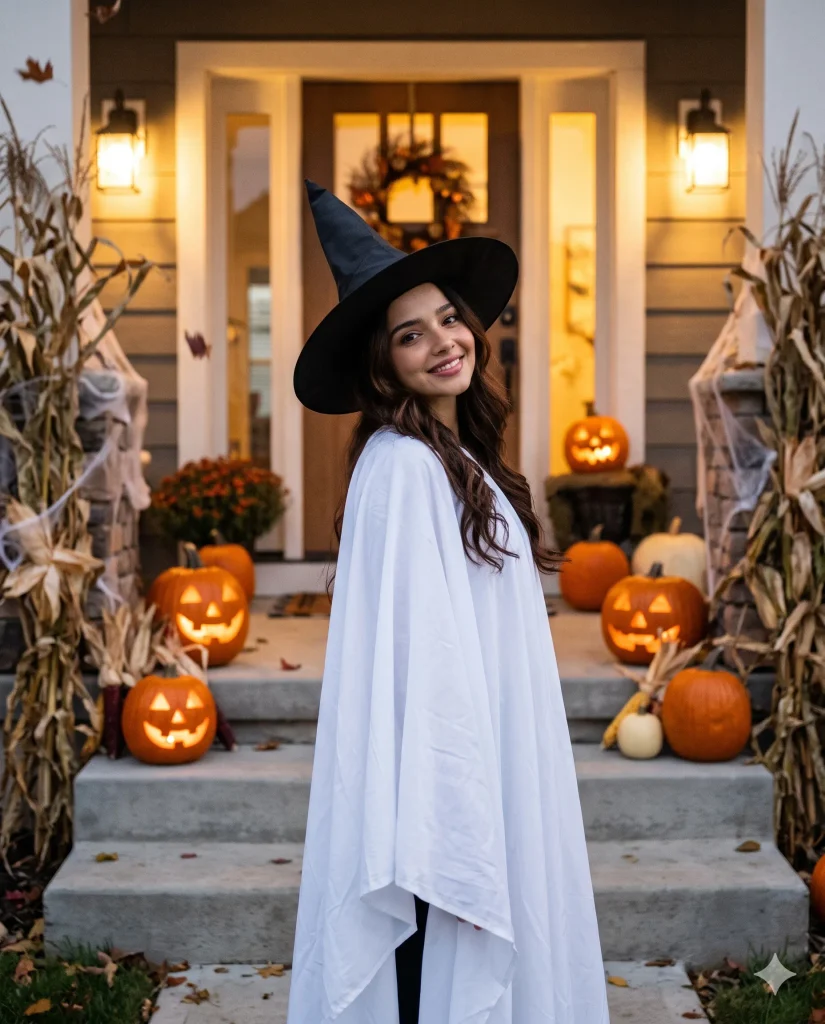
IDENTITY AND REALISM: Preserve the adult subject's recognizable face wherever visible, with natural skin and realistic proportions. COSTUME CONCEPT: Style a loose white sheet ghost costume with soft fabric folds and a classic black witch hat. SCENE SETUP: Place the subject on a decorated Halloween porch with a few pumpkins. POSE AND MOOD: Use a playful tilted head and a gentle, cheerful expression. CAMERA DETAILS: Capture a natural portrait with soft evening light and realistic shadows. NEGATIVE PROMPT: face alteration, identity mismatch, plastic skin, artificial AI look, over smoothing, cartoon rendering, anime style, harsh digital HDR, distorted features, double jewelry overlays, cluttered backgrounds, text overlays.
Prompt 3. Pumpkin-Lit Street Night Walk
This style gives your photo a cinematic Halloween night feel without making it look like a fantasy scene. Warm pumpkins and street lights create depth behind the subject. A slight movement in the background can make the picture feel like a real walk.
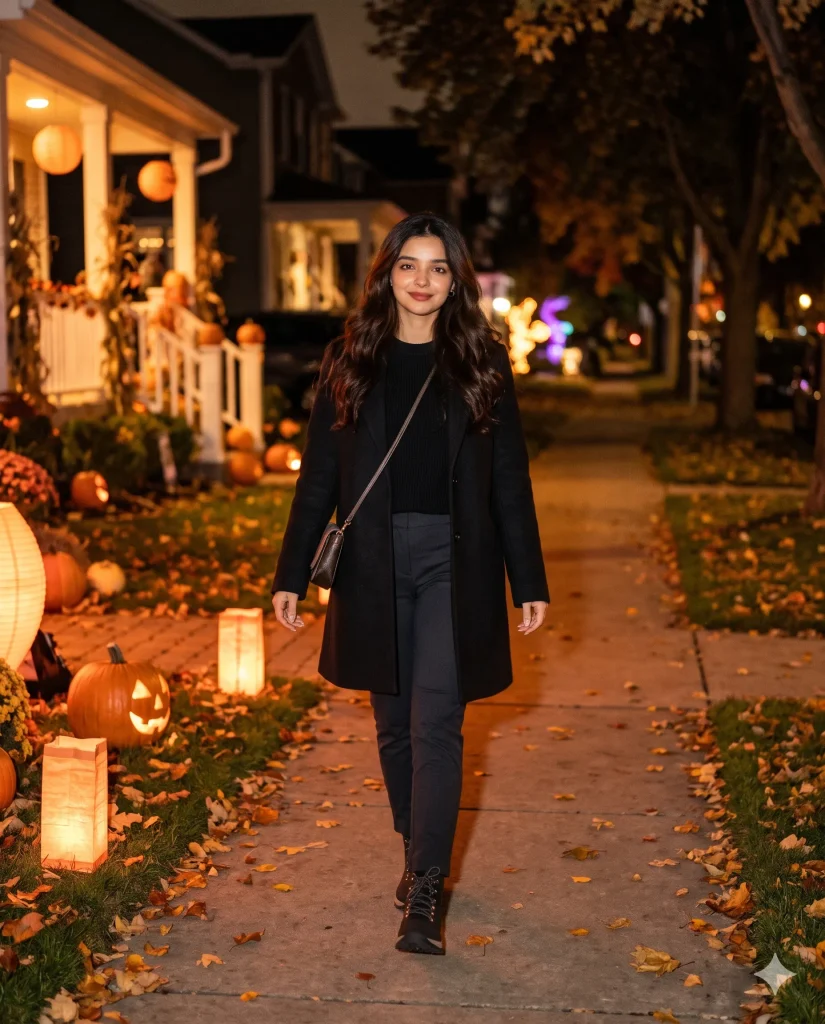
CAMERA AND NIGHT LIGHT: Use a realistic 50mm street portrait with warm pumpkin light, gentle shadows, and natural low light grain. SUBJECT IDENTITY: Preserve the adult subject's original facial structure, skin tone, and recognizable features. OUTFIT AND ACTION: Add a modern black Halloween outfit and capture the subject walking naturally with a relaxed expression. LOCATION AND MOOD: Set the scene on a decorated street with glowing pumpkins, lanterns, and fallen autumn leaves. STYLE CONTROL: Keep the face sharp while distant lights show subtle motion blur. NEGATIVE PROMPT: face alteration, identity mismatch, plastic skin, artificial AI look, over smoothing, cartoon rendering, anime style, harsh digital HDR, distorted features, double jewelry overlays, cluttered backgrounds, text overlays.
Prompt 4. Dark Romantic Vampire Close-Up
This look is for anyone who likes dark makeup and a dramatic portrait. Deep red lips, soft shadows, and detailed eye makeup create the vampire mood. Keep the makeup realistic so it does not hide the subject’s natural features.
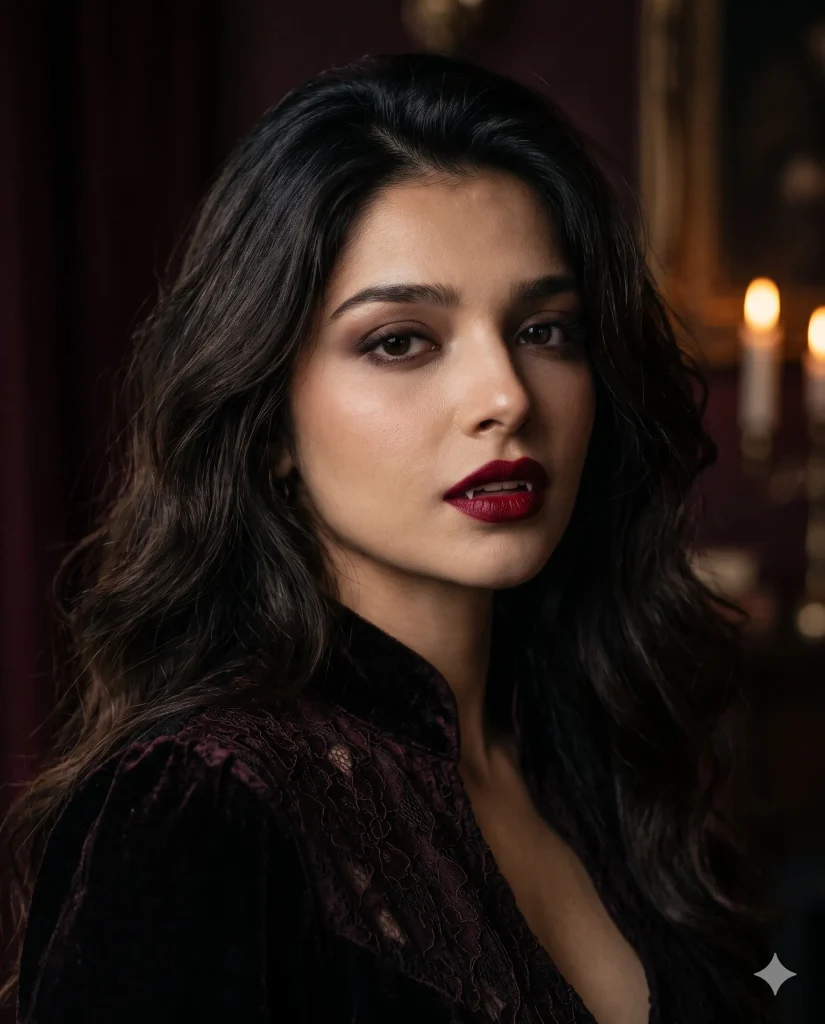
PORTRAIT DIRECTION: Create a dark romantic vampire close-up with a moody, realistic editorial style. MAKEUP AND EXPRESSION: Add deep red lipstick, softly smoky eyes, and a calm, intense expression on the adult subject. IDENTITY LOCK: Keep the uploaded face, facial proportions, and natural skin texture intact. LIGHTING AND LENS: Use an 85mm portrait lens look, soft side lighting, and gentle shadows. BACKGROUND: Add a blurred dark setting with subtle burgundy tones and faint candlelight. NEGATIVE PROMPT: face alteration, identity mismatch, plastic skin, artificial AI look, over smoothing, cartoon rendering, anime style, harsh digital HDR, distorted features, double jewelry overlays, cluttered backgrounds, text overlays.
Prompt 5. Lantern-Holding Ghost at a Pumpkin Patch
A white ghost costume looks especially fun beside glowing pumpkins. This prompt adds a lantern to create warm light around the fabric and hands. Keep the scene simple so the costume remains the main focus.
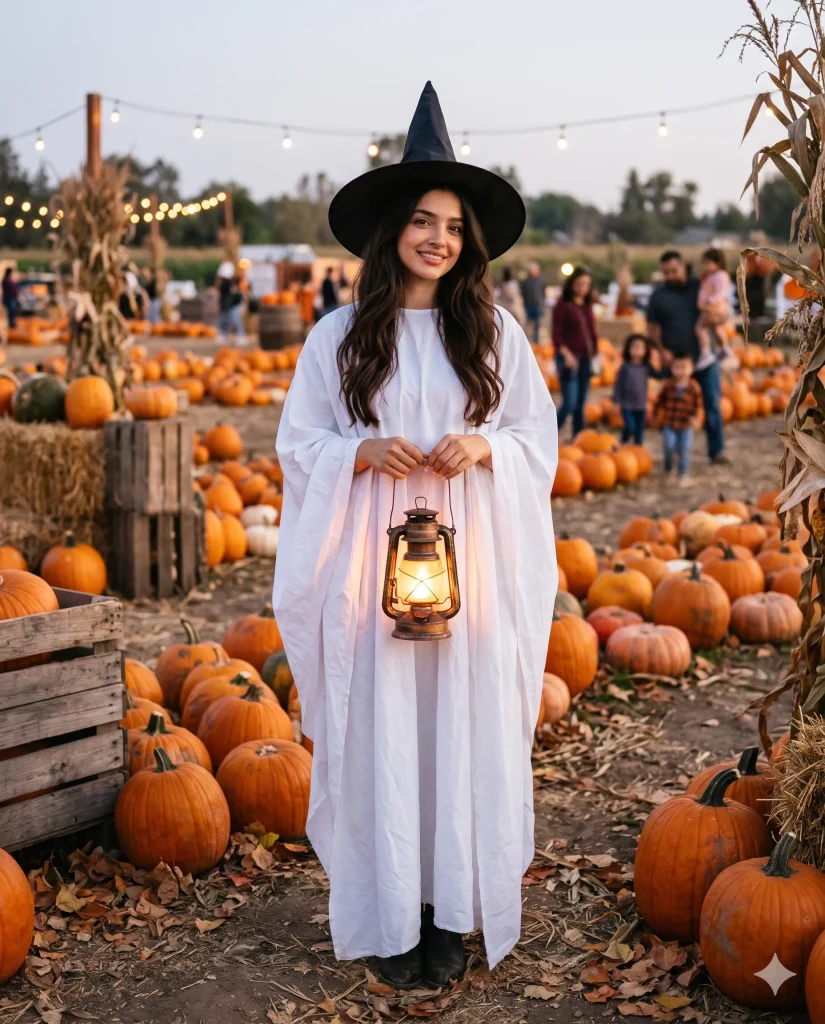
ENVIRONMENT AND STYLE: Place an adult subject in a realistic pumpkin patch at dusk, surrounded by pumpkins and dry autumn leaves. COSTUME DETAILS: Create a white sheet ghost outfit with natural fabric folds and a simple witch hat. FACE PRESERVATION: Keep visible facial features recognizable and skin texture natural. ACTION AND LIGHT: Have the subject hold a glowing lantern with both hands, casting warm light on the sheet. CAMERA: Use a clear full body portrait with realistic shadows and soft background blur. NEGATIVE PROMPT: face alteration, identity mismatch, plastic skin, artificial AI look, over smoothing, cartoon rendering, anime style, harsh digital HDR, distorted features, double jewelry overlays, cluttered backgrounds, text overlays.
Prompt 6. Before-the-Party Costume Mirror Selfie
This prompt creates a casual mirror selfie before heading to a Halloween party. It keeps the room and phone reflection believable while adding a themed outfit. The result should feel more like a personal photo than a planned studio shoot.
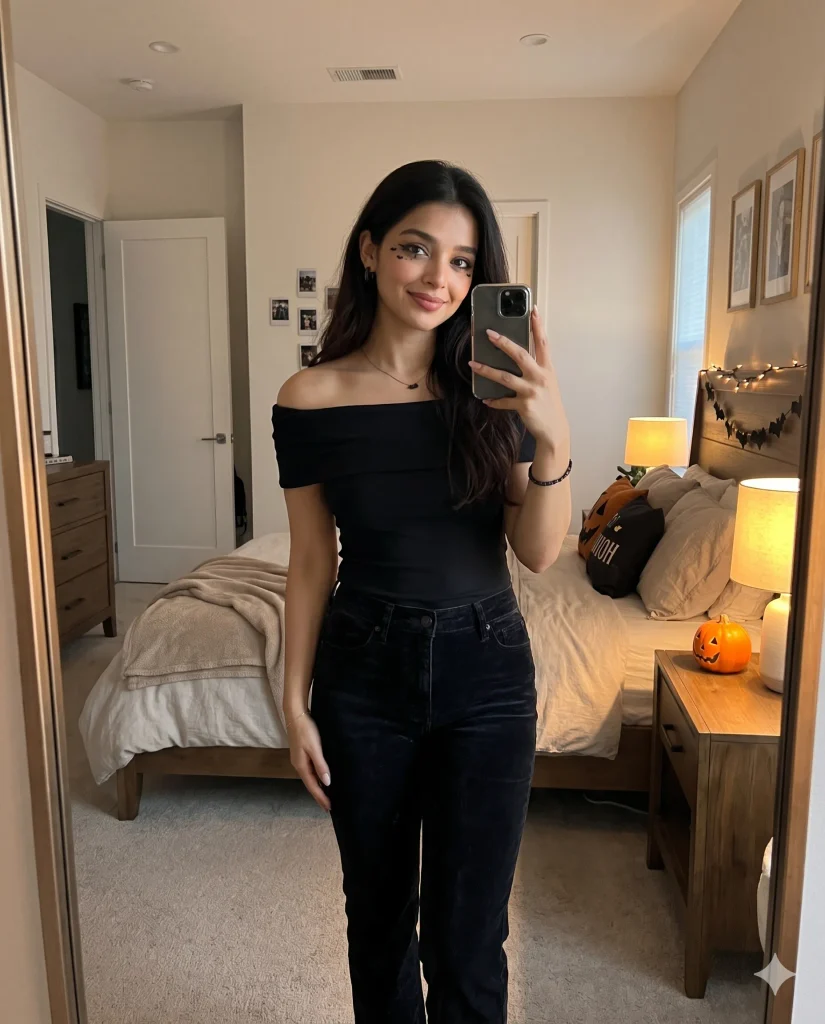
REALISM AND IDENTITY: Preserve the adult subject's original face, skin tone, and natural body proportions. SETTING: Create a believable bedroom mirror selfie scene with a tidy room and subtle Halloween decorations. OUTFIT AND POSE: Add a stylish black costume, simple spooky makeup, and a relaxed pose holding a phone naturally. CAMERA AND LIGHT: Use realistic indoor lighting, accurate mirror reflections, and natural smartphone photo detail. BACKGROUND: Include a small pumpkin and a warm bedside lamp. NEGATIVE PROMPT: face alteration, identity mismatch, plastic skin, artificial AI look, over smoothing, cartoon rendering, anime style, harsh digital HDR, distorted features, double jewelry overlays, cluttered backgrounds, text overlays.
Prompt 7. Best Friends’ Sheet Ghost Photoshoot
This is a fun option for two adult friends who want matching Halloween pictures. The white sheets and witch hats give the photos a simple shared theme. A little difference in pose helps each person look natural.
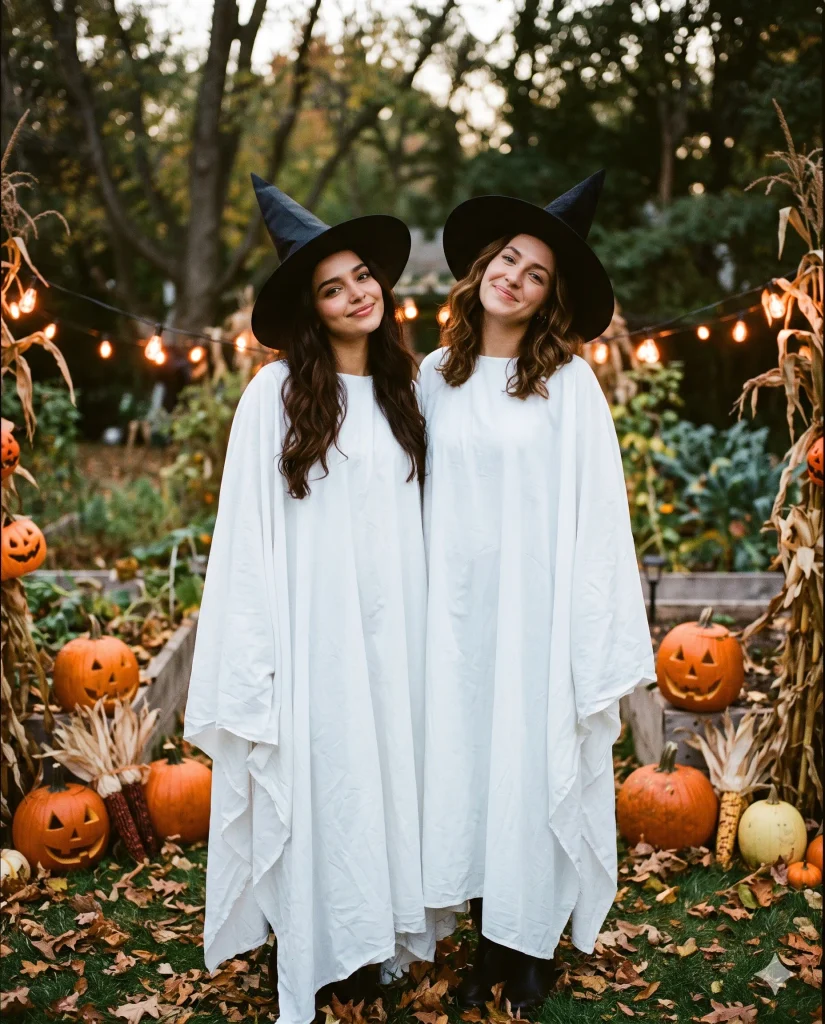
SUBJECT AND IDENTITY: Show two adult friends while preserving each person's recognizable facial features wherever visible. COSTUME STYLE: Dress both in white sheet ghost costumes with realistic folds and matching black witch hats. POSE AND EXPRESSION: Give them playful poses, slightly different head angles, and relaxed body language. SCENE: Use a Halloween decorated garden with pumpkins and fallen leaves. CAMERA AND LIGHT: Capture a realistic medium portrait with soft evening light, clear fabric detail, and natural shadows. NEGATIVE PROMPT: face alteration, identity mismatch, plastic skin, artificial AI look, over smoothing, cartoon rendering, anime style, harsh digital HDR, distorted features, double jewelry overlays, cluttered backgrounds, text overlays.
Prompt 8. Couple’s Halloween Carnival Snapshot
This prompt gives a couple’s photo a fun carnival mood with lights and Halloween decorations. The candid framing keeps it from feeling too posed. It is a good choice for a shared social media post.
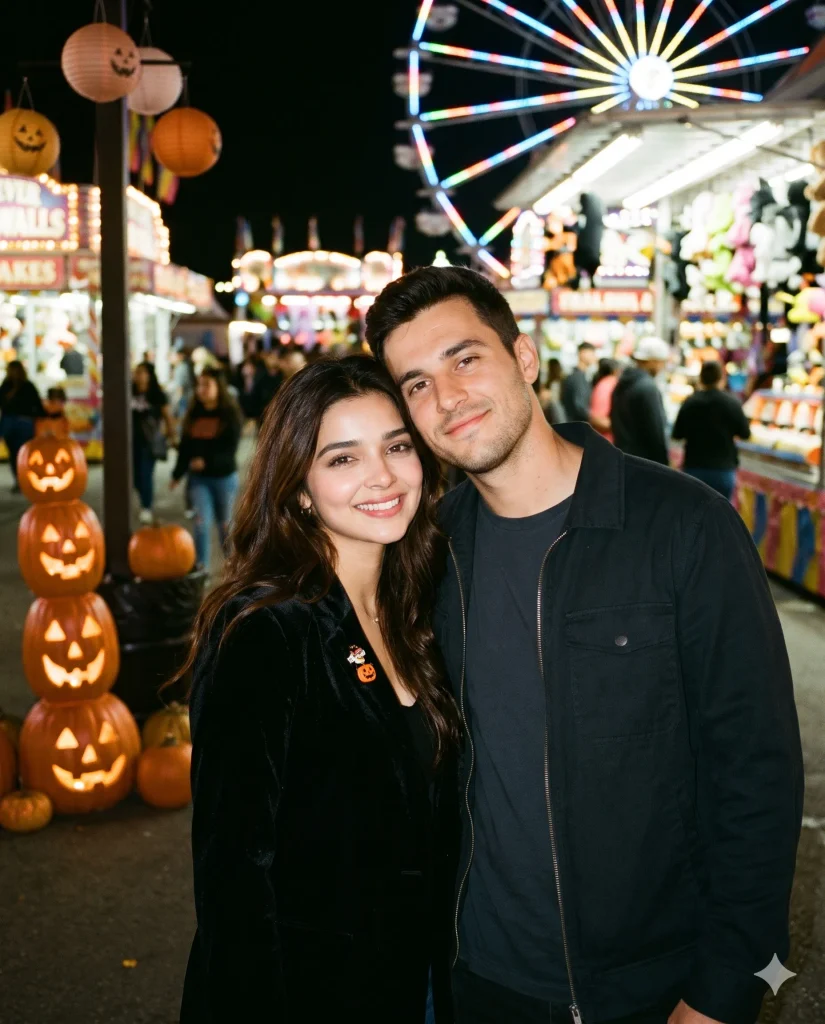
SCENE AND COMPOSITION: Create a realistic candid snapshot of an adult couple at a Halloween carnival after dark. IDENTITY DETAILS: Preserve both subjects' facial features, skin tones, and natural proportions. OUTFITS AND POSE: Give them stylish Halloween party outfits and a close, relaxed pose with genuine smiles. LIGHTING AND CAMERA: Use a 35mm snapshot look with colorful carnival lights, gentle flash, and natural motion in the background. SETTING: Include pumpkins, lanterns, and blurred rides behind them. NEGATIVE PROMPT: face alteration, identity mismatch, plastic skin, artificial AI look, over smoothing, cartoon rendering, anime style, harsh digital HDR, distorted features, double jewelry overlays, cluttered backgrounds, text overlays.
Prompt 9. Autumn Ghost with Pumpkins and Flying Bats
This look combines a cute ghost costume with autumn details and distant bats. The orange pumpkins contrast nicely with the white sheet. Keep the bats small and in the background for a believable Halloween scene.
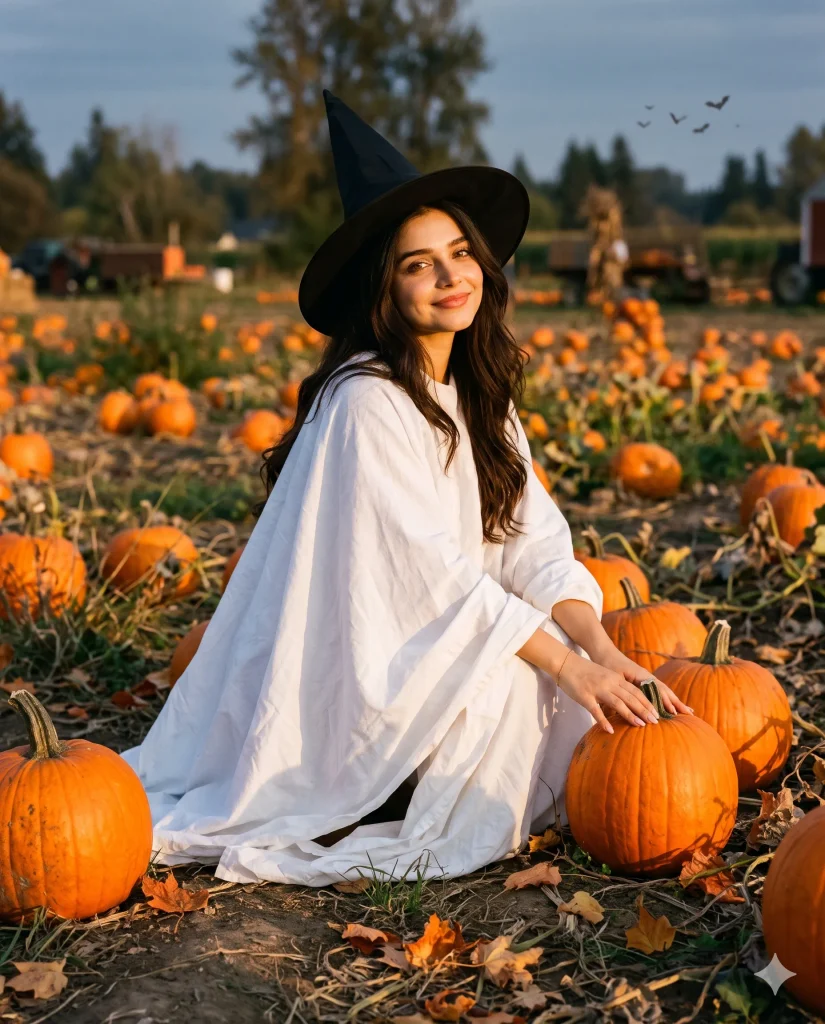
VISUAL SETUP: Create a realistic autumn portrait featuring an adult subject in a white sheet ghost costume. FACE AND BODY REALISM: Preserve recognizable facial features, natural proportions, and believable fabric contact. COSTUME AND POSE: Add a simple witch hat and a playful pose beside several pumpkins. LIGHT AND CAMERA: Use soft golden hour light, a portrait lens effect, and detailed autumn textures. BACKGROUND: Include fallen leaves, distant flying bats, and a softly blurred pumpkin patch. NEGATIVE PROMPT: face alteration, identity mismatch, plastic skin, artificial AI look, over smoothing, cartoon rendering, anime style, harsh digital HDR, distorted features, double jewelry overlays, cluttered backgrounds, text overlays.
Prompt 10. After-the-Party Porch Steps Candid
This final look feels like a relaxed photo taken at the end of a Halloween night. Slightly messy costume details and warm porch lighting add a casual mood. It works well for a candid portrait rather than a polished party pose.
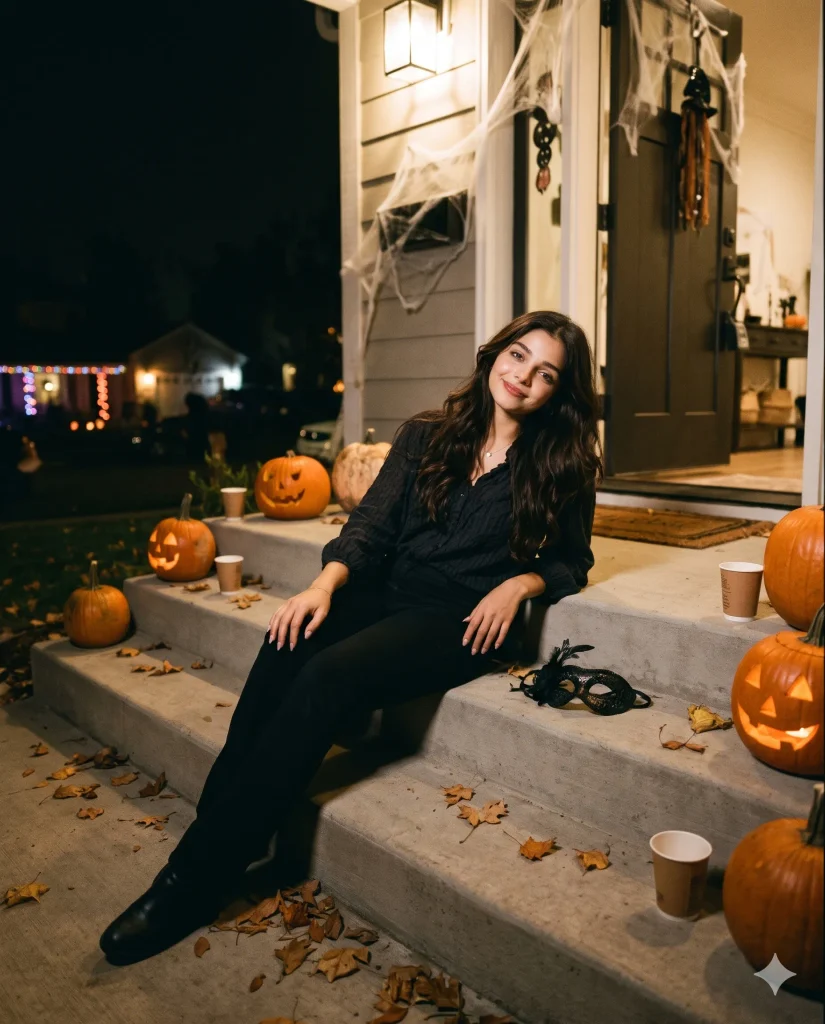
CAMERA AND ATMOSPHERE: Capture a realistic candid photo on porch steps after a Halloween party, using warm porch lighting and a natural 35mm perspective. IDENTITY PRESERVATION: Keep the adult subject's original face, skin tone, and recognizable features intact. OUTFIT AND BODY LANGUAGE: Show a slightly rumpled party costume, relaxed shoulders, and a tired but happy expression. ENVIRONMENT: Add a few pumpkins, scattered autumn leaves, and soft distant party lights. IMAGE FINISH: Keep skin texture natural and shadows believable. NEGATIVE PROMPT: face alteration, identity mismatch, plastic skin, artificial AI look, over smoothing, cartoon rendering, anime style, harsh digital HDR, distorted features, double jewelry overlays, cluttered backgrounds, text overlays.
How I Use These Prompts in Gemini AI or ChatGPT
- Choose a clear photo. Use a well lit portrait where your face is easy to see. Avoid strong filters and heavy shadows.
- Open your AI tool. Upload your photo to Gemini AI or ChatGPT’s image feature. Paste one complete prompt into the chat.
- Check the first result. Look at your face, hands, costume folds, and lighting. Make sure the outfit and background match your idea.
- Fix anything that looks wrong. Ask the tool to keep your original face and change only the costume or setting. Try again if the face looks different.
Best Image Size for Halloween Photos
For Instagram posts, a 4:5 portrait size works well. Try 1080 x 1350 pixels for a standard feed post. For Instagram Stories, use 1080 x 1920 pixels. A square 1:1 crop is useful for a WhatsApp DP.
My tip: Generate the image first, then crop it. This helps keep your face and costume inside the frame.
How to Make These Prompts More Personal
- Change the outfit description to match your own Halloween costume.
- Replace orange lighting with purple or red lights for a darker mood.
- Add a witch hat, vampire makeup, or a lantern if you want extra details.
- Mention your preferred background, such as a party room or pumpkin patch.
- Ask for natural skin texture if the result looks too smooth.
Keep your original face photo as the main reference. Change one or two details at a time so you can see what makes a difference.
How to Share Your Halloween Photos on Social Media
Post your vampire portraits on Instagram or use a cute ghost photo for your WhatsApp DP. You can also make a carousel with several different Halloween looks.
Caption idea: “A little spooky, a little cute. Which Halloween look is your favourite?”
Try relevant hashtags such as #HalloweenAIPhoto, #HalloweenPhotoIdeas, #GhostCostume, #VampireMakeup, and #AIPhotoEditing.
My tip: Pick a cover photo with a clear face and strong lighting. It helps your post stand out in the feed.
Questions People Ask Me About This
1. How can I make realistic Halloween photos with AI?
Start with a clear reference photo and describe the lighting, outfit, and setting. Ask for natural skin texture and realistic shadows to avoid an artificial finish.
2. Can I use these Halloween prompts with Gemini AI?
Yes, you can try these prompts with Gemini AI’s image features. The results depend on the feature available to your account and how it handles your reference photo.
3. What if AI changes my face in a Halloween photo?
Ask the tool to preserve your facial features and edit only your clothes, makeup, and background. You may need to try again if it still changes your face.
4. How do I create a cute ghost photo with a white sheet?
Describe a loose white sheet with natural folds and a simple witch hat. Add warm pumpkin lights and a relaxed pose for a playful Halloween look.
5. Which Halloween AI photo prompt is best for Instagram?
The house party flash portrait and vampire close-up are good options for Instagram posts. The sheet ghost and pumpkin patch looks work well for playful photos and carousels.
Last Words
The small details make the biggest difference in Halloween AI photos. A white sheet can look surprisingly convincing when the fabric folds and shadows feel natural. The same goes for vampire makeup, which looks better when it follows the face instead of hiding it.
I’d start with the cute sheet ghost if you want something fun and simple. Choose the vampire close-up if you prefer a darker, more dramatic look. You can also try the party portrait for a photo that feels like a real night out.
Remember that your first result may not be perfect. Adjust the prompt and try again until the image feels right for you. Most importantly, keep the look fun and make it your own.
Which style would you like to explore next?
Cute ghost photos Dark vampire portraits Halloween couple photos