
If you like trying new photo edits in ChatGPT, these ChatGPT photo editing codes can make the process much easier. Instead of writing a long prompt every time, you can upload your photo and use a short code with a simple editing instruction. Codes such as /FACEFIX, /DSLR and /Y2K can be used as simple shortcuts for different editing ideas. These codes work for both boys and girls and can help change outfits, backgrounds, poses, lighting, camera looks, old photo styles, and more. I have added many short photo editing codes in this post that are useful for different looks and creative ideas.
You can simply pick a code, copy and paste the code prompt into your ChatGPT photo edit, and then add the change you want. Some of these photo editing codes are also inspired by the short edit ideas people are sharing on Instagram. The goal here is not to make you learn complicated prompts. It is to give you easy codes that you can actually use with your own photos and experiment with different styles.
ChatGPT does not need the full instruction written out for these codes to work. Once you type a code like /AESTHETIC or /Y2K along with your photo, ChatGPT reads the word, understands the style it points to, and fills in the rest of the editing details on its own. That is why the codes stay short. You are not writing the actual editing instructions yourself, you are just naming the style, and ChatGPT handles the rest.
What are ChatGPT photo editing codes?
A photo editing code is simply a short text instruction that represents a bigger visual idea.
For example, instead of writing a long description for a Y2K style photo, you can use:
- /Y2K
You can also combine it with another visual direction:
- /Y2K /FLASHCAM
The first code can define the main era or aesthetic. The second can guide the camera feeling.
This makes the codes useful as shortcuts. They can also be combined with a normal sentence when you need more control over the final image.
For example:
- /ROYALWEAR /PALACESCENE
You can then add a short instruction about the exact colour or clothing you want.
How to use photo editing code in ChatGPT
The process is simple.
- Open ChatGPT and upload the photo you want to edit.
- Add one code from the list below.
- Tell ChatGPT to apply that visual direction to the uploaded photo.
- Check the result carefully.
- If you want another visual element, add one related code rather than using many unrelated codes together.
For example:
- /DSLR /GOLDENSUN
For a new fashion look:
- /ETHNICWEAR /WEDDINGHALL
I prefer starting with one or two codes. This makes it easier to understand which instruction actually changed the photo.
100 ChatGPT Photo Editing Codes You Can Try
Below are 100 original shorthand codes arranged into 10 categories. Each section focuses on a different type of photo edit.
1. Face Style Codes
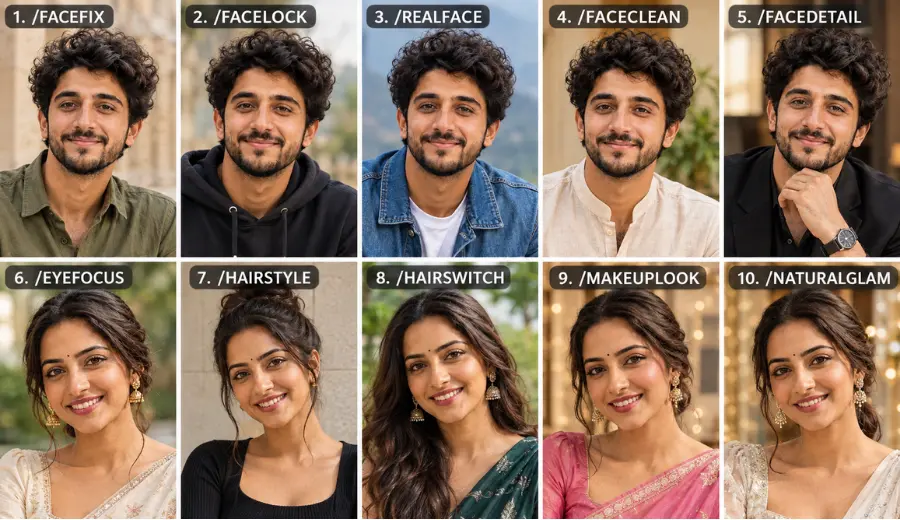
These codes are mainly for facial appearance and identity focused edits. I kept them separate from general photo enhancement because the goal here is changing or controlling specific face related details.
| ChatGPT Code | What Kind of Result It Targets |
|---|---|
/FACEFIX | Tells ChatGPT to focus on keeping the face consistent while making the requested edit. |
/FACELOCK | Gives stronger priority to preserving the original facial appearance during the transformation. |
/REALFACE | Pushes the edited face toward natural facial detail instead of an overly artificial finish. |
/FACECLEAN | Creates a cleaner facial appearance while keeping the overall identity direction intact. |
/FACEDETAIL | Places more attention on small facial details such as eyes, brows and natural skin texture. |
/EYEFOCUS | Gives the eyes stronger visual attention while keeping their basic appearance consistent. |
/HAIRSTYLE | Changes the hairstyle while keeping the rest of the visual concept under control. |
/HAIRSWITCH | Requests a clearly different hairstyle that fits the overall photo styling. |
/MAKEUPLOOK | Adds a specific makeup direction instead of applying a generic beauty treatment. |
/NATURALGLAM | Creates a dressed-up facial styling direction while keeping the overall look restrained. |
While testing these, I noticed /REALFACE gave a more natural looking result compared to /FACELOCK, which sometimes made the expression look a little stiff. If your result feels too rigid, try switching between these two codes and see which one suits your photo better.
2. Outfit Change Codes
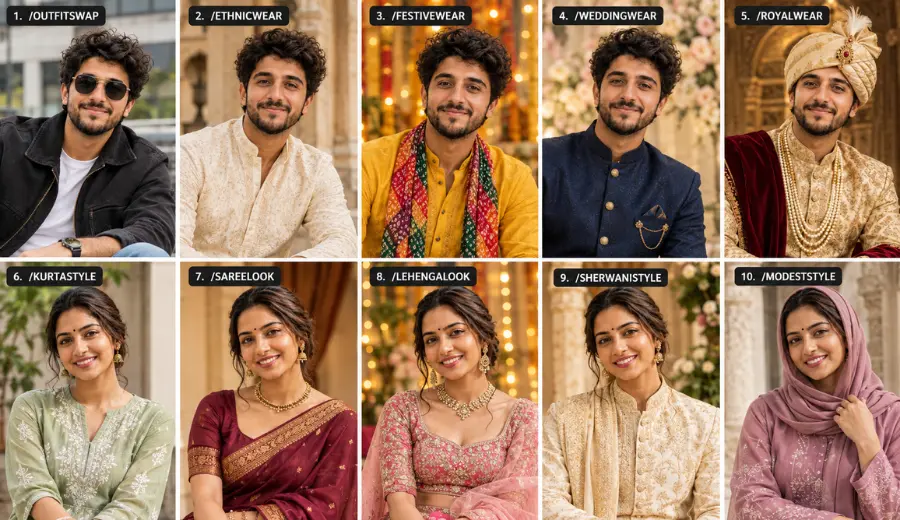
Outfit editing is one of the easiest ways to create a completely different image from the same uploaded photo. These codes focus on clothing and styling rather than image quality.
One thing I found useful is combining an outfit code with a small colour instruction, since ChatGPT sometimes picks a random shade on its own. Typing something like /SAREELOOK in a deep maroon shade gives a more predictable result than using the code alone.
| ChatGPT Code | What Kind of Result It Targets |
|---|---|
/OUTFITSWAP | Replaces the current clothing with a new outfit direction. |
/ETHNICWEAR | Changes the clothing toward Indian ethnic styling. |
/FESTIVEWEAR | Creates a colourful festive clothing direction suitable for celebrations. |
/WEDDINGWEAR | Gives the outfit a formal wedding function appearance. |
/ROYALWEAR | Creates a richer traditional outfit with regal styling details. |
/KURTASTYLE | Changes the clothing toward a traditional kurta based look. |
/SAREELOOK | Creates a saree based styling direction with suitable draping. |
/LEHENGALOOK | Changes the outfit toward a detailed lehenga style. |
/SHERWANISTYLE | Creates a traditional sherwani based wedding or formal look. |
/MODESTSTYLE | Gives the clothing a more covered and refined styling direction. |
3. Background Change Codes
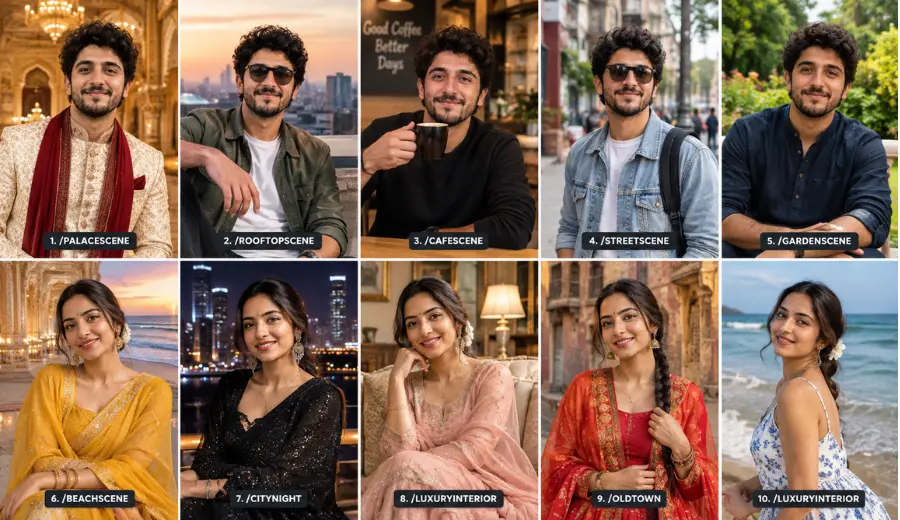
A background can completely change the story of an image. These codes are meant for scene replacement rather than simple background blur.
| ChatGPT Code | What Kind of Result It Targets |
|---|---|
/SCENESWAP | Replaces the existing environment with a new scene. |
/PALACESCENE | Places the photo inside a grand palace inspired setting. |
/ROOFTOPSCENE | Creates an open rooftop environment with an urban atmosphere. |
/CAFESCENE | Moves the photo into a realistic modern cafe setting. |
/STREETSCENE | Creates a natural street photography environment. |
/GARDENSCENE | Adds a landscaped garden setting with greenery and depth. |
/BEACHSCENE | Places the photo in a coastal environment with natural surroundings. |
/CITYNIGHT | Creates an urban night environment with practical city lights. |
/LUXURYINTERIOR | Moves the scene into an elegant premium interior. |
/OLDTOWN | Creates an older town or heritage street environment around the subject. |
4. Camera and Angle Codes
These codes focus on how the final photograph appears to have been captured. They can change the perspective, framing and camera position.
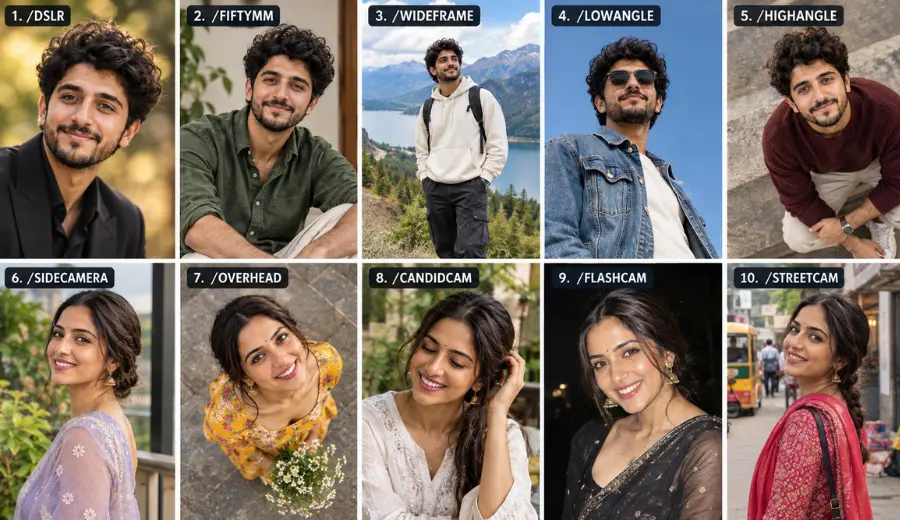
| ChatGPT Code | What Kind of Result It Targets |
|---|---|
/DSLR | Gives the scene a DSLR inspired photography direction. |
/FIFTYMM | Creates a natural standard lens perspective with balanced proportions. |
/WIDEFRAME | Uses a wider composition to show more of the surrounding environment. |
/LOWANGLE | Places the camera lower for a stronger visual perspective. |
/HIGHANGLE | Creates a higher camera viewpoint looking gently downward. |
/SIDECAMERA | Uses a side positioned camera angle rather than a direct front view. |
/OVERHEAD | Creates a view from above for a noticeably different composition. |
/CANDIDCAM | Gives the image a spontaneous camera moment rather than a formal pose. |
/FLASHCAM | Creates a direct camera flash photography feeling. |
/STREETCAM | Gives the image a casual street photography camera direction. |
Camera codes like /LOWANGLE and /OVERHEAD change the entire composition, so I always recheck the background after using them. A background that looked fine from a normal angle can sometimes appear stretched or oddly placed once the camera angle changes.
5. Lighting Codes
Lighting can change the mood without replacing the entire scene. These codes are designed around different light sources and moods.
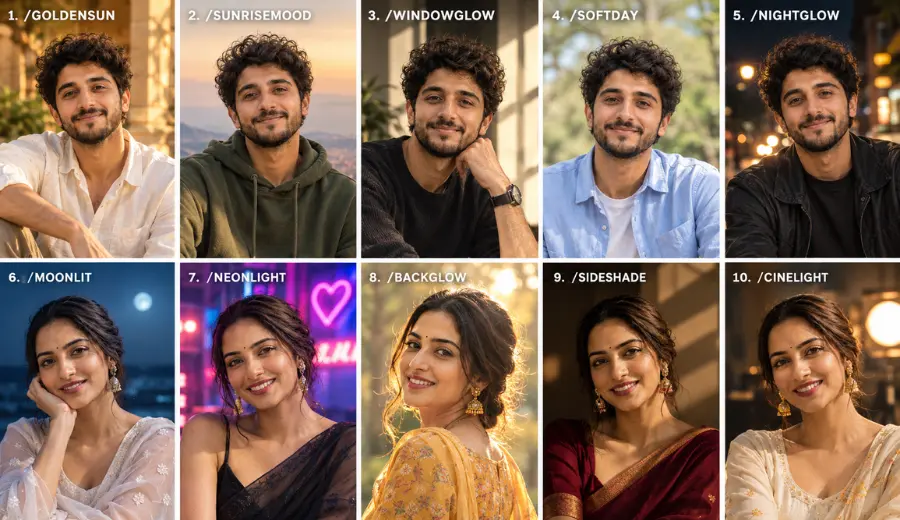
| ChatGPT Code | What Kind of Result It Targets |
|---|---|
/GOLDENSUN | Adds warm low angle sunlight similar to late afternoon light. |
/SUNRISEMOOD | Creates a soft early morning lighting atmosphere. |
/WINDOWGLOW | Uses directional window light as the main visual light source. |
/SOFTDAY | Creates gentle daylight without a harsh lighting direction. |
/NIGHTGLOW | Gives the scene a nighttime glow from surrounding practical lights. |
/MOONLIT | Creates a cool moonlit atmosphere for an evening scene. |
/NEONLIGHT | Adds colourful neon lighting to the surrounding environment. |
/BACKGLOW | Places a visible glow behind the subject for separation and atmosphere. |
/SIDESHADE | Uses stronger side lighting to create depth across the scene. |
/CINELIGHT | Gives the image a controlled movie inspired lighting setup. |
6. Y2K and Retro Codes
Retro photo edits remain useful because they can make a modern image feel like it came from another time. These codes focus on the visual character of different eras.
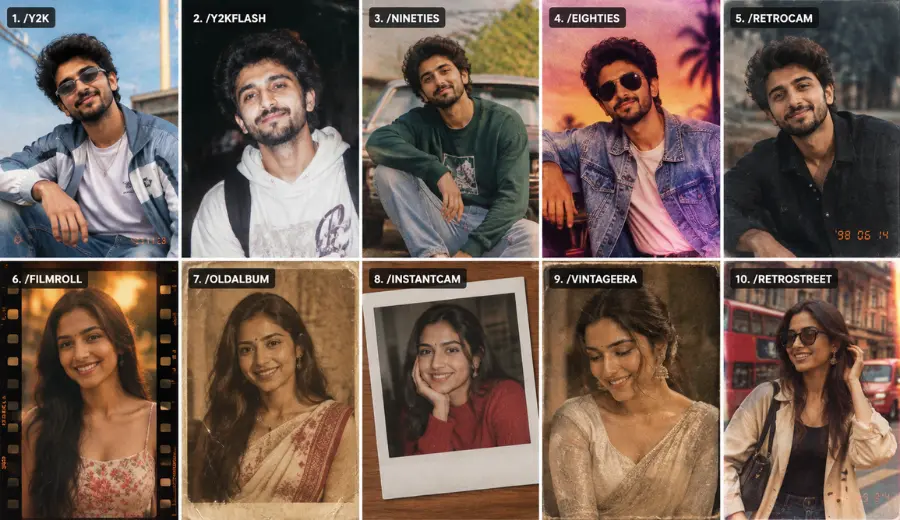
| ChatGPT Code | What Kind of Result It Targets |
|---|---|
/Y2K | Creates a playful early 2000s inspired photo direction. |
/Y2KFLASH | Combines a Y2K visual mood with direct flash photography. |
/NINETIES | Gives the image a 1990s inspired styling and camera feel. |
/EIGHTIES | Pushes the styling toward an older 1980s visual mood. |
/RETROCAM | Creates an old camera inspired photographic appearance. |
/FILMROLL | Gives the image the feeling of a photograph captured on a film roll. |
/OLDALBUM | Makes the scene feel like a photograph from an old family album. |
/INSTANTCAM | Creates an instant camera inspired composition and colour direction. |
/VINTAGEERA | Moves the entire styling toward an older photographic era. |
/RETROSTREET | Creates a nostalgic street photography atmosphere. |
7. Cinematic and Mood Codes
These codes are for people who want a normal photo to feel more like a carefully planned movie frame. The focus is on atmosphere rather than image sharpening.
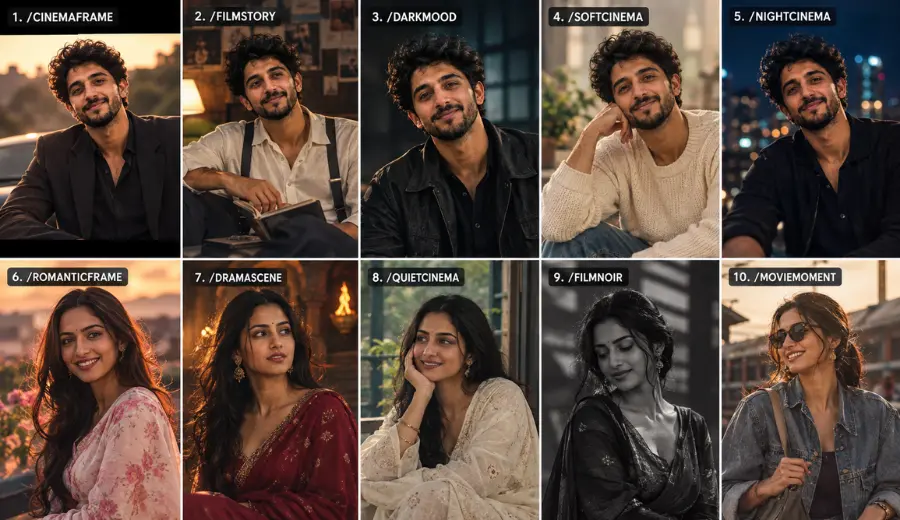
| ChatGPT Code | What Kind of Result It Targets |
|---|---|
/CINEMAFRAME | Gives the image a movie frame inspired composition. |
/FILMSTORY | Creates a visual scene that feels connected to a cinematic story. |
/DARKMOOD | Adds a deeper and more dramatic visual atmosphere. |
/SOFTCINEMA | Creates a gentle cinematic mood with softer visual contrast. |
/NIGHTCINEMA | Gives the photo a dramatic nighttime movie atmosphere. |
/ROMANTICFRAME | Creates a warm romantic visual mood without changing the basic scene unnecessarily. |
/DRAMASCENE | Gives the composition a stronger dramatic storytelling direction. |
/QUIETCINEMA | Creates a calm cinematic scene with restrained visual styling. |
/FILMNOIR | Moves the image toward a classic dark black and white inspired cinema mood. |
/MOVIEMOMENT | Makes the photo feel like a captured moment from a fictional film scene. |
8. Aesthetic and Fashion Codes
This group focuses on popular visual styling rather than one specific camera or background. These are useful when you want the complete visual mood to change.
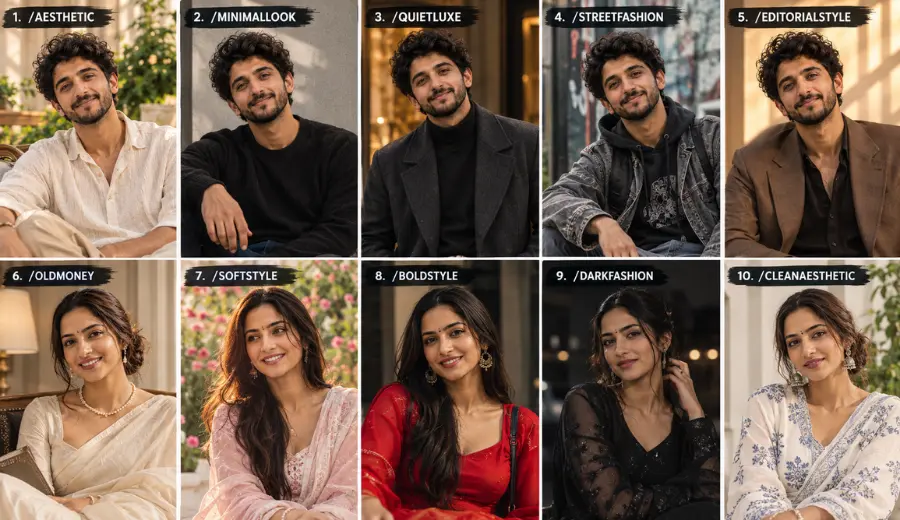
| ChatGPT Code | What Kind of Result It Targets |
|---|---|
/AESTHETIC | Creates a coordinated modern visual style across clothing, scene and colour. |
/MINIMALLOOK | Keeps the visual styling simple with fewer distracting elements. |
/QUIETLUXE | Creates an understated premium fashion atmosphere. |
/STREETFASHION | Gives the image a modern streetwear inspired styling direction. |
/EDITORIALSTYLE | Creates a fashion editorial inspired visual composition. |
/OLDMONEY | Uses classic refined clothing and surroundings for a timeless wealthy aesthetic. |
/SOFTSTYLE | Creates a gentle visual mood through softer styling and colours. |
/BOLDSTYLE | Uses stronger fashion choices and more noticeable visual contrast. |
/DARKFASHION | Creates a darker fashion focused styling direction. |
/CLEANAESTHETIC | Keeps the scene visually organized with a simple coordinated appearance. |
9. Weather and Environment Codes
Weather can change an ordinary photo into a completely different scene. These codes are useful when you want the environment to become part of the edit.
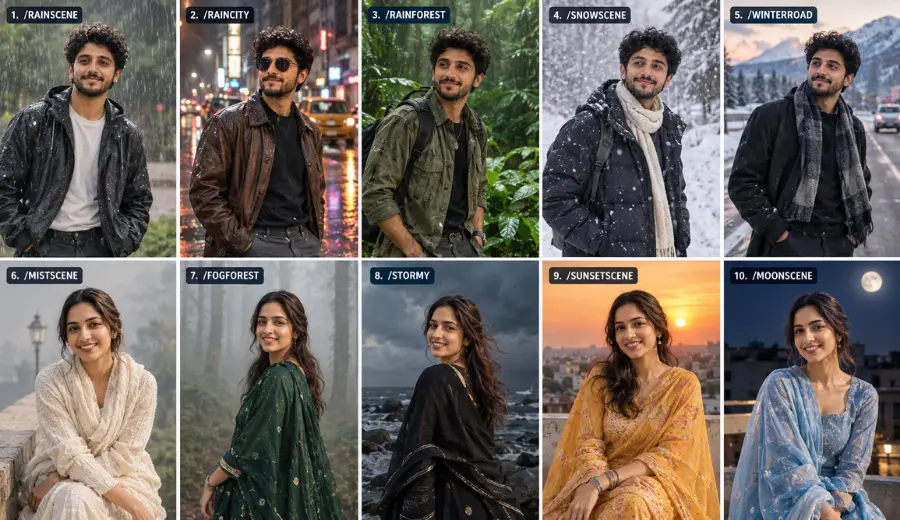
| ChatGPT Code | What Kind of Result It Targets |
|---|---|
/RAINSCENE | Turns the environment into a rainy scene with wet surroundings. |
/RAINCITY | Creates a rainy urban street atmosphere with reflections and lights. |
/RAINFOREST | Places the scene in a lush environment during rainfall. |
/SNOWSCENE | Creates a snowy environment with winter atmosphere. |
/WINTERROAD | Places the subject near a cold winter road setting. |
/MISTSCENE | Adds soft environmental mist to create more depth. |
/FOGFOREST | Creates a forest environment covered in atmospheric fog. |
/STORMY | Gives the environment a dramatic storm weather direction. |
/SUNSETSCENE | Builds the surrounding environment around a visible sunset. |
/MOONSCENE | Creates a nighttime environment with moon based illumination. |
10. Creative Transformation Codes
The final category is for stronger visual transformations. These can change the image into a distinctive creative scene rather than simply changing colours or clothing.
Codes in this category make bigger changes to the photo, so the face sometimes shifts more than expected. I usually pair a creative code with /FACELOCK, for example /CYBERCITY /FACELOCK, so the transformation happens around the person without changing who they look like.
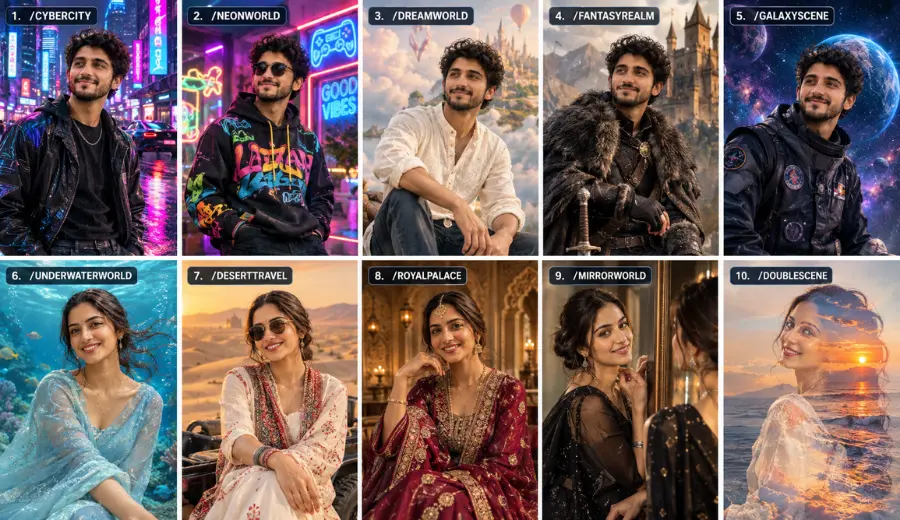
| ChatGPT Code | What Kind of Result It Targets |
|---|---|
/CYBERCITY | Turns the environment into a futuristic neon city setting. |
/NEONWORLD | Creates a colourful glowing world around the uploaded subject. |
/DREAMWORLD | Builds a soft imaginative environment around the original photo. |
/FANTASYREALM | Places the subject inside a fantasy inspired environment. |
/GALAXYSCENE | Creates a cosmic environment with stars and deep space elements. |
/UNDERWATERWORLD | Transforms the setting into an underwater visual scene. |
/DESERTTRAVEL | Places the subject in a dramatic desert travel environment. |
/ROYALPALACE | Creates a grand palace setting with formal royal styling. |
/MIRRORWORLD | Builds a creative scene around reflective mirror elements. |
/DOUBLESCENE | Creates an artistic composition where two visual environments blend together. |
How I Would Combine These Codes
The easiest way to use these codes is to give each one a clear job.
For example, if I wanted a retro camera style with warm evening light, I would use:
- /Y2KFLASH /GOLDENSUN
For a traditional clothing edit inside a grand setting:
- /ETHNICWEAR /ROYALPALACE
For an urban night scene:
- /STREETFASHION /CITYNIGHT /NEONLIGHT
The important part is not using as many codes as possible. Two or three related instructions are usually easier to understand than a long string of unrelated visual directions.
Can You Add Your Own Details With A Code?
Yes. A code can be the starting instruction rather than the entire prompt.
For example:
- /Y2KFLASH
Keep the original facial features and change the outfit to a casual early 2000s style. Use a realistic indoor flash photo setting.
This gives the model both a short visual shortcut and a specific instruction. You can also control a code by adding a colour, location or mood.
For example:
- /ROYALWEAR /PALACESCENE
Use deep emerald and antique gold clothing with warm evening lighting.
That makes the result more specific without turning the request into a very long prompt.
What I Noticed About Short Photo Editing Codes
Short codes are useful because they make repeated editing ideas easier to remember. But I would not expect one code to produce an identical result every time. The uploaded photo still matters. So does the surrounding instruction.
For example, /Y2K can create a broad early 2000s direction. Adding /FLASHCAM makes the camera feeling more specific. Adding a clothing instruction can then control the styling. I also prefer checking the face, hands, outfit edges and background after every major edit. If something looks wrong, a short follow-up instruction is usually easier than rebuilding the entire request.
FAQ
Can I use the same photo editing code on different pictures?
Yes. A short code can be reused on different photos, but the final result can change with each image. Face angle, clothes, background, lighting, and photo framing can affect how the edit appears.
Can I combine two or three photo editing codes?
You can try combining codes when the changes work well together. For example, you can mix a camera style with a lighting style or a background change. If too many changes are added at once, some details may not come out as expected.
Can I change the code wording to match my own idea?
Yes. These codes are short labels, not fixed commands that must always be used word for word. You can keep the code and add a simple instruction explaining the exact style, outfit, setting, mood, or visual change you want.
Are these photo editing codes only useful for Instagram trends?
No. You can use them for many personal photo ideas, including travel looks, fashion edits, old camera styles, cinematic scenes, festive photos, creative backgrounds, and different lighting moods. Instagram trends are simply one source of inspiration for these short editing ideas.


