
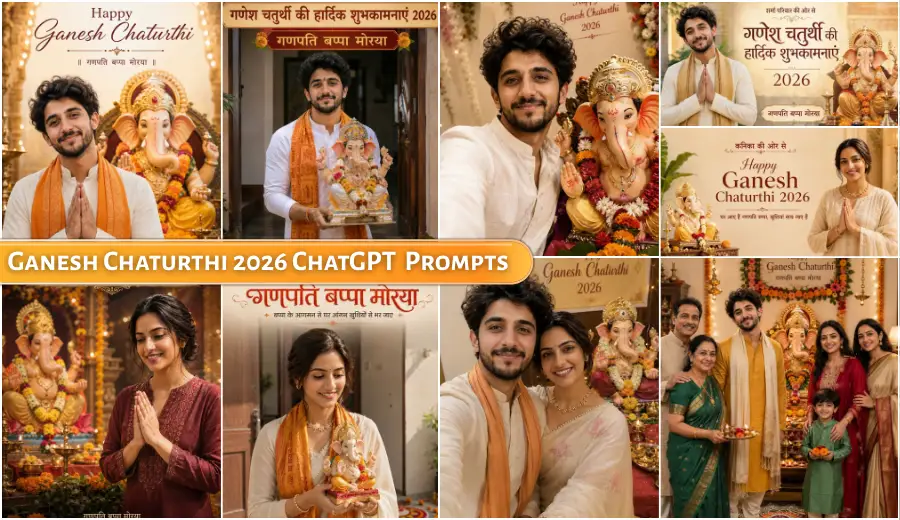
I wanted to make something special for Ganesh Chaturthi this year, so I started testing different Happy Ganesh Chaturthi poster prompts with my own photo. I tried decorated Ganesh Ji backgrounds, traditional outfits, prayer poses, home celebrations and festive banner designs. Some results looked too artificial, but after changing the lighting, pose and background details, I found a few combinations that felt much more natural. That is why I created these Ganesh Chaturthi poster prompts for anyone who wants to make a festive photo from their own picture. These copy paste AI photo prompts can be used for Ganesh Chaturthi photo editing, Ganpati poster ideas and festive banner photos.
I made these prompts specially for ChatGPT and tested them with realistic photo editing in mind. The uploaded photo stays as the main face reference, while each prompt changes the outfit, pose, setting, Ganesh Ji decoration and overall festival look. I have included different ideas for men, women and family photos, so the designs do not all look the same. Some prompts have a large Ganesh Ji idol behind the person, while others have a home welcome scene, friends celebration or a clean Happy Ganesh Chaturthi banner. I also kept the greeting text simple so the final photo does not look overloaded. You can try these prompts in ChatGPT first and also test them in Gemini AI.
How to Use These Poster Prompts in ChatGPT
- Choose a clear photo where your face is visible.
- Open ChatGPT and upload your photo.
- Copy your favorite Ganesh Chaturthi prompt and send it with the photo.
- Check the first result for your face, hands, outfit and background.
- If the face looks different, try the same prompt again.
- You can ask ChatGPT to change the outfit, pose or background.
- Check the final Happy Ganesh Chaturthi text before using the photo.
Happy Ganesh Chaturthi Photo Poster Prompts
I kept these 15 prompts very different from each other. Some have a clean poster design, while others feel like candid festival moments. Every prompt includes Happy Ganesh Chaturthi because that is the main greeting for this collection. I also used a few familiar Hindi Ganesh Chaturthi lines without filling the images with too much text.
Prompt 1. Bappa Ke Saath Namaste
This is the first style I would try for a clean festive poster. I kept the pose simple and gave the idol most of the background space.
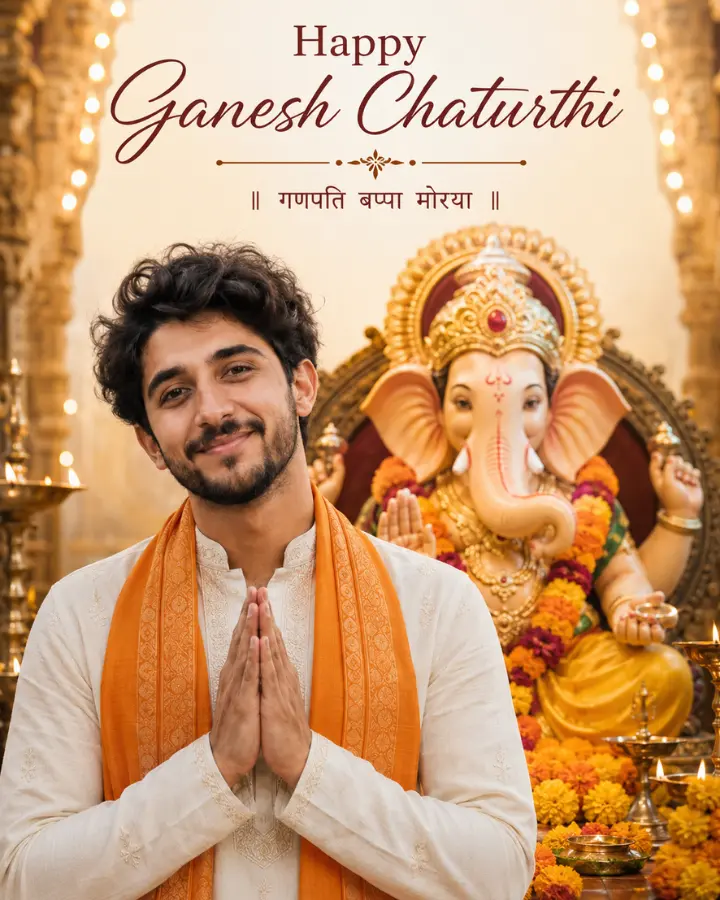
Create a premium realistic Ganesh Chaturthi 2026 festival poster using the uploaded photo as the exact face reference. Preserve the same facial identity, face shape, eyes, eyebrows, nose, lips, jawline, skin tone, natural marks and real skin texture. Keep the person standing with both hands joined in a respectful namaste pose, wearing an elegant cream kurta with a saffron stole. Place a large beautifully decorated Ganesh Ji idol directly behind, surrounded by fresh marigold flowers, brass diyas and warm golden temple lights. Use a 50mm full frame camera look, natural depth of field, realistic pores, sharp eyes and soft facial shadows. Leave clean space above the person's head for the greeting. Add refined text reading “Happy Ganesh Chaturthi” with “गणपति बप्पा मोरया” underneath. Negative prompt: altered face, different identity, fake skin, glossy skin, extra fingers, fused hands, malformed hands, duplicate person, distorted eyes, bad teeth, artificial lighting, excessive HDR, cartoon effect, plastic texture, messy typography, random text, blurry face.
Prompt 2. Ghar Mein Bappa Ka Swagat
I wanted this one to feel like a genuine home arrival moment. The warm doorway and flower decoration give it a personal festival feeling.
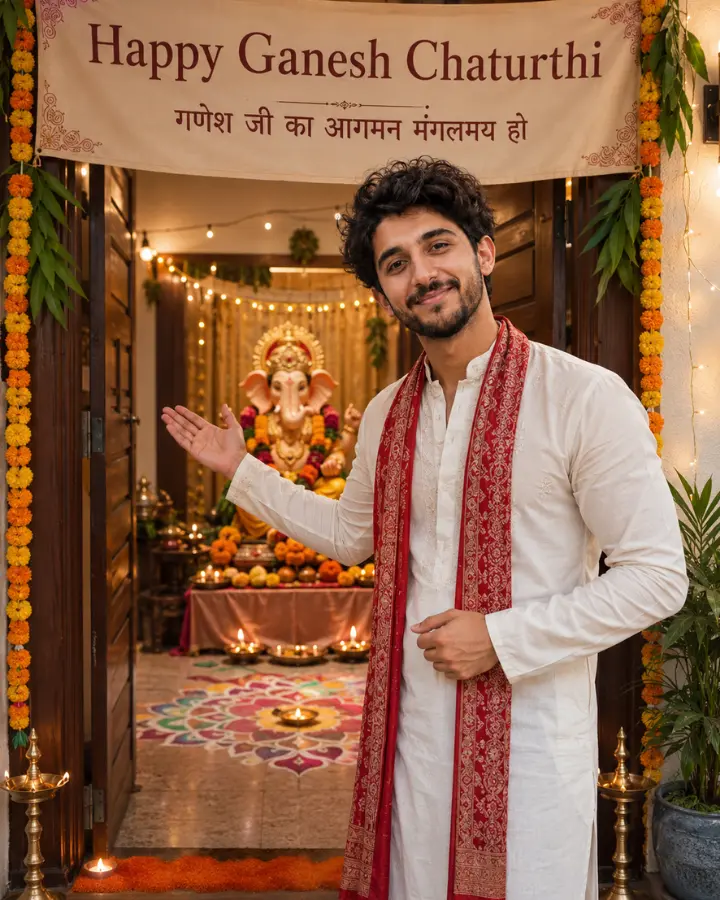
Turn the uploaded photo into a photorealistic Ganesh Chaturthi home welcome scene. Keep the person's exact facial identity unchanged, including facial proportions, eyes, eyebrows, nose, lips, cheeks, jawline, hairstyle and natural skin texture. Show the person standing beside a beautifully decorated home entrance, gently welcoming a Ganesh Ji idol with one hand raised toward the idol. Use a white traditional kurta with a red patterned stole and natural festive styling. Build the environment with a marigold toran, colorful rangoli, brass lamps and soft evening illumination. Capture the scene with an 85mm lens look and realistic background compression. Keep the expression happy and genuine. Add a fabric banner above the doorway saying “Happy Ganesh Chaturthi”. Under it, place only “गणेश जी का आगमन मंगलमय हो”. Negative prompt: face replacement, identity change, artificial skin, glass skin, extra arms, extra fingers, broken hands, unnatural joints, duplicated objects, fake shadows, oversaturated colors, CGI appearance, excessive sharpening, unreadable text, distorted idol.
Prompt 3. Friends Ke Saath Bappa Celebration
For this one, I went with a lively group scene. The main person stays clearly visible while the surrounding celebration adds energy.
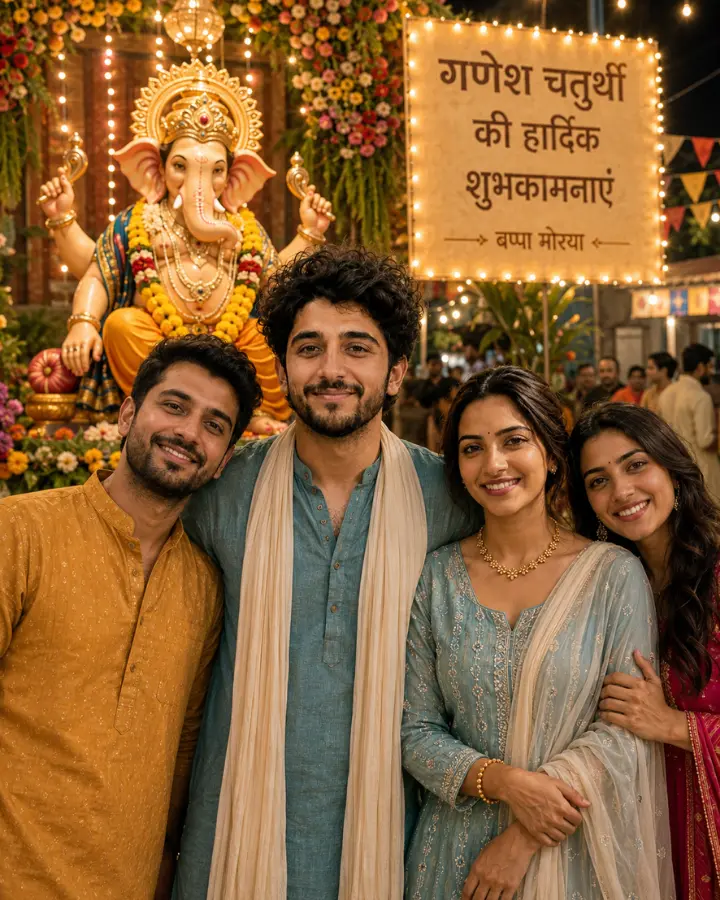
Use the uploaded image as the strict identity reference for the main person and create a realistic Ganesh Chaturthi celebration with a small group of friends. Preserve the exact original face, facial geometry, skin texture, hairstyle and recognizable natural features. Place the main person in the center wearing a muted teal kurta with a cream stole, standing naturally beside friends dressed in different traditional outfits. Everyone should have relaxed expressions and believable body positions. Set the scene around a large Ganesh Ji idol decorated with flowers and warm string lights. Use a 35mm documentary camera perspective, realistic ambient exposure, natural skin pores and gentle evening shadows. Add subtle festive movement in the distant background without making the scene crowded. Place “गणेश चतुर्थी की हार्दिक शुभकामनाएं” on a simple illuminated board behind the group. Add “बप्पा मोरया” in small lettering below. Negative prompt: identity mismatch, altered face, plastic skin, extra fingers, missing fingers, joined fingers, duplicated faces, unnatural poses, floating hands, distorted limbs, fake bokeh, excessive HDR, digital painting, random lettering, crowded composition.
Prompt 4. Ganpati Darshan Wala Look
I kept this edit peaceful and devotional. The person’s side pose makes the idol feel like part of the actual moment.
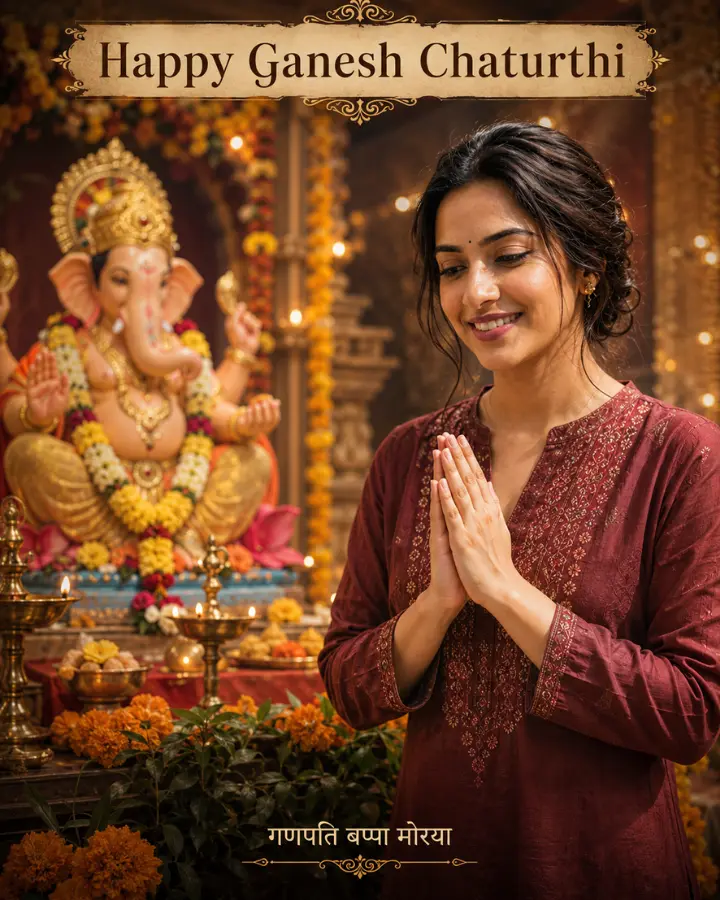
Create a natural Ganesh Chaturthi darshan photograph from the uploaded reference image. Lock the person's identity to the source photo with unchanged face structure, eyes, eyebrows, nose, lips, cheeks, jawline, skin tone, hairstyle and natural facial details. Position the person slightly sideways while looking respectfully toward a large Ganesh Ji idol. Keep both hands naturally joined near the chest. Dress the person in a deep maroon kurta with subtle traditional embroidery. The idol should stand on a decorated platform with flowers, brass lamps and soft incense atmosphere. Use a 70mm lens appearance, shallow but realistic depth, soft directional key light and gentle rim illumination from the decorations. Keep the expression peaceful and authentic. Add “Happy Ganesh Chaturthi” across a tasteful upper banner. Place “गणपति बप्पा मोरया” near the bottom in small clean lettering. Negative prompt: changed identity, modified face, artificial complexion, glossy skin, extra fingers, malformed hands, duplicated jewelry, incorrect anatomy, unnatural smile, harsh flash, fake shadows, CGI texture, excessive blur, distorted text, clutter.
Prompt 5. Ganesh Ji Ke Sath Family Photo
This version feels more intimate. I used a home puja setting instead of a large public celebration.
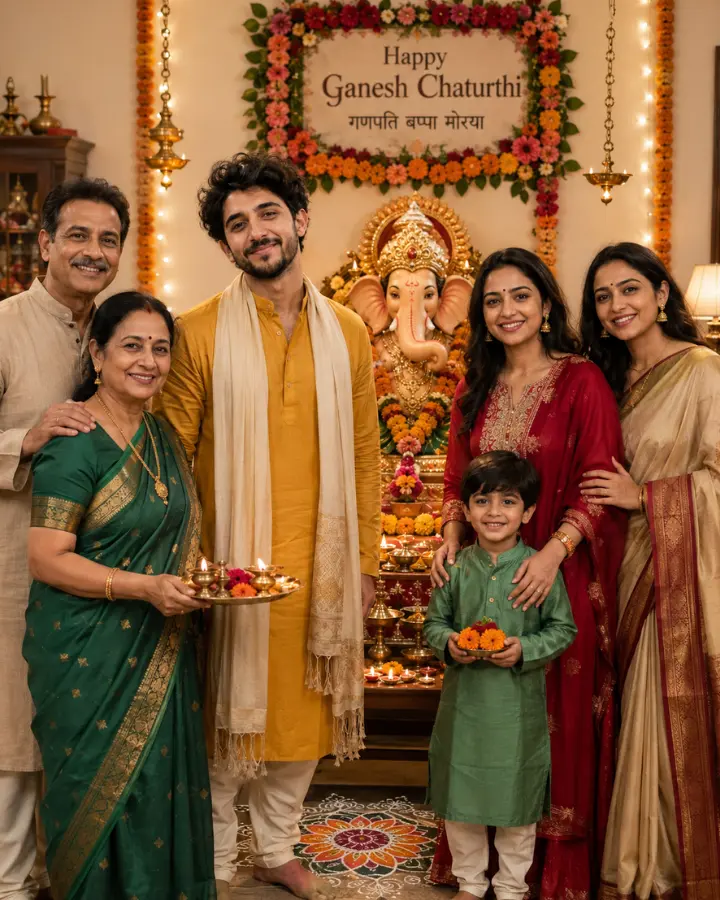
Create a high realism Ganesh Chaturthi family celebration using the uploaded photograph as the exact facial reference for the main person. Preserve the person's original identity and natural appearance without changing facial proportions, eyes, nose, lips, eyebrows, jawline, hairstyle or skin texture. Show the person standing with family members around a beautifully decorated Ganesh Ji idol inside a traditional living room. Give the main person a mustard yellow kurta with a simple cream stole. Family members should wear varied Indian festive clothing with different natural poses. Use warm practical lamps, marigold garlands, rangoli, brass puja items and realistic indoor shadows. Capture the scene with a 50mm DSLR style and balanced exposure. Keep the main face sharply focused. Add a small floral banner reading “Happy Ganesh Chaturthi” on the wall. Add “गणपति बप्पा मोरया” below it. Negative prompt: identity change, facial alteration, artificial skin, waxy face, extra hands, extra fingers, missing fingers, duplicated people, unnatural arms, distorted bodies, fake expressions, excessive saturation, unrealistic reflections, CGI appearance, blurry face, unwanted text.
Prompt 6. Ganesh Chaturthi Selfie With Bappa
This prompt gives a natural mobile selfie look with Bappa beside the person. I kept the scene simple so it feels like a real festival selfie.
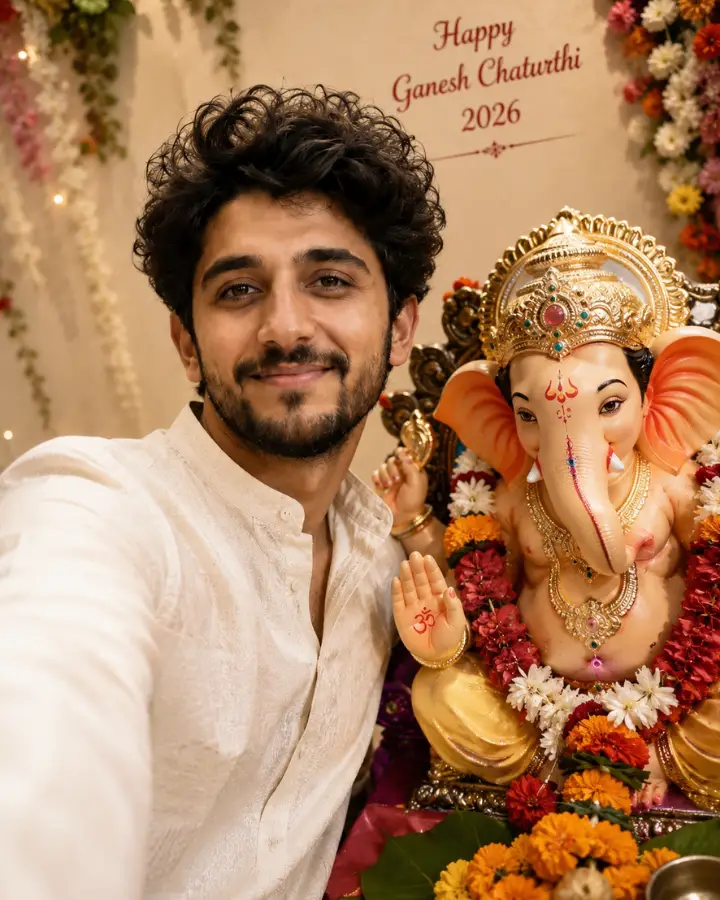
Create a highly realistic Ganesh Chaturthi 2026 mobile high angle selfie using the uploaded photo as the exact face reference. Preserve the person's identity completely, including the same face shape, eyes, eyebrows, nose, lips, cheeks, jawline, skin tone, natural pores, hairstyle and facial details. Show the person taking a genuine selfie with Ganesh Ji standing close beside them, with the person's arm naturally extended toward the camera. Use a slightly low mobile front high camera angle, as if the photo was captured casually from below eye level. The phone itself must remain completely outside the frame. Give the person a simple traditional kurta with realistic fabric and a natural festive expression. Keep Ganesh Ji beautifully visible but naturally positioned beside the person. Use realistic mobile camera exposure, mild lens distortion, natural skin texture, soft indoor festival lighting and authentic background depth. Add a small clean greeting in the background: "Happy Ganesh Chaturthi 2026". Keep everything believable like a genuine selfie taken during Ganesh Chaturthi. Negative prompt: altered face, identity mismatch, artificial skin, glass skin, extra fingers, malformed hands, duplicated face, phone visible, floating arm, unnatural selfie perspective, excessive beauty filter, fake bokeh, heavy HDR, CGI appearance, distorted idol, random text, unrealistic shadows.Prompt 7. High angle Selfie With Ganpati Bappa
I made this version from a different mobile camera angle. The person and idol stay close, while the background remains natural and lightly decorated.
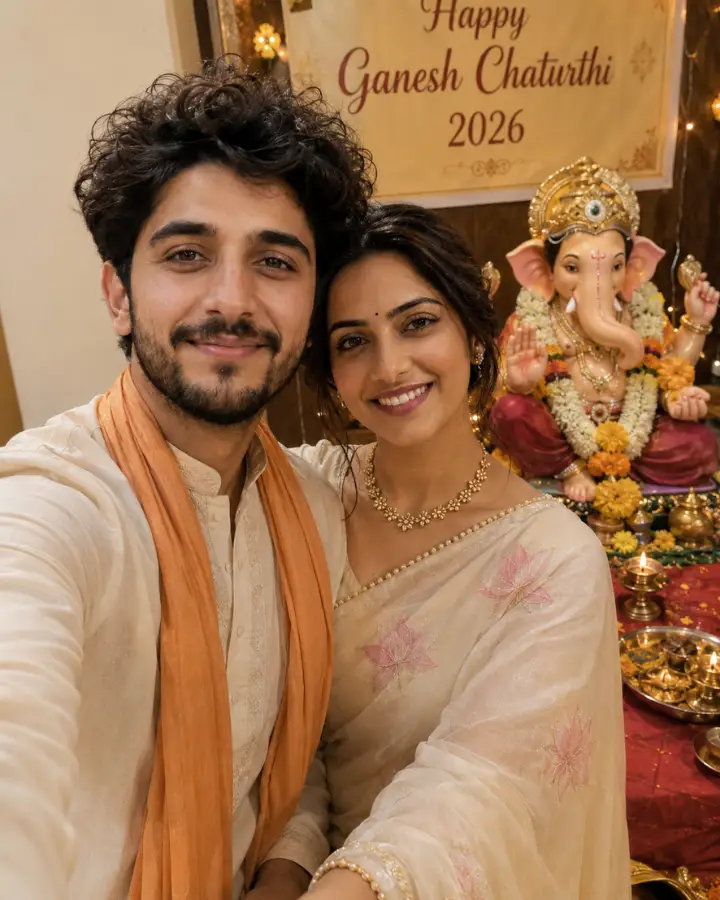
Turn the uploaded reference photo into a natural looking Ganesh Chaturthi 2026 selfie with Ganesh Ji. Keep the exact original face and identity unchanged, including facial proportions, eyes, eyebrows, nose, lips, cheeks, jawline, hairstyle, skin tone and real skin texture. Create the feeling of a photo taken with a mobile front camera from a slightly raised side angle, with the person looking naturally into the lens while Ganesh Ji appears clearly over the shoulder. The mobile phone must never appear anywhere in the image. Give the person a simple cream kurta with a light saffron stole and a relaxed happy expression. Keep the idol realistic with modest flower decoration and a few warm lights in the background. Use authentic mobile photography characteristics, natural exposure, realistic skin pores, subtle camera softness and believable indoor shadows. Add "Happy Ganesh Chaturthi 2026" on a small background banner without covering the face or idol. Negative prompt: face change, identity mismatch, plastic skin, over smoothing, extra fingers, deformed hands, visible mobile phone, duplicated person, warped face, unnatural arm length, fake camera perspective, excessive decoration, artificial glow, cartoon rendering, CGI texture, distorted idol, unreadable text, harsh digital HDR.Prompt 8. Ganesh Chaturthi Bappa Aagman Photo Photo
This one focuses on a simple Bappa arrival moment. I kept the scene grounded and devotional instead of making it look like a fancy festival setup.
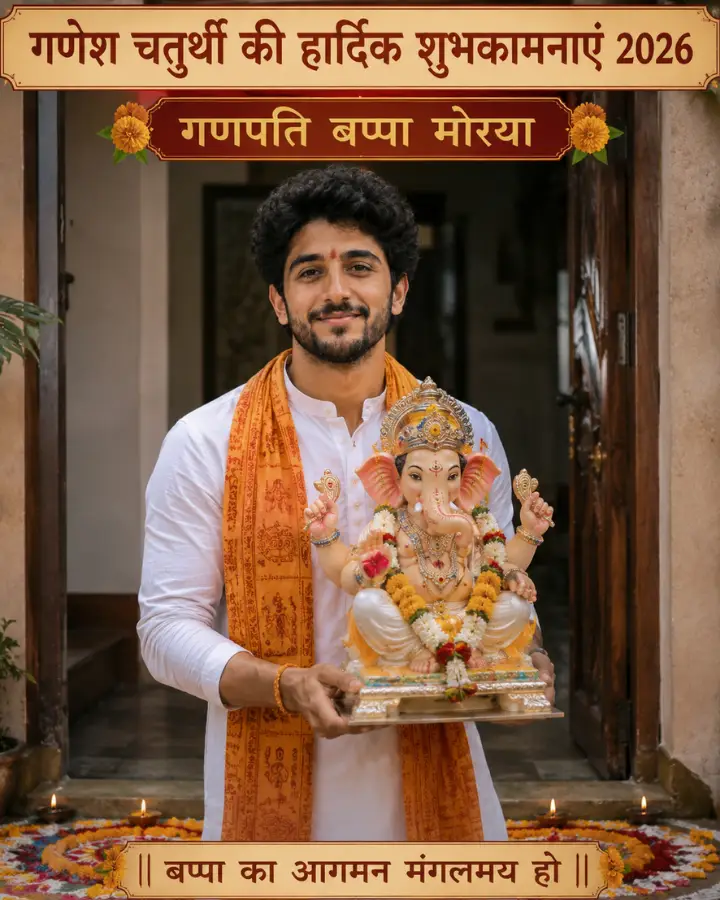
Create a realistic Ganesh Chaturthi 2026 Bappa Aagman photograph using the uploaded photo as the strict identity reference. Preserve the person's exact face, facial structure, eyes, eyebrows, nose, lips, cheeks, jawline, skin tone, natural pores, hairstyle and recognizable details. Show the person carefully bringing a decorated Ganesh Ji idol into a home entrance, holding the idol naturally with both hands and showing a peaceful devotional expression. Dress the person in a simple traditional white kurta with a saffron stole and realistic cotton texture. Keep the surroundings modest with a clean doorway, a small rangoli, a few marigold flowers and two or three diyas. Use soft natural evening light with realistic shadows and a documentary photography feel. Add a simple Hindi banner at the top reading "गणेश चतुर्थी की हार्दिक शुभकामनाएं 2026". Below it write "गणपति बप्पा मोरया". At the bottom add "बप्पा का आगमन मंगलमय हो". Negative prompt: changed face, identity mismatch, fake skin, glossy complexion, extra fingers, malformed hands, impossible grip, duplicate arms, distorted idol, floating objects, excessive decoration, artificial lighting, heavy HDR, CGI look, cartoon effect, blurry face, incorrect Hindi text.Prompt 9. Simple Ganpati Aagman Poster Prompt
I kept this scene even more natural, like a real family member bringing Bappa home. The devotional expression and simple setting are the main focus.
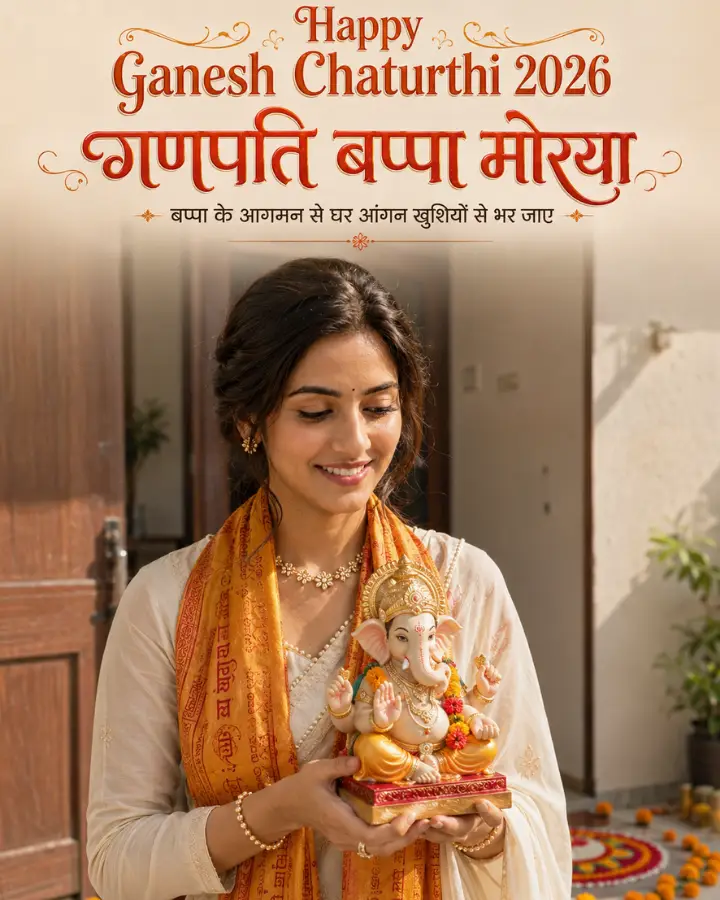
Use the uploaded photograph to create a hyper realistic Ganesh Chaturthi 2026 Bappa Aagman scene. Keep the person's identity exactly the same as the reference photo, including face shape, eyes, eyebrows, nose, lips, cheeks, jawline, skin tone, skin texture, hair and all natural facial details. Show the person walking slowly while carrying a small beautifully decorated Ganesh Ji idol with both hands, looking towards Bappa with genuine devotion. Give the person a simple light beige kurta and a traditional saffron stole with natural fabric folds. Set the scene near a normal home entrance with minimal decoration, a small rangoli and a few fresh flowers. Avoid grand stages or excessive festive elements. Use realistic morning or early evening light, natural shadows, authentic camera perspective and detailed real skin texture. Add "Happy Ganesh Chaturthi 2026" at the top and "गणपति बप्पा मोरया" below it. Add one simple line: "बप्पा के आगमन से घर आंगन खुशियों से भर जाए". Negative prompt: face alteration, identity mismatch, artificial skin, glass skin, extra fingers, malformed hands, duplicate limbs, wrong grip, distorted idol, unnatural walking pose, excessive decoration, fake background, overprocessed lighting, CGI appearance, plastic texture, random text, distorted Hindi lettering, unrealistic proportions.Prompt 10. Street Celebration Style
This one has a completely different feeling. I wanted it to look like someone captured the festival naturally on a decorated street.
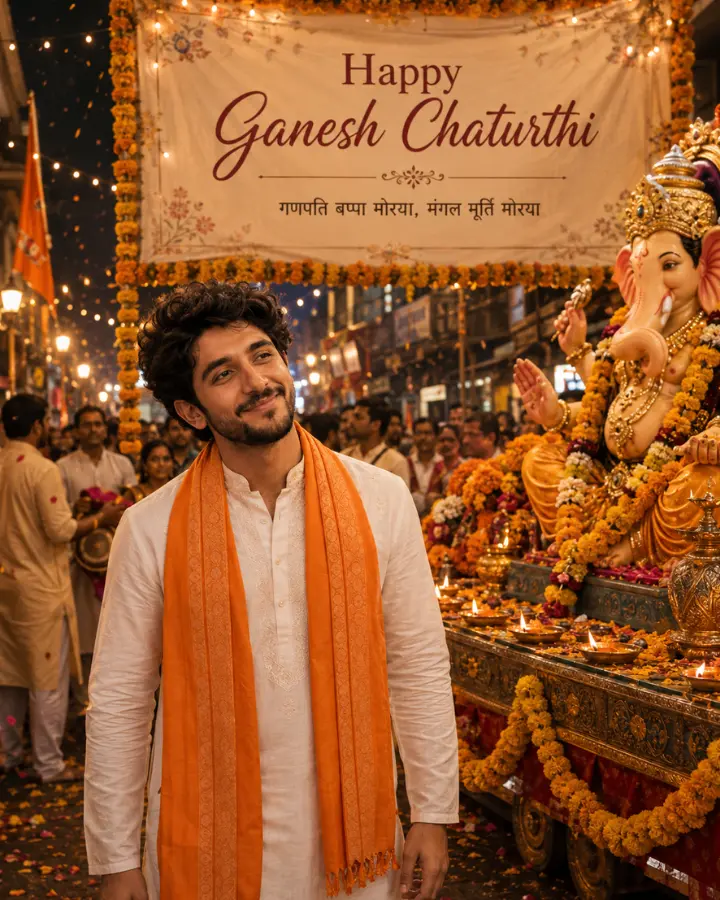
Build a photorealistic Ganesh Chaturthi evening street scene around the uploaded reference photo. Keep the person's face exactly recognizable with the same facial structure, eyes, eyebrows, nose, lips, jawline, skin texture and natural marks. Show the person walking slowly beside a decorated Ganesh Ji procession setup while looking toward the idol with a genuine smile. Dress the person in a crisp white kurta and bright orange stole. Use a 35mm full frame camera perspective with realistic street depth, subtle motion in the distant celebration and warm practical lights. Add marigold decorations, small lamps, flower showers and natural atmospheric haze. Keep the person's body proportions realistic and the hands naturally formed. Place a roadside banner saying “Happy Ganesh Chaturthi”. Add “गणपति बप्पा मोरया, मंगल मूर्ति मोरया” in a smaller line. Negative prompt: altered identity, different face, artificial complexion, glassy skin, extra fingers, deformed hands, duplicate limbs, floating objects, unnatural body proportions, fake crowd, excessive HDR, oversharpening, CGI look, random text, unreadable letters.
Prompt 11. Royal Green Kurta Poster
I wanted one premium looking option for people who prefer a more polished festival photo. It still stays realistic rather than looking like a digital graphic.
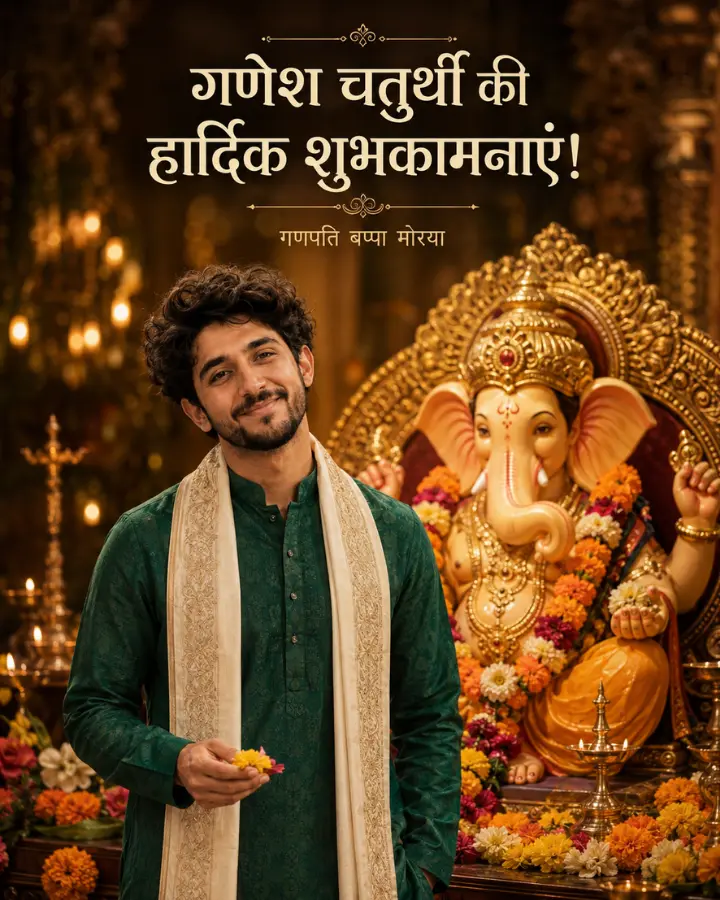
Create a luxury style yet photorealistic Ganesh Chaturthi 2026 poster from the uploaded reference photo. The person's identity must remain exactly the same, including face geometry, eyes, eyebrows, nose, lips, cheeks, jawline, hairstyle, skin tone and natural texture. Dress the person in a dark emerald green kurta with subtle woven detailing and an off white stole. Give the person a confident standing posture with one hand relaxed and the other holding a small flower offering. Place an elegant Ganesh Ji idol slightly behind and to one side. Use warm gold practical lighting, soft side illumination and realistic shadow gradients. Simulate a 50mm professional camera with moderate depth of field and natural lens rendering. Keep the background rich with flowers and brass decor. Add “गणेश चतुर्थी की हार्दिक शुभकामनाएं!” in refined cream lettering at the top. Below it write “गणपति बप्पा मोरया”. Negative prompt: face replacement, identity mismatch, smooth artificial skin, porcelain texture, extra fingers, broken hands, duplicate accessories, warped clothing, unnatural posture, fake reflections, overprocessed HDR, digital illustration, excessive glow, poor typography, random letters.
Prompt 12. Bappa Ke Saamne Traditional Pose
This one is simple but strong. I focused on the person’s expression and the large idol instead of adding too many decorations.
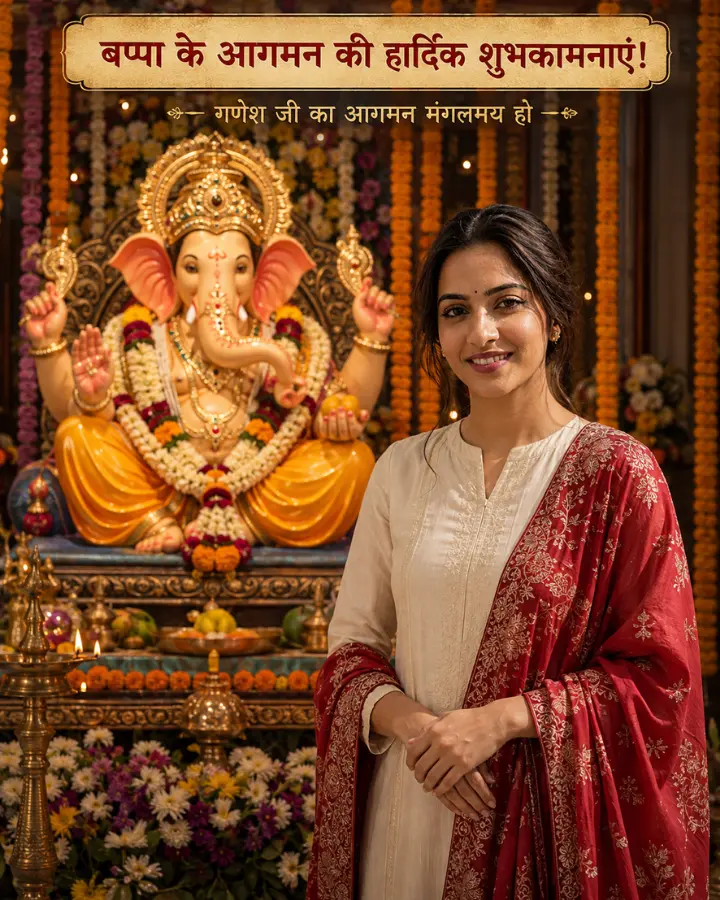
Use the uploaded photo to create a realistic traditional Ganesh Chaturthi photo with a grand Ganesh Ji idol in the background. Preserve the person's exact identity and natural facial details, including face shape, eyes, eyebrows, nose, lips, cheeks, jawline, skin tone and hairstyle. Place the person standing in a three quarter pose with a calm expression and hands gently joined. Dress the person in an ivory kurta with a red embroidered stole. Position a large Ganesh Ji idol behind the person on a decorated platform with fresh flowers and brass diyas. Use soft frontal light on the face with warm background illumination. Give the image a 70mm lens appearance with realistic depth separation and natural shadow detail. Add “बप्पा के आगमन की हार्दिक शुभकामनाएं!” in a clean upper banner. Include only “गणेश जी का आगमन मंगलमय हो” as the smaller Hindi line. Negative prompt: face modification, identity mismatch, fake skin, glossy skin, extra fingers, fused hands, incorrect anatomy, duplicate idol, unnatural expression, harsh lighting, fake depth, oversaturated colors, cartoon rendering, text errors, cluttered design.
Prompt 13. Bappa Ghar Laane Ka Moment
I wanted this to look like an actual celebration moment rather than a posed poster. The carrying action gives the image more movement.
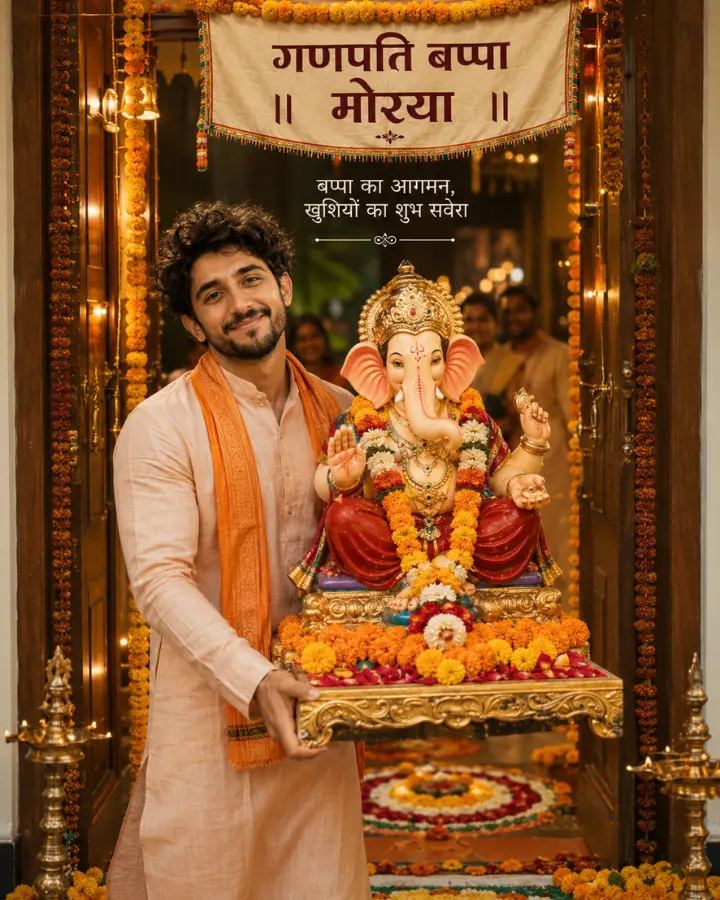
Create a cinematic but realistic Ganesh Chaturthi home arrival scene using the uploaded photo as the exact identity reference. Preserve the original face without changing facial structure, eyes, eyebrows, nose, lips, cheeks, jawline, hairstyle, skin tone or natural marks. Show the person helping bring a decorated Ganesh Ji idol through a beautifully decorated entrance. The person's hands must naturally support the base decoration without changing anatomy. Dress the person in a pale peach kurta with a saffron stole. Add marigold torans, rangoli, flower petals and warm lamps around the doorway. Use a 35mm documentary photography look with realistic perspective, natural motion and soft evening exposure. Keep the person's expression excited but believable. Place “गणपति बप्पा मोरया” on a hanging cloth banner above the entrance. Add “बप्पा का आगमन, खुशियों का शुभ सवेरा” below. Negative prompt: changed face, identity mismatch, artificial skin, extra fingers, malformed hands, duplicated arms, floating idol, impossible grip, distorted body, unnatural movement, excessive blur, fake lighting, CGI finish, overprocessed skin, unreadable text.
Prompt 14. Red And Gold Festive Look
I used stronger festive colors here but kept the face and lighting natural. This one works nicely for a richer social media style.
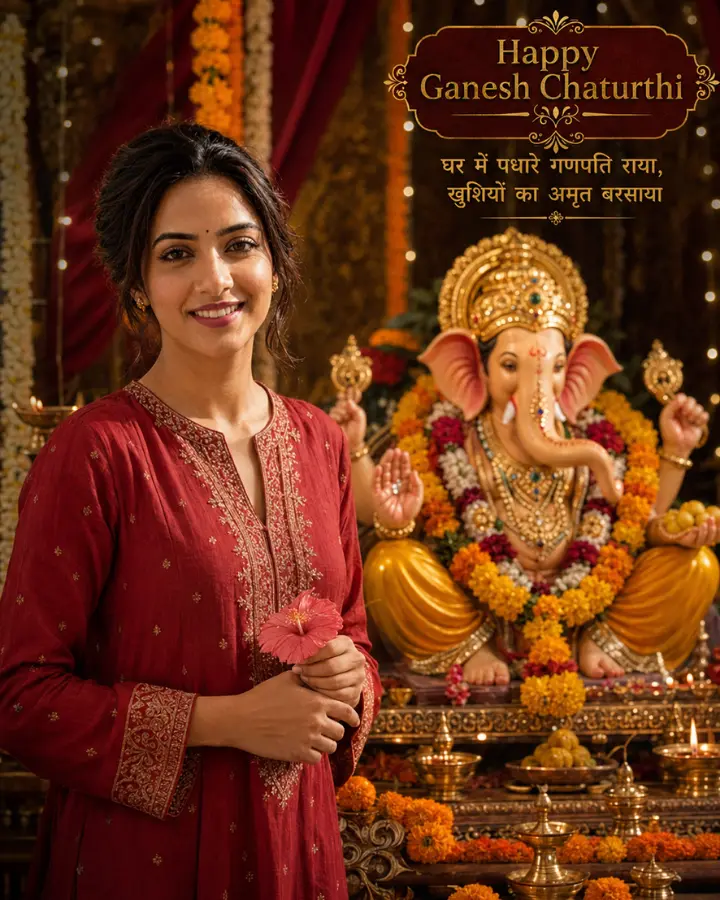
Generate a highly realistic Ganesh Chaturthi celebration image from the uploaded reference photo. Keep the person's exact identity, facial proportions, eyes, eyebrows, nose, lips, jawline, cheeks, hairstyle, skin tone and real skin texture unchanged. Dress the person in a deep red traditional kurta with delicate gold detailing. Show the person standing slightly angled toward a beautifully decorated Ganesh Ji idol, holding a single flower naturally at chest level. Build a rich background using red fabric drapes, marigold flowers, brass diyas and warm golden illumination. Use a professional 85mm camera appearance with realistic skin pores, controlled highlights, soft shadows and natural color balance. Keep the idol detailed but slightly behind the person. Place “Happy Ganesh Chaturthi” in a clean gold style banner at the upper right. Add “घर में पधारे गणपति राया, खुशियों का अमृत बरसाया” below in smaller lettering. Negative prompt: facial alteration, identity mismatch, artificial skin, glass skin, extra fingers, deformed hands, duplicated jewelry, strange anatomy, unrealistic smile, excessive glow, harsh HDR, plastic texture, fake depth, distorted typography, unnecessary words.
Prompt 15. Bappa Darshan With Friends
This prompt has a more casual celebration mood. I kept the group relaxed so it feels closer to a real festival photograph.
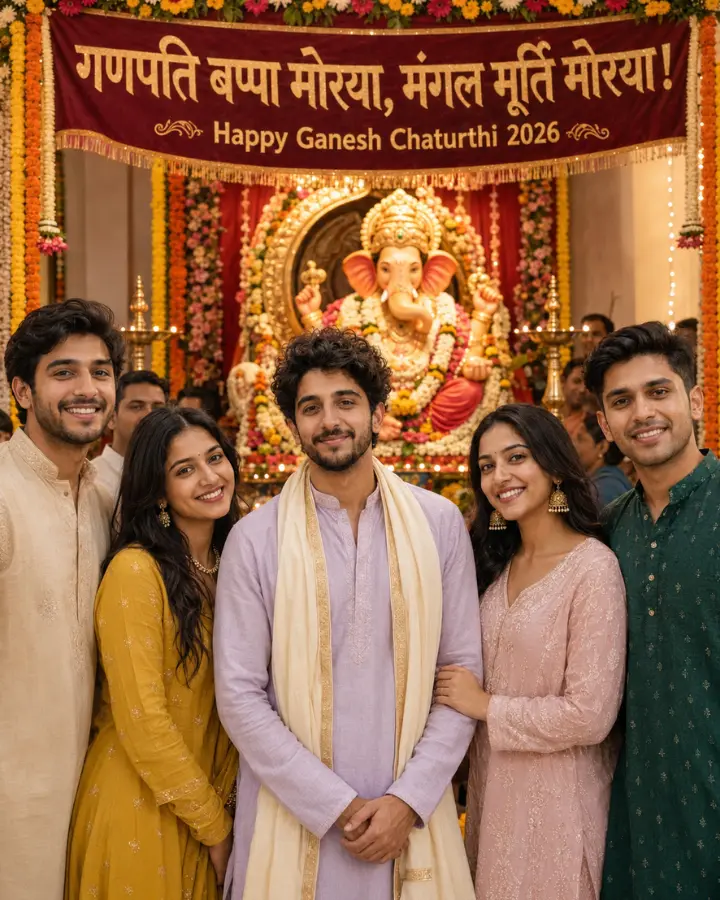
Transform the uploaded reference image into a realistic Ganesh Chaturthi celebration with the main person standing among close friends near a beautifully decorated Ganesh Ji idol. Preserve the exact face and identity from the source image, including facial structure, eyes, eyebrows, nose, lips, jawline, skin tone, hairstyle and natural skin texture. Give the main person a light lavender kurta with a cream stole. Let the friends wear different traditional outfits and stand at natural distances from one another. Use a decorated community hall with flower strings, warm bulbs, brass lamps and subtle festive details. Capture the scene with a 50mm camera perspective and realistic indoor exposure. Keep expressions genuine and body positions relaxed. Add a simple overhead banner saying “गणपति बप्पा मोरया, मंगल मूर्ति मोरया!” in fency big texts. Below the banner place “Happy Ganesh Chaturthi 2026”. Avoid adding any other wording. Negative prompt: face replacement, altered identity, plastic skin, excessive smoothing, extra fingers, missing fingers, fused hands, duplicate faces, unnatural arms, bad anatomy, fake smiles, artificial shadows, excessive saturation, CGI appearance, blurry details, random text.
Prompt 16. Simple Traditional Look, Ganesh Ji Darshan
I kept this one minimal because simple festival photos can sometimes look more natural. The idol and greeting carry the entire visual theme.
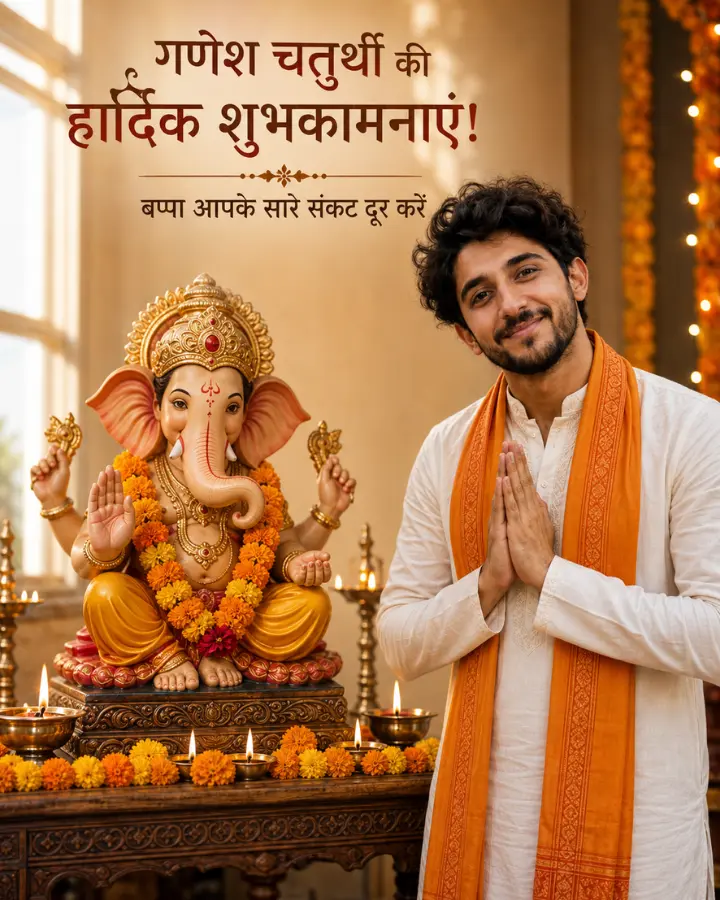
Create a clean and highly realistic Ganesh Chaturthi photo edit using the uploaded image as the strict face reference. Preserve the person's exact facial identity, including face shape, eyes, eyebrows, nose, lips, jawline, cheeks, skin tone, hairstyle and natural marks. Dress the person in a simple white kurta with a saffron stole. Position the person standing respectfully beside a medium sized Ganesh Ji idol, with both hands joined together in a traditional Namaste/prayer pose at chest level, expressing a peaceful and genuine devotional bhakti bhaav. Give the person a gentle, humble smile and a relaxed upright standing posture, looking toward Ganesh Ji with श्रद्धा and devotion. Place the Ganesh Ji idol on a decorated wooden platform. Use soft window light mixed with warm diya illumination for realistic skin and natural shadows. Simulate a 50mm DSLR shot with subtle background blur and sharp facial details. Add a small marigold arrangement around the idol. Place “गणेश चतुर्थी की हार्दिक शुभकामनाएं!” across the upper background with “बप्पा आपके सारे संकट दूर करें” underneath. Negative prompt: identity mismatch, changed facial features, fake complexion, glossy skin, hands not joined, hands down, hands in pockets, holding a flower, casual pose, incorrect Namaste, malformed hands, extra fingers, unnatural posture, distorted clothing, excessive bokeh, harsh HDR, cartoon effect, artificial texture, bad text rendering.Prompt 17: Happy Ganesh Chaturthi 2026 Banner Prompt
This prompt creates a simple printed style banner with a clean festive feel. The person stays in focus with traditional clothing and folded hands.
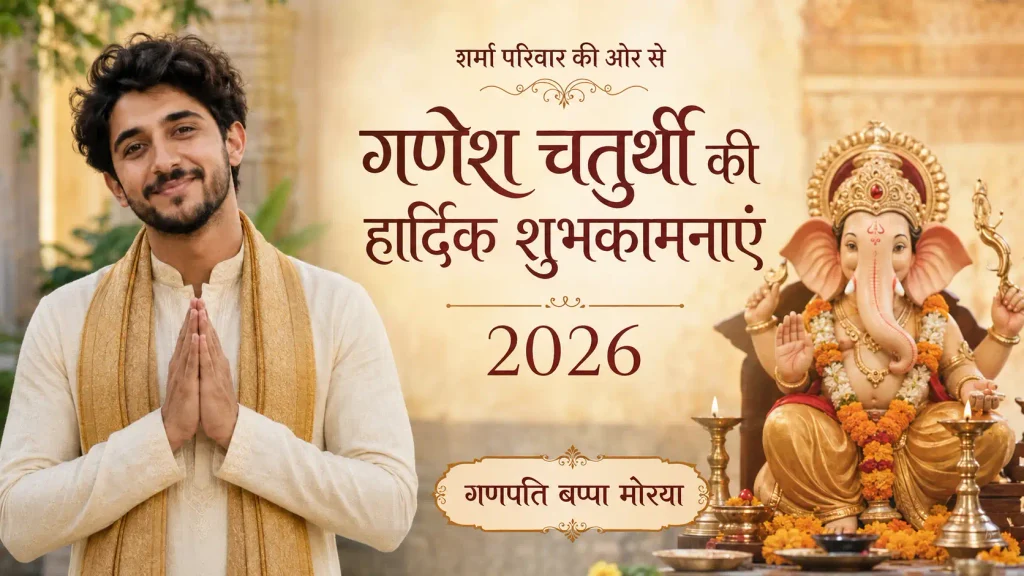
Create a wide 16:9 Ganesh Chaturthi 2026 greeting banner using the uploaded photo as the exact face reference. Keep the person's real identity unchanged, including face shape, eyes, eyebrows, nose, lips, jawline, skin tone, skin texture, hair and natural facial details. Show the person standing naturally with both hands joined in a respectful Namaste pose. Give them a simple traditional Indian outfit with realistic fabric and natural fitting. Keep the styling modest and suitable for a printed family greeting banner. Place a clean and realistic Ganesh Ji image or idol subtly in the background without heavy decoration. At the top, add large elegant Hindi text: "गणेश चतुर्थी की हार्दिक शुभकामनाएं 2026". Add a smaller line above it: "[आपका नाम / परिवार के नाम] की ओर से". At the bottom, write: "गणपति बप्पा मोरया". Use balanced spacing, realistic photography, natural skin texture, soft daylight, sharp facial details and professional 16:9 banner composition. Avoid extra fingers, malformed hands, altered face, duplicate people, fake skin, excessive decoration, distorted idol, blurry text, unnatural body proportions, CGI appearance or artificial generated look.Quick Tip: Prompt mein diye [Your Name] ya [Family Name] ko apne naam ya family name se change karke hi final poster/banner banayein.
Prompt 18. Ganesh Chaturthi Wishes Banner Design Prompt
This version feels more like a traditional local greeting banner. It uses a calm background and keeps the written message clearly visible.
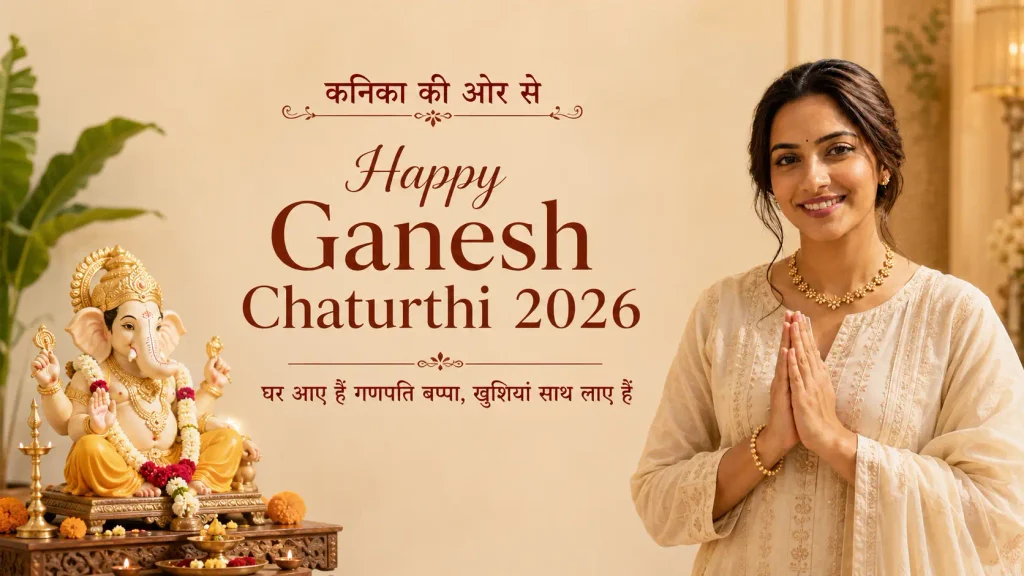
Design a realistic 16:9 horizontal Ganesh Chaturthi 2026 banner from the uploaded photograph. Preserve the exact identity of the person without changing facial proportions, eyes, eyebrows, nose, lips, jawline, complexion, skin texture, hairstyle or natural marks. Place the person slightly to one side, standing straight with joined hands and a gentle respectful expression. Dress them in a simple traditional kurta with natural cotton or silk texture. Keep the background clean and uncluttered, with a tasteful Ganesh Ji idol placed on the opposite side. Use soft warm indoor lighting with realistic shadows and natural depth. Create the main Hindi greeting in a large readable style: "गणेश चतुर्थी की बहुत बहुत बधाई एवं शुभकामनाएं 2026". Above the greeting, add: "[नाम / परिवार का नाम] की ओर से". Add a simple bottom line: "घर आए हैं गणपति बप्पा, खुशियां साथ लाए हैं". Keep the design suitable for large format printing. No excessive flowers, glowing effects, artificial skin, face changes, extra hands, extra fingers, duplicated subjects, warped clothing, distorted idol, random text, cartoon effects or CGI look.
How to Customize These Ganesh Chaturthi Prompts?
You do not need to rewrite the complete prompt for every new design. I usually change a few specific details while keeping the face reference and main festival theme consistent.
- Dress: Change the saree, kurta, shirt or traditional outfit according to the look you want.
- Pose: Try folded hands, a slight side pose, sitting, standing or looking towards Ganesh Ji.
- Expression: Ask for a soft smile, peaceful expression or a more joyful festive mood.
- Background: Replace the home setup with a decorated hall, temple inspired setting or festive stage.
- Ganesh Ji Setup: Change the idol position, decoration, flowers, diyas or surrounding festive elements.
- Lighting: Try warm diya lighting, soft daylight or a beautiful evening setup for a different atmosphere.
- Greeting Text: Keep “Happy Ganesh Chaturthi” and add a short line like “गणपति बप्पा मोरया” if needed.
- Text Placement: Move the greeting to the top, bottom or open side area where it does not cover the face.
- Camera Look: Ask for a closer frame, wider composition, shallow depth or sharper environmental details.
My Personal Tip: If the first result has a face, hand, dress or background issue, do not change the whole prompt.
Tell ChatGPT exactly what looks wrong and ask it to fix only that part while keeping everything else unchanged.
Which Poster Size Is Best for Your Ganesh Chaturthi Poster?
The best size depends on where you plan to share your Ganesh Chaturthi photo. I usually choose the format before editing because it helps keep the face, idol and greeting text properly placed.
| Size | Best For | Why I Would Use It |
|---|---|---|
| 4:5 | Instagram & Facebook posts | Gives good space for the person and festive background |
| 9:16 | WhatsApp Status & Instagram Story | Uses the full vertical screen |
| 1:1 | Square social posts | Works well for centred poster designs |
| 16:9 | YouTube thumbnails & Banner Size | Gives more horizontal space for the festival setup |
| A4 | Home or shop printing | Good for a standard printed poster |
| A3 | Wall or event decoration | Better for larger printed designs |
My quick pick: I would use 4:5 for regular social posts and 9:16 for Status or Stories. For printing, A4 or A3 gives a better layout.
Post Publishing Tips for Ganesh Chaturthi
I usually keep the caption short and connected to the photo. The poster already has the main greeting, so the caption does not need to repeat everything.
- Caption: Mention that you created your Ganesh Chaturthi photo using a ChatGPT photo prompt.
- Keep It Natural: Write one simple line about the look you liked instead of making the caption too promotional.
- Mention the Theme: You can mention whether your photo is a Bappa selfie, greeting banner or Aagman photo.
- Hashtags: Use a few relevant hashtags like #GaneshChaturthi2026 #GanpatiBappaMorya #GaneshChaturthi #GanpatiPoster #AIPhotoEditing.
- Do Not Overuse: I prefer relevant hashtags over adding a long list of unrelated trending tags.
- For Stories: If you are sharing the design on WhatsApp Status or Instagram Story, use the 9:16 version.
My Caption Tip: I would write something simple like, “Created my Ganesh Chaturthi 2026 photo with a ChatGPT prompt. I really liked how the Bappa theme came out.” Then add a few relevant hashtags.
FAQ
What Makes These Prompts Different?
I made every prompt with a different scene, pose, outfit, lighting and Ganesh Ji setup. Some are poster styles, while others feel like real festival moments. I also added simple festive greetings and strong face preservation, so each edit can have its own natural look.
What if ChatGPT changes my face while editing the photo?
If the face looks different, I suggest running the prompt again with the same reference photo. You can also ask ChatGPT to preserve the original face and change only the problem area.
Can I add my name or family name to the Ganesh Chaturthi banner?
Yes. Replace the name placeholder in the prompt with your own name or family name before generating the banner. I prefer keeping this line short so the design stays clean.
What should I do if the Hindi text looks wrong?
Generated text can sometimes have spelling or letter issues. I usually generate the image again and keep the greeting short, especially when the banner has large Hindi lettering.
Can I use these prompts in Gemini AI?
Yes, you can also try these prompts in Gemini AI with your own photo. I created them mainly for ChatGPT, but the same photo editing instructions can also work in Gemini AI.


