
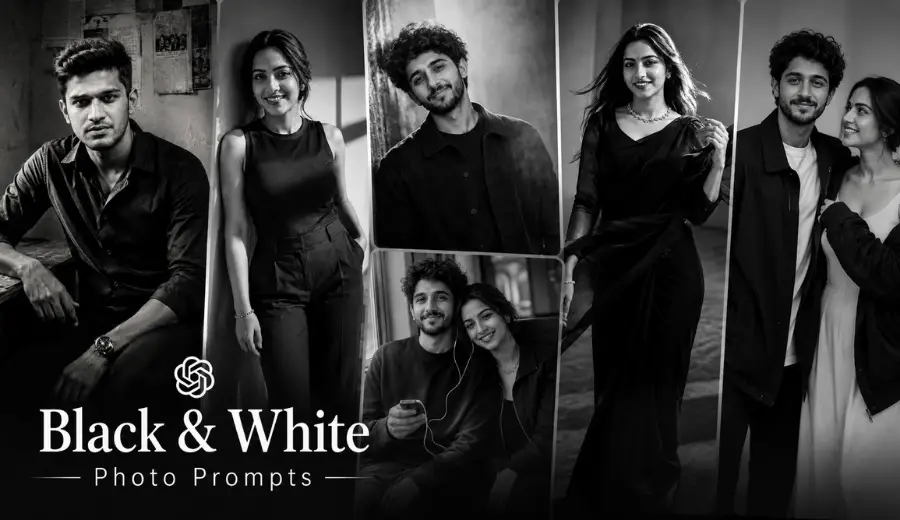
These black and white photo edits are made for anyone who wants a more stylish look from a normal picture. I did not want these ideas to end with a basic black and white filter. Instead, I focused on different poses, expressions, clothes, shadows, camera angles, and backgrounds so every result feels different. I have included separate ideas for boys, girls, and couples because the same style does not suit every photo. This kind of aesthetic photo editing prompts is also getting a lot of attention on Instagram, especially for profile pictures, posts, and stylish photo uploads. I noticed that the final image looks much better when the face stays natural and the whole scene changes around it.
I created these copy paste prompts specially for ChatGPT photo editing, so you can upload your photo and try the look directly. I also kept the wording simple enough to use without changing too much. Along with black and white photo ideas, you will find aesthetic photo prompts, boy photo edits, girl photo edits, and couple photo edits with different moods. I have focused on natural skin, real looking light, and the original face so the result does not feel overly edited.
Black and White Aesthetic Photo Prompt for Boys
For these five boy photo edits, I avoided the usual street and fashion ideas. Each look has a different visual story, from old newspaper styling to futuristic shadow work. I wanted every result to feel like a completely new photograph while keeping the same face and natural skin details. These are made for people who want something more interesting than a basic black and white filter.
Prompt 1. Old Newspaper Style
I wanted this one to feel like a rare photograph found inside an old newspaper archive. The paper texture and sharp side light made the result much more characterful than normal grayscale.
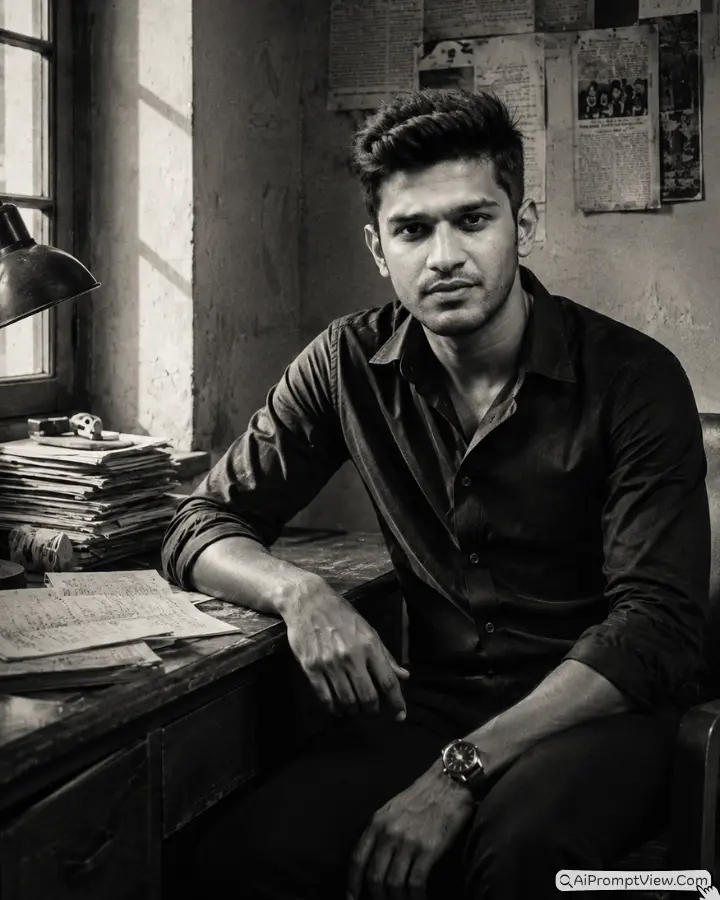
FACE FIRST FOUNDATION: Preserve the uploaded person's exact facial identity, face shape, eyes, eyebrows, nose, lips, jawline, natural skin texture, pores, and unique marks with complete consistency. ERA INSPIRED VISUAL: Create a black and white editorial scene inspired by a 1970s newspaper photograph, with aged paper texture and restrained tonal contrast. CLOTHING AND BODY LANGUAGE: Use a fitted dark shirt with rolled sleeves, seated beside a wooden writing desk, shoulders slightly forward, hands relaxed, and a serious thoughtful expression. LIGHT CONTROL: Use one hard window beam from the left, deep natural shadow falloff, 50mm lens, realistic exposure, sharp eyes, and fine film grain. SET DESIGN: Add old printed papers, a desk lamp, handwritten notes, and textured walls. REAL PHOTO LIMITS: Keep everything physically believable with natural skin and realistic fabric detail. NEGATIVE PROMPT: face alteration, identity mismatch, plastic skin, artificial AI look, over smoothing, cartoon rendering, anime style, harsh digital HDR, distorted features, double jewelry overlays, cluttered backgrounds, text overlays.
Prompt 2. Silver Flash Fashion
This one uses direct flash instead of soft lighting. I liked the slightly raw camera feeling because it made the photo feel younger and more energetic.
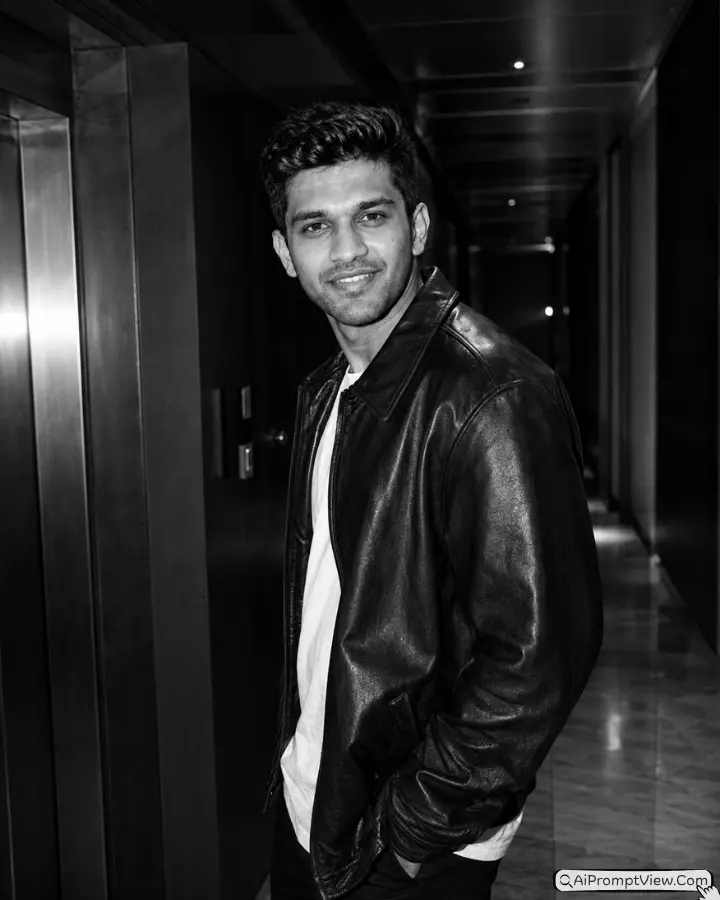
IDENTITY PRESERVATION CORE: Keep the uploaded person's exact face, facial proportions, eyes, eyebrows, nose, lips, jawline, skin texture, pores, and natural marks unchanged. RAW CAMERA MOOD: Build a bold black and white fashion image with a direct flash effect similar to an unplanned late evening camera shot. WARDROBE AND POSE: Dress the person in a loose black leather jacket over a plain white shirt, standing with one shoulder toward the camera and looking slightly upward with a confident expression. FLASH DESIGN: Use frontal on camera flash, fast shutter speed, 35mm lens perspective, crisp details, natural shadow behind the body, and controlled highlights. VISUAL BACKDROP: Place the subject against a narrow hallway with metallic surfaces, a polished floor, and strong geometric lines. NATURAL FINISH: Keep realistic pores, fabric texture, small imperfections, and authentic camera grain. NEGATIVE PROMPT: face alteration, identity mismatch, plastic skin, artificial AI look, over smoothing, cartoon rendering, anime style, harsh digital HDR, distorted features, double jewelry overlays, cluttered backgrounds, text overlays.
Prompt 3. Black Ink Wall Mood
I tried this idea to make the background feel almost like moving ink without turning the image into artwork. The result stayed photographic but had a much more creative mood.
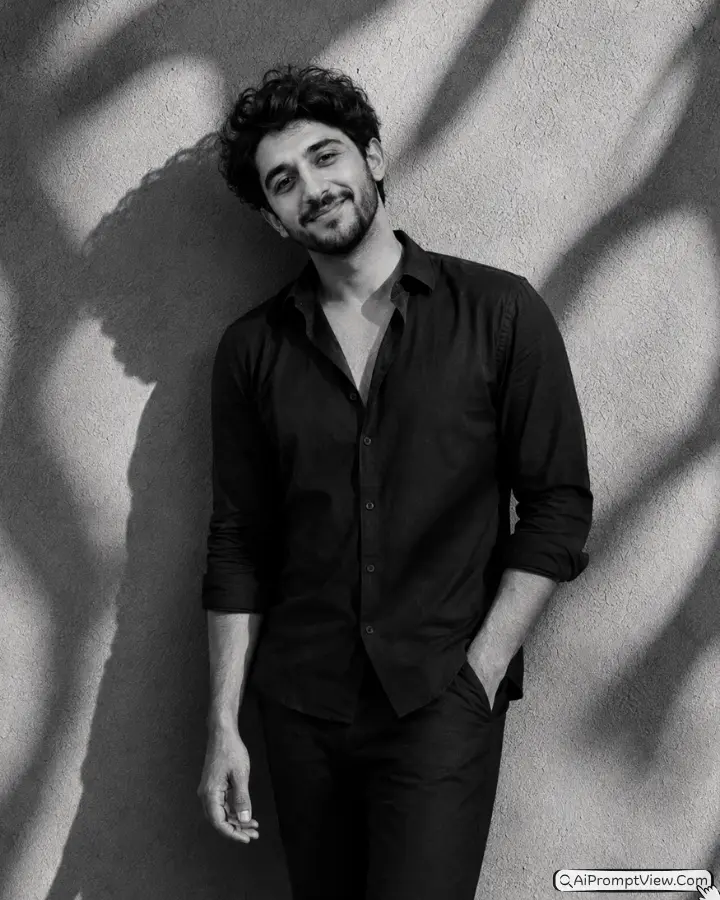
RECOGNIZABLE FACE ANCHOR: Preserve the uploaded person's exact identity, natural facial structure, eyes, eyebrows, nose, lips, jawline, pores, skin texture, and all recognizable details without redesign. INK SHADOW CONCEPT: Create a black and white photograph where soft abstract shadow shapes fall across a textured wall behind the subject, giving a flowing ink inspired visual mood while remaining realistic. STYLE AND POSTURE: Use a relaxed open collar black shirt, standing sideways with one hand near the pocket and the face turned toward camera with a calm expression. LIGHTING FORMULA: Use a narrow projector style light from the side, 85mm lens, moderate depth of field, controlled highlights, natural facial texture, and smooth shadow transitions. SURROUNDING DETAILS: Add subtle wall texture and layered curved shadows without adding objects that distract from the subject. CAMERA REALISM: Use authentic lens depth, realistic fabric folds, and natural tonal variation. NEGATIVE PROMPT: face alteration, identity mismatch, plastic skin, artificial AI look, over smoothing, cartoon rendering, anime style, harsh digital HDR, distorted features, double jewelry overlays, cluttered backgrounds, text overlays.
Prompt 4. Train Window Reflection Look
I wanted this to feel like a quiet moment during travel. The reflection creates a second visual layer while the face remains sharp and easy to recognize.
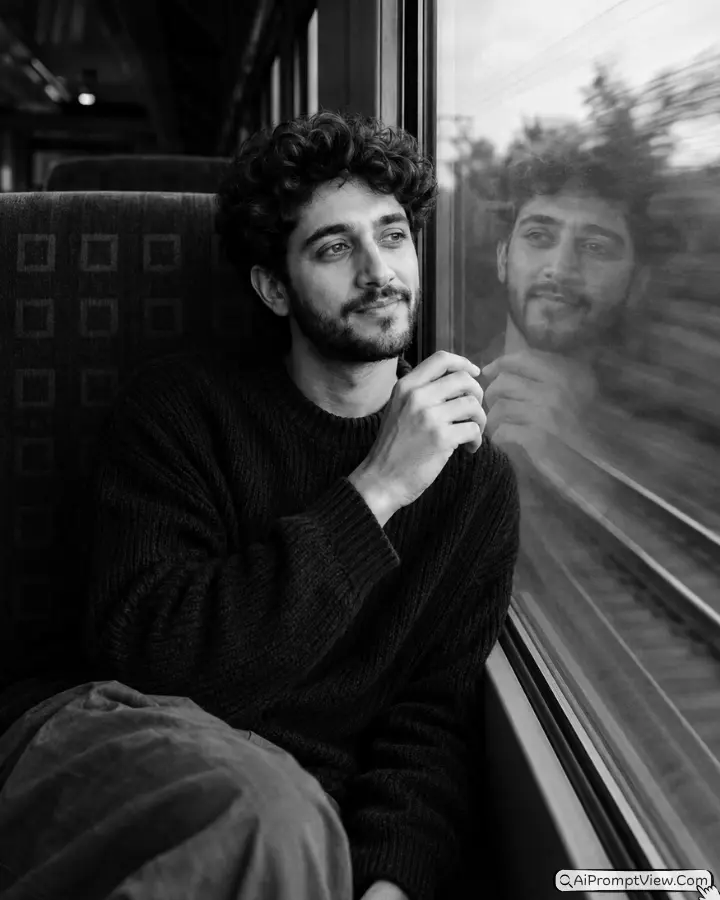
ORIGINAL FACE LOCK: Preserve the uploaded person's exact facial identity, face proportions, eyes, eyebrows, nose, lips, jawline, pores, skin texture, and natural facial details with no changes. TRAVEL MOMENT CONCEPT: Create a black and white photograph showing the person seated beside a moving train window during early morning, with soft reflections crossing the glass. OUTFIT AND EXPRESSION: Style a dark knit sweater with relaxed trousers, seated near the window, one hand resting near the glass, looking outside with a quiet distant expression. NATURAL CAMERA SETUP: Use a 50mm lens, soft directional daylight from the window, slight motion blur outside, crisp facial focus, realistic exposure, gentle grain, and moderate contrast. ENVIRONMENT STORY: Show train seats, window framing, faint reflections, and blurred landscapes outside. PHYSICAL REALISM: Keep reflections believable, skin natural, clothing detailed, and facial identity unchanged. NEGATIVE PROMPT: face alteration, identity mismatch, plastic skin, artificial AI look, over smoothing, cartoon rendering, anime style, harsh digital HDR, distorted features, double jewelry overlays, cluttered backgrounds, text overlays.
Prompt 5. Soft Smoke Light
This look uses light and atmosphere instead of a busy setting. I kept the smoke subtle so it added depth without covering the face or making the result look fake.
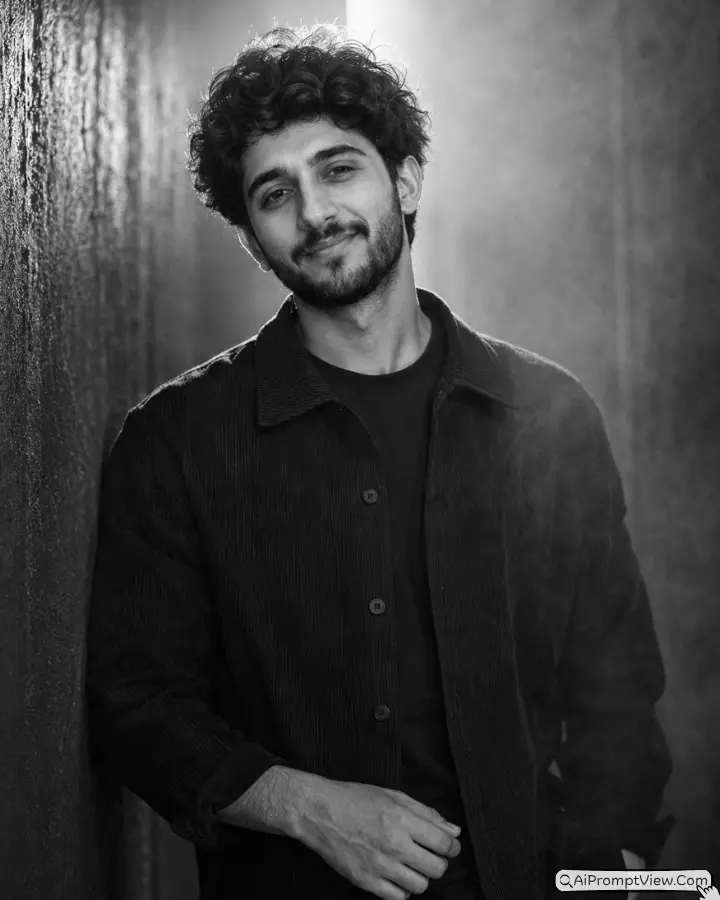
FACIAL IDENTITY FOUNDATION: Keep the uploaded person's exact face, eyes, eyebrows, nose, lips, jawline, skin texture, pores, facial proportions, and natural features fully unchanged. ATMOSPHERIC IDEA: Create a dramatic black and white photograph with very light natural haze surrounding the subject, producing a soft layered fashion mood. CLOTHING AND POSITION: Use a dark textured overshirt with a plain inner layer, standing near a textured wall with the body slightly turned and one hand resting loosely while giving a composed direct expression. LIGHT SHAPING: Use a focused back side light through gentle haze, 85mm lens, realistic highlight control, detailed eyes, natural shadow depth, and fine monochrome grain. SCENE DETAILS: Add only subtle atmospheric haze, soft wall texture, and a narrow strip of light behind the subject. REAL CAMERA FEEL: Preserve natural pores, realistic fabric, authentic lens depth, and believable light behavior. NEGATIVE PROMPT: face alteration, identity mismatch, plastic skin, artificial AI look, over smoothing, cartoon rendering, anime style, harsh digital HDR, distorted features, double jewelry overlays, cluttered backgrounds, text overlays.
Black and White Aesthetic Photo Prompt for Girls
For these five looks, I wanted a mix of soft fashion, bold attitude, artistic shadows, and unusual visual framing. I stayed away from common social media setups and focused more on interesting light patterns and body language. The face should still look like the same person after the complete edit, even when the surrounding scene changes.
Prompt 6. Window Grid Shadow Look
The main feature here is the patterned light across the surroundings. I found that simple geometric shadows can create a strong aesthetic without needing an overdone background.
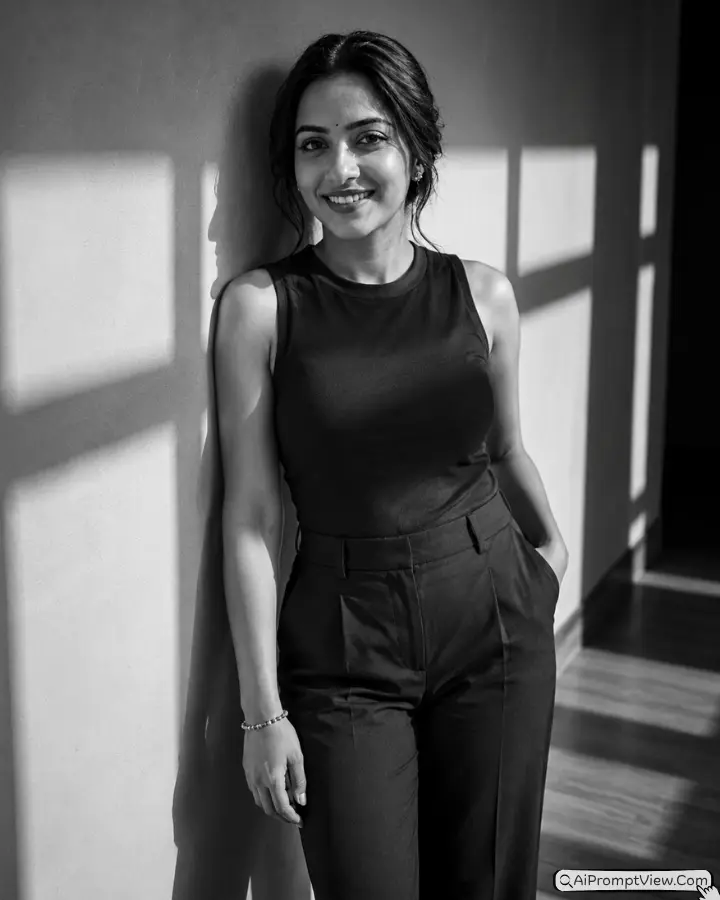
IDENTITY DETAIL PRESERVATION: Keep the uploaded person's exact face, eyes, eyebrows, nose, lips, jawline, skin texture, pores, facial proportions, and natural marks unchanged throughout the edit. GEOMETRIC LIGHT IDEA: Create a black and white fashion photograph where narrow window frame shadows create soft rectangular patterns across the wall and clothing. OUTFIT AND POSE: Use a dark sleeveless top with tailored trousers, standing beside the wall with one arm relaxed and the other slightly bent, looking directly toward camera with a confident calm expression. CAMERA AND EXPOSURE: Use a 70mm lens, directional side light, moderate contrast, realistic skin detail, sharp eyes, soft background separation, and subtle film grain. ENVIRONMENTAL DESIGN: Use a clean interior with textured plaster, wooden flooring, and long rectangular light shapes. AUTHENTICITY RULE: Keep all shadows physically consistent with one light source and maintain natural facial texture. NEGATIVE PROMPT: face alteration, identity mismatch, plastic skin, artificial AI look, over smoothing, cartoon rendering, anime style, harsh digital HDR, distorted features, double jewelry overlays, cluttered backgrounds, text overlays.
Prompt 7. Elevator Mirror Aesthetic
I wanted this one to feel like a stylish candid captured before going somewhere. The mirror gives depth while the direct camera angle keeps the face clear.
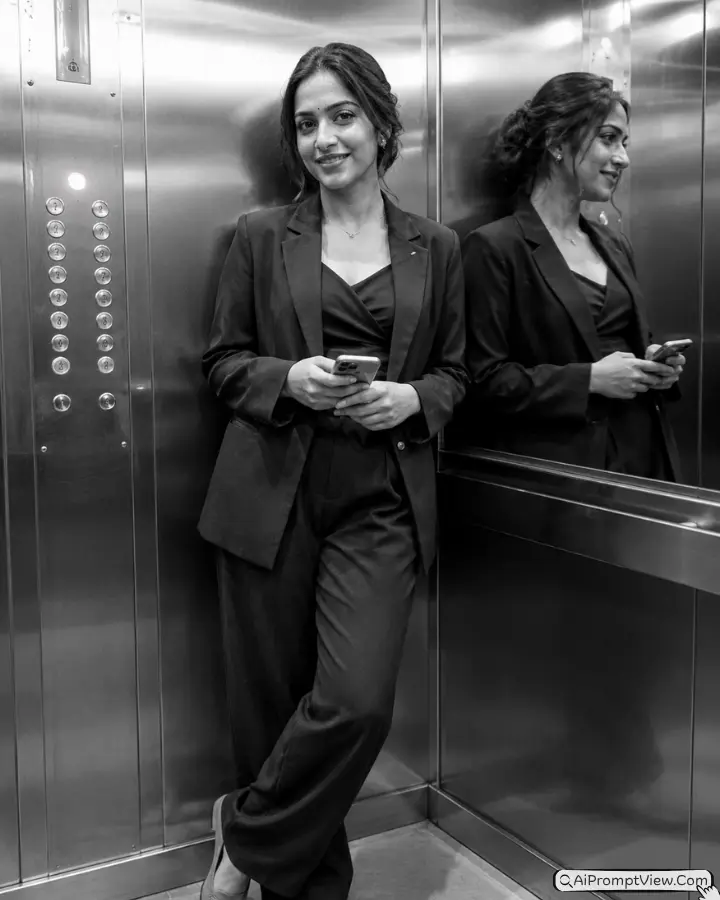
TRUE FACE MATCH: Preserve the uploaded person's exact identity, facial structure, eyes, eyebrows, nose, lips, jawline, pores, skin texture, and natural facial characteristics without modification. MIRROR COMPOSITION: Create a black and white photograph inside a brushed metal elevator with a large reflective panel creating a second believable view of the same person. CLOTHING AND MOVEMENT: Dress the person in a structured dark blazer, wide trousers, and simple shoes, holding a small phone naturally while standing with one foot slightly forward and a relaxed confident expression. LIGHTING AND CAMERA: Use overhead elevator lighting softened by reflective metal, 35mm lens, realistic exposure, moderate depth, controlled reflections, sharp facial detail, and fine grain. BACKGROUND FEATURES: Include elevator buttons, brushed steel texture, floor reflections, and subtle perspective lines. REALISM CHECK: Keep reflections physically accurate, facial identity consistent, clothing proportions natural, and skin texture authentic. NEGATIVE PROMPT: face alteration, identity mismatch, plastic skin, artificial AI look, over smoothing, cartoon rendering, anime style, harsh digital HDR, distorted features, double jewelry overlays, cluttered backgrounds, text overlays.
Prompt 8. Torn Poster Fashion Look
This concept was made to feel like modern fashion photography mixed with layered city textures. The torn paper should stay subtle and never cover the face.
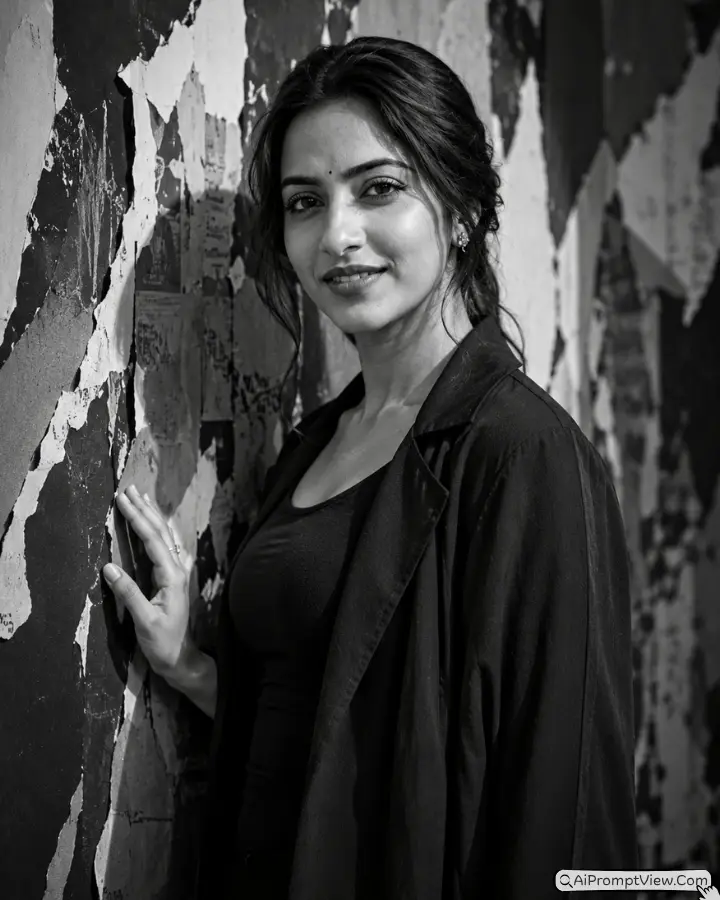
FACE CONSISTENCY RULE: Preserve the uploaded person's exact face, facial proportions, eyes, eyebrows, nose, lips, jawline, pores, skin texture, and all recognizable details without altering identity. LAYERED WALL CONCEPT: Create a black and white fashion photograph against a wall covered with partially torn paper layers, creating irregular shapes and shadows. STYLE AND POSE: Use a fitted black top with a long open jacket, standing close to the wall with one hand touching the surface and the head turned slightly toward camera with a bold expression. LIGHTING METHOD: Use directional side lighting, 50mm lens, moderate contrast, realistic shadow edges, detailed skin, sharp eyes, and subtle paper texture. VISUAL BALANCE: Keep torn layers around the body rather than over the face, with muted background detail and controlled tonal separation. NATURAL PHOTO QUALITY: Preserve real pores, fabric folds, imperfect paper edges, and believable depth. NEGATIVE PROMPT: face alteration, identity mismatch, plastic skin, artificial AI look, over smoothing, cartoon rendering, anime style, harsh digital HDR, distorted features, double jewelry overlays, cluttered backgrounds, text overlays.
Prompt 9. Floating Fabric Mood
This is one of the more creative ones I designed. The fabric movement creates drama while the person’s face and body stay grounded and realistic.
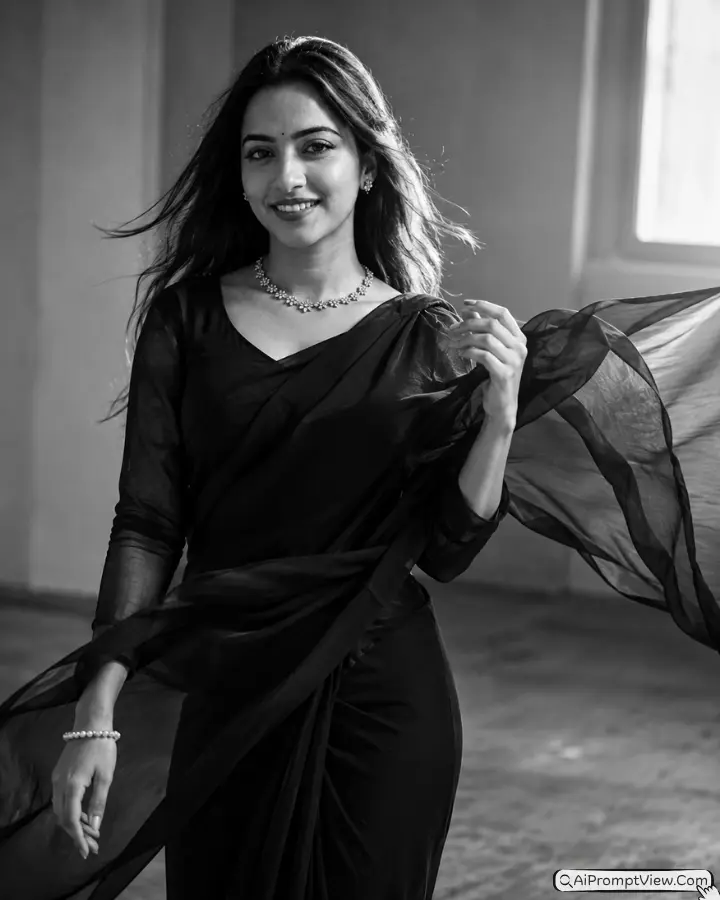
FACE IDENTITY CONTROL: Keep the uploaded person's exact facial identity, eye shape, eyebrows, nose, lips, jawline, skin texture, pores, facial proportions, and natural features unchanged. FABRIC MOVEMENT IDEA: Create a black and white fashion photograph with long lightweight dark fabric moving gently around the subject as if caught by a controlled indoor breeze. CLOTHING AND POSTURE: Use a simple fitted dark outfit beneath the fabric, standing upright with one arm lowered and the other slightly raised, giving a focused confident expression. LIGHT DIRECTION: Use one large side light plus weak rear fill, 85mm lens, natural exposure, controlled highlights, realistic shadows, crisp eyes, and subtle grain. ENVIRONMENT DESIGN: Place the subject in a large empty room with a textured floor and soft distant walls. MOTION REALISM: Make the fabric folds physically believable with natural gravity and airflow, while preserving realistic skin and body proportions. NEGATIVE PROMPT: face alteration, identity mismatch, plastic skin, artificial AI look, over smoothing, cartoon rendering, anime style, harsh digital HDR, distorted features, double jewelry overlays, cluttered backgrounds, text overlays.
Prompt 10. Moody Side Close Up
I wanted this one to feel darker and more intense without making the skin unnaturally smooth. The side angle gives the face more depth while keeping the expression natural.
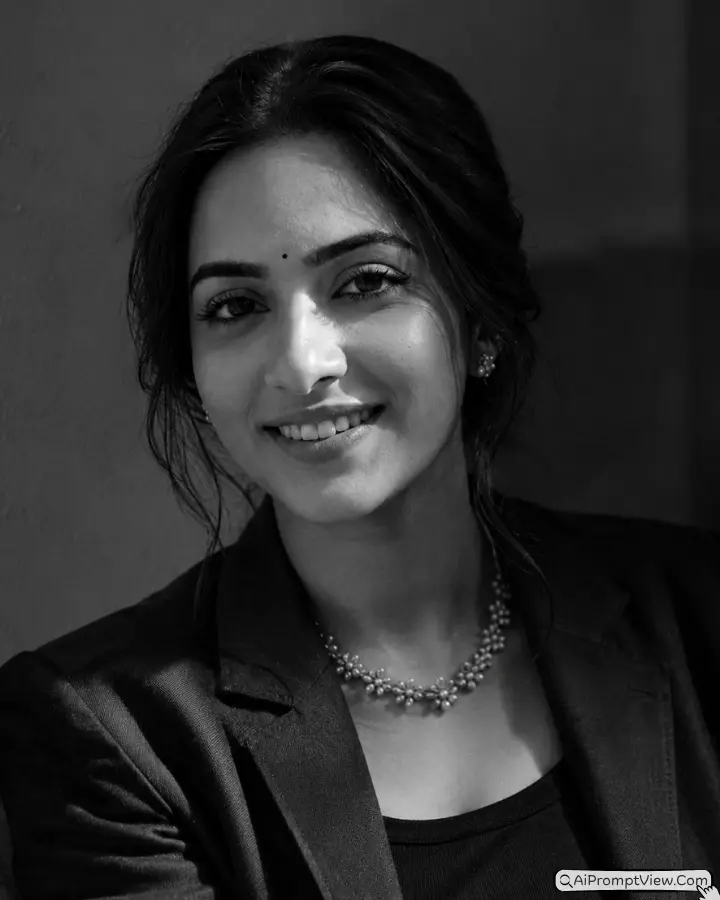
FACE DETAIL LOCK: Preserve the uploaded person's exact identity, face shape, eyes, eyebrows, nose, lips, jawline, pores, skin texture, natural marks, and facial proportions exactly as shown in the original photo. INTENSE CLOSE COMPOSITION: Create a highly realistic black and white close framing from slightly above eye level, showing the face, neck, and upper shoulders with strong visual depth and a modern moody aesthetic. STYLING AND BODY POSITION: Use a dark structured jacket over a plain top, keep the shoulders slightly angled, turn the face gently toward camera, and give a calm confident expression. LIGHTING AND LENS: Use narrow directional light from one side, soft reflected fill, 70mm lens, realistic exposure, detailed eyes, controlled highlights, deep but visible shadows, fine grain, and natural monochrome contrast. SETTING AND DEPTH: Use a minimal textured interior with a soft shadow behind the subject and subtle atmospheric depth. HIGH REALISM RULE: Keep authentic pores, tiny skin variations, natural facial asymmetry, realistic hair texture, and believable fabric folds without beautification. NEGATIVE PROMPT: face alteration, identity mismatch, plastic skin, artificial AI look, glass skin, over smoothing, cartoon rendering, anime style, harsh digital HDR, distorted features, excessive makeup, fake skin texture, cluttered backgrounds, text overlays.
Black and White Aesthetic Photo Prompt for Couple
For the couple section, I wanted to move far away from the usual romantic poses. These five ideas are based on quiet connection, fashion, movement, memory, and cinematic storytelling. Both faces need to remain recognizable, while the body language feels natural instead of looking copied from a typical couple photoshoot.
Prompt 11. Shared Headphone Moment
I wanted the connection here to feel casual rather than staged. The headphone detail gives the image a modern feel while keeping the interaction simple.
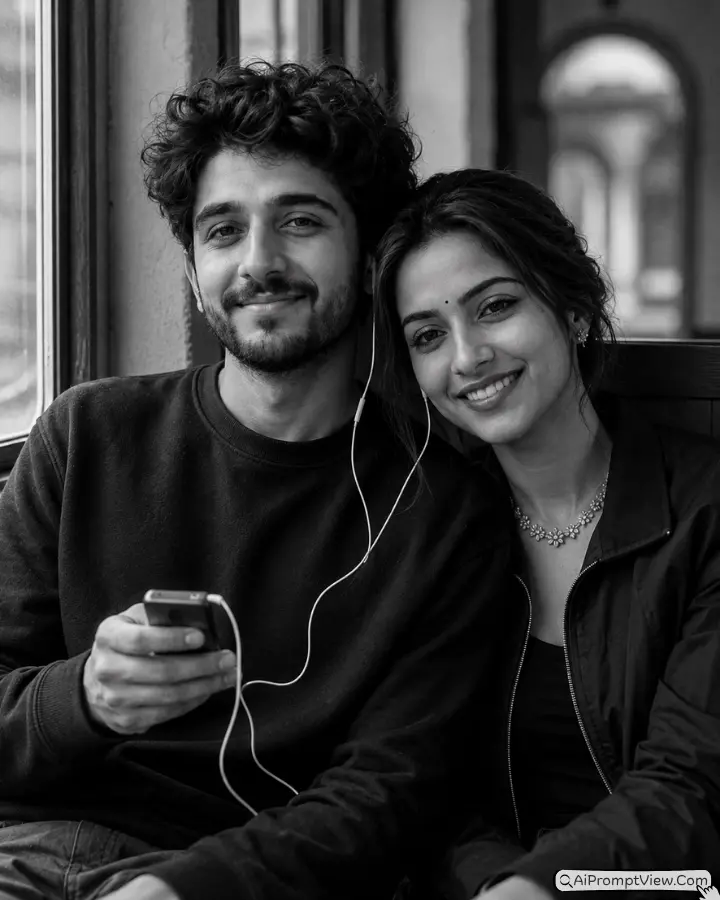
TWO FACE IDENTITY LOCK: Preserve both uploaded people's exact faces, facial proportions, eyes, eyebrows, noses, lips, jawlines, skin texture, pores, and unique natural features without changing either identity. MODERN QUIET MOMENT: Create a black and white photograph showing two people sharing one pair of wired headphones while sitting beside each other. OUTFIT AND INTERACTION: Dress one person in a dark sweatshirt and the other in a simple fitted jacket, with their shoulders lightly touching, one person holding the music player and both showing relaxed expressions. CAMERA DESIGN: Use a 50mm lens, soft side illumination, realistic exposure, detailed facial texture, gentle shadow depth, shallow background separation, and fine grain. ENVIRONMENT: Place them beside a large window with a simple bench, subtle reflections, and blurred architectural details. NATURAL STORYTELLING: Keep hands, headphone wires, clothing folds, and body proportions physically realistic while maintaining clear facial identity. NEGATIVE PROMPT: face alteration, identity mismatch, plastic skin, artificial AI look, over smoothing, cartoon rendering, anime style, harsh digital HDR, distorted features, double jewelry overlays, cluttered backgrounds, text overlays.
Prompt 12. Passing Photograph Effect
I designed this one around memory and motion. The couple stays sharp while distant movement gives the image a feeling of a real moment captured quickly.
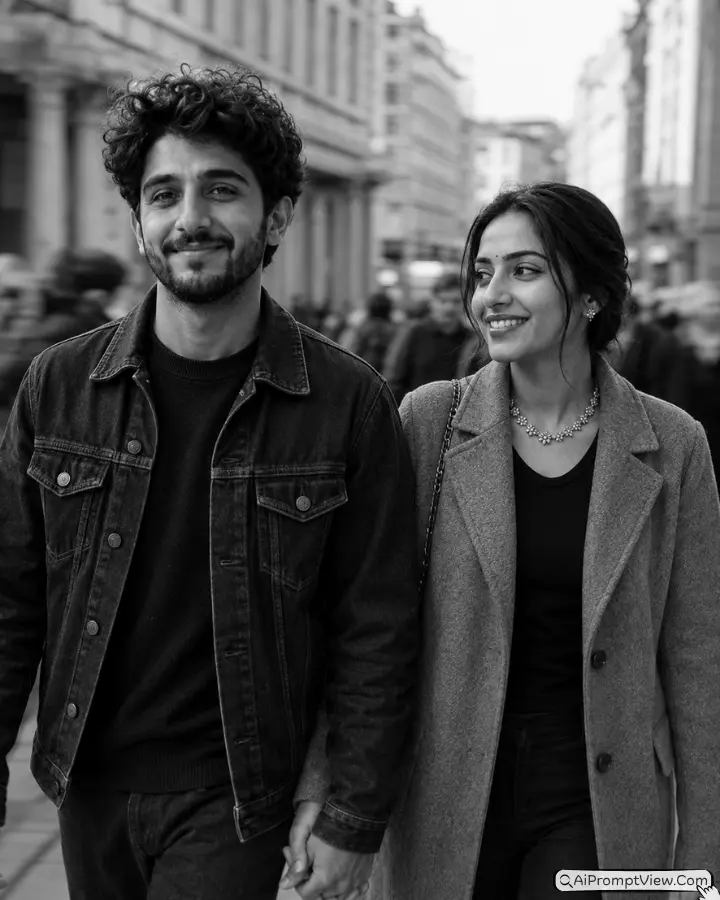
DUAL IDENTITY FOUNDATION: Keep both uploaded people's exact facial identities, face shapes, eyes, eyebrows, noses, lips, jawlines, pores, skin texture, and natural details unchanged. MEMORY FRAME CONCEPT: Create a black and white photograph that feels like a spontaneous frame from a passing moment, with the couple sharply focused while distant surroundings show slight natural motion. CLOTHING AND BODY LANGUAGE: Dress one person in a dark denim jacket and the other in a long textured coat, walking side by side with one person looking forward and the other turning toward them with a small genuine smile. CAMERA SETTINGS: Use a 35mm lens, shutter speed around 1/80 second, natural daylight, realistic motion around the edges, moderate contrast, detailed faces, and fine grain. BACKGROUND STORY: Use a wide pedestrian walkway with moving figures shown only as soft shapes. REALISM STANDARD: Keep both faces sharp, body proportions believable, and motion blur physically consistent with camera movement. NEGATIVE PROMPT: face alteration, identity mismatch, plastic skin, artificial AI look, over smoothing, cartoon rendering, anime style, harsh digital HDR, distorted features, double jewelry overlays, cluttered backgrounds, text overlays.
Prompt 13. Forehead Touch Romance
This one creates a quiet romantic moment instead of a typical posed couple picture. The close interaction keeps the mood warm while both faces stay natural and recognizable.
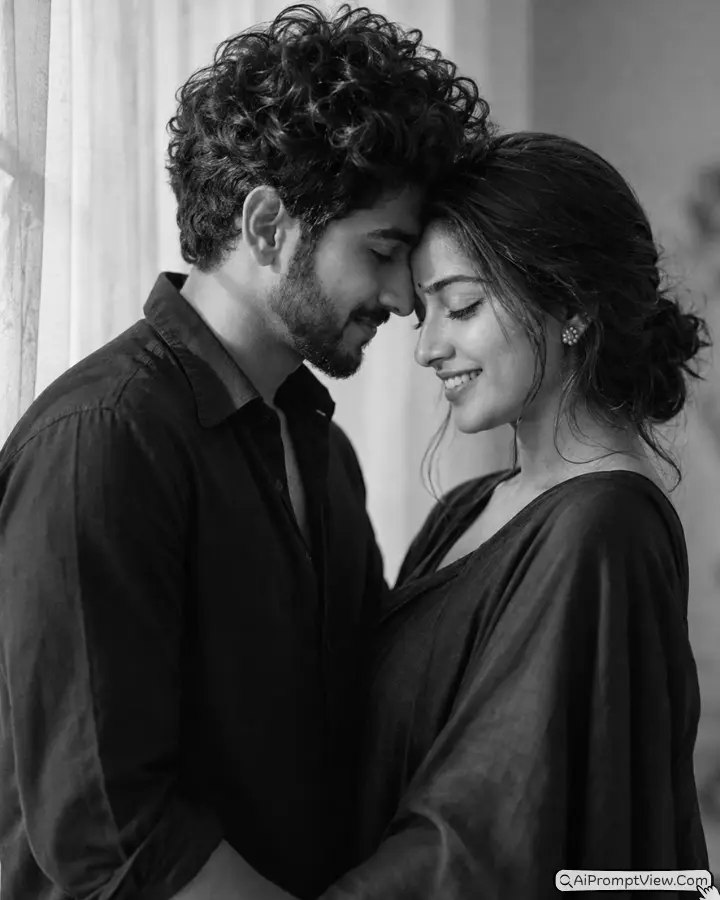
DUAL FACE IDENTITY LOCK: Preserve both uploaded people's exact facial identities, facial proportions, eyes, eyebrows, noses, lips, jawlines, natural pores, skin texture, facial marks, and realistic asymmetry without changing either face. QUIET ROMANTIC MOMENT: Create a highly realistic black and white photograph showing the couple standing very close with their foreheads gently touching, creating a soft emotional connection. OUTFIT AND BODY LANGUAGE: Dress one person in a dark relaxed shirt and the other in an elegant dark flowing top, with relaxed shoulders, natural hand placement, and subtle closed eye expressions. CAMERA AND LIGHTING: Use an 85mm lens, soft side window light, gentle back separation, realistic exposure, shallow depth of field, visible natural skin texture, delicate grain, and controlled monochrome contrast. ENVIRONMENT AND MOOD: Place them beside a softly lit interior window with curtains moving slightly in the background and a calm intimate atmosphere. REAL PHOTO FINISH: Keep pores, fine lines, tiny skin variations, fabric texture, and believable body proportions clearly visible. NEGATIVE PROMPT: face alteration, identity mismatch, plastic skin, glass skin, artificial AI look, over smoothing, cartoon rendering, anime style, harsh digital HDR, distorted features, fake skin texture, unnatural hands, exaggerated romance, cluttered backgrounds, text overlays.
Prompt 14. Jacket Swap Fashion Story
I wanted this to feel playful without becoming a typical romantic edit. The shared jacket creates interaction and gives both people a natural reason to stand close.
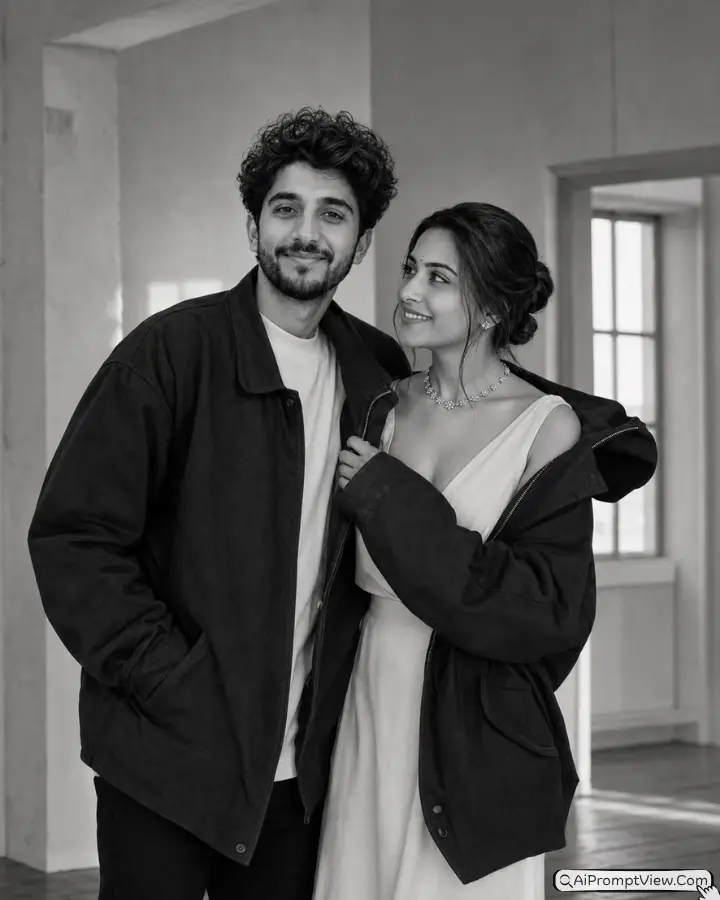
IDENTITY FOR TWO PEOPLE: Preserve both uploaded faces exactly, including facial proportions, eyes, eyebrows, noses, lips, jawlines, skin texture, pores, and unique facial characteristics. SHARED CLOTHING IDEA: Create a stylish black and white photograph where one person wears a large dark jacket while the other casually holds one side of it, creating a natural shared styling moment. POSE AND EXPRESSION: Place them standing close but not stiff, with one looking toward the camera and the other looking toward their partner with a subtle relaxed smile. LIGHTING CHARACTER: Use broad overhead window illumination, gentle reflected fill, 50mm lens, realistic tonal range, detailed eyes, natural shadows, and light film grain. ENVIRONMENT: Use a plain textured interior with a large doorway, wooden floor, and soft background depth. REALITY CHECK: Make the jacket folds, hand placement, body proportions, facial expressions, and eye direction physically believable. Keep skin natural rather than overly smooth. NEGATIVE PROMPT: face alteration, identity mismatch, plastic skin, artificial AI look, over smoothing, cartoon rendering, anime style, harsh digital HDR, distorted features, double jewelry overlays, cluttered backgrounds, text overlays.
Prompt 15. Quiet Side Hug
The side hug and soft eye contact give it a warm romantic feeling without looking forced.
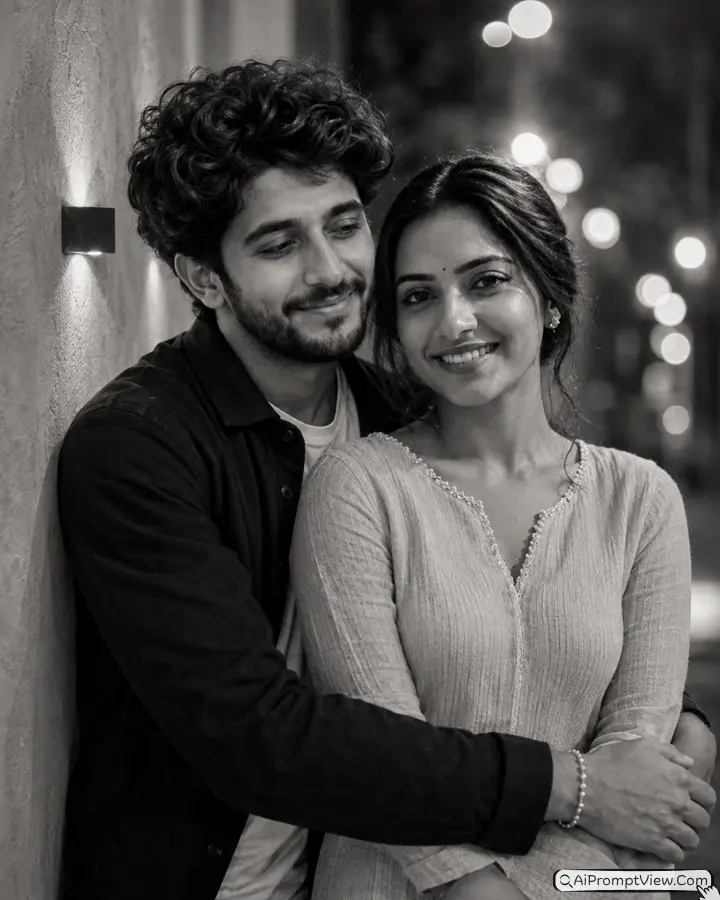
BOTH IDENTITIES MUST REMAIN UNCHANGED: Keep both uploaded people's exact faces, face shapes, eyes, eyebrows, noses, lips, jawlines, pores, natural skin texture, facial marks, and recognizable proportions identical to the source photos. NATURAL ROMANTIC COMPOSITION: Create a realistic black and white couple photograph where one person gives the other a gentle side hug while they stand together with comfortable body language. CLOTHING AND EXPRESSION: Use a dark casual jacket for one person and a simple textured top for the other, with one looking softly toward their partner and the other giving a small genuine smile toward the camera. CAMERA AND LIGHTING PLAN: Use a 50mm lens, soft directional evening light, subtle rim illumination, realistic shadow depth, moderate monochrome contrast, sharp facial detail, natural pores, and delicate photographic grain. ENVIRONMENT DESIGN: Place them beside a quiet wall with soft decorative lights appearing as distant circular reflections. REALISM PRIORITY: Keep hands correctly positioned, expressions subtle, clothing folds believable, skin texture visible, and both faces perfectly recognizable. NEGATIVE PROMPT: face alteration, identity mismatch, plastic skin, glass skin, artificial AI look, over smoothing, cartoon rendering, anime style, harsh digital HDR, distorted features, fake skin texture, unnatural hands, forced expressions, excessive glow, cluttered backgrounds, text overlays.
How To Use These Prompts In ChatGPT
You can use these prompts directly with your own photo in ChatGPT. I found that a clear original photo gives a cleaner result.
- Open ChatGPT and start a new chat where image editing is available.
- Upload the original photo you want to edit. Make sure the face is clearly visible.
- After uploading it, paste one complete prompt from this article below the photo.
- Tell ChatGPT to use the uploaded photo as the identity reference and follow the full prompt.
- Check the first result carefully, especially the face, eyes, hands, clothes, and new pose.
- For another look, upload the original photo again and use a different prompt from the list.
My quick tip: I get more natural results when I use the original photo again instead of editing an already edited image.
How To Customize These Prompts
You can change small parts of the prompts to match your own style. I suggest changing only one or two things at first.
- Change the outfit: Replace the shirt, jacket, blazer, or other clothing with your preferred style.
- Change the pose: Ask for a standing, sitting, walking, looking sideways, or more relaxed position.
- Change the expression: You can use a calm look, slight smile, serious face, confident look, or thoughtful expression.
- Change the lighting: Try softer side light, stronger shadows, window light, or a brighter face.
- Change the setting: Keep the main idea but replace the wall, window, train, elevator, or other background element.
- Change the mood: Add words like bold, quiet, raw, classy, mysterious, or soft when they fit the look.
My quick tip: I avoid changing everything at once. Small changes make it easier to see what actually improved the photo.
Where To Use These Photos
These edits can work nicely for profile photos, Instagram posts, story covers, WhatsApp display photos, and other personal social media posts.
- Instagram profile: Use a close and clear result where the face is easy to recognize.
- Instagram posts: Full body or wider shots can work better with the more detailed scene based prompts.
- Instagram Stories: Use a vertical crop and leave some empty space for your text.
- WhatsApp profile: Pick a simple composition because the photo appears smaller.
- Couple posts: Use the couple edits when both faces are clearly visible and the interaction feels natural.
- Fashion posts: The stronger styling prompts work well when you want the clothes and pose to stand out.
Simple Instagram Caption Tips
I usually keep the caption natural instead of writing a long description of the edit.
- Start with the mood, such as “Quiet mood, black and white.”
- Add one small line about the photo, pose, or feeling.
- Keep the caption easy to read and avoid adding too many keywords.
- Use around 5 to 10 relevant hashtags instead of filling the caption with random tags.
- Mix broad and specific tags like #BlackAndWhitePhoto #AestheticPhoto #PhotoEdit #MonochromeStyle
FAQ
Can I use these prompts in Gemini AI?
Yes. These prompts can also be tried in Gemini AI. I wrote them with detailed image editing instructions, so you can test the same idea there.
What caption should I use for a dark black and white edit?
Keep it short and match the mood of the picture. A simple line about confidence, silence, style, or the moment can work better than a long caption.
Can I change the background without changing my face?
Yes. Keep the identity instruction in the prompt and only change the environment section. This is a useful way to test new backgrounds while keeping the same person.
What should I do if the result looks too edited?
I would first try the prompt again with the original photo. You can also make the lighting softer and keep natural skin texture clearly mentioned.


