
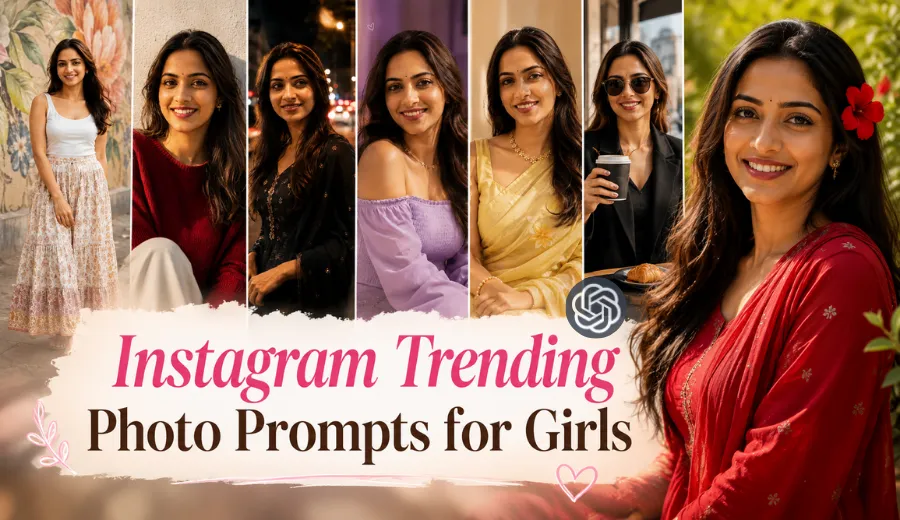
A good photo can look completely different with the right light, background, and a natural pose. I had a lot of fun trying these cute aesthetic photo ideas because every look gave me a different Instagram vibe. In this collection, I am sharing ChatGPT photo editing prompts for girls, including soft sunlight looks, cute outfit photos, beautiful outdoor scenes, city night edits, and motion blur photos. These are copy paste trending photo prompts inspired by the kind of Instagram styles that are getting attention right now.
I made these prompts specially for ChatGPT and kept all 12 looks different from each other. Some are soft and simple, while others have colorful lights, flowers, street scenes, or movement in the background. I focused on realistic details while writing them because, in my experience, a good aesthetic photo still needs natural skin, believable light, and a pose that does not feel forced.
Instagram Trending Girls Photo Editing Prompts
What I like about these looks is that they do not all use the same mood. During my testing, small details like light direction and background distance made a big difference. I also noticed that natural skin texture helped the final image feel much more believable.
Prompt 1. Soft Golden Window Look
This look has that quiet warm sunlight feeling that I really like for a simple Instagram photo. I found that keeping the sunlight behind the subject gave the hair a beautiful natural glow. The result worked best when the expression stayed relaxed and unforced.

Create a full hyper realistic photograph with a quiet indoor setting beside a sunlit window, using soft golden morning light and a calm cinematic mood. Keep the uploaded person's identity exactly unchanged with natural facial proportions, real skin texture, natural eyes, hairline, and individual hair strands. Dress her in a simple teal traditional outfit, with open flowing hair and a gentle relaxed pose while lightly touching one side of her hair. Use an 85mm lens, f/2, 1/200s, ISO 250, soft backlight and subtle window fill. Add a warm blurred room background with realistic shadows. Avoid face alteration, identity mismatch, plastic skin, artificial AI look, over smoothing, cartoon rendering, anime style, harsh digital HDR, distorted features, double jewelry overlays, cluttered backgrounds, text overlays.
Prompt 2. Warm Yellow Saree Room Look
This is one of those soft indoor looks that feels simple but still beautiful. When I tried a similar setup, warm light worked much better than bright white light. I also kept the background plain so the outfit remained the main focus.

Create a full hyper realistic photograph inside a softly lit room filled with warm late afternoon sunlight and a peaceful Instagram aesthetic. Preserve the uploaded person's exact identity, natural skin details, facial shape, eyes, lips, hairline, and realistic hair texture without changing any features. Style her in a graceful yellow saree with open natural hair, a soft head tilt, and a small natural smile. Capture the scene with a 50mm lens, f/1.8, 1/160s, ISO 320, using diffused window light and gentle bounce light across the face. Keep the room softly blurred with warm cream tones and realistic fabric texture. Avoid face alteration, identity mismatch, plastic skin, artificial AI look, over smoothing, cartoon rendering, anime style, harsh digital HDR, distorted features, double jewelry overlays, cluttered backgrounds, text overlays.
Prompt 3. Cute Purple Heart Aesthetic
I wanted one look with a playful social media vibe without making the actual photo look fake. The soft purple outfit and tiny heart details create that feeling nicely. In my experience, keeping decorative effects subtle gives a much cleaner result.

Create a full hyper realistic fashion photograph with a cute purple aesthetic and soft indoor evening lighting, keeping the scene playful but believable. Maintain the uploaded person's exact identity with untouched facial structure, realistic pores, natural skin texture, true eye shape, and loose hair strands. Dress her in an off shoulder lavender top with open wavy hair, a gentle sideways pose, and a warm confident smile. Photograph with a 50mm lens, f/2, 1/160s, ISO 400, using soft key light and delicate shadow falloff. Add a few tiny hand drawn heart accents around the frame while keeping them secondary to the photograph. Avoid face alteration, identity mismatch, plastic skin, artificial AI look, over smoothing, cartoon rendering, anime style, harsh digital HDR, distorted features, double jewelry overlays, cluttered backgrounds, text overlays.
Prompt 4. Sunflower Street Style Look
This look feels cheerful and artistic because the large flowers create a strong background without hiding the person. I noticed that darker clothing gave better contrast against the yellow tones. A slightly wider camera view also helped show the whole scene.

Create a full hyper realistic outdoor fashion photograph with oversized sunflower decorations creating a cheerful artistic setting and a natural city mood. Keep the uploaded person's identity completely unchanged, including natural facial details, skin texture, proportions, hairline, and realistic expression. Dress her in a dark patterned dress with open hair, standing naturally beside the flowers while holding a simple black shoulder bag. Use a 35mm lens, f/2.8, 1/250s, ISO 200, with soft daylight, gentle side illumination, and realistic contact shadows. Keep distant buildings softly out of focus and preserve detailed flower petals and fabric texture. Avoid face alteration, identity mismatch, plastic skin, artificial AI look, over smoothing, cartoon rendering, anime style, harsh digital HDR, distorted features, double jewelry overlays, cluttered backgrounds, text overlays.
Prompt 5. Colorful Festival Evening Look
I love how colored lighting can change a simple scene completely. While testing this type of look, I found that mixing warm and cool light created more depth. The important part was keeping the skin tones natural despite the colored lights.

Create a full hyper realistic evening photograph with a colorful festive atmosphere, soft red and green lights, and a rich cinematic mood. Preserve the uploaded person's exact identity with natural skin texture, original facial proportions, realistic eyes, lips, hairline, and open flowing hair. Dress her in a bright yellow traditional outfit with delicate floral details, holding a small festive prop naturally with both hands and looking slightly away from the camera. Use an 85mm lens, f/2, 1/160s, ISO 500, with warm key light, subtle colored rim light, and realistic shadow detail. Build a softly blurred festive background with natural depth. Avoid face alteration, identity mismatch, plastic skin, artificial AI look, over smoothing, cartoon rendering, anime style, harsh digital HDR, distorted features, double jewelry overlays, cluttered backgrounds, text overlays.
Prompt 6. Butterfly Garden Motion Blur Look
This was one of the more creative looks I explored because it mixes motion with a calm outdoor scene. The moving background should stay soft while the main person remains clear. That contrast gave me the most interesting result.

Create a full hyper realistic outdoor photograph in a green garden area during soft blue hour, with a dreamy cinematic feeling and gentle motion around the scene. Keep the uploaded person's identity exactly the same with real facial texture, natural proportions, realistic hair movement, and untouched features. Dress her in a stylish dark floral outfit with open hair, standing calmly while blurred people pass in the background and a few subtle butterflies appear near flowering plants. Use a 35mm lens, f/2.8, 1/80s, ISO 400, combining a sharp subject with controlled background motion blur and soft natural light. Preserve realistic plants, pavement, and shadows. Avoid face alteration, identity mismatch, plastic skin, artificial AI look, over smoothing, cartoon rendering, anime style, harsh digital HDR, distorted features, double jewelry overlays, cluttered backgrounds, text overlays.
Prompt 7. Night Street Motion Look
This one is perfect for a bold city vibe. I noticed that too much blur can make the image messy, so I kept the face sharp and let the lights move around it. That small change made the photo feel more realistic.

Create a full hyper realistic nighttime street photograph with glowing city lights streaking softly through the background and a moody cinematic atmosphere. Preserve the uploaded person's exact identity, natural facial proportions, real skin texture, original eyes, lips, hairline, and open hair without beautifying the face unnaturally. Dress her in a dark traditional inspired outfit with subtle detailing, standing still with a thoughtful expression while traffic lights create controlled motion blur behind her. Use a 50mm lens, f/1.8, 1/60s, ISO 800, with gentle streetlight on the face and realistic low light exposure. Keep the surroundings detailed but softly moving. Avoid face alteration, identity mismatch, plastic skin, artificial AI look, over smoothing, cartoon rendering, anime style, harsh digital HDR, distorted features, double jewelry overlays, cluttered backgrounds, text overlays.
Prompt 8. White Dress Sunset Glow
I always enjoy this kind of soft sunset edit because it looks beautiful without needing too many props. The warm sky and flowing fabric do most of the work. During testing, a gentle side pose looked more natural than a direct camera pose.

Create a full hyper realistic outdoor photograph during sunset with a soft peach and pink sky, gentle wind, and a peaceful elegant atmosphere. Keep the uploaded person's identity completely unchanged with realistic skin texture, natural facial features, true hairline, and individual strands moving naturally in the breeze. Dress her in a flowing white traditional outfit with subtle embroidery, open hair, and a calm upward gaze while lightly holding the fabric near one shoulder. Use a 56mm lens, f/2, 1/320s, ISO 160, with warm sunset rim light, soft front fill, and natural shadow depth. Add a softly blurred open background with delicate feather details. Avoid face alteration, identity mismatch, plastic skin, artificial AI look, over smoothing, cartoon rendering, anime style, harsh digital HDR, distorted features, double jewelry overlays, cluttered backgrounds, text overlays.
Prompt 9. Coffee Shop Street Moment
This is a fun lifestyle look with a little action in the frame. I liked the idea of capturing a real moment instead of making everything feel posed. The drink splash needs to stay believable, otherwise the whole image can look artificial.

Create a full hyper realistic city lifestyle photograph outside a stylish cafe, capturing a lively unplanned moment with natural movement and realistic detail. Preserve the uploaded person's exact identity with authentic facial proportions, skin texture, eyes, lips, hairline, and natural hair. Dress her in a dark modern outfit with sunglasses, holding a takeaway coffee cup as a small realistic splash freezes naturally near the cup. Use a 35mm lens, f/2.4, 1/500s, ISO 250, with crisp daylight, realistic reflections, and soft city shadows. Show cafe tables, a pastry plate, and distant street buildings with believable depth. Avoid face alteration, identity mismatch, plastic skin, artificial AI look, over smoothing, cartoon rendering, anime style, harsh digital HDR, distorted features, double jewelry overlays, cluttered backgrounds, text overlays.
Prompt 10. Red Sweater Cozy Wall Look
I added this look because a simple wall and strong outfit color can create a very clean photo. When I worked with similar ideas, texture in the background stopped it from looking flat. A soft expression also suited this style better.

Create a full hyper realistic fashion photograph against a textured light wall with a warm simple Instagram aesthetic and soft natural daylight. Keep the uploaded person's identity exactly unchanged, preserving natural skin texture, facial proportions, real eyes, lips, hairline, and realistic open hair. Dress her in a deep red knit top with a relaxed seated pose and a subtle genuine smile, keeping the styling simple and natural. Use an 85mm lens, f/2, 1/200s, ISO 200, with soft side light, gentle reflected fill, and realistic shadows around the hair and clothing. Keep the wall texture visible and the background clean with natural depth. Avoid face alteration, identity mismatch, plastic skin, artificial AI look, over smoothing, cartoon rendering, anime style, harsh digital HDR, distorted features, double jewelry overlays, cluttered backgrounds, text overlays.
Prompt 11. Red Flower Sunny Day Look
A bright flower can add a lot of personality to a simple outdoor photo. I found that placing the color near the hair worked better than filling the whole frame with flowers. It kept the result fresh and natural.

Create a full hyper realistic outdoor photograph on a bright sunny day with soft green foliage, colorful flowers, and a cheerful natural mood. Preserve the uploaded person's exact identity without changing facial structure, skin texture, eyes, lips, hairline, or natural hair pattern. Dress her in a rich red outfit with open flowing hair and place one fresh red flower naturally near the side of her hair, capturing a wide genuine smile. Use a 50mm lens, f/2, 1/250s, ISO 160, with filtered sunlight, soft facial fill, and gentle background bokeh. Keep flower colors realistic and add natural shadows across the scene. Avoid face alteration, identity mismatch, plastic skin, artificial AI look, over smoothing, cartoon rendering, anime style, harsh digital HDR, distorted features, double jewelry overlays, cluttered backgrounds, text overlays.
Prompt 12. Art Wall Street Look
This look stood out to me because the background itself feels like part of the story. The painted wall gives the scene a creative touch while the real photo stays natural. I would keep the person slightly away from the wall for better depth.

Create a full hyper realistic street fashion photograph beside a large hand painted floral mural, combining real photography with a creative urban background. Keep the uploaded person's exact identity completely unchanged with natural facial texture, realistic proportions, true hairline, open hair, and authentic expression. Dress her in a simple white sleeveless top with a patterned long skirt, standing naturally a short distance from the mural and looking toward the camera with a relaxed smile. Use a 35mm lens, f/2.8, 1/250s, ISO 200, with soft afternoon light, realistic wall shadows, and gentle depth separation. Preserve paint texture, pavement detail, and natural colors throughout. Avoid face alteration, identity mismatch, plastic skin, artificial AI look, over smoothing, cartoon rendering, anime style, harsh digital HDR, distorted features, double jewelry overlays, cluttered backgrounds, text overlays.How To Use These Prompts in ChatGPT
I personally tested these prompts in ChatGPT while trying different Instagram style looks. I usually keep the process simple because adding too many extra instructions can make the result confusing.
- Choose a clear photo: I start with a photo where the face, hair, and main details are clearly visible.
- Upload the photo in ChatGPT: I upload my photo first, then paste the prompt for the look I want to try.
- Use one prompt at a time: I do not mix two different looks together. Each prompt has its own lighting and mood.
- Check the first result carefully: I look at the face, hair, hands, outfit, and background before deciding what to change.
- Change only what feels wrong: If I like the photo but not the background or pose, I ask ChatGPT to fix that part instead of starting again.
How to Customize These Prompts
You can change small parts of these prompts to match your own photo. I usually change only one or two things first. That helps me understand what actually improved the result.
- Change the background: You can replace the garden, street, cafe, or room with a place you like. I try to keep the lighting suitable for the new background.
- Change the outfit: Pick a color or outfit style that suits your photo. In my testing, changing too many outfit details sometimes made the result less natural.
- Change the pose: You can ask for a standing pose, sitting pose, or a simple side pose. I usually choose a pose close to the original photo.
- Change the expression: Try a soft smile, relaxed face, or thoughtful look. Small expression changes often look more natural than very dramatic ones.
- Change the lighting: You can switch from warm sunlight to soft indoor light or evening light. I always make sure the face lighting matches the background.
- Change the camera feel: You can use a closer view or show more of the surroundings. For busy locations, I prefer a wider view to make the scene feel more real.
- Keep the face instructions: If you customize anything, I would keep the identity and natural skin details in the prompt. This helped me get more believable results during testing.
Quick Personal Tip: When a result does not look right, I do not rewrite the whole prompt. I first change the one part causing the problem, like the background or pose, then try again.
Choose the Right Photo Size for Instagram
I usually decide the photo size before I run the prompt. This helps me keep the pose, outfit, and background in the right place from the beginning.
| Where You Want to Post | Best Size | When I Use It |
|---|---|---|
| Instagram Feed | 4:5 vertical | My first choice for most aesthetic photos because it fills more screen space. |
| Instagram Story | 9:16 vertical | Best when I want to show more of the full scene from top to bottom. |
| Instagram Reel Cover | 9:16 vertical | Useful for a full-screen Reel cover, but I keep the important part near the center. |
| Square Feed Post | 1:1 square | Good for simple and balanced photos where the full scene fits nicely. |
| Close Instagram Photo | 4:5 vertical | I use this when the face and outfit are the main focus and I still want some background. |
Post Publishing Tips
After creating the photo, I usually choose the version that still looks natural. For most Instagram feed posts, I prefer the 4:5 size because the photo gets more space on the screen.
- Pick the right photo: Choose the result where the face, hair, outfit, and lighting look most natural.
- Use a simple caption: Write one or two natural lines about the look you tried. I avoid long captions when the photo itself is the main focus.
- Match the caption to the vibe: A soft sunset look needs a different caption than a city night or cafe look.
- Use relevant hashtags: I add only hashtags related to the actual photo style. Too many unrelated tags can make the post look messy.
- Keep the main photo clean: I personally avoid adding too much text over these aesthetic photos.
- Post the best version: If I create several results, I compare them before posting instead of uploading the first one immediately.
Quick Tip: For these Instagram looks, I usually keep the caption short and let the photo do most of the talking.
For example, you can write: “Tried this soft sunset look with a ChatGPT photo editing prompt. I really liked how the warm light turned out.” Then add a few relevant hashtags, such as #InstagramAesthetic #AestheticPhoto #AIPhotoEditing #InstagramStyle.


