

Aesthetic musician and guitar AI photo prompts turn a normal portrait into a stylish music inspired photo with a dark studio feel. This look is popular for guitar portraits, musician photos, cinematic edits, and premium profile pictures. I found that ChatGPT gave me especially good results with these copy paste prompts when the original photo was clear. The guitar, outfit, pose, and studio lighting can all change while keeping the person looking natural.
These AI photo editing prompts include different musician styles, from acoustic guitar portraits to darker editorial looks. You can use them for Instagram posts, Facebook profile photos, music themed pictures, or a personal creative edit. I kept the prompts detailed so you can copy and paste them into Gemini AI without having to write the whole scene yourself.
Musician Boy With Guitar AI Photo Prompts
These prompts are not only about adding a guitar to a normal photo. They build the complete musician scene around the subject. The outfit, guitar position, facial expression, studio lighting, camera look, and background all work together. I also kept the identity instructions strong because changing the face can make the final photo feel unnatural. The darker setup helps create a premium music portrait instead of a basic edited picture.
Prompt 1. Burgundy Kurta Guitar Portrait
This is closest to the reference style you shared. I like the rich burgundy outfit with the black guitar. The upward gaze also gives the portrait a calm musician feel.

Use the uploaded image as the exact facial reference and create an ultra realistic cinematic studio portrait of the same adult South Asian man playing a glossy black acoustic guitar. Keep his facial features completely unchanged, including face shape, eyes, nose, lips, skin texture, hairline and natural identity. Dress him in a premium deep burgundy embroidered kurta with matching trousers, a thin gold chain and black bracelet. Seat him naturally with the guitar across his body and give him a calm expression while looking slightly upward. Use a black seamless studio background with soft frontal lighting and a warm golden rim light around his hair. Shoot with an 85mm lens at f/1.8, shallow depth of field, realistic skin texture, natural guitar reflections, cinematic warm grading and premium music editorial photography. Avoid face alteration, identity mismatch, plastic skin, artificial AI look, over smoothing, cartoon rendering, anime style, harsh digital HDR, distorted features, double jewelry overlays, cluttered backgrounds, text overlays.Prompt 2. White Velvet Jacket Musician Portrait
This version has a darker fashion feel. The velvet jacket gives the guitar portrait a premium editorial mood without adding too much background detail.

Use the uploaded image as the facial reference and transform it into an ultra realistic premium musician portrait without changing the person's actual face or identity. Preserve his exact eyes, nose, lips, jawline, skin texture, hairstyle and natural facial proportions. Style him in a luxurious white velvet jacket over a charcoal shirt with white trousers. Place him naturally on a studio stool while holding the acoustic guitar across his body, with a serious and slightly thoughtful expression. Create a deep charcoal studio environment with soft shadows and a subtle warm amber rim light behind the subject. Use a professional 50mm lens at f/2 with soft side lighting, realistic exposure, natural skin detail, controlled contrast and shallow depth of field. Make the guitar physically realistic with natural wood and string details, creating a high end music editorial photograph. Avoid face alteration, identity mismatch, plastic skin, artificial AI look, over smoothing, cartoon rendering, anime style, harsh digital HDR, distorted features, double jewelry overlays, cluttered backgrounds, text overlays.Prompt 3. Cream Shirt Acoustic Guitar Look
I wanted this one to feel softer and more relaxed. The cream shirt creates a clear contrast against the dark studio while keeping the portrait simple.

Use the uploaded photograph as the exact identity reference and create a photorealistic cinematic portrait of the same adult man with his face preserved perfectly. Do not modify his facial structure, eyes, nose, lips, skin tone, hairline or recognizable features. Give him a relaxed premium look with a soft cream linen shirt, naturally rolled sleeves and dark trousers. Seat him comfortably with a glossy black acoustic guitar positioned diagonally across his body. His expression should feel thoughtful and peaceful while his eyes look slightly toward the side. Keep the studio background completely dark with subtle shadows. Use an 85mm portrait lens at f/1.8, soft overhead studio lighting and a warm edge light around the shoulders and hair. Maintain realistic skin pores, authentic fabric texture, natural guitar reflections and cinematic depth without an artificial appearance. Avoid face alteration, identity mismatch, plastic skin, artificial AI look, over smoothing, cartoon rendering, anime style, harsh digital HDR, distorted features, double jewelry overlays, cluttered backgrounds, text overlays.Prompt 4. Maroon Satin Guitar Performance
This style feels more like a live music moment. The closed eyes and strumming pose give it a peaceful performance mood.

Take the uploaded image as the exact reference for the subject's face and create an ultra realistic cinematic music performance portrait. His identity must remain completely unchanged with the same facial proportions, eyes, nose, lips, skin texture, hairstyle and natural features. Dress him in an elegant deep maroon satin shirt with fitted black trousers. Show him seated naturally while actively strumming the acoustic guitar, with relaxed shoulders and a peaceful expression with his eyes gently closed. Build a premium black studio around him with a very subtle red atmospheric glow in the background. Use a professional 70mm lens at f/2, soft directional key lighting, controlled shadows and a gentle red rim light. Keep the guitar strings, fretboard, hands and clothing physically realistic. Add cinematic contrast, natural skin texture and refined music editorial quality while keeping the final photograph believable. Avoid face alteration, identity mismatch, plastic skin, artificial AI look, over smoothing, cartoon rendering, anime style, harsh digital HDR, distorted features, double jewelry overlays, cluttered backgrounds, text overlays.Prompt 5. Green Shirt Guitar Editorial
I made this one more casual than the others. The green shirt and beige pants create a softer fashion contrast while the expression stays confident.

Create a premium ultra realistic musician editorial using the uploaded image as the exact facial reference. The subject must remain the same adult man with completely unchanged facial identity, including his eyes, nose, lips, jawline, skin texture, hairstyle and natural expression details. Dress him in a rich dark green shirt with beige trousers for a subtle fashion contrast. Place him in a relaxed standing pose beside a glossy black acoustic guitar, with one hand naturally resting near the guitar and a confident slight smile on his face. Use a professional black studio background with controlled shadows and a warm golden rim light. Capture the scene using an 85mm lens at f/1.8 with soft side lighting, realistic depth of field, natural skin pores, detailed fabric texture and authentic guitar reflections. Keep the overall image cinematic, elegant and suitable for a premium music editorial without making it look digitally generated. Avoid face alteration, identity mismatch, plastic skin, artificial AI look, over smoothing, cartoon rendering, anime style, harsh digital HDR, distorted features, double jewelry overlays, cluttered backgrounds, text overlays.Prompt 6. Vintage Brown Guitar Portrait
This one moves away from the modern studio look. The brown jacket and warm lighting create an older music magazine feeling.
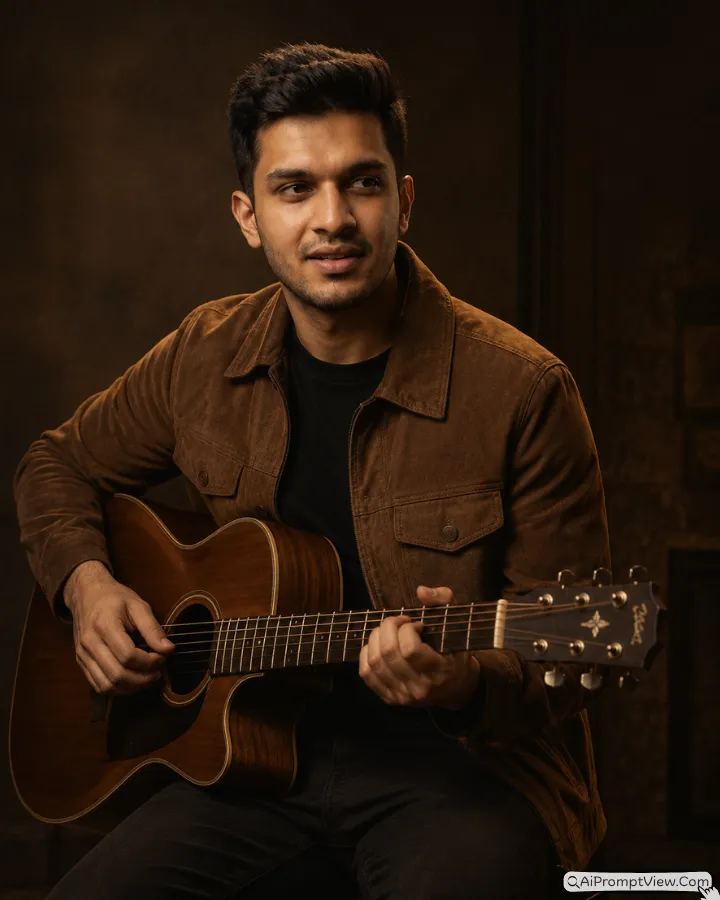
Use the uploaded photo as the precise facial reference and create a realistic vintage inspired portrait of the same adult male guitarist. His face must remain identical to the reference with no changes to facial structure, eyes, nose, lips, beard, skin texture, hairstyle or identity. Give him a sophisticated brown suede jacket over a simple black shirt with dark trousers. Position him naturally with the acoustic guitar held close to his body, slightly tilt his head and give him a reflective sideward gaze. Create a dark brown studio atmosphere with subtle warm shadows and a classic music magazine feeling. Use an 85mm lens at f/1.8 with soft tungsten studio illumination and a gentle warm rim light. Preserve realistic skin pores, suede texture, guitar wood, strings and natural hand positioning. Add restrained cinematic contrast and warm color grading while keeping the photograph completely believable and free from an artificial appearance. Avoid face alteration, identity mismatch, plastic skin, artificial AI look, over smoothing, cartoon rendering, anime style, harsh digital HDR, distorted features, double jewelry overlays, cluttered backgrounds, text overlays.Prompt 7. Charcoal Kurta Night Music Portrait
This final style brings the traditional clothing idea back in a different way. The guitar sits beside the subject instead of being played directly.

Use the uploaded image as the exact reference for the adult man's face and create an ultra realistic premium night music portrait without altering his identity. Preserve his original facial structure, eyes, nose, lips, skin texture, beard, hairstyle and every recognizable facial detail. Dress him in a sophisticated textured charcoal kurta with fitted black trousers. Instead of actively playing the guitar, position a realistic acoustic guitar naturally beside him while he sits in a relaxed studio pose with his hands resting comfortably and a subtle half smile. Use a completely black studio environment with a soft floor shadow and minimal background detail. Light his face with a large soft key source and add a warm golden rim light around his hair and shoulders. Capture the portrait with an 85mm lens at f/2, natural depth of field, realistic skin pores, authentic textile texture and cinematic warm grading. Keep the result elegant, photographic and suitable for a premium musician profile. Avoid face alteration, identity mismatch, plastic skin, artificial AI look, over smoothing, cartoon rendering, anime style, harsh digital HDR, distorted features, double jewelry overlays, cluttered backgrounds, text overlays.How These Prompt Versions Are Different
Each prompt is made for a slightly different musician mood. Some versions have a traditional outfit, while others use shirts, jackets, or more modern fashion. The guitar position also changes from one prompt to another.
The lighting is another big difference. Some edits use warm golden light, while others use blue or darker studio lighting. A few prompts are designed for a calm portrait, while others have a stronger performance or editorial feeling.
So you do not need to use all the prompts in the same way. Pick one based on the type of photo you want. I normally start with the outfit and mood I like most, then adjust the details after seeing the first result.
How To Customize These Prompts
You do not have to use every prompt exactly as it is. You can change small details based on your own style.
For example, you can change the outfit from a kurta to a black shirt or jacket. You can also replace an acoustic guitar with an electric guitar if that matches your style.
You can change the background from a black studio to a recording room, concert stage, or simple dark wall. If you want a softer image, reduce the dramatic lighting and use warm studio light.
The pose can also be changed. You can ask for a standing pose, seated pose, guitar playing pose, or relaxed pose beside the guitar.
I recommend changing one section at a time. When I change too many things together, it becomes harder to understand which change affected the final result.
Which Photo Size Should You Choose?
The best size depends on where you want to use the final musician photo. I would choose the format before generating the image when the tool gives you that option.
| Where You Want To Use It | Best Size | Simple Use |
|---|---|---|
| Instagram Post | 4:5 | Good for portrait photos and feed posts |
| Instagram Story | 9:16 | Full screen story or status |
| Facebook Post | 4:5 or 1:1 | Good for normal profile or feed posts |
| WhatsApp Status | 9:16 | Full screen status photo |
| WhatsApp Profile | 1:1 | Square profile picture |
| YouTube Thumbnail | 16:9 | Music video or guitar content thumbnail |
| Profile Picture | 1:1 | Instagram, Facebook, or other profiles |
I usually prefer a vertical size for these musician portraits because it gives enough space for the guitar and upper body. For social media, I also avoid cropping the guitar too close to the bottom.
Gemini AI or ChatGPT – Which One I’d Pick Here
For these dark musician portraits, I found ChatGPT useful for keeping the overall studio mood and clothing details balanced.
Gemini AI was also useful for controlled portrait changes. I would try both when the first result does not preserve the guitar or face well.
FAQ
Can I use these guitar prompts with my own portrait?
Yes. Use a clear adult portrait as your reference. Keep the original face visible and avoid heavily edited source photos.
Does the face stay the same in every guitar edit?
The prompts strongly instruct the tool to preserve the uploaded identity. Results can still vary, so check the face before using the final image.
What if the guitar changes between different results?
Try the same prompt again with a clearer reference photo. You can also describe the guitar type and finish more specifically.
How can I get the dark studio background?
Keep the background simple and dark. Black or charcoal backgrounds usually fit this musician style well.
Can I change the outfit without changing the face?
Yes. Change only the outfit section while keeping the identity instructions unchanged. This lets you create different looks from the same reference.


